Meijer - Delivery & Pickup
- 27.26K
- 3.6
- Installs
- 5.00M
- Price
- Free

Screenshots



Analysis by Reviewed
I usually judge a grocery app less by the excitement of placing its first order and more by whether it still saves me time after the novelty wears off. Meijer - Delivery & Pickup makes the most sense when Meijer is already a regular stop and I want to move some of the planning onto my phone. It is a free shopping app from Meijer, but convenience alone does not make every shop easier; the real test is whether its ordering options fit my household’s habits week after week.
Why the first week feels convenient
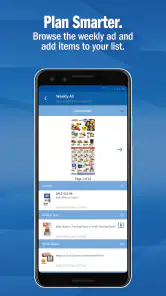
When I am short on time, searching for a particular item is more practical than walking every aisle to find it. A useful approach is to make the first order a small, familiar shop: add household staples alongside fresh food, then review the basket before choosing how to receive it. That gives me a chance to learn how the catalog is organized without relying on the app for every meal straight away.
For example, after work I might add milk, produce, and a few cupboard basics while deciding what to cook for the next couple of days. If I want to avoid an extra stop, delivery can suit that plan; if I am already driving near a Meijer, pickup may fit more naturally. The choice is less about which option is universally better and more about whether I am trying to save a trip or combine shopping with errands.
What makes it worth returning to
The long-term value comes down to whether the app helps me shop with intention. Deals can make browsing worthwhile, but I would still compare the offer with what I actually planned to buy. A discount is not a saving if it nudges me into adding something I would not otherwise use. Checking the basket before placing an order is a simple habit that keeps convenience from turning into impulse shopping.
Compared with a paper list and an in-store trip, the app makes it easier to build an order around a schedule and check details while shopping from home. A standard grocery marketplace may be a better fit for someone who wants to compare several retailers in one place; this app is more relevant when Meijer is already the store they intend to use. If I prefer choosing every piece of produce myself or changing my mind while walking the aisles, shopping in person remains the more flexible choice.
Getting Started with Meijer
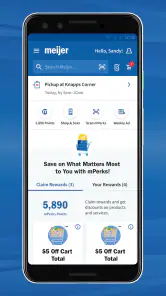
First things first, downloading the app was a breeze. Available on both Android and iOS, it’s as simple as pie to set up. The interface is super user-friendly, which is a big win in my book. Upon launching, you're greeted with a clean layout that makes navigation a cinch. I was impressed by how intuitive it felt; even my tech-challenged friends wouldn't have a hard time with this one!
A Shopping Experience Like No Other
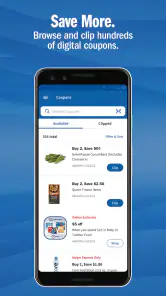
Now, onto the juicy part – shopping! With Meijer - Delivery & Pickup, you can browse through a vast selection of products. We're talking everything from fresh produce to household essentials. The app’s search functionality is pretty spot-on, helping me find what I need without any fuss. Plus, the deals and discounts section is a treasure trove for those of us who love a good bargain!
More From Our News Desk

Weather by Xiaomi Review: Clear at a Glance, Less Clear Up Close

X Under Pressure: Can It Recover When Posting Goes Wrong?

Clash of Clans Is Won Between the Battles

Android Auto Makes the Case for Quieter Car Software

MobiOffice: Transforming Mobile Productivity with Seamless Integration

EA SPORTS FC™ Mobile Soccer: Redefining Mobile Sports Gaming
One thing that stood out was the level of detail in product listings. They’ve got nutritional info, customer reviews, and even related recipes. Talk about going above and beyond! It’s like having a personal shopping assistant in your pocket.
Delivery & Pickup: Convenience at Its Best
So, how does the delivery and pickup work? Smooth as butter, folks. I opted for delivery, and scheduling was flexible, fitting perfectly around my busy week. The real kicker? The delivery was prompt, and the groceries were in tip-top condition. If you’re someone who likes to plan ahead, the pickup option is just as convenient. You can swing by a nearby Meijer store at your convenience and grab your order without leaving your car. Talk about service!
Keeping the routine manageable
For repeat shops, I find it helps to treat the basket as a working list rather than a finished order. I can add essentials as I notice them, then check quantities and remove anything I no longer need before checkout. That small review matters especially for fresh ingredients: planning meals first makes it easier to avoid ordering produce that may sit unused.
There is also a useful trade-off between browsing and speed. Searching by a precise product name can be quicker than exploring categories, while browsing is better when I am open to substitutes or looking for a deal. I would not assume that every online detail answers every practical question about an item, so for an unfamiliar product I take a moment to check its listing carefully before adding it.
Making the order fit a real week
A practical way to decide whether to use delivery or pickup is to start with the shape of the day, not the convenience label. If I am home and carrying bags would be awkward, delivery could remove a genuine chore. If I already have an errand near the store, pickup may let me combine tasks instead of making a separate trip. I would check the available option before planning around it, then keep the first order modest enough that a change of plan does not leave me with a complicated shop to sort out.
For a household with different meal preferences, I would use the catalog as a planning aid rather than expecting it to solve dinner by itself. I can search for the main ingredients, check the basket against the meals I intend to make, and then add household basics in a separate pass. That separation helps me notice when a planned recipe is missing an ingredient and prevents the familiar mistake of filling a cart with tempting extras before covering the actual needs.
Where the convenience can wear thin
Online grocery shopping still asks me to make decisions without seeing the items in person. That can matter most with produce, where appearance and ripeness are personal preferences. Delivery and pickup also depend on having a suitable option for my plans, so I would check the choices offered for the intended shop before building a large order around a particular time.
The app is less compelling if I shop at different retailers each week, enjoy browsing in person, or only need one or two things and can reach a store quickly. In those situations, a regular store visit—or a service that covers the shops I already use—may involve less effort. Its lasting usefulness depends on how often Meijer is already part of my grocery routine, not simply on how polished an app feels during the first try.
The small habits that protect its value
The most helpful habit is a deliberate final check, especially when the basket has been built over several short sessions. I would confirm quantities, look for duplicate staples, and make sure the ingredients match the meals I planned. This is more than tidying up: a saved or unfinished basket can reflect what I considered buying earlier, not what I still need now. Taking a moment to edit it keeps a quick reorder from becoming an unnecessarily large one.
I would also separate price-led browsing from need-led shopping. The deals area can be useful when I am already looking for something, but I would not let it set the menu or the budget on its own. A good rule is to decide what the household needs first, then see whether an offer makes a sensible substitution. That keeps the app’s convenience working in my favor instead of turning every browse into another reason to spend.
Who will keep it installed
I can see this becoming a regular tool for someone who shops at Meijer often, has a predictable household list, and values planning from home. It is also useful when coordinating a shop around work or family responsibilities, because I can prepare the basket before deciding whether collection or delivery best fits the day. The benefit is strongest when the app supports an existing store preference rather than asking me to change how I shop entirely.
On the other hand, I would skip making it my main grocery tool if I routinely compare prices across several chains, want a single marketplace for different retailers, or need to inspect produce personally. It may also be more process than I need for an occasional handful of items. A quick in-person stop can be simpler when I am nearby, while a multi-store service is a more natural choice when retailer choice matters more than sticking with Meijer.
Long-term verdict
In a nutshell, Meijer - Delivery & Pickup is a solid choice for anyone looking to streamline their grocery shopping. It’s efficient, easy to use, and packed with features that make life a tad easier. Whether you’re a busy parent, a college student, or just someone who hates grocery lines, this app is worth checking out. I’m definitely keeping it on my phone for those "I-need-groceries-now" moments!
Meijer develops the app, which is rated for Everyone. Its average rating is 3.6 from around 74,000 ratings, and it has over 5 million installs. It was released on January 8, 2013, and version 10.40.0 supports Android 7.0 and later. Those figures suggest an established shopping tool, though they cannot tell me whether its current delivery or pickup options suit a particular order.
For me, the lasting question is not whether online grocery shopping sounds convenient, but whether it removes enough friction from the shop I already make. If Meijer is part of my regular routine, I can see the app earning space through planned orders, a carefully checked basket, and a pickup or delivery choice that suits that week. If my habits change or I value browsing several stores more, I would choose the option that matches those priorities instead. Its strongest case is as a practical companion to a familiar grocery routine, not a reason to force one.
Meijer - Delivery & Pickup Frequently Asked Questions
Do I need a Meijer account to browse products in the app?
The app is built for shopping, so browsing Meijer products is a natural place to start. If you plan to place an order or use services such as delivery or pickup, you may need to provide account or order details during the process. The app is free to download, which makes it easy to explore its shopping experience before deciding how you want to use it.
Who develops the Meijer app, and what can I expect from its overall experience?
Meijer develops the app, which focuses on making shopping easier at home or in store. It has an average rating of around 3.6 from roughly 74,000 ratings, reflecting a range of shopper experiences. The overall purpose is practical: browse and shop for Meijer products, with delivery and pickup among the available ways to shop.
Is the Meijer app free to download, and which devices can use it?
The Meijer app is free to download and is intended for shopping on Android and iOS devices. On Android, it requires version 7.0 or later. Its straightforward focus is helping shoppers browse and shop with ease, whether they are at home or in a Meijer store. Before installing, check that your device’s operating system meets the requirement.
Can I use the Meijer app for shopping in store as well as for online orders?
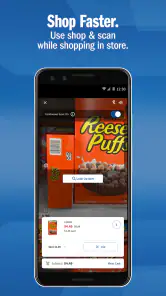
Yes. The app is designed to support shopping both at home and in store, so it can be useful even if you are not arranging delivery or pickup. You can use it to shop for groceries and other products, then choose an order option that suits your plans. This makes it a flexible choice for shoppers who prefer different ways to shop.
What services does the Meijer app offer for delivery and pickup?
The Meijer app provides convenient delivery and pickup services, allowing users to shop for groceries and other products online. Customers can choose between curbside pickup or home delivery, ensuring flexibility to meet their needs. The app also offers the ability to schedule deliveries and pickups in advance, making grocery shopping more convenient than ever.
Pros
- User-friendly interface for easy navigation.
- Wide range of products available.
- Convenient delivery and pickup options.
- Frequent updates and improvements.
- Secure payment methods.
Cons
- Occasional app crashes reported.
- Limited delivery areas.
- Customer support response can be slow.
- Some users experience login issues.
- High delivery fees for small orders.
- Category
- Shopping
- Version
- 10.40.0











