

Mark - AI Logo Generator
- 98.00
- 4.6
- Installs
- 500.00K
- Price
- Free
Screenshots
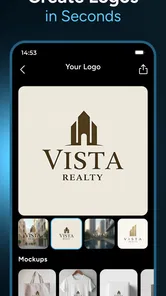
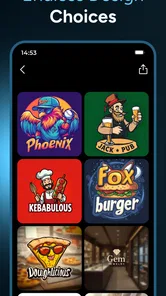
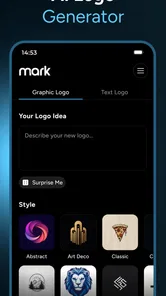
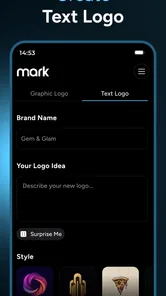
Analysis by Reviewed
When I need a quick visual direction for a new project, I find it easier to react to a draft than to face a blank canvas. That is the appeal of Mark - AI Logo Generator: it turns a name and a short description into logo ideas I can judge and refine. It is a free art and design app from 88 Tech, aimed at people who want a starting point without opening a full design suite.
Why starting with generated ideas helps
The useful capability here is not simply making an image; it is giving me several possible directions from a brief. That changes the task from “invent a brand identity” to “notice what feels right, then adjust it.” For a side project or an early business idea, that can be a much less intimidating way to begin.
It is also important to treat the result as a draft rather than a final identity. A generated mark can help clarify whether a brand should feel playful, calm, or bold, but I would still check that the design is readable at small sizes and distinctive enough to represent the business. If the logo will be central to a long-term brand, I would use these concepts to guide further design work, not assume the first output is ready for every purpose.
Start with a decision, not a pile of adjectives
Before I write a prompt, I try to decide what the logo needs to communicate first. Is the business handmade and friendly, or dependable and restrained? A short description that names the product and one clear mood gives the generator a more useful target than a string of broad words such as “modern,” “cool,” and “unique.” This is a small preparation step, but it makes comparing the results less random.
I also think about where the mark will appear. A logo for a profile picture has different practical demands from one intended for a printed stall sign. That does not mean I need to solve every production detail inside the app; it means I should judge the concepts against their actual job. A detailed symbol might be appealing on a large screen but disappear when reduced, while a simple shape and readable name may hold up better.
One useful way to work is to keep a basic record of the strongest options: the version I prefer, the reason I prefer it, and the one concern I still have. That could be as simple as noting “clear name, but icon feels too generic.” It gives me a more useful next step than endlessly browsing designs without knowing what I am trying to improve.
Getting Started with Ease
First off, downloading and setting up Mark - AI Logo Generator was a breeze. It's available for both Android and iOS, so no matter your device preference, you're covered. Once I had it installed, I was greeted by a clean and intuitive interface. Honestly, even if you're not tech-savvy, you won't have any trouble navigating through it.
More From Our News Desk

 Gmail
GmailGmail in a Busy Inbox: Who Benefits Most?
From first account to crowded workday, Gmail earns its place through dependable search and flexible sorting—but its best fit depends on how much inbox maintenance you can tolerate.

 Prime Video
Switching to Prime Video: What Changes in Your Viewing Routine
Prime Video can make a compelling second home for streaming, but switching means learning a different catalog, rental layer, and route from browsing to playback.

 Universal TV Remote Control
Universal TV Remote Control Works Best as a Reliable Backup
A phone remote earns its place through quick setup and reliable habits. Here is how to get more from Universal TV Remote Control—and where its limits show.

 Weather - By Xiaomi
Weather by Xiaomi Review: Clear at a Glance, Less Clear Up Close
Xiaomi’s weather app makes everyday forecasts quick to scan, but its calm surface can leave useful details and recovery paths harder to find than they should be.

 X
XX Under Pressure: Can It Recover When Posting Goes Wrong?
A resilience-focused review of X, examining setup, mistaken posts, interruptions, weak connections, and the gaps that matter when recovery needs to be dependable.

 Clash of Clans
Clash of Clans Is Won Between the Battles
Its raids are quick; its community is a long-term project of coordination, teaching, rivalry, and shared responsibility—with all the friction that entails.
Latest News



From a short brief to a useful shortlist
The app’s AI workflow is most helpful when I give it a focused prompt. I would describe what the business does and the impression I want to convey, rather than piling on vague adjectives. For example, someone preparing a simple identity for a weekend craft stall could enter the stall’s name and explain the products and mood. The resulting options then give them something concrete to compare before printing a sign or setting up a social profile.
A practical tip is to keep the first brief simple, then use the available customization to explore one change at a time. Adjusting a color while keeping the icon and type treatment steady makes it easier to see what is actually improving the design. If I change everything at once, I can lose track of why one version works better than another.
Making the shortlist useful beyond the screen
Once I have a few promising directions, I would not judge them only side by side in the editor. I would put each candidate into a rough mock-up of its intended setting: a profile circle, a small label, or a simple sign layout. Even a plain test helps reveal whether the business name remains readable and whether the symbol still makes sense without the surrounding editing interface.
This is also where I would test color thoughtfully. If the design depends on a particular color combination to make its icon understandable, it may be less flexible than a version that works through shape and contrast as well. I would compare a restrained option with a more decorative one, rather than assuming the more elaborate design is automatically more memorable.
For a new seller, that workflow can answer a practical question before they spend time on packaging or social graphics: does this visual direction feel like the same business in each place? The generator can help create candidates, while the real-world mock-up helps me decide whether a candidate is usable. Those are different jobs, and keeping them separate prevents a polished-looking preview from making the decision for me.
Features That Stand Out
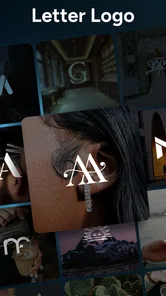
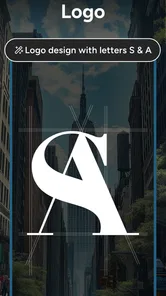
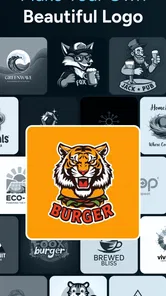
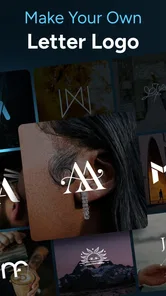
What really grabbed my attention is the variety of templates available. The app offers a huge selection of logo templates tailored to different industries—from tech to fashion, and everything in between. It felt like there was a little something for everyone.
Another highlight is the customization options. You can tweak colors, fonts, and icons to your heart's content, making each logo uniquely yours. I spent a good chunk of time playing around with these features, and it was surprisingly fun! It's like being a kid in a candy store but for design enthusiasts.
That freedom is best used with restraint. A logo has to remain clear when it is squeezed into a small profile image, so I would favor a legible name and a simple visual over decorative detail. I would also compare a few variations against the places I actually plan to use the mark; a design that looks appealing in an editor may feel crowded on a small screen.
Useful choices for a small, real-world launch
For someone opening a small online shop, the most valuable outcome may not be a finished logo at all. It may be a clearer sense of what visual language fits the products. If several generated concepts lean toward a style that feels wrong, that is still useful feedback: I can revise the brief, remove an assumption, or decide that a different direction better suits the shop.
I would also keep the business name easy to read before spending time on decorative adjustments. If the name is long, a layout that gives it room may be more practical than an intricate icon. If the name is short, the symbol may carry more of the identity. These are not rules the app can decide for me; they are checks that help me make better use of the options it presents.
One trade-off worth considering is consistency. If I plan to make several related logos—for separate product lines, for example—I would want to compare them together and make sure they look like part of one family. A single attractive mark can be easy to choose in isolation, yet a set of marks may clash once placed beside one another. I would use the app to explore and then review the group as a whole before settling on a direction.
AI-Powered Convenience
The real magic happens with the AI capabilities. I simply inputted my brand name and a bit about what the brand represents, and voila, the app generated several logo suggestions. This feature is a game-changer for anyone who needs a logo but doesn't have the time or resources to hire a professional designer.
What's more, the AI suggestions weren't just generic designs—they were thoughtful and aligned with the brand description I provided. It's clear that the app's AI is well-trained to understand different brand vibes and translate them into visual art.
Compared with building a logo from scratch in a general-purpose graphics editor, this approach gets me to options faster and asks less design knowledge of me. A template-based tool can also be a quick route, but AI suggestions make the initial exploration feel more guided by the description. The trade-off is control: people who need precise geometry, carefully drawn lettering, or a highly original identity may prefer professional design software or a designer’s input.
How it compares with familiar alternatives
A blank-canvas graphics app gives me finer control over every element, but it also expects me to make the design decisions from the beginning. That is a good fit when I already know what I want to draw or have the patience to build a mark piece by piece. Mark’s stronger role is earlier in the process: it gives a non-designer visual options to react to, then lets them adjust basic choices such as color, font, and icon.
Template-based logo makers sit somewhere between those approaches. They can be quick, but their starting point is a design the user selects and adapts. Here, the AI-generated suggestions make the description itself part of the starting point. I would still look critically at the result, because a generated concept can feel less personal than artwork made specifically for a business. For a brand where distinctiveness is crucial, a designer or a more controllable design tool is worth considering.
That distinction matters if I am choosing an app for a specific job. If I need a rough visual to test whether a business name and mood work together, Mark is a convenient place to begin. If I need exact spacing, custom lettering, or a coordinated system of assets, I would not expect a phone-first logo generator to replace a dedicated design workflow. The right choice depends less on which tool looks easiest and more on how much control the final work needs.
Where the quick route has limits
I would not choose a phone-based generator as the only step for a company that needs a complete identity system. A logo is only one piece of that work, and a business may need consistent rules for typography, color, and use across many materials. Mark is more naturally suited to exploring a starting point than managing all those decisions.
It is free to install, but the app also offers in-app purchases priced from $6.99 to $39.99 per item. I would check what is included in the option I want before relying on a particular workflow. The app is rated for Everyone, and it has a 4.6 average from around 19,000 ratings, with over 500,000 installs. Version 2.0.10 requires Android 8.0 or later.
Questions I would settle before committing
If I am only exploring ideas, I can start without treating the first result as a purchase decision. But if I have a particular design or workflow in mind, I would check the relevant in-app purchase details before investing time in it. The app is free to install, while optional items are priced from $6.99 to $39.99 each, so I would make sure the option I need is clear before depending on it for a deadline.
I would also ask myself whether the finished artwork needs to be changed later in another program. Someone who only wants a quick concept to use as a temporary profile image may have a different standard from a business preparing printed materials or building a lasting identity. If editability, precise output requirements, or a formal brand system are essential, I would compare the available workflow with a dedicated graphics tool before settling on this route.
For Android users, the minimum operating system is 8.0; the app is also available on iOS. Its Everyone age rating makes it broadly suitable from a content perspective, though that is separate from whether its design tools are right for a particular professional job. I would choose based on the task: quick exploration is a sensible match, while demanding production work calls for more control.
Final Thoughts
All in all, my experience with Mark - AI Logo Generator was top-notch. It’s perfect for startups, small businesses, or anyone in need of a quick yet professional logo solution. The mix of AI efficiency and creative freedom makes it a must-have tool in any entrepreneur's toolkit.
I would especially recommend it to a solo seller who needs to test a name and visual style before investing more time or money. It is less suitable if you already know you need bespoke artwork, exact brand specifications, or extensive editing control. In that situation, a dedicated graphics program or a professional designer is the better fit.
If you're in the market for a logo and want to skip the hassle of traditional design routes, give this app a whirl. Trust me, you’ll be impressed with what it can do. And hey, it's always nice to have a little extra time to focus on other aspects of your business while leaving the design work to AI.
Mark - AI Logo Generator Frequently Asked Questions
Does Mark - AI Logo Generator need an internet connection?
An internet connection can be useful when working with an AI-powered logo maker, particularly when you want to generate or explore designs. Before starting a project, make sure your phone has a reliable connection so the app can load its logo-creation features smoothly. Once you have a design idea, you can assess how the app fits into your usual creative workflow.
Can beginners use Mark - AI Logo Generator without design experience?
Mark - AI Logo Generator is aimed at making logo creation approachable for people who are not professional designers. You can begin with a brand name and preferences, then explore generated ideas and adjust a design to suit your taste. It may be a practical starting point for beginners, while experienced users can use it to explore concepts before refining their branding.
Can I use Mark - AI Logo Generator on my phone or tablet?
Mark - AI Logo Generator is an Art & Design app for Android, with a minimum operating system requirement of 8.0. It is designed for creating logos on a mobile device, so it may suit users who want to explore ideas or make edits without opening desktop design software. The app is free to download, with optional in-app purchases.
Who develops Mark - AI Logo Generator, and is it suitable for all ages?
The app is developed by 88 Tech and has an Everyone content rating, making it appropriate for a broad audience. Its focus is logo design, so it may appeal to small-business owners, creators, students, or anyone interested in experimenting with visual branding. As with any app, parents can review its features and in-app purchase options before letting younger users download it.
What is Mark - AI Logo Generator and how does it work?
Mark - AI Logo Generator is a cutting-edge application that employs artificial intelligence to help users create unique and professional logos effortlessly. By inputting your brand's name and choosing a few preferences, the app generates multiple logo options tailored to your specifications, saving you time and design costs.
Pros
- Easy to use interface
- Fast logo generation
- Customizable templates
- High-quality exports
- Affordable pricing
Cons
- Limited free features
- Occasional glitches
- Requires internet connection
- Limited font options
- In-app ads












