Mamava - Breastfeed on the Go
- 156.00
- 4.0
- Installs
- 100.00K
- Price
- Free

Screenshots



Analysis by Reviewed
Finding a private place to breastfeed or pump can turn an ordinary trip into a stressful search, especially when I am away from home and do not know the area. Mamava - Breastfeed on the Go is built around that specific problem. It is a free parenting app from Mamava, Inc. that helps me look for lactation spaces, connect with support, and plan feeding breaks with less guesswork.
After using it as a practical travel companion rather than treating it like a general parenting community, I found its value fairly clear: it is most useful when I need location-based help at the right moment. It does not replace personal medical advice, and it is not a complete feeding tracker, but it can make public outings easier to organize. The app works best when I use it before I urgently need a private space.
How the everyday search workflow feels
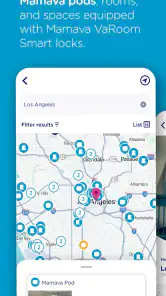
The simplest way to use the app is to begin with the map and search for nearby lactation spaces. That sounds basic, but the timing matters. I would open it before leaving for an appointment, while planning a shopping trip, or as soon as I knew I would be spending several hours somewhere unfamiliar. Looking ahead gives me time to compare possible stops instead of searching while a baby is already hungry.
The app’s central idea is more focused than a broad map service. A normal map can show businesses, restrooms, hospitals, or public buildings, but it usually does not put breastfeeding and pumping needs at the center of the search. Mamava’s app is designed specifically for lactation spaces, so the results are easier to interpret for this purpose. That focus is its main advantage over simply typing “private room” into a general navigation app.
I also like the distinction between finding a place and deciding whether it fits my situation. A location may be convenient for a quick feed but less suitable for pumping equipment, a longer break, or a parent who needs a quieter environment. I would treat the map as the first step, then check the available location information and consider the route, timing, and my own needs before relying on it.
A realistic example would be a long afternoon away from home with a young baby. Before starting the trip, I could search the destination area, identify a couple of possible lactation spaces, and keep one alternative in mind in case the first stop is inconvenient. If the baby needs feeding sooner than expected, I am not starting from zero. That small amount of preparation is where the app offers more value than a last-minute web search.
What I would do before leaving home
My preferred routine is to search while I still have a reliable connection and enough time to think. I would check the destination, look for more than one nearby option, and note which choice is closest to the part of the trip where I expect to be. I would also avoid assuming that the nearest result is automatically the best one. A slightly farther location may fit better with parking, public transport, or the planned route.
This is one of the less obvious strengths of a dedicated app: it encourages me to plan feeding breaks as part of the outing instead of treating them as an emergency interruption. Parents who regularly travel between familiar places can build a personal habit around that process. Search once before a recurring trip, remember the useful locations, and repeat the check when plans change.
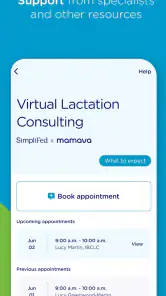
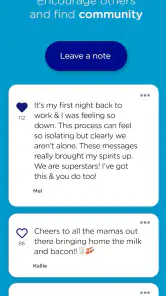
The app also includes ways to get and give support, which adds a community element to the location search. I see that as useful when a parent wants more than a pin on a map. At the same time, I would keep expectations realistic. Community information can help me discover possibilities, but I would still use my judgement about whether a space is appropriate at that particular moment.
Settings and habits worth checking
Experienced use is less about changing dozens of options and more about making the app fit the way I travel. I would first check the location-related settings available on my device so the search can work smoothly when I need nearby results. If location access is limited, I would be ready to search by area rather than depending entirely on automatic positioning.
I would also pay attention to notification preferences. A parenting app can become distracting if every alert is treated as urgent, particularly during a busy day with a baby. I prefer to keep useful support or location-related prompts manageable and avoid letting notifications replace my own planning. The best setup is the one that helps me remember the app without making it another source of noise.
Because the app is free, I can keep it installed for occasional trips without having to decide whether a subscription is worth the cost. That matters for families who may only need a lactation-space finder during travel, hospital visits, events, or a temporary change in routine. It also makes it easier to recommend to a friend who wants a practical tool but does not want another paid parenting service.
The app is rated for Everyone, which matches its role as a family-oriented utility rather than an entertainment product. Still, an age rating does not answer every practical question a parent may have. I would focus on whether the available locations and support features suit my own circumstances, especially if I need accessibility, a particular level of privacy, or a place that can accommodate pumping supplies.
Shortcuts that make repeat trips easier
One useful shortcut is to search by destination before the journey begins rather than waiting for the app to detect where I am. This is especially helpful when I am travelling, moving between neighbourhoods, or planning a day with several stops. Searching in advance also lets me compare the feeding-space options with the rest of my itinerary.
Another practical pattern is to keep a primary and backup choice. I would not assume that one result will always be available at the exact moment I need it. Having a second possibility reduces pressure and gives me a fallback if the first location is too far away, unsuitable for the baby’s mood, or awkward for the equipment I am carrying.
I would also use the support side thoughtfully. If I contribute information or encouragement, I would keep it clear and useful for another parent trying to make a quick decision. A concise note about what made a space helpful is more valuable than a vague comment. This turns the app from a one-time search tool into a resource that can improve through practical user input.
For recurring routines, I would create a simple mental checklist: search the destination, identify two possible spaces, check the route, and leave enough time for an unplanned feeding break. The app does not need to manage every part of the outing for this to work. Its role is to make the location question easier, while I handle transport, supplies, timing, and the baby’s changing needs.
Where it is stronger than ordinary alternatives
A general search engine may return articles, business pages, or scattered suggestions, but those results can be difficult to evaluate quickly. A standard map application is excellent for directions, yet its categories are not always designed around breastfeeding or pumping. Mamava’s narrower purpose gives me a more relevant starting point.
It is also more focused than a broad parenting forum. Forums can be helpful for personal experiences and emotional support, but finding a nearby place there may require reading through posts or asking a question and waiting. Here, the location search is the practical centre of the experience, while support is available alongside it.
That focus comes with a trade-off. Someone looking for feeding schedules, growth records, sleep tools, medication reminders, or detailed educational content will probably need another app. This is not a complete digital parenting dashboard. I would choose it for finding and thinking about lactation spaces, not for managing every part of infant care.
Advanced limits and situations that need judgement
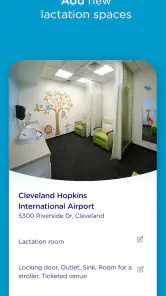
The biggest limitation is that a map result cannot guarantee that a space will match my personal expectations. I may need more privacy than another parent, more room for a pump bag, easier access from a wheelchair, or a location that works with a stroller. I would therefore use the app to narrow the search, not to make the final decision without considering those details.
Connectivity is another practical concern. A location-based tool is most useful when I can access it during the journey, but travel conditions are not always ideal. My safer habit would be to search before entering an unfamiliar area and remember the backup plan. I would not wait until the final minute and assume the app alone will solve every logistical problem.
I also would not treat the app as a substitute for a healthcare professional. Its parenting category and support features may help with practical confidence and community connection, but questions about pain, supply, illness, medication, or a baby’s health need qualified medical guidance. That boundary is important because a convenient location finder should not be mistaken for clinical care.
Parents who already have a dependable private space at home and rarely travel may find limited day-to-day value. The same is true for someone who wants a detailed tracker or an all-in-one family organizer. In those cases, a general parenting app or a calendar-based routine may be a better match, with this app kept only for occasional trips.
On the other hand, the app is particularly sensible for new parents rebuilding their confidence outside the home, families travelling to unfamiliar places, and anyone who pumps or breastfeeds during long days away. It can also help a supportive partner plan more intelligently. Instead of asking where a feeding break might happen at the last moment, a partner can check possible spaces ahead of time and help shape a calmer route.
What the current app details suggest about upkeep
Mamava, Inc. has kept this app available as an established parenting tool since its release on April 26, 2017. The current version is 9.67.0, and it requires Android 7.0 or later. Those details make it worth checking the operating-system requirement before installing it on an older phone, particularly if the device is kept as a backup for travel.
The app has passed one hundred thousand installs and holds a 4.0 average from around three hundred ratings, with more than one hundred written reviews. I read that combination as a sign of useful but not universal appeal: enough adoption to make the concept credible, while the rating suggests that individual experience with locations and expectations can vary.
Since it is free, the main cost is not money but attention. I need to spend a little time learning how to search effectively, checking the results, and preparing a backup. For me, that is a fair exchange when the alternative is searching randomly with a hungry baby or carrying pumping equipment without knowing where a break might be possible.
My verdict after building a repeatable routine
I would recommend Mamava - Breastfeed on the Go to parents who want a focused way to plan breastfeeding or pumping breaks away from home. Its best feature is not complexity; it is the decision to put lactation spaces at the centre of the search. That makes it more immediately relevant than a general map when the question is specifically, “Where can I feed or pump nearby?”
My strongest recommendation is to use it proactively. Search before leaving, identify a backup, and consider the practical details that a map cannot decide for you. Use the support features as an additional resource, but keep medical questions with healthcare professionals. This approach turns the app into a calm planning aid instead of a last-minute rescue tool.
I would skip it if I wanted a full infant-care tracker, detailed health guidance, or a broad family organizer. I would also avoid relying on it blindly when accessibility, privacy, or equipment space is essential without checking the situation more carefully. For those needs, another specialized service may be a better companion.
For the right user, though, the narrow focus is exactly why it works. It is free, family-friendly, and built around a real problem that ordinary map apps do not always handle well. My final view is that this is a practical travel companion, not an all-purpose parenting app—and that clear purpose is its greatest strength.
Pros
- Find nearby Mamava lactation pods with directions and location details.
- Private
- hygienic spaces designed specifically for breastfeeding and pumping.
- App helps parents plan feeding breaks while traveling or running errands.
- Useful for locating pods in airports
- hospitals
- malls
- and other public venues.
- Simple interface makes searching for nearby lactation spaces quick and convenient.
Cons
- Coverage depends on Mamava pod availability in your city or travel area.
- Some listed locations may have limited hours or restricted building access.
- The app is less useful in regions without Mamava facilities nearby.
- Location data may occasionally require verification before making a detour.
- Parents may still need to bring their own pump
- bottles
- and personal supplies.

- Category
- Parenting
- Version
- 9.67.0











