

Lumyros: Aurora App & Social
- 4.00
- 1.7
- Installs
- 10.00K
- Price
- Free

Screenshots
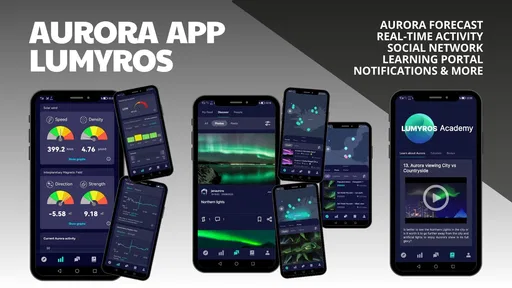
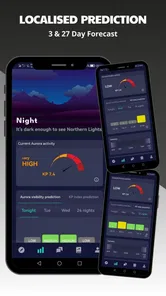
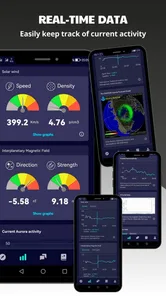
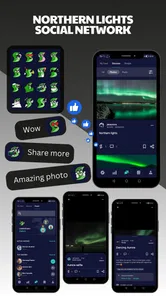
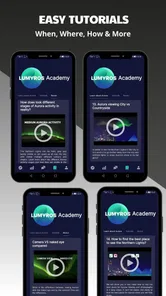
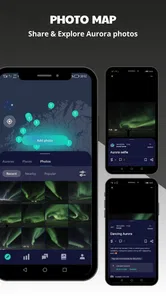
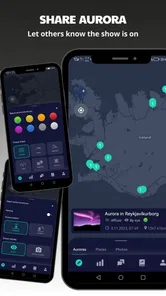
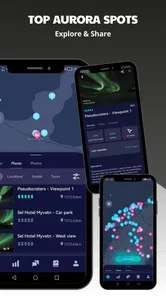
Analysis by Reviewed
I tested Lumyros: Aurora App & Social as a weather-focused tool for people who follow the Northern Lights, and its appeal became clearest in a shared household. It is not simply an app I would open to check whether it might rain before leaving home. Its purpose is narrower: helping Aurora watchers stay connected around a possible sighting. That makes it interesting for couples, friends, or relatives who enjoy planning an evening around the sky, but it also means the app needs to be judged differently from a full everyday weather service.
The app is free to download, is suitable for Everyone, and comes from developer Jan Svamberg. It has passed the ten-thousand-install mark, which suggests that it has found a modest audience without feeling like a mainstream weather replacement. Its average rating is 1.7 from roughly two dozen ratings, with a handful of written reviews. I would not treat that score as a complete verdict, but I would take it seriously: anyone installing it should approach it as a specialized Aurora companion rather than a polished all-purpose forecast app.
How Lumyros fits into a shared Aurora-watching routine
I would use this section to set a practical boundary around shared Aurora watching: the app can give a group a common point of attention, while the actual decision to go out still belongs to the people making the outing. I also find it useful to distinguish a shared interest from a shared device, since those lead to different habits and expectations. That distinction makes the first steps easier to plan.
A useful role when several people are waiting for the same sky
The most convincing use case is a household where one person notices a promising forecast and wants everyone else to be ready. Instead of sending a vague message such as “the Northern Lights might be visible tonight,” the app’s social angle gives the group a more focused place to follow the event. That can reduce the usual back-and-forth between messaging apps, weather apps, and manually checked websites.
I can imagine using it before an evening drive: one person checks the Aurora outlook, another decides whether to bring warm clothing, and someone else watches for changes while preparing the camera. The value is not that the application magically guarantees a sighting. Aurora conditions can change, clouds can spoil an otherwise promising night, and local light pollution still matters. The value is that it gives enthusiasts a shared point of attention.
That distinction is important for families. A shared device in the living room may be enough for casual planning, while a phone carried outside is more practical for the person actually looking at the sky. I would not assume that one installation automatically creates a complete household dashboard or a formal family workspace. The safer approach is to treat the app as a personal tool that can support coordination, then agree within the household who checks it and how updates are passed along.
Where it differs from a normal weather app
Most weather applications begin with temperature, precipitation, wind, and hourly conditions. Those details remain essential because a clear Aurora forecast is not very useful if the sky is covered or the outing becomes uncomfortable. Lumyros approaches the problem from the other direction: it is built around the interest in Northern Lights and the community surrounding that interest.
More From Our News Desk

 Gmail
GmailGmail in a Busy Inbox: Who Benefits Most?
From first account to crowded workday, Gmail earns its place through dependable search and flexible sorting—but its best fit depends on how much inbox maintenance you can tolerate.

 Prime Video
Switching to Prime Video: What Changes in Your Viewing Routine
Prime Video can make a compelling second home for streaming, but switching means learning a different catalog, rental layer, and route from browsing to playback.

 Universal TV Remote Control
Universal TV Remote Control Works Best as a Reliable Backup
A phone remote earns its place through quick setup and reliable habits. Here is how to get more from Universal TV Remote Control—and where its limits show.

 Weather - By Xiaomi
Weather by Xiaomi Review: Clear at a Glance, Less Clear Up Close
Xiaomi’s weather app makes everyday forecasts quick to scan, but its calm surface can leave useful details and recovery paths harder to find than they should be.

 X
XX Under Pressure: Can It Recover When Posting Goes Wrong?
A resilience-focused review of X, examining setup, mistaken posts, interruptions, weak connections, and the gaps that matter when recovery needs to be dependable.

 Clash of Clans
Clash of Clans Is Won Between the Battles
Its raids are quick; its community is a long-term project of coordination, teaching, rivalry, and shared responsibility—with all the friction that entails.
Latest News



That specialization can make the experience more motivating for an enthusiast. Opening a general weather app may tell me that the night is cold and partly cloudy, but it rarely feels like a place for people who are actively waiting for an Aurora opportunity. On the other hand, I would still keep a conventional weather service nearby. For road conditions, rain timing, wind, and practical clothing decisions, the familiar alternative is likely to remain more complete.
My recommendation is to use Lumyros as the Aurora layer, not as the only source of weather information. That two-app habit is a small inconvenience, but it is also the most sensible way to avoid confusing an atmospheric forecast with a complete plan for being outdoors.
What I would do before inviting the whole household
I would first install it on my own phone and spend a little time understanding the flow. This is especially worthwhile because the app has an average rating of 1.7, and a low score can sometimes reflect usability friction rather than a problem with the idea itself. A short personal trial lets me decide whether the interface feels clear enough for a child, a less technical relative, or a partner who only checks the sky occasionally.
I would also decide what “shared use” means in my home. If everyone simply wants to know whether an outing is worth considering, one person can monitor the app and relay the conclusion. If several people want to participate directly, each person should use their own device and personal judgement rather than passing around a single logged-in phone. That keeps conversations and preferences from becoming mixed together.
A practical tip is to establish a simple household rule: treat an alert or promising outlook as a reason to look outside, not as a promise that the Aurora will appear. This avoids disappointment, especially for younger users who may interpret a strong signal as a guaranteed show. The app can help organize attention, but it cannot replace the final check of the actual sky.
Setup boundaries, accounts, and everyday coordination
Before involving more people, I would decide who will explore the app, whose device or profile is being used, and how the household will pass along a worthwhile update. That keeps coordination manageable without assuming everyone wants the same level of participation. I would also agree on a simple check before leaving, so an early Aurora outlook is treated as a reason to reassess conditions rather than a fixed promise.
Start with the smallest setup that works
For a first evening, I would avoid trying to make every household member an active participant immediately. One adult can explore the app, check how information is presented, and decide whether it adds something beyond the weather tools already in use. Once that person understands the rhythm of checking, the rest of the household can join in without having to learn everything at once.
This staged approach is useful because Aurora watching is often occasional rather than constant. Someone who is excited during a strong season may not want another daily weather routine. A lighter setup prevents the app from becoming background clutter on every phone. It also makes it easier to notice whether the social element genuinely improves coordination or merely adds another place to look.
The current version is 3.3.2 and the app requires Android 6.0 or later. That makes it accessible to many older Android devices, which is helpful when a household keeps an older phone for outdoor use or shares a spare handset. Still, compatibility does not guarantee that every older device will feel equally comfortable. Screen size, battery condition, and general performance can matter more outside than they do on a desk.
Keep personal boundaries clear on a shared device
A family tablet or shared phone can be convenient for browsing an Aurora forecast together, but I would not use a shared device as a substitute for separate account boundaries. If the app includes social participation, the person using it should know whose identity is represented and who may see their activity. I would avoid leaving one person’s session open for everyone unless the household is comfortable with that arrangement.
This matters even in a friendly home. A parent may want to explore the app with a child, while a teenager may prefer to keep social activity separate from the family device. Those are different needs, and a weather community should not be treated as automatically private simply because the subject is harmless. Before inviting children or relatives to participate, I would explain what they are doing, which name or profile is being used, and what information they should avoid sharing.
There is also a practical boundary around notifications. A person who is keen on Aurora hunting may welcome frequent reasons to check the sky, while another household member may find them distracting late at night. I would begin with conservative notification habits and adjust only after seeing how the app fits into real life. This is not about assuming a particular notification system; it is about preventing a shared device from becoming the loudest member of the household.
Use a simple coordination workflow
My preferred workflow would be deliberately simple. One person checks the app during the evening, compares the outlook with ordinary cloud and precipitation information, and sends the household a short message: worth watching, worth going outside, or not worth changing plans. That keeps the app in a supporting role and gives everyone a clear decision instead of a stream of uncertain updates.
For a planned trip, I would check earlier, then check again shortly before leaving. The first look answers whether the idea deserves preparation; the later look answers whether conditions still justify the effort. This two-stage habit is more useful than repeatedly refreshing throughout the day. It also prevents the household from treating an early forecast as fixed.
A less obvious benefit of this approach is that it separates enthusiasm from logistics. The person most excited about the Aurora can follow the social side, while another person handles driving, clothing, timing, and safety. That division works well because the best Aurora information is not automatically the best travel advice. Keeping those responsibilities separate makes the outing calmer.
Where the social promise may fall short
The app’s central idea depends on having a community that feels active and useful. With more than ten thousand installs but a relatively small number of ratings, I would keep expectations realistic about how busy the social experience may feel at any particular moment. A community app can be valuable when other enthusiasts are engaged, yet feel quiet when few people are looking at the sky.
That is the main trade-off compared with checking a large weather service or a familiar messaging group. A conventional forecast app provides information without needing other users to be present. A family chat provides immediate access to people I already know. Lumyros sits between those models: it can make Aurora watching feel more communal, but its usefulness may vary with participation and timing.
I would therefore judge it after several real checks rather than after one quiet evening. If the social layer helps me discover useful context or makes it easier to coordinate, it earns a place on my phone. If I only open it for a forecast and never use the community side, a specialized forecast source or ordinary weather app may be a better fit.
Age, trust, and sensible participation
The Everyone age rating makes the app approachable for households with children, but an age label should not replace supervision or conversation. A young user may understand the Aurora topic perfectly well and still need help distinguishing a forecast from a guarantee. I would show a child how to read the information as a possibility, then make the outdoor decision together.
For older children and teenagers, the social aspect deserves extra attention. I would encourage them to keep personal details private, avoid sharing where the family will be at a specific time, and ask before posting anything that identifies the household. Those are sensible habits for any community app. The fact that the subject is weather does not remove the need for basic digital trust.
Adults should also think about trust in the other direction. A community comment or enthusiastic report can be interesting, but I would not let an unfamiliar user’s excitement decide whether a child travels somewhere at night. The household should rely on its own safety rules, known adults, and practical conditions. Lumyros can support a plan; it should not be the authority that makes the plan for you.
Free entry, optional spending, and household expectations
The app is free, which makes it easy to test without committing the household to a subscription. There are in-app purchases ranging from $0.99 to $99.99 per item, so I would review the purchase screen carefully before handing the device to a child or enabling casual buying. The broad range means that “free to install” should not be interpreted as “every part of the experience is necessarily free.”
My practical advice is to make the purchase boundary explicit. If the app is being used on a shared tablet, the adult responsible for the device should decide whether purchases are allowed at all. If a child is exploring the app, I would supervise the first sessions and explain that a button offering extra content or functionality may involve real money. This is a small step, but it prevents a weather hobby from turning into an unexpected household expense.
For adults, the question is whether optional spending improves a genuine Aurora-watching routine. I would not buy anything immediately. I would first use the free experience for several outings, identify the exact limitation that is bothering me, and then decide whether paying addresses it. If the main need is simply a reliable everyday forecast, spending inside this app is unlikely to solve the larger problem of needing broader weather information.
Who should use it, and who should skip it?
I would recommend trying it if you already enjoy Northern Lights watching, like the idea of connecting with other enthusiasts, and are willing to combine it with ordinary weather information. It is particularly suitable for a household that wants one person to monitor Aurora conditions while the rest of the family joins only when an outing looks promising. That keeps participation flexible rather than forcing everyone into the same routine.
I would be more cautious if you want one app for forecasts, radar, severe-weather warnings, travel planning, and daily household scheduling. Lumyros is too specialized for that role. I would also skip it if a low community rating immediately makes you uncomfortable, or if you dislike apps whose value depends partly on other users being active. In those cases, a mature general weather service may offer a smoother and more predictable experience.
It is also not the right choice for someone expecting certainty. Aurora forecasts are inherently about opportunity, and the app’s social atmosphere should not change that. If you need a definite answer before making an expensive trip, use multiple trusted sources, inspect local cloud conditions, and make a conservative decision. The app can help you notice a possibility; it cannot remove the uncertainty that makes Aurora hunting exciting in the first place.
My household verdict
After looking at it as a shared-use tool rather than a standard weather replacement, I see a clear but limited purpose. Lumyros gives Aurora enthusiasts a more focused place to organize attention around the Northern Lights. Its strongest moment is not a routine morning forecast; it is the evening when someone spots a promising opportunity and wants the household to decide together whether to step outside.
The weaknesses are equally important. The low average rating suggests that the experience may not satisfy everyone, and the social value can depend on how active the community feels. The presence of in-app purchases means adults should set clear boundaries on shared devices. The Everyone rating is reassuring for general access, but it does not eliminate the need to teach children about privacy, uncertainty, and safe outdoor decisions.
My final advice is to treat it as an optional Aurora companion. Install it on one device first, test its usefulness during a few genuine viewing opportunities, and keep a regular weather app available for the practical details. If the shared conversation becomes easier and the community adds something meaningful, it may earn a permanent place in the household routine. If it only duplicates information you already have, uninstalling it is a reasonable conclusion rather than a failure.
For me, the deciding question is simple: does Lumyros help your household act on Aurora opportunities together without replacing common sense? If the answer is yes, the free entry makes it worth exploring. If your priority is dependable everyday forecasting or tightly controlled family coordination, I would choose a more established general-purpose alternative and keep this one only as a specialist tool.
Lumyros: Aurora App & Social Frequently Asked Questions
What is Lumyros: Aurora App & Social, and what can I do with it?
Lumyros: Aurora App & Social appears to combine an aurora-themed visual experience with social features. Depending on the available version, users may be able to explore atmospheric content, personalize their experience, share posts or images, and interact with other members. Before downloading, check the current store description because features, community tools, and supported content can change between updates or regions.
What kind of aurora forecast experience does Lumyros offer?
Lumyros is a weather app presented as an aurora forecast experience and a social space for Northern Lights hunters. Its description calls it a friendly app connecting people interested in the aurora. If you are choosing it mainly to follow forecasts, consider how that weather focus fits what you want from an app, alongside its community-oriented approach.
Is Lumyros: Aurora App & Social free to download and use?
The application is free to download, but it offers in-app purchases priced from $0.99 to $99.99 per item. These might include extra customization choices, exclusive visual elements, enhanced social tools, or other optional content. Review the purchase details shown in the app before buying anything so you understand the price and what each item provides. You can download the app without paying upfront.
Does Lumyros: Aurora App & Social require an account or internet connection?
Because Lumyros includes a social component, an account may be necessary for features such as creating a profile, publishing content, following users, or participating in community interactions. An internet connection is also likely needed for synchronization and online content. Some visual or personal features may work offline, but the exact offline functionality should be confirmed in the app description and during setup.
Is Lumyros: Aurora App & Social safe for privacy and social interaction?
Before joining the community, review the app’s privacy policy and requested permissions. Pay particular attention to access involving photos, camera, location, contacts, notifications, or account information, and only grant permissions that are genuinely needed. If the app allows public profiles or messaging, use privacy controls, avoid sharing sensitive details, and report or block inappropriate users when those tools are available.
Pros
- Beautiful aurora visuals create a calming
- immersive experience.
- Social features let users share aurora moments with others.
- Simple interface makes the app easy to explore and use.
- Useful for discovering aurora-related content and inspiration.
- Appealing choice for users interested in nature and night-sky events.
Cons
- Some features may require an account or social permissions.
- Content quality can depend on activity from the user community.
- Aurora information may vary by location and available data.
- Frequent social updates could feel distracting for some users.
- The app may use extra battery when location or notifications are enabled.











