LumaFusion: Pro Video Editing
- 215.00
- 4.1
- Installs
- 10.00K
- Price
- $29.99

Screenshots
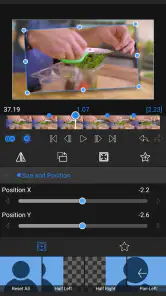
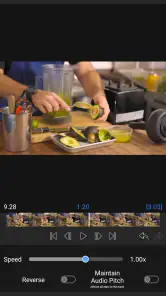
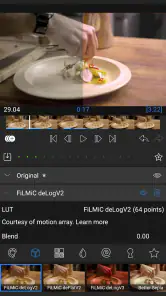
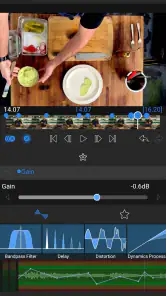
Analysis by Reviewed
My first-week impression of LumaFusion is that it takes mobile editing seriously: this is a hands-on timeline tool, not just a quick way to trim a clip and add a filter. I can see the appeal if you regularly make videos and want to shape the story on a phone or tablet rather than waiting until you are back at a computer. The flip side is that a capable editor asks you to make more choices. If most of your videos need only a cut, captions, and a soundtrack, a simpler editor may get you to a finished post faster.
Where the first week pays off
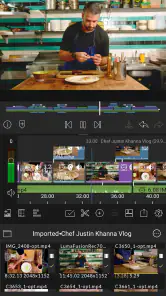
After the initial learning curve, the value becomes clearer in projects with several kinds of material. For example, when I’m putting together a short travel video, I can arrange the main footage, layer in supporting shots, and balance music against recorded sound in one project. The timeline’s multiple video and audio tracks give that kind of edit room to grow; they are most useful when I plan the layers before piling clips into the sequence.
A practical habit is to build a rough cut first, then return for effects, color adjustments, and keyframes. That separation keeps small visual decisions from slowing down the story edit. I would also keep source clips organized before starting: a tidy camera roll makes it easier to find the shot I want and reduces the temptation to add material just because it is available.
That staged workflow also helps answer a common question: do I need to know editing before opening the app? I don’t think so, but I would approach it as a skill to build rather than a set of buttons to master in one sitting. Start with a sequence that has a clear beginning, middle, and end, then make one deliberate pass for sound or visual polish. If the first project is only a handful of clips, the timeline is easier to understand and mistakes are less costly.
Keeping the workflow sustainable
The app is from LumaTouch and sits in the video editing category, where it offers more control than many quick social-video editors. The trade-off is attention: a multi-track project takes longer to manage than an automatic template, and a detailed edit is not automatically a better one. I find it most worthwhile when I expect to revisit editing as a regular task, such as making client clips, channel videos, or family recaps, rather than for a single post every few months.
It costs $29.99, with optional in-app purchases priced from $9.99 to $69.99 per item. That makes it a considered purchase rather than a casual download, so I’d first ask whether I will use the extra control repeatedly. It has a 4.1 average from around 2.5 thousand ratings, and more than 10 thousand installs. Those figures provide a little context, but they cannot tell me whether the editing style suits my own projects.
For someone weighing it against a familiar free editor, I’d focus on the kind of control needed rather than counting features. A template-first app is usually the better fit when speed and ready-made social formats matter most. A desktop editor is more comfortable for long sessions, detailed review, and projects that benefit from a larger workspace. This mobile editor occupies the useful middle ground: more deliberate than an automatic montage, but available where I can review footage and make meaningful edits without moving to a computer.
More From Our News Desk

Weather by Xiaomi Review: Clear at a Glance, Less Clear Up Close

X Under Pressure: Can It Recover When Posting Goes Wrong?

Clash of Clans Is Won Between the Battles

Android Auto Makes the Case for Quieter Car Software

MobiOffice: Transforming Mobile Productivity with Seamless Integration

EA SPORTS FC™ Mobile Soccer: Redefining Mobile Sports Gaming
That middle ground can be especially helpful for a small business owner or a creator who records away from a desk. I might assemble a product demonstration on a tablet, check whether the sound is clear, and make a shorter cut for a social post without rebuilding the story from scratch. The important trade-off is that mobile convenience does not remove the need to plan: when footage is scattered or the edit has too many competing goals, the screen and timeline can feel crowded quickly.
Unleashing Creativity on the Go
Imagine having the power to edit your videos with precision and flair, all from the comfort of your smartphone or tablet. That's exactly what LumaFusion offers. The app is like having a mini editing studio right in your hands, allowing you to create stunning videos whenever and wherever inspiration strikes.
Features That Wow
One of the first things you'll notice is the intuitive interface. It's so user-friendly that even if you're not a seasoned editor, you'll find yourself navigating through its features with ease. The app supports up to 12 tracks for video/audio, which means you can layer your clips, music, and effects, crafting a truly dynamic story.
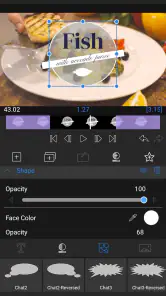
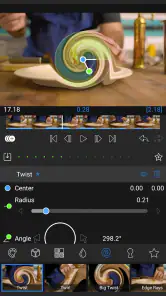
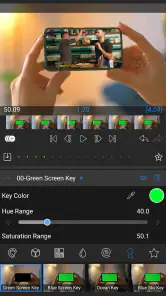
Another standout feature is the wide array of effects and transitions. From color grading to keyframing, LumaFusion gives you the tools to add a professional touch to your projects. And let's not forget about the audio – with advanced audio editing capabilities, you can tweak your sound to perfection, ensuring your video is as immersive as it is visually appealing.
The most useful way I’ve found to think about all those layers is as separate jobs, not a reason to fill every track. I keep the main picture sequence easy to follow, reserve another layer for supporting images when they genuinely add context, and treat audio as its own pass. This makes later changes less confusing: if a music choice no longer fits, I can work on the sound without losing track of the visual sequence. The trade-off is that more layers demand more careful checking before I call a project finished.
Keyframes are another tool worth approaching with restraint. They make sense when a change needs to happen gradually within a shot, but setting them without a clear purpose can turn a simple edit into a fiddly one. I would first decide what the viewer should notice, then use a keyframe only if a fixed setting cannot achieve that result. For a new editor, learning this distinction is more useful than trying to apply every effect in the toolbox.
It is worth setting expectations before paying: this is a one-time app price, but optional purchases are available, so I would check what a particular add-on costs before deciding I need it. The app is rated for Everyone, was released on February 20, 2023, and its current version is 2.4.1; it requires OS 10 or later. Those details make the basic compatibility check straightforward, but they do not remove the practical question of whether editing on your device feels comfortable over a longer session.
For a realistic routine, picture filming a few clips during a weekend outing, then using a quiet evening to make a concise recap. I’d select only the shots that move the story forward, lay down the sequence, and add music or sound adjustments after the pacing feels right. That workflow is less tiring than polishing every clip as I import it, and it makes the app’s layered timeline useful instead of merely impressive.
There’s also a good reason not to edit every part of that recap in one sitting. I can make the first pass while the footage is fresh in my mind, step away, and return to see whether the order still makes sense. On that second visit, I’m more likely to notice a repeated shot or a pause that drags. This is a simple quality check, not a special feature, but it turns a capable timeline into a more dependable routine and helps keep perfectionism from taking over.
Performance and Compatibility
Performance-wise, this app is a beast. It's optimized to make the most out of your device's hardware, providing smooth playback and fast rendering times. Whether you're working on a short clip or a full-length feature, LumaFusion handles it with grace.
Compatibility is also top-notch. The app supports a range of resolutions, including 4K, and works seamlessly with cloud storage solutions. So, whether you're editing a vacation video or a business presentation, you can easily access your media files from anywhere.
Before committing to a larger project, I would test the complete route from importing a few representative clips to producing a short finished edit. That gives me a chance to see whether the device feels comfortable for playback and timeline adjustments, and whether the chosen media is easy to manage in my own setup. It is a more practical test than judging an editor by its feature list, especially if I plan to work away from a desk.
It also helps to decide where the finished video is going before the last pass. A family recap meant for private viewing may not need the same polish or pacing as a short piece for a public channel. Knowing the destination keeps me from spending time on refinements that do not serve the audience, and it gives me a clear reason to stop editing. That matters for recurring value: the best workflow is one I can repeat without turning every small video into a major project.
When the detail becomes a burden
Mobile editing has a real physical trade-off: a small screen can make precise timeline work and fine adjustments less comfortable, especially when a project grows. I would choose a tablet when I expect a longer edit and keep a phone session for selecting clips or making a small change. If I need the broadest workspace, a desktop editor remains the more comfortable choice; if I only want an automatic montage, a template-based app is likely quicker.
Another source of fatigue is overworking the polish. Effects, transitions, and keyframes can improve a sequence, but they can also consume time without making the story clearer. I try to use them to solve a visible problem—such as smoothing a change in pace or shaping a look—rather than adding an effect to every shot. That restraint is a better long-term skill than learning every control at once.
Maintenance here is mostly about keeping the work organized and the editing habit manageable, not constantly tuning settings. I would give projects clear names, gather the clips I intend to use, and avoid leaving several half-finished versions that are hard to distinguish later. If I edit only occasionally, a short note about the next step can make it easier to return: for instance, finish the cut before adjusting color. These small practices reduce the mental setup cost that can otherwise make a capable app feel like a chore.
Storage and attention are practical considerations too. Video projects bring source media and finished exports into the same routine, so I would decide which clips need to remain easy to reach and which finished versions can be moved elsewhere. I would also avoid treating every recording as a candidate for a project; selecting a small set first makes the timeline clearer and keeps a casual evening edit from becoming a sorting session. That workflow suits organized creators, but it may frustrate anyone who wants an app to make all those decisions automatically.
The app is not the right choice for every use case. If I mainly want quick captions, a ready-made style, or an instant montage with minimal manual work, a lighter editor is the more sensible option. Likewise, someone who does not expect to edit often may find the purchase hard to justify, even if the tools are appealing. I would choose this one when the freedom to shape timing, layers, and sound is part of the point—not merely because a long feature list looks impressive.
While the app is packed with features, it doesn't feel overwhelming. Each tool is thoughtfully designed to enhance your editing process without cluttering your workspace. It’s like having a Swiss Army knife for video editing – versatile, reliable, and always handy.
Final Thoughts
In a world where content creation is booming, having the right tools can make all the difference. LumaFusion doesn’t just provide you with those tools; it empowers you to tell your story your way. Whether you’re a YouTuber, filmmaker, or just someone who loves capturing moments, this app is definitely worth checking out.
So, next time you’re on a long commute or relaxing at a coffee shop, why not turn those spare moments into creative opportunities? With LumaFusion, the only limit is your imagination. Happy editing!
For regular use, I’d judge it by whether it makes the second and third projects easier than the first. Once I have a repeatable order—choose footage, assemble the story, refine sound, then polish only where needed—I spend less time deciding what to do next. That is where a paid editor can earn lasting space: not by making every video effortless, but by letting a familiar process handle different kinds of stories without forcing me into one template.
My lasting verdict is that the purchase makes sense for someone who expects to edit often enough to build a repeatable routine. The ability to combine layered picture, sound, and finishing adjustments in one mobile project is the reason I would keep it installed; it is not a shortcut that makes every edit effortless. Beginners can learn by starting with a short sequence and adding one kind of refinement at a time, while casual users may be happier with a simpler, cheaper tool that gets occasional clips out the door with less setup. For me, its space on a device is earned when I return to it for the next story, not just when the first project feels exciting.
LumaFusion: Pro Video Editing Frequently Asked Questions
How much does LumaFusion cost, and are there in-app purchases?
LumaFusion is a paid video-editing app, so you should be ready to purchase it before getting started. The listed price is $29.99, and in-app purchases are also available, ranging from $9.99 to $69.99 per item. Check the purchase details on your device’s app store before downloading so you understand which costs apply to the version you plan to use.
What devices and operating systems can run LumaFusion?
LumaFusion is available for iOS and Android devices, including compatible phones and tablets. The minimum operating-system requirement is version 10, so check your device’s system version and the app-store compatibility details before downloading. Editing video can also be demanding on a mobile device, so a compatible operating system is only one part of deciding whether the app will suit your setup.
What platforms is LumaFusion available on?
LumaFusion is primarily available for iOS devices, including iPhones and iPads. Recently, it has expanded its availability to Android devices as well, making it accessible to a wider range of users. It's important to check the specific requirements for your mobile device to ensure compatibility and optimal performance.
Does LumaFusion support 4K video editing?
Yes, LumaFusion supports 4K video editing, allowing users to edit high-resolution videos with ease. This feature is particularly beneficial for professional videographers and content creators who require high-quality video outputs. The app offers a robust set of tools and features to manage and edit 4K footage effectively.
Is LumaFusion suitable for beginners?
LumaFusion is designed to cater to both beginners and professional video editors. It offers an intuitive interface and a variety of tutorials and support resources to help new users get started. While it has advanced features for professional use, beginners will find it user-friendly and easy to navigate.
Pros
- Intuitive and user-friendly interface.
- Wide range of editing tools available.
- Supports 4K video editing.
- No subscription fees
- one-time purchase.
- Highly customizable workspace.
Cons
- Limited audio editing options.
- No Android version available.
- Steep learning curve for beginners.
- Occasional app crashes reported.
- Lacks advanced color grading tools.
- Category
- Video Players & Editors
- Version
- 2.4.1











