Lowe's
- 36.46K
- 4.7
- Installs
- 10.00M
- Price
- Free

Screenshots





Analysis by Reviewed
I usually reach for a home-improvement shopping app when I know what I’m trying to fix but still need to turn that idea into a sensible list. Lowe’s is most useful once a project has moved past “I need something for the house” and into specific jobs and supplies. It is a free shopping app from Lowe’s Companies, Inc., and its 4.7 average across around 275,000 ratings suggests it has a large, satisfied audience. I’d consider it a practical starting point for planning a store run, though I wouldn’t treat a phone screen as a substitute for checking whether a product suits the job.
Begin with the job and the information you have
For a weekend fix, I’d begin by searching for the item I need, then compare product details and customer reviews before adding it to a list. That simple order matters: a shopping list is more useful when it reflects a decision already made, rather than a jumble of possibilities. The app is especially convenient if I’m trying to coordinate a few related purchases, such as paint supplies and garden materials, without relying on memory while walking through a store.
There is a useful distinction between knowing the name of a part and only knowing what it does. If I can identify a product, searching is likely to be a direct route to its page. If all I know is that a cabinet door is loose or a faucet is dripping, I’d first inspect the existing hardware and note its size or shape rather than choose the first result that sounds close. That small bit of preparation can prevent an avoidable trip back to the store.
I also try to decide which details matter before I browse. For paint, that might mean the room and surface; for a replacement part, it might mean compatibility with what is already installed. Product pages and reviews can help narrow options, but they don’t remove the need to verify fit. I treat the app as a way to organize a decision, not as a substitute for understanding the job.
Turn rough plans into a workable list
The project calculators can help turn rough plans into a more useful shopping estimate. I’d use one to get a starting quantity for a wall or garden bed, then recheck the measurements and product instructions before buying. That gives the calculator a sensible role: it can reduce guesswork, but it should not make the final call when the room has unusual shapes, the surface needs special preparation, or the material is sold in quantities that don’t match the estimate.
One practical way to use an estimate is to separate the main material from the supplies that make the job possible. A wall project may involve more than the paint itself; a garden task may require materials beyond the soil or mulch. I’d use the calculator to orient the main quantity, then review the chosen product and my plan for any additional items. This keeps the estimate from looking more complete than it really is.
Before sharing a list, I’d also make its purpose clear. A list meant for someone to buy the items should be tighter than a personal research list with several alternatives. Keeping only the chosen option—or clearly distinguishing it from backups—reduces the chance that a helper will bring home the wrong version. That is a modest but useful handoff habit when a project involves more than one person.
More From Our News Desk

Weather by Xiaomi Review: Clear at a Glance, Less Clear Up Close

X Under Pressure: Can It Recover When Posting Goes Wrong?

Clash of Clans Is Won Between the Battles

Android Auto Makes the Case for Quieter Car Software

MobiOffice: Transforming Mobile Productivity with Seamless Integration

EA SPORTS FC™ Mobile Soccer: Redefining Mobile Sports Gaming
From list to store visit or order
When I’m ready to buy, the list creates a handy handoff between planning and shopping. Sharing it with a partner or contractor can help everyone work from the same set of items, rather than sending separate messages that are easy to miss. Before leaving home, I’d check local availability in the app; for a project with several parts, I’d pay particular attention to anything that could hold up the rest of the work.
For a shared errand, I’d use the list as the single place to keep the current plan, then agree on who is checking out which item or making the trip. That is more reliable than assuming everyone has the latest version of a text conversation. If a contractor is involved, I’d still confirm any technical choices directly with them; a shared shopping list keeps the selection visible, but it does not settle questions about the work itself.
That workflow is where this app differs from a general shopping marketplace. A broad retailer can be better for comparing unrelated household goods across many sellers, but Lowe’s keeps the experience focused on home-improvement products and its own store shopping. That focus is useful when I want to plan a project around a local store. It is less useful if I’m mainly looking for the widest possible selection across retailers or need a neutral comparison of brands and sellers.
Compared with making a paper list or keeping notes in a general-purpose app, the Lowe’s app has the advantage of connecting product browsing and project planning to a shopping destination. A plain notes app can be better for rough sketches, measurements, or reminders that have nothing to do with a purchase. I wouldn’t force every part of a project into one tool: I’d keep measurements and decisions wherever they are easiest to review, then use the shopping app to organize the items I’m considering buying.
Getting Started with Lowe’s
First things first, downloading and setting up the Lowe's app is a breeze. Available on both Android and iOS, the app offers a sleek and intuitive interface that makes navigation a walk in the park. Whether you're searching for lumber or looking to update your kitchen, everything you need is just a few taps away.
Features Galore
Now, let’s talk about features because that’s where Lowe’s really shines. The app is loaded with functionalities designed to make your shopping experience smooth and efficient. You can easily browse through thousands of products and get detailed descriptions, reviews, and pricing. If you’re someone who likes to plan ahead, the app’s project calculators will become your best friend. Whether you're measuring paint for your living room walls or calculating the amount of mulch for your garden, this tool saves you time and energy.
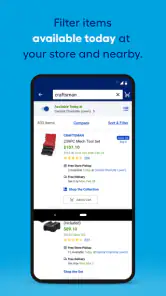
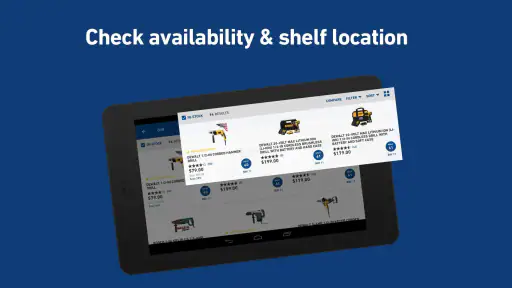
Another fantastic feature is the ability to create shopping lists. Trust me, this is a game-changer. You can save all the items you need for your next project and even share the list with your partner or contractor. Plus, with real-time inventory updates, you’ll always know if your local store has what you need.
For someone deciding whether to install it, the key question is how often home-improvement shopping is part of their routine. I’d find it most useful if I already shop at Lowe’s, have a project with several supplies to coordinate, or want to check products before making a store visit. If I only need an occasional household item and have no reason to shop there, a general retailer or a quick in-person trip may be simpler than adding another shopping app.
Move from online choices to the right handoff
For a common real-world example, imagine noticing a leaking tap before work and planning a repair for the evening. I’d use the app to look up likely replacement supplies, compare the product details, and check whether my local store shows them as available. If the fix needs several parts, I’d keep them together on a list rather than make separate searches at the counter. That can make a quick errand more organized, but it cannot diagnose the leak; if I’m unsure which fitting is needed, I’d inspect the existing part or ask an in-store associate before placing an order.
The handoff in that example is from a search on a phone to a physical repair at home, and that is where I’d be careful. I’d take a clear note of the existing part’s identifying details or bring the old piece if it is safe and practical to remove. The app can help me compare likely options and keep the shopping trip focused, but I would not rely on a vague visual resemblance for a part that has to connect correctly. If the repair is beyond my confidence, getting help from a knowledgeable person is a better move than treating a product page as a diagnosis.
For routine projects, the choice between pickup, delivery, and shopping in person depends on what I’m buying and how much uncertainty remains. If I know the exact item and have checked its details, ordering can reduce time spent browsing. If I need to inspect a finish, compare a physical sample, or ask about an unfamiliar component, going to the store first is more sensible. The app is most helpful when it supports that choice rather than making every purchase feel like it should happen on a screen.
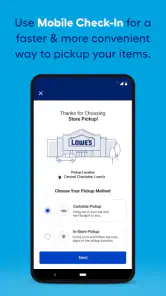
If you think shopping online means long waits and complicated procedures, think again. The Lowe’s app makes ordering as simple as pie. You can choose between home delivery or in-store pickup, and the app keeps you updated on your order status every step of the way. Plus, their hassle-free return policy ensures that if something isn't right, you can easily return it.
Where the convenience has limits
Inventory shown on a screen is a useful planning signal, not a guarantee that every item will be waiting exactly where expected when I arrive. For a time-sensitive repair, I’d verify the key item before building the whole trip around it, and keep a backup plan if a particular size or finish is essential. A second practical trade-off is that product pages can narrow the choice, but they can’t show how a finish looks in your home’s lighting or whether a material feels right in person. For those decisions, a store visit remains worthwhile.
There is another limit to planning around a list: projects change once work begins. A measurement can reveal that the planned quantity is off, or removing an old fixture can expose a different need than expected. I’d avoid treating a completed list as proof that the job is fully understood. For a project with dependent steps, it is safer to identify which purchase is essential to getting started and which supplies can wait until I have checked the actual condition of the space.
The app is a strong fit for homeowners, renters handling small fixes, and contractors who want a shared list and a convenient way to check products while planning a store visit. I’d skip it if I rarely shop at Lowe’s, prefer browsing several retailers at once, or need expert help choosing a technical part before I know its name. In those cases, a visit to a specialist or a broader comparison tool may be a better first step. The app is free, rated for Everyone, and has more than 10 million installs; its current version is 25.10.5, and it runs on operating systems version 11 or newer.
It is also worth thinking about the kind of comparison you need. If the decision is between several home-improvement products available through Lowe’s, product details and reviews can help me make a shortlist. If I’m trying to compare what multiple retailers carry, or decide whether a product from one seller is better value than a different seller’s alternative, a multi-retailer search is more appropriate. The app’s focused shopping path is a strength for planning a Lowe’s trip, not a replacement for every kind of research.
Support, follow-through, and the final decision
Let’s not forget about customer support. The app provides a direct line to Lowe’s customer service, so you can get answers to your questions quickly. Whether you're curious about product specs or need help with an order, support is just a tap away.
When an order or product choice is important to the schedule, I’d keep the next step clear: check the order information, make sure the selected item matches the project, and contact support if a question concerns the purchase itself. For a construction or repair question, though, customer service is not a stand-in for a qualified trade professional. I’d separate shopping help from technical advice so I know whom to ask and do not mistake a smooth order process for confirmation that a repair plan is sound.
With a 4.7 average from roughly 275,000 ratings and around 36,000 written reviews, Lowe’s has clearly drawn substantial interest from shoppers. It was released on May 3, 2012, and I see its main value less as a complete home-improvement adviser than as a practical bridge from planning to purchase: search, compare, estimate, list, and then choose a store visit, pickup, or delivery. If you already shop there and want to keep a project organized, I’d give it a try; if your needs are mostly research or cross-store price comparison, I’d use a broader resource alongside it.
Lowe's Frequently Asked Questions
Can I use the Lowe's app to prepare for a home improvement project?
The Lowe's app is a shopping app centered on home improvement, so it can be useful when you are getting ready to shop for a project. You can browse products and use shopping tools to help organize what you need. Its store summary, “Lowe’s Knows Home Improvement,” captures that focus. The app is free to download, and its content is rated Everyone.
Is the Lowe's app available in more than one language?
The Lowe's app is intended for shopping and home improvement, but language preferences can affect how comfortable any shopping app feels to use. Before downloading, consider whether you are comfortable navigating a retail app in its available interface language. The app is free, and you can explore its shopping features after installing it. Its general-audience content rating is Everyone.
What devices can I use the Lowe's app on?
The Lowe's app is available for Android and iOS devices, making it accessible on many commonly used smartphones and tablets. Before downloading, check that your device meets the minimum operating system requirement: version 11. The app is free to download, so you can install it and explore its shopping features without paying for the app itself.
Who develops the Lowe's app, and what is it for?
The Lowe's app is developed by Lowe's Companies, Inc. and is a shopping app focused on home improvement. Its store summary, “Lowe’s Knows Home Improvement,” reflects its purpose: helping customers browse products and use shopping tools for their projects. It is rated for Everyone, so its content is intended for a general audience.
What is the primary function of the Lowe's app?
The Lowe's app is designed to enhance your shopping experience by providing easy access to a wide range of home improvement products and services. It allows users to browse and purchase items, track orders, and access personalized shopping lists. The app also offers features like store locator, product reviews, and DIY project ideas to assist customers in their home improvement endeavors.
Pros
- User-friendly interface.
- Wide range of products available.
- Easy order tracking.
- Multiple payment options.
- Helpful customer service.
Cons
- Occasional app crashes.
- Slow loading times.
- Limited delivery areas.
- Frequent login issues.
- Outdated product info.
- Category
- Shopping
- Version
- 25.10.5











