Lock Screen OS
- 332.00
- 3.3
- Installs
- 5.00M
- Price
- Free
Screenshots
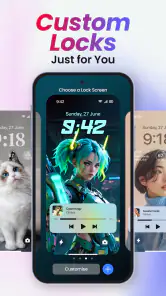
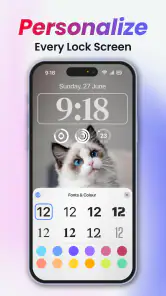
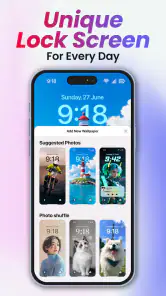
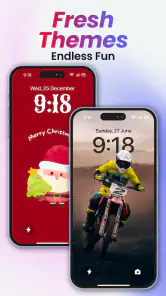
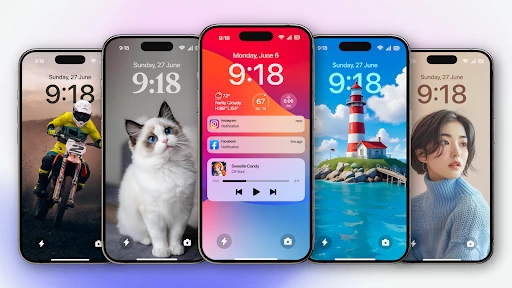
Analysis by Reviewed
I like the idea behind Lock Screen OS: making the screen I see whenever I pick up my phone feel more personal, without turning customization into a project. It is a personalization app from Apps Genz, and its appeal is clearest if you enjoy adjusting your phone’s look and want more to work with than a single wallpaper. I would treat it as a way to experiment with a different lock-screen style, not as an essential upgrade or a replacement for the phone’s own security.
Who will get the most from it
I see the strongest case for this personalization app as someone who enjoys changing a phone’s appearance and wants the lock screen to feel less generic. It is free to install, aimed at everyone, and developed by Apps Genz. The app has a 3.3 average from around 63,000 ratings, so I would approach it as a customization option to try rather than a guaranteed improvement for every phone.
A practical use is to choose a look that makes your phone easy to recognize at a glance, then keep the rest of the screen simple enough that the clock and notifications remain readable. If you regularly change wallpapers, fonts, or widgets, having those choices gathered around the lock screen can make a small daily routine feel more personal. I would start with one visual change, use it for a day, and only then add more; that makes it easier to tell whether the extra decoration is genuinely useful or just busier.
A New Look for Your Lock Screen
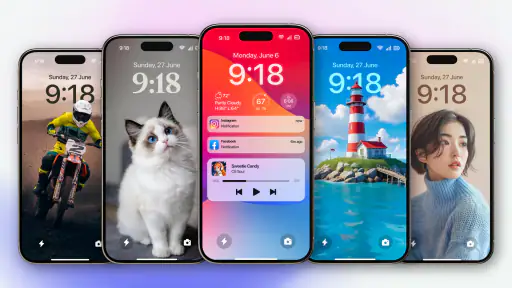
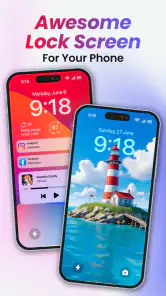
First off, Lock Screen OS offers a plethora of customization options that let you tailor your lock screen to your heart's content. Whether you're into dynamic wallpapers, widgets, or just a sleek, minimalist design, this app has got you covered. I was pleasantly surprised by how intuitive the interface is; even if you’re not tech-savvy, you’ll find it a breeze to navigate through the options.
The Features That Stand Out
What really makes this app shine are its interactive features. Imagine glancing at your lock screen to get a quick update on your calendar, weather, and even news headlines without unlocking your phone. It’s like having a personal assistant right at your fingertips! The app integrates seamlessly with your existing apps, providing notifications that are not just informative but also visually appealing.
Another cool feature is the security options. Lock Screen OS offers advanced security settings, ensuring your data stays safe. From fingerprint recognition to facial unlock, it’s got all the modern tech vibes covered. I felt like a secret agent every time I accessed my phone!
Choices, trade-offs, and everyday use
In ordinary use, I would treat any lock-screen widgets as a quick-glance convenience, not a reason to stop using the phone’s built-in security or settings. For example, if I were checking my calendar while heading out, I would keep the display focused on the information I actually need and avoid adding decorative elements that make it harder to read. That small bit of restraint is useful with any highly customizable screen: more choices can create a better fit, but they can also make the result cluttered.
More From Our News Desk

Clash of Clans Is Won Between the Battles

Android Auto Makes the Case for Quieter Car Software

MobiOffice: Transforming Mobile Productivity with Seamless Integration

EA SPORTS FC™ Mobile Soccer: Redefining Mobile Sports Gaming

How Microsoft OneDrive Became a Mobile Productivity Giant

How Google Translate Breaks Language Barriers Effortlessly
Compared with changing a wallpaper through the phone’s standard settings, an app devoted to lock-screen styling can feel more appealing when you want to adjust several visual elements together. The built-in route is still the simpler choice if all you want is a new background, or if you prefer to keep system behavior as familiar as possible. I would also check that the finished screen remains comfortable to read and that the device’s own unlock method still behaves as expected; a visual makeover is not worth making everyday access confusing.
A small routine that can make the design work harder
For a realistic test, I would set up the screen in the evening, when I have time to compare a few styles without rushing. The next morning, I would check it in the situations that matter: glancing at the time while getting ready, seeing whether a notification is easy to scan, and unlocking the phone with my usual hand position. This is more revealing than judging a theme while staring at the customization screen, because a design that looks attractive in a preview can be less practical when viewed quickly.
There is also a useful way to avoid endless tweaking: decide what the lock screen should help you do before choosing its appearance. If the main purpose is to recognize the phone and see the time, a restrained layout is likely enough. If you want a quick glance at useful information, prioritize legibility and leave visual accents secondary. I would change one element at a time, since that makes it easier to identify which choice improves the experience and which one simply adds noise.
Performance and Usability
Performance-wise, Lock Screen OS runs smoothly without any noticeable lag. It’s optimized to ensure your phone’s battery life isn’t compromised, which is a huge relief for heavy users like me. The app doesn’t bombard you with ads either, which is a massive win in my book. It respects your space while enhancing your phone’s functionality.
The usability factor is high. Whether you’re using an Android or iOS device, Lock Screen OS is designed to integrate effortlessly. I found the setup process to be straightforward, making it accessible for users of all ages.
How it compares with the built-in option
The main alternative is not necessarily another app; it is the lock screen already included with your phone. That default tends to be the sensible choice if you value a familiar, predictable setup and only want to change a background. Lock Screen OS makes more sense when visual variety is the point and you are willing to spend time finding a combination that suits you. I would not install it just to solve a problem that a simple wallpaper change already fixes.
There is a trade-off between a more personalized appearance and the consistency of the system interface. With any added customization layer, I would check whether the style feels coherent with the rest of the phone and whether everyday actions remain obvious. If you share a device, use it for work, or depend on a clear, uncluttered screen, the default may be more practical than a design that needs frequent adjustment. For someone who enjoys making a phone feel like their own, that extra choice is precisely the draw.
What to weigh before installing
The app has reached over five million installs, and its current version is 4.0.6. It was released in March 2021 and requires Android 7.0 or later. Those details make it worth checking your device’s compatibility before you plan around it. Although the app is free, in-app purchases are available at $0.99 per item, so I would look carefully at any optional purchase prompts and decide whether the free customization already meets your needs.
One question I would ask before relying on a lock-screen app is whether its look and controls work consistently with the phone I use every day. I would test the setup on my own device, check how notifications appear, and make sure the final design does not obscure information I need. If dependable access, minimal changes, or a strictly built-in experience matters more to you than visual variety, the phone’s default lock screen may be the better fit.
What I would check during the first few days
I would give the chosen setup a little time rather than deciding from the first impression. A lock screen is seen in short bursts, so small frustrations can become obvious only after repeated use: text that blends into a background, a layout that draws attention away from notifications, or a design that feels less clear outdoors. If any of those happen, I would simplify the screen before abandoning the app altogether. The point is to make the phone easier and more pleasant to pick up, not to preserve a theme that looks good only in a preview.
I would also be cautious about treating a more informative-looking screen as a substitute for opening the relevant app. A glance is convenient for deciding whether something needs attention, but details are easier to check in the app that owns them. That distinction keeps the lock screen useful without expecting it to do everything. It is a particularly helpful approach for anyone who wants a bit more personality but does not want a new screen to become another place to manage.
Who may want to skip it
If you rarely notice your lock screen, prefer a plain interface, or are happy with the wallpaper controls already on your phone, I would skip the extra customization layer. It may also be a poor fit if you need every on-screen element to behave exactly like the standard system experience. A modest rating average suggests that experiences are not uniformly enthusiastic, so I would keep expectations measured and judge it on your own device rather than assuming every option will suit your taste.
For people who do want to try it, the low-commitment approach is to begin with the free choices and avoid buying anything until the everyday setup feels worthwhile. The listed age rating is Everyone, but that does not mean every visual style will be equally suitable for every user; I would choose a simple, readable arrangement for a shared or family device. The useful question is not how many choices the app offers, but whether the choices you actually use make the phone more comfortable.
Why You Should Consider It
If you’re looking to add a touch of personality and practicality to your smartphone experience, Lock Screen OS is definitely worth checking out. It’s more than just a lock screen; it’s a comprehensive tool that enhances your daily interactions with your device. Plus, who doesn’t love a bit of flair every time they pick up their phone?
In conclusion, Lock Screen OS isn’t just about aesthetics; it’s about making your life a tad bit easier and more stylish. So, if you haven’t already, give it a whirl. Your lock screen might just become your new favorite feature!
Lock Screen OS Frequently Asked Questions
Can I personalize my lock screen without replacing my phone’s built-in interface?
Lock Screen OS is a personalization app focused on changing the look of your lock screen with wallpapers, fonts, and widgets. It is intended to add visual choices to the screen you see when your phone is locked, rather than serve as a general phone replacement. If you prefer a customized appearance, its central features may be worth exploring.
Who is Lock Screen OS intended for, and what is its age rating?
Lock Screen OS is a personalisation app for people who want to change the appearance of their phone’s lock screen. It is listed for everyone, so its stated content rating is suitable for a general audience. Its main appeal is straightforward visual customization through wallpapers, fonts, and widgets, rather than a collection of unrelated phone tools.
Is Lock Screen OS free to download, and are there any extra costs?
Lock Screen OS is free to download, so you can try its lock-screen personalization features without paying upfront. It also offers in-app purchases, priced at $0.99 per item, which may apply to optional content or features. Check the purchase details shown in the app before confirming anything, especially if you share your device or payment method with someone else.
Can I use Lock Screen OS on an older Android phone?
Lock Screen OS requires Android 7.0 or later, so an older phone can run it if its operating system meets that minimum. The app is a personalization tool from Apps Genz, focused on making the lock screen more individual with wallpapers, fonts, and widgets. Check your phone’s Android version before downloading to avoid compatibility surprises.
What is Lock Screen OS and how does it work?
Lock Screen OS is an innovative application designed to enhance your smartphone's lock screen functionality. It offers customizable widgets, notifications, and shortcuts directly on your lock screen, allowing for quick access to essential apps and information without unlocking your device. By integrating seamlessly with your phone's operating system, it ensures a smooth and efficient user experience.
Pros
- Highly customizable interface
- Improves phone security
- Minimal battery usage
- Supports widgets
- User-friendly design
Cons
- Frequent ads in free version
- Limited free features
- Occasional app crashes
- Inconsistent theme options
- Some features require root access
- Category
- Personalization
- Version
- 4.0.6













