

Dynamic View AZ
- 789.00
- 4.1
- Installs
- 10.00M
- Price
- Free

Screenshots
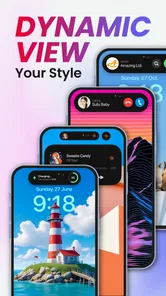
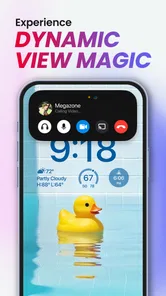
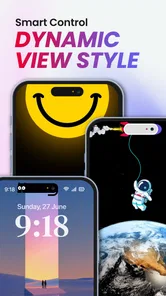
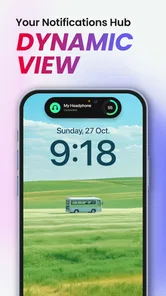

Analysis by Reviewed
I would judge Dynamic View AZ by one practical question: does its on-screen multitasking feel useful enough to justify changing the way I interact with my phone? That matters more than a dramatic makeover. It is a free personalization app from Apps Genz, and its appeal is specifically the Dynamic View-style experience on Android, rather than being a general-purpose replacement for every part of the phone’s interface.
That focus makes it worth considering if you like having more visible ways to move between tasks. It is less compelling if you are already happy with your standard home screen and want only a new wallpaper or icon set. I would try it with a specific routine in mind—such as switching between messages and another app—rather than expecting a broad redesign of the entire device.
Decide by the task you want to improve
Before installing, I would pin down what feels inconvenient now. Is it the repeated trip back to the home screen, the visual sameness of the interface, or simply the desire to experiment with a different interaction? Those are separate needs, and this app is most relevant to the first and third. A clearer goal also makes it easier to tell after a few days whether the change is helping.
A useful test is to pick one recurring situation and notice how you handle it today. For example, if I often read a message while checking a delivery detail, I can see whether the new view makes that switch feel more direct. If the routine is rare, the added interface may not earn its place. I would judge the experience by the number of small interruptions it removes, not by how striking the first screen looks.
People who enjoy adjusting a phone’s appearance may also appreciate the chance to explore a more distinctive style. But I would not assume that liking customization means liking every interface change. Someone who depends on a settled layout, uses the phone one-handed, or prefers familiar navigation may value consistency more than novelty. In that case, a small wallpaper change is a safer experiment.
What Makes Dynamic View AZ Stand Out?
Dynamic View AZ is not your typical customization app. It offers a unique take on the user interface by allowing you to create a dynamic home screen experience. Imagine having a home screen that changes based on your activities, preferences, or even the time of day. It's like having a personal assistant right at your fingertips.
The app comes with a plethora of widgets and themes that are not only visually appealing but also incredibly functional. Whether you want a minimalist look or something more vibrant, there's something in store for everyone. The customization options are almost endless, and the best part is, it's super easy to use. Just drag, drop, and voila! Your phone gets a makeover in seconds.
More From Our News Desk

 Gmail
GmailGmail in a Busy Inbox: Who Benefits Most?
From first account to crowded workday, Gmail earns its place through dependable search and flexible sorting—but its best fit depends on how much inbox maintenance you can tolerate.

 Prime Video
Switching to Prime Video: What Changes in Your Viewing Routine
Prime Video can make a compelling second home for streaming, but switching means learning a different catalog, rental layer, and route from browsing to playback.

 Universal TV Remote Control
Universal TV Remote Control Works Best as a Reliable Backup
A phone remote earns its place through quick setup and reliable habits. Here is how to get more from Universal TV Remote Control—and where its limits show.

 Weather - By Xiaomi
Weather by Xiaomi Review: Clear at a Glance, Less Clear Up Close
Xiaomi’s weather app makes everyday forecasts quick to scan, but its calm surface can leave useful details and recovery paths harder to find than they should be.

 X
XX Under Pressure: Can It Recover When Posting Goes Wrong?
A resilience-focused review of X, examining setup, mistaken posts, interruptions, weak connections, and the gaps that matter when recovery needs to be dependable.

 Clash of Clans
Clash of Clans Is Won Between the Battles
Its raids are quick; its community is a long-term project of coordination, teaching, rivalry, and shared responsibility—with all the friction that entails.
Latest News



For a realistic test, I would set it up around a moment when interruptions are common: checking a message while following a recipe, or briefly moving between a chat and a task. The useful question is whether the Dynamic View interaction saves a step without making the screen feel crowded. Start with the smallest change that supports that routine, then keep it only if it becomes natural after a few days.
Where the Dynamic View approach is useful
The strongest case for this kind of tool is a phone routine involving short, repeated switches rather than long stretches inside one app. Think of checking a note while replying to a conversation, or glancing at a task while moving between other activities. The point is not to turn the phone into a desktop workspace; it is to make a particular style of multitasking feel more accessible on a device you already use.
There is a small but important trade-off here: a more visible interaction can make switching feel purposeful, yet it can also draw attention to the interface itself. I would avoid setting up a busy view just because the options are available. A calm arrangement leaves more room for the information you actually need and makes it easier to notice whether the interaction helps rather than merely decorating the screen.
For someone who shares a phone screen with family or coworkers, a modest layout can also be easier to explain than a heavily reworked home screen. I would keep the main paths to essential apps recognizable and use the new experience around them, rather than rebuilding everything at once. That approach reduces the chance that a quick handoff turns into a hunt for familiar controls.
Ease of Use
I have to say, one of the things I love most about Dynamic View AZ is its user-friendly interface. Even if you're not tech-savvy, you'll find navigating through the app a breeze. The developers have done a fantastic job of making sure that the features are intuitive, so you won't need to spend hours trying to figure things out. Plus, the app runs smoothly without draining your battery or slowing down your device, which is always a plus.
For a fair trial, I would avoid changing several parts of the interface at once. Keep your familiar layout initially, learn where the new controls sit, and then decide whether the added interaction is genuinely quicker. That makes it easier to identify what helps and what merely looks different. If the new view competes with your usual gestures or feels awkward to reach, returning to a simpler setup may be the better choice.
Customization Galore
From customizable widgets to dynamic wallpapers, Dynamic View AZ lets you unleash your creativity. You can personalize each aspect of your home screen to reflect your style. The app supports third-party icon packs, which means you can completely revamp the look of your apps. And if you're into automation, you'll love the smart settings that allow your phone to adapt to your routine seamlessly.
The trade-off is that personalization can take attention away from the practical reason to install it. I would choose a restrained arrangement first, especially if I rely on familiar app positions. A useful tip is to change one visual element at a time and live with it before adjusting the rest; that way, it is easier to tell whether a new look improves everyday access or simply adds another layer to maintain.
Another feature worth mentioning is the interactive notifications. Instead of regular, boring notifications, you'll get ones that are interactive and allow you to perform actions directly from the notification panel. It's these little touches that make the app truly stand out.
Small choices that make a trial more useful
I would begin by deciding which parts of the phone should stay untouched. Keeping essential app positions and familiar habits intact gives the new view a fair test without making every routine feel unfamiliar. Then try it during a normal day, not just while exploring settings. A change that seems clever during setup may be less convenient when you are in a hurry, carrying something, or trying to focus on another task.
It is also worth evaluating notifications separately from the home-screen look. If acting on a notification is the main draw, pay attention to whether the available actions fit the way you actually respond. A notification that saves a step is useful; one that encourages you to stop and inspect the phone more often may not be. The practical benefit depends on your own notification habits, so I would avoid judging it from appearance alone.
Choosing the Right Kind of Personalization
Personalization tools do different jobs. A wallpaper or icon pack is the simpler option when the goal is appearance, while a full launcher is more suitable for people who want to reorganize the broader home-screen experience. This app makes more sense when the Dynamic View interaction itself is what you want to try. I would not install it expecting it to replace every customization tool or make every app behave differently.
It is also reasonable to ask whether trying it means committing to a permanent change. I would treat the first setup as an experiment: note the original arrangement, make a modest adjustment, and use the phone normally before deciding. If you dislike the feel, remove the changes you made or go back to your usual setup. That low-pressure approach is especially helpful for anyone who depends on muscle memory for quick access.
When another option is the better fit
If the only goal is a new visual mood, a wallpaper or icon pack is usually the more direct route; there is little reason to alter how you move around the phone just to change its appearance. If your priority is extensive control over screens and layout, a launcher is the category I would compare first. Those choices serve different purposes, so the fairest comparison is not which one has more options, but which one solves the annoyance you actually have.
Some users may also prefer the phone’s existing interface because it is already familiar and requires no learning period. That is a perfectly sensible choice if the standard way of switching apps works well for you. Dynamic View AZ is less persuasive when the new interaction is something you would use only occasionally, or when consistency matters more than having another way to personalize the experience.
The app is free to install, with optional in-app purchases ranging from $0.99 to $1.99 per item. I would explore the basic experience before paying for anything, then decide whether an extra is worth it to me. It is rated for Everyone, has a 4.1 average from around 78,000 ratings, and has been installed over 10 million times. Those figures suggest a widely tried app, but they do not tell you whether its particular style will suit your habits.
Cost, compatibility, and changing back
There is no need to treat the first session as a commitment. I would first explore the free experience, make only a small adjustment, and leave optional purchases until I know what I would actually use. If an item is presented as an extra, consider whether it solves a real problem for your routine or merely adds another visual choice. That keeps spending connected to a clear benefit rather than the excitement of setting up a new look.
The app is currently at version 3.0.5 and requires Android 7.0 or later, so checking the operating-system requirement before trying it is a sensible first step. Before altering the layout, I would also remember the parts of the existing setup I rely on most. If the new arrangement feels slower after ordinary use, restoring a familiar pattern is more useful than forcing myself to adapt just because I have already spent time customizing it.
A practical question for anyone cautious about trying interface tools is whether they can test it without rebuilding their phone around it. I would make one contained change, use it through a few typical tasks, and then decide. This lets you assess navigation, visual comfort, and usefulness separately. If the experience is not a clear improvement, going back to a simpler approach is a reasonable outcome, not a failed experiment.
Final Thoughts
In a world where every smartphone looks and feels the same, Dynamic View AZ offers a breath of fresh air. It's like having a personal designer for your phone, ensuring it looks and functions just the way you want it. Whether you're a customization enthusiast or just looking for a way to make your phone more personal, this app is definitely worth checking out.
My recommendation is strongest for Android users who are curious about a more interactive way to handle everyday phone use and enjoy adjusting their interface. If all you want is a fresh background, a standalone wallpaper option is likely simpler; if you want deep control over the whole home screen, compare it with a launcher instead. The app is currently at version 3.0.5 and requires Android 7.0 or later, so check that your device meets that requirement before installing. I would give it a short, routine-based trial rather than assume the new view will suit everyone.
So, if you're ready to transform your smartphone experience, give Dynamic View AZ a try. It's one of those apps that once you start using, you'll wonder how you ever lived without it. Happy customizing!
Dynamic View AZ Frequently Asked Questions
Is Dynamic View AZ free to download, and are there optional purchases?
Dynamic View AZ is free to download, so you can try the app without paying upfront. It also offers in-app purchases, with individual items priced from $0.99 to $1.99. Consider whether its free features suit your needs before choosing to buy anything, and review the purchase options shown in the app before confirming a transaction.
Is Dynamic View AZ compatible with my Android device?
Dynamic View AZ requires Android 7.0 or later, so check your device’s operating system version before downloading. The app is a personalization tool for Android, and its stated minimum requirement gives you a straightforward way to assess compatibility. If your device meets that requirement, you can look for Dynamic View AZ in the app store available to you.
What is Dynamic View AZ and what does it offer?
Dynamic View AZ is an innovative application designed to enhance your visual experiences on both Android and iOS devices. It provides users with tools to adjust and personalize their screen displays dynamically, offering features such as customizable themes, adaptive brightness, and interactive wallpapers. This app aims to optimize viewing comfort and personalize user experience across different lighting conditions.
How does Dynamic View AZ improve screen visibility?
Dynamic View AZ improves screen visibility by utilizing adaptive brightness settings that adjust according to the surrounding light conditions. This feature ensures that your screen remains clear and readable whether you’re in bright sunlight or a dimly lit room. Additionally, the app provides customizable themes and contrast levels to further enhance visual clarity.
Is Dynamic View AZ user-friendly for beginners?
Yes, Dynamic View AZ is designed with a user-friendly interface that is easy to navigate, making it suitable for beginners. The app includes a guided setup process and intuitive controls, allowing users to quickly familiarize themselves with its features. Additionally, it offers helpful tips and tutorials to assist users in maximizing their experience.
Pros
- User-friendly interface for beginners.
- Customizable settings for power users.
- Offers real-time data synchronization.
- Compatible with both Android and iOS.
- Regular updates enhance functionality.
Cons
- Occasional lags on older devices.
- Requires a stable internet connection.
- Limited offline features available.
- Some features are behind a paywall.
- In-app ads can be intrusive.













