

Live Weather: Forecast & Radar
- 20.00
- 3.8
- Installs
- 100.00K
- Price
- Free
Screenshots
Analysis by Reviewed
I like weather apps best when they help me make a decision quickly, not when they turn a simple forecast into another chore. Live Weather: Forecast & Radar is aimed at everyday planning: checking what conditions may affect a commute, an errand, or time outdoors. Its appeal is straightforward, but the experience depends on a few practical basics—getting the right place selected, understanding what the forecast can and cannot tell you, and knowing when a confusing result may be caused by something outside the app.
Who benefits from a second weather app?
I would consider Live Weather if I want a dedicated place to check the forecast without changing the rest of my phone routine. It can make sense for someone who regularly plans around a particular destination, such as a relative’s neighbourhood or a weekend walking area, rather than checking only the weather where they happen to be. The useful test is whether opening it answers a question I actually have, not whether another icon promises more information.
It is less compelling if the built-in weather tool already gives me the information I use and is easy to reach. A second app can mean another location to maintain, another screen to interpret, and another source that may disagree with the first. I would keep both only if each has a clear purpose—for example, one for quick local checks and the other for a destination I monitor regularly.
A practical way to judge that is to use the app for one recurring decision over several days: whether to walk, what to wear, or when to leave for an errand. I would notice whether the location is consistently right and whether the forecast is clear enough to change my plan. If I keep switching back to another app to understand the result, that is useful evidence that this one is not improving my routine.
Getting past the first points of friction
The first useful check is whether the forecast is for the place you actually care about. If you are away from home, travelling, or planning for someone in another area, a weather result tied to the wrong location can look like an inaccurate forecast even when the issue is simply context. I would confirm the displayed place before relying on the information to make a time-sensitive decision.
Location access is another common source of confusion in weather apps. If you prefer not to share your device’s location, manually choosing a place—where that option is available—can be a sensible alternative. If the app does not seem to reflect where you are, check the app’s location setting and the phone’s own location controls rather than repeatedly refreshing. A refresh cannot correct a location choice that is still wrong.
That distinction matters because weather is local. Conditions can change over a short distance, and a forecast for a nearby town is not necessarily a good stand-in for a particular neighbourhood, trail, or destination. I would treat the location shown in Live Weather as the starting point for every check, especially before a drive or outdoor plan.
More From Our News Desk

 Gmail
GmailGmail in a Busy Inbox: Who Benefits Most?
From first account to crowded workday, Gmail earns its place through dependable search and flexible sorting—but its best fit depends on how much inbox maintenance you can tolerate.

 Prime Video
Switching to Prime Video: What Changes in Your Viewing Routine
Prime Video can make a compelling second home for streaming, but switching means learning a different catalog, rental layer, and route from browsing to playback.

 Universal TV Remote Control
Universal TV Remote Control Works Best as a Reliable Backup
A phone remote earns its place through quick setup and reliable habits. Here is how to get more from Universal TV Remote Control—and where its limits show.

 Weather - By Xiaomi
Weather by Xiaomi Review: Clear at a Glance, Less Clear Up Close
Xiaomi’s weather app makes everyday forecasts quick to scan, but its calm surface can leave useful details and recovery paths harder to find than they should be.

 X
XX Under Pressure: Can It Recover When Posting Goes Wrong?
A resilience-focused review of X, examining setup, mistaken posts, interruptions, weak connections, and the gaps that matter when recovery needs to be dependable.

 Clash of Clans
Clash of Clans Is Won Between the Battles
Its raids are quick; its community is a long-term project of coordination, teaching, rivalry, and shared responsibility—with all the friction that entails.
Latest News



Simple setup checks before trusting a forecast
Live Weather is free to install, and it is rated for Everyone. It is developed by Chavazoem Potenutme, has an average rating of 3.8 from 452 ratings, and has been installed over 100,000 times. Those figures suggest that it has found an audience, but they do not tell me whether it will suit every person’s needs. I would judge it by whether its forecast is easy to interpret and useful for the places I check most.
The current version is 1.3.1.0, and the listed minimum operating system is version 9. If the app behaves oddly, checking that the device meets that requirement is a practical first step. I would also make sure the app itself is up to date through the device’s usual app-management process. These checks do not guarantee a fix, but they can rule out basic compatibility and version problems before you spend time changing other settings.
Weather information also relies on a working connection. If the screen appears stale or fails to update, I would first check whether other apps can load current information, then try the weather app again once the connection is stable. Switching between Wi-Fi and mobile data can help identify whether the problem is specific to one connection. If nothing else is loading either, the weather app is probably not the first place to troubleshoot.
One useful habit is to check the forecast at the moment you are making a plan, then check again before leaving if conditions matter. A forecast is a guide, not a promise that the sky will behave exactly as expected. This is particularly important for outdoor events, long drives, or plans where a change in conditions would affect what you carry or whether you go at all.
A realistic routine for a changeable day
Imagine I have errands in the morning and a walk planned later. I would first confirm that the forecast is for the area where I will be walking, not just my current location. If the conditions look uncertain, I would use that as a prompt to pack a light layer or reconsider the timing, then take another look before heading out. That is a more useful role for a forecast than expecting one early check to settle the whole day.
For a trip involving several stops, I would check the destination that matters most rather than treating the weather at home as representative of the entire route. If the plan is flexible, a quick check before leaving can help me decide whether to go earlier or postpone. For a fixed appointment, it is more useful to plan a practical fallback—such as allowing extra time or carrying suitable clothing—than to assume the weather will cooperate.
This kind of routine also helps me notice whether the app is genuinely useful. If I can confirm the place and get a clear enough forecast to make a small decision, it is doing its everyday job. If I need exact local detail or a confident answer for a safety-sensitive outing, I would compare another source instead of asking a general weather app to provide certainty it cannot promise.
A calmer way to recover from a confusing screen
When the information looks wrong, I would avoid changing several things at once. Confirm the selected location, check the network, and reopen the app only after those basics are clear. Doing one check at a time makes it easier to tell whether the issue was a misplaced location, a temporary connection problem, or a display that simply needed another moment to update.
If the app opens but does not seem to show fresh information, restarting it may be worth trying after checking connectivity. If that does not help, a device restart is a reasonable general troubleshooting step. I would be more cautious about clearing app data or reinstalling, because those steps can remove local preferences. Before using them, consider whether you remember the locations or choices you have made and whether you are comfortable setting them up again.
For a recurring problem, note what was happening when it appeared: whether you were on Wi-Fi or mobile data, whether the selected place was correct, and whether other apps were online. That small record is more useful than repeatedly tapping around without a clear idea of what changed. It can also help you describe the issue accurately if you decide to seek support.
There is a useful trade-off here: a weather app is most convenient when it can quickly present the place you need, but convenience should not encourage blind trust. If a forecast seems inconsistent with what you see outside, or if the decision has serious safety implications, check another reliable source and use your own judgement. A phone forecast should support a decision, not replace it.
When the cause may be somewhere else
Not every blank or outdated weather screen points to a fault in Live Weather. A weak connection, a device setting, or an operating-system issue can affect how current information appears. If other apps are also struggling, begin with the phone’s connection rather than changing weather-specific settings. If only this app has trouble, checking its location access and installed version is a more focused next step.
Location accuracy can also be affected by the environment. Indoors, among tall buildings, or while travelling, a device may not identify the intended place as precisely as you expect. In that situation, selecting a destination directly, if the app allows it, is more dependable than assuming the phone has inferred your plans. This is especially useful when checking weather for a day trip rather than the place where you are standing.
There is also a difference between an inconvenient forecast and a technical failure. Weather changes, and forecasts can differ from what eventually happens. If the app is loading and showing the intended location, an unexpected shower does not by itself prove that the app is broken. I would compare the forecast again later and use a second source when timing or safety makes the distinction important.
How it fits beside other weather options
Compared with a built-in phone weather app, Live Weather is another option for people who want a dedicated place to check conditions. The familiar system app may be more convenient if you already use it and it answers your questions. I would switch only if this app makes the information easier for me to consult or better fits the places I need to monitor; installing another weather app is not automatically an upgrade.
Against more specialised weather services, the practical question is how much detail you need. For a quick everyday check—deciding whether to bring an extra layer, postpone a walk, or leave earlier—simplicity can be more useful than a dense screen full of information. If you need highly detailed local analysis for work, outdoor activity, or safety-sensitive planning, compare the information available in several apps before settling on one. I would not choose any single general-purpose forecast as my only authority for a high-stakes decision.
One trade-off when comparing weather apps is convenience versus the kind of detail you rely on. A familiar built-in option may be faster for a glance, while a separate app is worth keeping only if its presentation or the places you check make planning easier. I would avoid judging either one by how much information it appears to offer; the better choice is the one that helps me make the decision at hand without obscuring what matters.
My most useful routine would be to keep the app focused on the places I genuinely plan around, verify the selected location before interpreting the forecast, and check again close to departure when the weather could change my choices. That approach avoids a common trap: opening a weather app out of habit, glancing at a result for the wrong place, and then making a plan based on it.
Cost and the decision to install
The app is free, with in-app purchases ranging from $2.99 to $49.99 per item. I would start with the free experience and decide whether it meets my needs before considering any purchase. The range is broad enough that I would check the exact purchase details in the app before paying, rather than assuming that every option offers the same value or is necessary for ordinary forecast checks.
That approach is particularly sensible if you already have a weather app you trust. Try Live Weather for the specific routine you want to improve: perhaps checking a destination before a weekend outing, or having a dedicated place to review the forecast before the school run. If it does not make that decision easier, there is little reason to add another app or spend money simply because paid options are available.
Its 3.8 average rating offers a modest signal, not a guarantee of personal fit. Ratings reflect different devices, expectations, and habits. I would put more weight on whether the app loads reliably for you, handles the locations you care about, and presents information in a way you can act on without confusion.
My practical verdict
I see Live Weather as a reasonable everyday weather app for someone who wants a straightforward place to check conditions and is willing to do a little basic troubleshooting if the result looks off. Its free entry point makes it easy to try, while the optional purchases mean it is worth reviewing the in-app choices carefully before buying anything. The most important habits are unglamorous but effective: confirm the place, check the connection, and avoid treating a forecast as a guarantee.
I would recommend giving it a try if you want a separate weather option for routine planning and your device meets its operating-system requirement. I would skip it if your current weather app already gives you clear, dependable answers, or if you need specialised detail that a general forecast may not provide. For me, the deciding test is simple: after checking the right location, does it help me make a better everyday plan with less fuss? If yes, it earns a place on the phone; if not, the usual built-in alternative may be the more sensible choice.
Live Weather: Forecast & Radar Frequently Asked Questions
What can you do with Live Weather: Forecast & Radar?
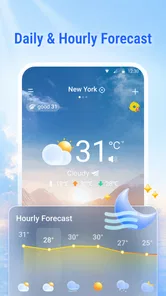
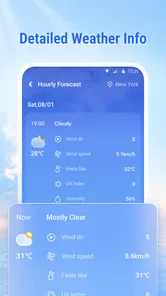
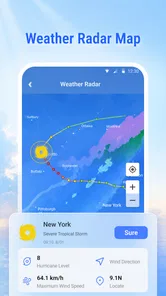
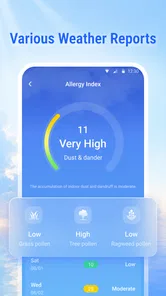
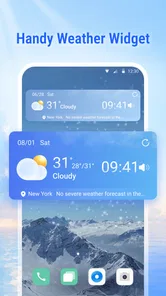
Live Weather: Forecast & Radar is designed to help you check current conditions and plan around upcoming weather. Depending on the version and the information available for your location, it may show details such as temperature, precipitation, wind, hourly forecasts, and radar imagery. The exact features can vary by device, region, and app update, so check the app listing and on-screen settings for what is available to you.
Does Live Weather: Forecast & Radar provide accurate forecasts?
Weather forecasts are estimates based on changing data, so they cannot guarantee exactly what conditions you will encounter. Results can also differ by location, forecast provider, and how recently the information was updated. Use the app as a helpful guide for everyday planning, but consult official local weather services for severe-weather alerts or other safety-critical decisions. Radar and forecast coverage may be limited in some areas.
Does the app need my location, and can I enter a city manually?
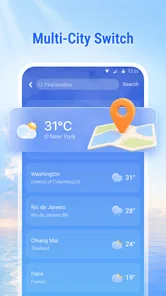
Location access can help the app display local conditions and forecasts for where you are. If you prefer not to share your device’s location, look for an option to search for or save a city manually; availability can depend on the app version. You can review or change location permissions in your phone’s settings. Check the app’s privacy information to understand how location data is handled.
Is Live Weather: Forecast & Radar free, and does it include ads or in-app purchases?
Pricing and monetization may vary between the Android and iOS versions, regions, and app updates. Before installing, review the store listing for information about ads, subscriptions, or in-app purchases. If the app offers a paid plan, check what it unlocks, its renewal terms, and how to cancel it through your app store account. Do not assume every feature is free or available everywhere.
Can I rely on Live Weather: Forecast & Radar for severe-weather warnings?
The app may provide forecasts, radar views, or alerts, but alert availability and delivery can depend on your region, notification permissions, connectivity, and the app’s data sources. Enable notifications if you want to receive available warnings, and keep the app updated. For emergencies or dangerous conditions, follow official alerts from local meteorological and emergency-management authorities rather than relying on a single weather app.
Pros
- Hourly and extended forecasts help with planning ahead.
- Radar maps make it easier to track approaching rain and storms.
- Weather alerts can provide timely notice of severe conditions.
- Useful details include temperature
- wind
- humidity
- and precipitation.
- Saved locations make it convenient to check weather in multiple places.
Cons
- Forecast accuracy can vary by location and weather conditions.
- Radar and forecast data may take time to load on slower connections.
- Frequent alerts may feel distracting if notifications are enabled.
- Some features may require a paid subscription or in-app purchase.
- Location access may be needed for automatic local forecasts.











