LightInTheBox Online Shopping
- 15.81K
- 4.5
- Installs
- 10.00M
- Price
- Free

Screenshots




Analysis by Reviewed
Have you ever found yourself endlessly scrolling through online shopping sites, only to feel overwhelmed by the sheer number of choices? Well, let me introduce you to LightInTheBox Online Shopping, an app that's becoming a one-stop-shop for global fashionistas. I've been exploring it, and I have to say, it's quite the treasure trove!
Discovering a World of Fashion
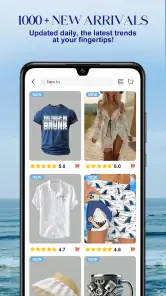
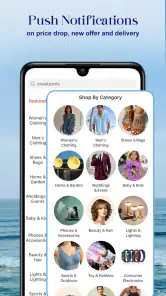
From the moment I opened the app, I was greeted with a vibrant interface that’s both user-friendly and visually appealing. The home page showcases a wide array of categories, from clothing and accessories to home gadgets and electronics. It's clear that LightInTheBox wants to cater to just about every shopper's needs.
Easy Navigation and Search
One of the highlights of the app is its smooth navigation. I found it incredibly easy to toggle between categories or use the search bar for specific items. The filters are particularly handy, allowing you to narrow down choices by size, color, and even customer ratings. This makes the shopping experience not just convenient, but also personalized.
Great Deals and Discounts
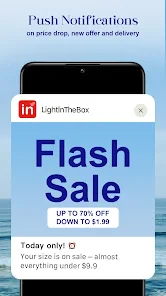
Who doesn’t love a good deal? LightInTheBox is known for its competitive prices, and the app does a great job of highlighting ongoing sales and flash deals. I came across some incredible discounts that were hard to resist. Plus, they frequently offer promo codes, so keep an eye out for those!
Global Shipping and Payment Options
Shopping internationally has never been easier. With shipping available to numerous countries, the app ensures that your favorite products can reach you no matter where you are. The app provides a variety of payment options, making transactions seamless and secure. I appreciated how easy it was to complete my purchase without any hiccups.
Customer Support and Feedback
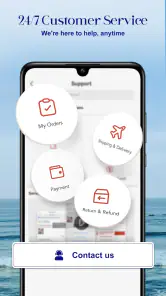
Another aspect worth mentioning is their customer support. The app integrates a chat feature that connects you with support agents in case you have any queries or issues. I tested this out with a question about shipping times and got a prompt and helpful response. Moreover, the inclusion of customer reviews for products adds a layer of trust and transparency.
What Makes the First Week Enjoyable
The early appeal is the chance to browse beyond the familiar selection on a local shopping app. LightInTheBox is a free shopping app from Light In The Box Limited, and its mix of fashion, accessories, home items, and electronics makes casual discovery part of the experience. I’d use it when I have a loose idea—say, a particular kind of accessory—rather than when I need one exact item quickly. The breadth is useful, but it also means a focused search is often a better starting point than scrolling through the home page.
More From Our News Desk

Weather by Xiaomi Review: Clear at a Glance, Less Clear Up Close

X Under Pressure: Can It Recover When Posting Goes Wrong?

Clash of Clans Is Won Between the Battles

Android Auto Makes the Case for Quieter Car Software

MobiOffice: Transforming Mobile Productivity with Seamless Integration

EA SPORTS FC™ Mobile Soccer: Redefining Mobile Sports Gaming
For a practical first order, I would treat the product page as a checklist, not just a picture gallery. Compare the size information with something you already own, look closely at available colors and customer feedback, and check the item details before deciding. Filters can narrow the field, but they do not replace checking whether a particular listing suits your needs. That small pause is especially worthwhile for clothing, where the right choice depends on more than a polished product image.
Does It Earn a Place in a Regular Routine?
Its month-to-month value depends on whether you enjoy browsing a broad assortment and can plan purchases ahead. A useful everyday scenario is looking for a few non-urgent items for home or wardrobe, saving time by searching each item directly, then comparing the shortlisted listings before placing an order. That approach makes the range an advantage without turning every visit into an endless scroll. If you mostly buy the same essentials repeatedly, a retailer with a tighter, more familiar catalogue may be quicker.
Compared with the usual shopping alternatives, this app leans more toward variety and discovery than a specialist store focused on one type of product. That is helpful when you want to explore several kinds of goods in one place; it is less helpful when you need expert product guidance or want to inspect an item locally before buying. I’d also separate a tempting discount from genuine suitability: a lower price only matters if the item’s details, fit, and delivery expectations work for you.
Small Habits That Reduce Shopping Friction
I would make a shortlist before browsing, then use the search and filters to compare a manageable number of options instead of treating every sale banner as a reason to buy. Customer reviews are most useful when read for specifics relevant to your decision, rather than as a single overall signal. For a clothing purchase, prioritize fit-related comments; for a home item, focus on details that affect how you plan to use it. This is a simple way to make the app’s broad catalogue feel less overwhelming.
Shipping is another part of the decision, not an afterthought. The app supports international shopping, but delivery timing can matter more than selection when a purchase is needed for a specific occasion. I’d check the relevant shipping information during checkout and avoid relying on an order for a last-minute need. If anything is unclear, the support chat described in my experience gives shoppers a route to ask before committing, though I’d still keep the product and order details handy when asking a question.
What May Become Tiring Over Time
The same abundance that makes the first visit entertaining can create fatigue. Sales and promo codes may draw attention away from the original shopping plan, while a large number of choices takes time to compare. I would skip the app if I dislike browsing, need a guaranteed quick local purchase, or prefer to see and handle products before paying. It is also not the best fit for someone who expects every category to offer the depth and guidance of a dedicated specialist retailer.
LightInTheBox has an average rating of 4.5 from around 299,000 ratings, and it has been installed over 10 million times. Those figures suggest broad interest, but they cannot tell me whether a specific listing will suit an individual shopper. I’d use ratings as background context and make the final decision from the item’s own details and customer feedback. The app is rated Teen, runs on Android 6.0 or later, and version 8.94.0 is its current release; it is a shopping tool, so its lasting usefulness comes down to whether its selection matches your habits.
There is little routine maintenance beyond keeping the app usable and approaching each purchase thoughtfully. I would revisit it when I have a clear need or want to compare options across its different categories, rather than opening it automatically whenever I have a spare minute. That habit helps preserve the useful side of discovery and limits the temptation to browse just because fresh deals are visible.
Keeping Orders Deliberate
For a household purchase, I’d decide what the item needs to do before searching, then compare listings against that purpose instead of choosing the most eye-catching image. A compact list of must-haves—such as the intended dimensions or the kind of material you want—helps prevent a broad catalogue from blurring the differences between similar-looking products. This is particularly useful when shopping across categories, because the details that matter for an accessory are not the same as those for a home item.
I’d also treat browsing and buying as separate tasks. The app can be enjoyable for discovering possibilities, but a saved mental shortlist and a later, calmer comparison make it easier to decide whether a purchase is genuinely useful. If I’m shopping for several people or planning a seasonal refresh, I would group the items by need and check each product individually rather than assuming that one good experience applies to every listing. The range is an advantage, not a guarantee of uniformity.
Who Gets the Most from the App
I think it suits shoppers who are comfortable comparing online listings and have some flexibility about when an order arrives. It can be handy for someone who wants to look across fashion, accessories, and household goods without opening a separate specialist app for every idea. It is also a reasonable place to begin when you know the kind of item you want but are still weighing styles or options. The search tools help turn that open-ended browsing into a more manageable task.
On the other hand, I would choose a local retailer for an urgent replacement, a product I need to inspect in person, or a purchase where tailored expertise matters. A specialist store may offer a narrower selection but make the decision easier through more focused guidance. The right alternative depends on the job: broad discovery favors LightInTheBox, while speed, hands-on inspection, or deep category knowledge can favor a more direct option.
Questions to Settle Before Checkout
Can I rely on it for a time-sensitive gift? I wouldn’t, unless the shipping information for that specific order fits the date comfortably. Does a discount mean I should buy now? Not by itself; I’d check the item’s specifications and feedback first, then decide whether it solves a real need. Is the overall app rating enough to judge a product? No. It gives general context about the app, while the listing and its customer comments are more relevant to a particular purchase.
What if I need help choosing or have a question before ordering? I’d use the support chat for a concrete question and include the relevant item details so the conversation stays focused. And is it worth keeping installed if I only shop occasionally? That depends on whether the range saves effort when a suitable need comes up. I would keep it as an occasional comparison tool rather than making daily browsing part of my routine.
Those small decisions are what make the app more sustainable for me over time. I don’t need to check every sale or explore every category to get value from it. A clear purpose, a careful look at the product information, and realistic expectations about delivery are enough to make a visit useful without letting shopping turn into another source of clutter.
In conclusion, LightInTheBox Online Shopping stands out as a versatile and user-friendly app that caters to a wide audience. Whether you’re looking for the latest fashion trends or nifty gadgets, this app has something for everyone. With its competitive prices, customer support, and global reach, it’s a worthwhile option for shoppers who value variety and are comfortable taking time to compare. I’d recommend it for planned, flexible purchases, but for urgent essentials or highly specialized advice, I’d choose a more direct alternative. Give it a try, and you might just find a useful addition to your shopping routine.
LightInTheBox Online Shopping Frequently Asked Questions
What is LightInTheBox Online Shopping, and what can I browse in the app?
LightInTheBox Online Shopping is a shopping app from Light In The Box Limited. Its store summary describes it as a place where abundance meets variety for less. The app provides a way to browse and purchase products, including clothing, gadgets, home goods, and more, with items presented across various categories for shoppers to explore.
Who is LightInTheBox Online Shopping designed for?
The app is intended for people who want to browse and shop for a variety of products on a mobile device. Its Teen content rating is worth considering when deciding whether it is suitable for a younger user. Anyone planning to make purchases should also keep in mind that the app itself is free to download, while products are purchased separately.
What devices can run LightInTheBox Online Shopping?
LightInTheBox Online Shopping is a shopping app from Light In The Box Limited. On Android, it requires version 6.0 or later, so checking your device’s software before downloading can help avoid compatibility surprises. The app is free to download and is rated Teen, which is worth keeping in mind when deciding whether it is suitable for younger users.
Is LightInTheBox Online Shopping free to download?
Yes, LightInTheBox Online Shopping is free to download. The app is designed for browsing and shopping, so downloading it does not mean that products are free; purchases are made separately through the app. Its store summary describes it as a place where abundance meets variety for less, making it useful for shoppers who want to explore a broad selection in one place.
What is LightInTheBox Online Shopping app?
LightInTheBox Online Shopping is a mobile application that allows users to browse and purchase a wide range of products including clothing, gadgets, home goods, and more. The app provides access to exclusive deals, discounts, and a vast selection of items from various categories, making it a convenient platform for online shoppers.
Pros
- Wide range of products available.
- Affordable prices for most items.
- User-friendly interface.
- Frequent discounts and promotions.
- Multiple payment options supported.
Cons
- Shipping times can be lengthy.
- Product quality varies greatly.
- Customer service is slow to respond.
- Return process can be complicated.
- Limited product reviews available.
- Category
- Shopping
- Version
- 8.94.0











