KissMe.ai - AI Kiss Generator
- 284.00
- 3.9
- Installs
- 100.00K
- Price
- Free

Screenshots
Analysis by Reviewed
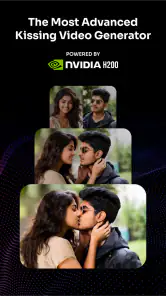
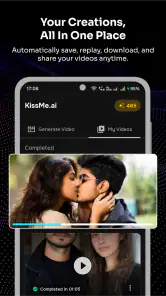
Turning a still photograph into a believable romantic moment is the entire appeal of KissMe.ai. The app focuses on creating AI kissing videos from photos, using Seedance 2.5 to add movement to an image that would otherwise remain static. I found that narrow purpose more interesting than a general image editor because the result is meant to feel like a tiny scene rather than a simple filter.
That focus also makes the app easy to understand. It belongs to the art and design category, is free to install, and is developed by imotion.ai. Its audience is broad enough to include casual users, social-media creators, couples making a playful keepsake, and anyone curious about image-to-video generation. The content rating is Everyone, although the subject itself is romantic, so good judgment still matters when choosing whose photos to use.
The app has reached over 100 thousand installs and holds a 3.9 average from around 4.1 thousand ratings, with roughly 284 written reviews. Those figures suggest a product people are actively trying, but also one where the experience may vary depending on the source images and the user’s expectations. I would approach it as a creative experiment with a specific result in mind, not as a replacement for filming a real moment.
What the AI kissing effect really changes
A normal photo captures a pose, expression, and background at one instant. The central capability here is different: the app interprets that still image and generates motion between the people shown. In practical terms, it tries to make two faces appear to move toward a kiss, creating a short visual event from a single source.
That distinction matters because the strongest results are not necessarily the most polished portraits. A photo with two people already facing each other, with their faces clearly visible and enough space around them, gives the model a much easier starting point. If one person is turned away, partly hidden, heavily blurred, or photographed from an unusual angle, the generated movement has more room to look unnatural.
I see the effect working best as a playful transformation. It can give an old couple’s photo a new emotional twist, turn a posed selfie into a shareable clip, or add a humorous surprise to a group of friends who understand the joke. The appeal comes from seeing a familiar image behave in an unfamiliar way.
The important trade-off is that the app is animating an interpretation, not recovering real footage. The generated kiss is an imagined continuation of the photograph. That means the result can be charming when the faces and pose are simple, but it can also expose the limits of AI motion when small facial details need to remain consistent.
More From Our News Desk

Clash of Clans Is Won Between the Battles

Android Auto Makes the Case for Quieter Car Software

MobiOffice: Transforming Mobile Productivity with Seamless Integration

EA SPORTS FC™ Mobile Soccer: Redefining Mobile Sports Gaming

How Microsoft OneDrive Became a Mobile Productivity Giant

How Google Translate Breaks Language Barriers Effortlessly
For that reason, I would not judge every output as though it were a professional visual-effects shot. The right question is whether the clip communicates the intended playful idea. A slightly artificial movement may be perfectly acceptable for a private joke or a short social post, while the same flaw could be distracting in a wedding montage or a serious creative project.
Choosing a source photo makes more difference than expected
My first practical recommendation is to spend more time selecting the image than searching for a clever prompt or complicated setup. Use a clear photo in which both faces are large enough to read, the lighting is reasonably even, and neither subject is covered by sunglasses, hands, hair, or another object. A straightforward front-facing or three-quarter view is usually a safer choice than a dramatic profile.
It is also useful to avoid photographs where the people are already touching in a way that hides their mouths. The model needs visual information about the faces and the space between them. A little separation can actually help because it gives the generated movement somewhere to go.
Another overlooked issue is expression. A relaxed smile or neutral expression tends to leave more room for the animation to create a natural transition. Strong laughter, open mouths, exaggerated poses, or tightly cropped faces may produce a more unpredictable result. Those images can still be fun to test, but I would treat them as experiments rather than reliable inputs.
Backgrounds deserve attention too. A simple background makes it easier to notice whether the faces remain stable, while a busy setting can make the finished clip feel more energetic but may also reveal unwanted distortions. If the people are the point of the video, I would choose a photo where they are visually separated from clutter.
What using it feels like in practice
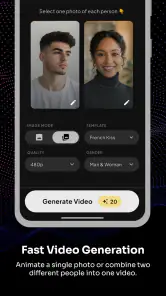
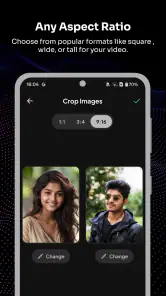
The basic workflow is intentionally approachable: choose a suitable photo, let the app process the image, and review the generated result. That simplicity is a strength for people who do not want to learn timeline editing, keyframes, masking, or manual facial animation. The app’s purpose is clear enough that I would expect most users to understand the idea quickly.
The more important part comes after generation. I recommend checking the entire clip instead of judging it from the opening frame. AI animation can look convincing at the beginning and become less stable during the movement, especially around mouths, cheeks, hair, or the edges of faces. Watching the result more than once helps separate a genuinely usable clip from one that only looks good in a preview moment.
A useful workflow is to keep the original photograph untouched, then test a small selection of similar images rather than repeatedly forcing one difficult picture to work. If the first result looks awkward, changing the source image is often more productive than blaming the effect. A photo with a slightly different crop or a calmer expression may produce a much better outcome.
The current version is 2.0.9, and the app supports devices running Android 7.0 or later. That makes it accessible to many Android users, including people with older phones, although compatibility alone does not guarantee that every device will feel equally quick during AI processing. I would keep expectations realistic on an older handset and allow time for generation rather than assuming the result will appear instantly.
The app is free to install, while in-app purchases range from twenty cents to $28.99 per item. That pricing structure makes it especially important to understand what you are doing before repeatedly generating clips. I would begin with a photo that has a clear purpose and review the output carefully before spending on additional attempts. The low end may suit a small experiment, while the highest item price is significant enough that casual users should avoid tapping through without checking the purchase details.
A realistic everyday use case
Imagine finding an old vacation photo of two partners standing beside a landmark. The picture is meaningful, but it is still only a snapshot. With this app, you could try turning that image into a short kissing moment and send it privately as an anniversary surprise or a lighthearted message. The emotional value would come from the memory attached to the photo, not from cinematic perfection.
In that situation, I would first make a copy of the original image and choose the clearest version available. I would avoid a crop that cuts off one person’s face, and I would inspect the generated clip before sharing it. If the movement looked strange, I would try another photo from the same trip rather than repeatedly using the weakest source.
This workflow also shows where the app is more useful than a conventional photo editor. A standard editor can adjust color, remove distractions, or add text, but it cannot easily turn a fixed romantic pose into a moving interaction. A manual video editor can create motion with keyframes, yet doing that convincingly around two faces takes far more effort. KissMe.ai sits between those options: more expressive than a filter, but much faster than building the animation yourself.
For a creator, the same idea can become a visual hook for a short post. A still image that would normally pass unnoticed can become a brief moment that encourages viewers to stop. I would keep the surrounding edit simple, though. Adding too many stickers, transitions, or effects could hide the very facial movement that makes the generated clip interesting.
Where the usual alternatives are stronger
Compared with a regular photo editor, this app offers a much more specific transformation. Photo editors give you control over the final appearance, but they generally leave the subjects frozen. If your goal is color correction, retouching, typography, or a carefully designed poster, I would choose a conventional art-and-design tool instead.
Compared with a full video editor, the advantage here is speed and narrow focus. A video editor is better when you have genuine footage, multiple shots, music, captions, timing controls, and a story to arrange. It also gives you more control over mistakes because you can cut around them. This app is better when you have one image and want to test a single romantic motion without learning a large interface.
Compared with a broad AI animation service, the focused kissing concept can be easier for a casual user to approach. You are not starting with a long list of creative directions or trying to describe every movement yourself. The limitation is equally clear: if you want dancing, walking, speaking, camera movement, or a custom action, this is not the right specialist.
I would also be cautious about using it for anything that depends on exact identity preservation. A generated face may look close enough for a playful private clip while still changing in small ways during motion. If the person’s likeness must remain precise from beginning to end, real video or a more controlled animation workflow would be safer.
Privacy, consent, and responsible sharing
Because the app works from personal photographs, the social side deserves as much attention as the creative side. I would only use images of people who would be comfortable with the transformation, especially when the result places them in an intimate situation. A private joke can become uncomfortable if it is shared publicly without permission.
This is particularly important with photos of friends, relatives, classmates, or recognizable public settings. Even with an Everyone content rating, the generated context can change how an image feels. Before posting, I would ask whether the people shown would reasonably expect to appear in a kissing video and whether the audience needs to see it at all.
I would also keep the original file and the generated result organized separately. That simple habit makes it easier to compare the animation with the source, remove an unwanted version, and avoid accidentally sending the wrong file. For meaningful personal photos, I would treat the generated clip as a derivative experiment rather than the only copy of the memory.
Small techniques that improve the outcome
One useful technique is to test composition before emotion. Look first at whether both faces are visible, similarly sized, and positioned with enough room for movement. A romantic image with poor geometry is usually a weaker input than an ordinary-looking photo with clean facial visibility.
A second technique is to make the source feel intentional. If the image is cluttered, a simple crop can direct attention toward the people. I would not crop so tightly that the chins or foreheads are cut off, but removing irrelevant space can make the result easier to read and more suitable for sharing.
A third is to compare outputs by stability, not just by how dramatic the kiss looks. The most exaggerated animation may attract attention for a second but show more obvious facial warping. A subtler movement can feel more believable and may work better in a personal message or memory post.
Finally, I would save only the versions that serve a purpose. Generative tools can encourage endless retries, but more attempts do not automatically create a better clip. Decide whether you want a funny result, a tender result, or a social-media-ready result, then choose the output that best matches that goal rather than chasing an abstract idea of perfection.
Who will get the most from it
This app is a good match for people who want a quick, playful way to animate a pair of faces without learning professional software. It is especially appealing if you already have a meaningful photograph and want to give it a new form. Couples, casual creators, and users who enjoy testing AI visual effects will probably understand its appeal immediately.
It can also help someone who has an idea for a short visual gag but no video footage. The single-image workflow lowers the barrier to trying that idea. You do not need to stage a scene, find actors, or build a complex edit; you start with an image and see how the interpretation lands.
I would recommend skipping it if you need dependable realism, detailed creative control, or a polished production asset. It is also a poor fit if your main interest is general photo editing, since the app’s value comes from its particular kissing animation rather than from a broad toolkit. Users who dislike AI-generated changes to people’s faces may find the central effect uncomfortable instead of entertaining.
My overall view is positive but deliberately limited: KissMe.ai is most enjoyable when you treat it as a fast visual experiment, not a promise of perfect human motion. Its focused capability gives an ordinary photo a memorable twist, and the best results can feel surprisingly personal when the source image already carries emotional meaning. At the same time, source-photo quality, facial stability, purchase choices, and consent all matter.
For me, the app earns a place among lightweight creative tools because it does something a normal editor cannot do with a single photograph. I would install it for a specific image, use careful selection rather than random testing, and share the result thoughtfully. If that is the kind of small, AI-made romantic moment you want, the free starting point makes it easy to explore; if you need precision or a wider editing workflow, a conventional video tool will serve you better.
KissMe.ai - AI Kiss Generator Frequently Asked Questions
What kind of images should I prepare before using KissMe.ai?
KissMe.ai is designed to create AI kissing videos from photos, so start with an image where the people are easy to see and their faces are not obscured. A clear, well-lit photo gives the generator more visual detail to work with. If you are choosing a picture of someone else, make sure you have permission to use it, especially if you plan to share the result.
Is KissMe.ai suitable for beginners, or do I need editing experience?
KissMe.ai is an AI creative app in the Art & Design category, and its central idea is to generate a kissing video from a photo rather than require users to build an edit frame by frame. That makes it approachable for someone who is new to image or video editing. As with other AI tools, the result may take some experimentation, since the source photo can affect how natural the generated scene looks.
What is KissMe.ai – AI Kiss Generator, and how does it work?
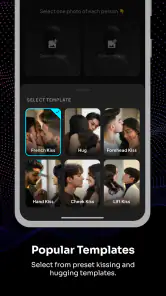
KissMe.ai – AI Kiss Generator is an AI-powered creative app that creates or simulates kissing videos from photos using Seedance 2.5. After selecting a suitable image, the app analyzes faces and body positioning, then generates an edited result based on the chosen kiss effect or style. Results can vary depending on image quality, lighting, facial visibility, and the selected feature.
Can I use KissMe.ai with any photo or do I need specific images?
The app may accept many portrait and couple photos, but the best results usually come from clear, well-lit images in which faces are visible and positioned relatively close together. Blurry pictures, extreme angles, covered faces, group photos, or images with strong shadows can produce unnatural edits. Before downloading, users should also check the app’s supported formats, image requirements, and any limitations on free generations.
Is KissMe.ai free to download and use?
KissMe.ai is free to download, but some features can require in-app purchases. Optional purchases range from $0.20 to $28.99 per item, so check the price shown for a feature before confirming payment. Premium effects, higher-quality exports, or additional generations may not be included at no cost, and the available purchase options can vary. Review the purchase screen carefully before proceeding.
Pros
- Creates playful AI-generated kissing images from uploaded photos.
- Simple interface makes the effect easy to try without editing skills.
- Useful for sharing humorous or romantic content on social media.
- Results are generated quickly for most standard photo uploads.
- Can offer a fun way to experiment with AI image effects.
Cons
- Output quality may vary depending on lighting
- pose
- and photo resolution.
- Some generated faces or details can look unnatural or distorted.
- Uploading personal photos raises privacy and data-handling concerns.
- The most appealing features may require payment or usage credits.
- Results may not always match the intended romantic style or expression.

- Category
- Art & Design
- Version
- 2.0.9