

Keyboard Themes: Emoji Fonts
- 235.00
- 4.5
- Installs
- 5.00M
- Price
- Free

Screenshots
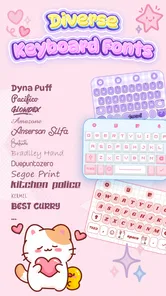
Analysis by Reviewed
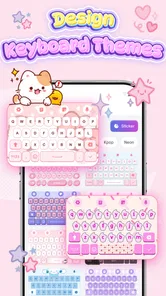
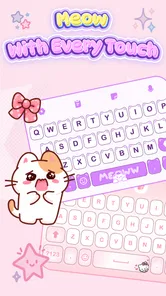
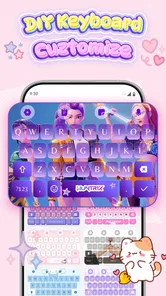
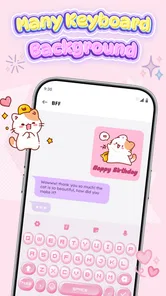
I notice a keyboard most when it gets in the way: a theme is hard to read, a font feels cramped, or the same plain layout has followed me through years of messages. Keyboard Themes: Emoji Fonts is aimed at that everyday bit of phone life. It gives personal style a place at the point where I type, with themes, fonts, and emoji choices to make the keyboard feel less generic. I’d consider it for someone who enjoys changing small details on a phone, especially in a household where devices are shared or family members like different looks.
Making a shared device feel personal
On a shared tablet or phone, a keyboard is a surprisingly visible detail. One person may prefer a bright, cute design; another may want something calmer that keeps letters easy to spot. A keyboard theme can make the device feel more welcoming without changing the apps, home screen, or account setup. That is the practical appeal here: the customization is focused on typing, rather than trying to reorganize the whole device.
I would treat this as a visual personalization app, not a household-management tool. It does not replace separate user accounts, device profiles, or the rules a family sets around shared use. If several people take turns on one device, agree on who can change the keyboard and when. Otherwise, a child experimenting with fonts or themes may leave the next person wondering why the keyboard suddenly looks different.
That small coordination step matters more than it might sound. A keyboard is used across messaging, search, and other text fields, so a change can affect everyone who picks up the device. For a family that enjoys customizing phones together, that can be part of the fun. For a shared device used for schoolwork or practical tasks, I’d keep the design restrained and prioritize legibility over novelty.
Customization is most useful when it stays readable
The best theme is not necessarily the cutest one. When choosing a look, I’d check whether the letter labels remain easy to distinguish against the background and whether the design still works in ordinary indoor light. Fonts that look charming in a preview can be tiring when typing a longer message. A quick test in a notes field is more useful than judging a theme from its thumbnail alone.
That is one of the more useful ways to approach a keyboard makeover: test it with the kinds of messages you actually write. Try a short search, a sentence with punctuation, and a longer note. If you need to pause to find a key, or if similar letters blend together, switch back to a clearer option. Decoration should make the keyboard more enjoyable, not turn everyday typing into a small obstacle.
A small routine makes shared use smoother
For a realistic example, imagine a parent and child sharing a tablet for homework and messages. The child may enjoy a playful style, while the adult needs a keyboard that is quick to use for searches and longer notes. I’d test a preferred design together, then leave it unchanged during a school week. That avoids turning each handoff into a hunt for familiar keys, while still making room to experiment later.
More From Our News Desk

 Gmail
GmailGmail in a Busy Inbox: Who Benefits Most?
From first account to crowded workday, Gmail earns its place through dependable search and flexible sorting—but its best fit depends on how much inbox maintenance you can tolerate.

 Prime Video
Switching to Prime Video: What Changes in Your Viewing Routine
Prime Video can make a compelling second home for streaming, but switching means learning a different catalog, rental layer, and route from browsing to playback.

 Universal TV Remote Control
Universal TV Remote Control Works Best as a Reliable Backup
A phone remote earns its place through quick setup and reliable habits. Here is how to get more from Universal TV Remote Control—and where its limits show.

 Weather - By Xiaomi
Weather by Xiaomi Review: Clear at a Glance, Less Clear Up Close
Xiaomi’s weather app makes everyday forecasts quick to scan, but its calm surface can leave useful details and recovery paths harder to find than they should be.

 X
XX Under Pressure: Can It Recover When Posting Goes Wrong?
A resilience-focused review of X, examining setup, mistaken posts, interruptions, weak connections, and the gaps that matter when recovery needs to be dependable.

 Clash of Clans
Clash of Clans Is Won Between the Battles
Its raids are quick; its community is a long-term project of coordination, teaching, rivalry, and shared responsibility—with all the friction that entails.
Latest News



One useful compromise is to make changes at a calm moment rather than just before someone needs the device. Try the layout in a low-stakes note, check punctuation and numbers, and let the next regular user try it too. This is more revealing than looking at a theme on the person who selected it; different typing habits can make the same design feel quite different.
Setting it up without confusing accounts
Keyboard Themes: Emoji Fonts is a free personalization app from FunGear inc. Its current version is 1.3.9, and it is intended for devices running Android 9 or later. It is rated for Everyone, so its audience is broad, though that age label should not be mistaken for a promise that every design will suit every child or every family’s preferences.
Before changing a keyboard, I’d first check whose device and account are in use. On a personal phone, the choice is straightforward: install the app, explore the available appearance options, and decide whether the keyboard suits your habits. On a shared device, make the change while the other users are available, so everyone can see what has changed and say whether it works for them.
It is also sensible to keep account boundaries clear. A keyboard appearance choice is not the same thing as creating a separate profile, and changing the visual layout should not be treated as a way to separate one person’s messages or settings from another’s. If privacy between household members matters, use the device’s normal account and screen-lock options rather than relying on a keyboard theme to provide separation.
After selecting a design, spend a moment checking how it behaves in more than one place. A theme that looks good in a messaging app may feel less comfortable in a search box or a form. I’d also show other regular users how to return to a familiar appearance if they prefer it. This avoids the common shared-device nuisance of one person making a harmless change that another person experiences as an unexpected problem.
Coordinate changes rather than treating them as private
For a household, I’d make keyboard customization a quick, shared decision instead of a surprise. Let the person who types most often choose the default, then consider whether a more decorative style is still clear enough for everyone else. If children use the device, an adult can help review the appearance and keep the selection age-appropriate without assuming the app offers parental controls.
A practical routine is to take a screenshot of the preferred look or simply agree on the theme name before experimenting. That makes it easier to restore the familiar setup if someone dislikes a new font. It is a small bit of coordination, but it prevents repeated tinkering and helps everyone understand that the keyboard is part of the shared device experience, not a separate personal space.
There is a trade-off here: personalization can make a shared phone feel friendlier, but the more often people swap styles, the less consistent typing becomes. For adults with distinct preferences, that may be perfectly manageable. For younger users still learning where keys are, frequent changes can make practice harder. In that situation, I’d favor one stable, high-contrast design over a rotating collection of looks.
What it offers compared with the usual options
Most phones already provide some basic keyboard appearance choices through system settings or the keyboard app that is installed by default. Those built-in options are often the simplest route if all you want is a dark or light look, predictable typing, and minimal setup. Keyboard Themes: Emoji Fonts is more appealing when the standard choices feel limited and you specifically want to explore a more expressive combination of themes, fonts, and emoji styling.
That distinction is important. This is not the choice I’d make just to solve a typing problem such as correcting missed taps or improving text entry. Its central draw is appearance. If you are already happy with your keyboard’s layout and clarity, an extra personalization app may add little. If you enjoy tuning the visual details of your phone and want the keyboard to match that effort, it has a more focused reason to be installed.
There is also a cost boundary to keep in mind. The app is free to download, while in-app purchases range from $4.99 to $29.99 per item. I’d explore what is available at no cost before considering a purchase, and decide in advance whether a particular paid customization is worth it to you. A decorative keyboard is a nice-to-have, so I would not spend simply because a theme catches my eye in the moment.
In practical use, I’d approach paid choices as optional extras rather than a necessary step to make the app useful. If the free selection already gives you a style you enjoy, there is no reason to pay for more. If you are shopping for a child, make that decision together and keep purchases within the household’s usual spending rules. The price range is broad enough that it is worth checking the individual item before tapping through.
Age, comfort, and trust in a typing app
The Everyone age rating makes the app broadly suitable in terms of its stated audience, but I would still review it with a child who will use it. The keyboard is where people type messages and searches, so any keyboard app deserves more thought than a wallpaper picker. Before making it the active keyboard, read the on-device setup explanations carefully and make sure the person using the phone understands which keyboard is selected.
I would not infer privacy protections, family controls, or account separation from the app’s age rating or its visual purpose. Those are separate questions from whether the themes look good. If you are uncomfortable with a third-party keyboard being used for sensitive work, passwords, or private messages, the cautious choice is to keep the device’s familiar keyboard for those tasks or avoid switching altogether.
For adults, the same judgment applies in a less formal way. I’d ask whether a custom look is worth adding another app to my typing setup, particularly if my default keyboard already does everything I need. For a child, I’d also consider whether decorative fonts make letters harder to recognize. The right answer depends on the user: a playful design can be a nice personal touch, but clarity and comfort should win when there is a conflict.
The app has an average rating of 4.5 from around 17,000 ratings, and it has been installed over 5 million times. Those figures suggest that keyboard customization has broad appeal, but they do not tell me whether a particular theme will feel comfortable on your device or suit everyone at home. I’d use them as general context, then make the decision based on readability, available choices, and whether the app’s approach fits your household.
Who I’d recommend it to
I’d recommend Keyboard Themes: Emoji Fonts to someone who enjoys personalizing a phone and wants the keyboard to feel like part of that style. It makes the most sense for a personal device, or for a shared device where users can agree on a design and keep it consistent. The combination of visual themes, fonts, and emoji-focused styling gives it a clear purpose beyond simply changing the phone’s wallpaper.
I’d skip it if you want a keyboard chiefly for improved typing accuracy, a stripped-back interface, or strong separation between family members. In those cases, the standard keyboard or a dedicated account profile is likely a better fit. I’d also pass if you are uncomfortable with a third-party keyboard or if your main user finds decorative lettering distracting. A more attractive layout is not an upgrade when it makes ordinary typing slower.
My household verdict is that this can be a fun, low-stakes way to make a shared device feel a little more welcoming, provided everyone understands the change and the design remains legible. It works best when one person is not constantly replacing another’s preferred setup. For a personal phone, I’d happily experiment; for a family device, I’d choose one clear default together and leave it in place.
Overall, I see it as a focused personalization option rather than an essential keyboard replacement. The free starting point makes it easy to explore, while optional purchases call for a little restraint. If you want your typing screen to reflect your taste and are willing to check readability before committing, Keyboard Themes: Emoji Fonts is worth a look. If reliability, privacy boundaries, or a familiar layout matter more than appearance, I’d stick with the keyboard you already trust.
Keyboard Themes: Emoji Fonts Frequently Asked Questions
What is Keyboard Themes: Emoji Fonts?
Keyboard Themes: Emoji Fonts is a keyboard customization app designed to change the appearance of your typing experience. Depending on the version available for your device, it may offer themes, decorative fonts, and emoji or symbol options. Check the app’s current store listing for the exact features, since available designs and tools can vary by platform and update.
How do I set up Keyboard Themes: Emoji Fonts?
After installing the app, open it and follow its setup instructions to select a theme or font and enable the keyboard in your device’s settings. You may also need to choose it as the active keyboard before it appears when you type. The names and order of these settings differ between Android and iOS, so follow the on-screen prompts carefully.
Is Keyboard Themes: Emoji Fonts safe to use?
A third-party keyboard can handle text you enter, so review its privacy policy and the permissions it requests before enabling it. In particular, consider what information may be collected or transmitted and whether the app asks for full access or similar capabilities on your device. Download it from an official app store, and avoid entering sensitive information if you are unsure about its data practices.
Does Keyboard Themes: Emoji Fonts cost money?
The app may be free to download while offering optional in-app purchases, subscriptions, advertising, or paid themes. Pricing and available features can change by country, platform, and app version, so check the store listing and purchase screen before confirming anything. If a free trial is offered, read its renewal terms and cancellation instructions to avoid unexpected charges.
Will its fonts and emojis work in every app and on every device?
Compatibility depends on the device, operating-system version, and the app in which you are typing. Some decorative fonts rely on special characters that may display differently or appear as empty boxes on another device, while emoji appearance is often determined by the recipient’s platform. Check the app’s stated requirements and test the keyboard in a non-sensitive text field first.
Pros
- Offers a wide range of keyboard themes to personalize your typing screen.
- Emoji and font options make messages more expressive.
- Theme previews help you choose a look before applying it.
- A useful choice for users who enjoy frequently changing their keyboard style.
- Customization can give the device a more distinctive appearance.
Cons
- Some themes or features may require payment or in-app purchases.
- The keyboard may request access to typed information to provide its features.
- Decorative fonts can be harder to read than standard text.
- A new keyboard may take time to get used to and configure.
- Theme selection and extra options may feel cluttered to some users.













