JCPenney – Shopping & Deals
- 39.59K
- 4.2
- Installs
- 10.00M
- Price
- Free

Screenshots



Analysis by Reviewed
Shopping apps are a dime a dozen these days, but let me tell you about my recent experience with the JCPenney – Shopping & Deals app. If you're like me and love a good deal while shopping from the comfort of your couch, this app might just become your new best friend. So, grab a cup of coffee and let’s dive in!
Shopping for a household, not just yourself
Where I see this app being most useful is in a household that already shops at JCPenney and needs to coordinate everyday purchases. One person can browse clothes while another is looking for bedding or something for the home, then compare choices before placing an order. That makes it more practical than a general shopping app when the goal is to shop this retailer’s range in one place. It is less compelling if you mainly want to compare prices across many stores; a broad marketplace or retailer-neutral comparison tool is a better fit for that job.
A realistic use is replacing a worn-out set of towels while also checking whether a family member needs a clothing item. I’d search by the specific item first, then use the product details and customer reviews to narrow the options rather than browsing deal banners indefinitely. That small change helps keep a shopping trip focused: promotions are useful when they match a real need, but a discount alone is not a reason to buy something.
Making a shared shopping list work
For a household purchase, I’d agree on the essentials before opening the app: what needs replacing, who needs to approve the choice, and what details matter, such as color, size, or how an item will be used. That keeps browsing from turning into a long scroll through unrelated offers. If one person is shopping for several people, writing down those requirements first also makes it easier to compare suitable options without relying on memory.
The app is most helpful when the household has already decided to shop at JCPenney. It brings that retailer’s clothing and home shopping into one place, but it is not a shared planning board or a multi-store cart. I’d use a separate list or household conversation to agree on needs, then use the app to check the retailer’s own selection. That distinction matters if one person expects the app to coordinate everyone’s preferences automatically.
Keep account and device boundaries clear
On a shared phone or tablet, I would treat the app as belonging to the person whose shopping account is signed in. Before letting someone else browse or check out, make sure they understand that an order may use that account’s saved details and rewards. I would not assume that separate household profiles or family-specific controls are available. If several people need to shop independently, using their own accounts and devices where possible is the cleaner approach.
This matters most at checkout. A younger family member can help choose a color or size without being the person who completes the purchase. I’d keep payment decisions and final order review with the account holder, then check the order information together. That is ordinary good practice for a shared shopping device, not a special family feature of the app.
More From Our News Desk

Weather by Xiaomi Review: Clear at a Glance, Less Clear Up Close

X Under Pressure: Can It Recover When Posting Goes Wrong?

Clash of Clans Is Won Between the Battles

Android Auto Makes the Case for Quieter Car Software

MobiOffice: Transforming Mobile Productivity with Seamless Integration

EA SPORTS FC™ Mobile Soccer: Redefining Mobile Sports Gaming
Coordinating without handing over the account
When someone else in the household is helping me shop, I’d keep the account holder in charge of the signed-in device and use conversation to gather preferences. A family member can send a product name, describe the size or color they need, or sit beside the shopper while options are compared. This avoids the awkwardness of passing around a device that may still be signed in to someone else’s account.
Before an order is placed, I’d have the account holder review the chosen items and the checkout details rather than treating another person’s selection as final. This is a small but useful boundary: it separates helping with a purchase from authorizing it. If a household needs each person to maintain separate order histories and account details, individual accounts are a better fit than sharing one login.
First Impressions and Interface
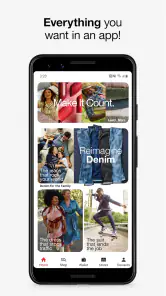
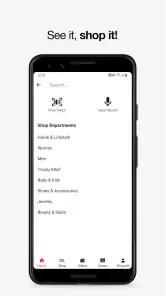
When I first downloaded the app, I was struck by how clean and user-friendly the interface is. It’s like the designers read my mind and knew exactly what I wanted: simplicity and efficiency. The homepage greets you with a neat layout, showcasing the latest deals and promotions. It’s super easy to navigate, which is crucial when you’re trying to snag that limited-time offer before it’s gone.
Features That Stand Out
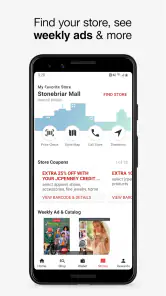
One of the coolest features I discovered is the in-app barcode scanner. You can use it to scan items in-store to check for discounts or read reviews. It’s like having a personal shopping assistant right there in your pocket! Plus, the app syncs with your JCPenney account, letting you track your orders and manage your rewards seamlessly.
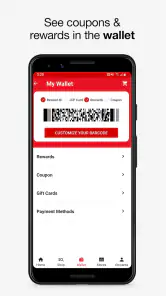
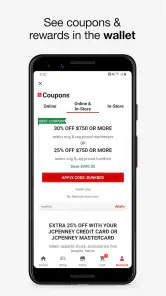
If you’re a bargain hunter, the “Today’s Offers” section will be your go-to spot. Daily deals and exclusive online discounts are just a tap away. I found myself checking this part of the app more often than I’d like to admit. And for those of us who occasionally forget to print out coupons, the app offers digital coupons that you can apply at checkout—both online and in-store. How cool is that?
Using offers without losing track
For shared shopping, I find it helps to agree on the item and its intended use before anyone starts chasing coupons. A coupon can make a planned purchase more convenient, but it can also distract from comparing the item itself. I’d check the offer against the product I actually want, then confirm it is applied at checkout rather than assuming every promotion works for every item or order. That habit is especially useful when another person has picked out the product and expects the final total to reflect a particular deal.
The barcode scanner also makes the app more useful during an in-store visit than a basic online catalog. I’d use it to look up an item already in hand, then read reviews or check the offer before deciding. It is a practical second opinion, not a substitute for checking that the scanned product is the same size, color, or version you intend to buy.
Getting more deliberate value from the app
I find it helps to treat the offers area as a final check, not as the starting point for every shopping trip. If I open a deals page without a particular need in mind, it is easy to spend time considering things I was not planning to buy. When I know what I am looking for first, I can check whether an offer applies to a relevant choice and move on if it does not.
For a planned in-store visit, I’d use the app in two short passes: first to identify the item or details I want, and then, once I’m looking at a particular product, to scan it and check reviews or an available offer. That way, the phone supports the decision without taking over the whole visit. If the app’s offer does not match the item in front of me, I would rely on the actual checkout total rather than assume the discount will carry over.
Shopping Experience
Shopping through the app is a breeze. Whether you’re looking for clothes, home goods, or beauty products, the search function is quick and accurate. I loved how the app categorized everything neatly, so you’re not overwhelmed by choices. Plus, the detailed product descriptions and customer reviews help make informed decisions. It’s like having a personal shopping buddy who’s always ready with advice.
The checkout process is smooth and secure, which is always a concern when shopping online. I appreciated the multiple payment options, including PayPal and various credit cards. And let’s not forget the excitement of tracking your order right from the app until it arrives at your doorstep.
When a different shopping option makes more sense
The main trade-off is focus. This app is useful if I want to browse JCPenney’s assortment, check its offers, or follow an order in the same retailer’s environment. A general marketplace is more convenient when I want one search across multiple sellers, while a price-comparison service is more appropriate when my first priority is finding the lowest price for a particular product. Those tools answer different questions; I would not expect this app to replace them.
It also suits a shopper who is comfortable making decisions within one retailer’s selection. If I need a very specific item and want to compare many brands or stores before choosing, I’d start elsewhere and use this app only if JCPenney becomes one of the options. For a routine clothing or home purchase from a retailer the household already uses, opening a focused store app can be simpler than sorting through a broad marketplace.
Who will get the most from it
JCPenney is a free shopping app from Penney OpCo LLC, and its focused connection to one retailer is both its strength and its main boundary. I’d recommend it to someone who already buys clothing or home items there and wants offers, account rewards, and order tracking close at hand. Its average rating is 4.2 from around 113,000 ratings, and it has been installed over 10 million times, so it is a well-established option rather than an obscure store app.
It is not my first choice for a shopper who wants one cart spanning competing retailers, or for someone who prefers to research a product across several stores before deciding. In that case, I’d use a general marketplace or comparison service for discovery, then turn to this app when I’m ready to check JCPenney’s own selection and offers. The app is rated for Everyone, but that does not make shared-account shopping a reason to hand over payment or order decisions to a child; an adult should stay involved.
Age, trust, and practical expectations
An Everyone age rating is reassuring for ordinary browsing, but I still see this as a shopping tool that works best with an adult managing the account and purchase. A child might help spot a preferred style or color, yet the account holder should remain responsible for reviewing the cart and placing the order. That approach is less about restricting browsing and more about keeping spending, rewards, and order information under the right person’s control.
I would also set expectations about what the app can and cannot do for a household. It can help the account holder shop and follow orders, but family coordination still comes from people agreeing on what to buy and who is responsible for it. If everyone needs independent access, personal account boundaries are clearer than relying on a shared device to keep activities separate.
Final Thoughts
In my opinion, the JCPenney – Shopping & Deals app is a must-have for anyone who loves convenience and savings. Whether you’re a frequent JCPenney shopper or just looking for a reliable app to find great deals, this one ticks all the boxes. It’s intuitive, packed with features, and makes shopping an enjoyable experience. So why not give it a try and see if it becomes your favorite shopping companion too?
I’d describe it as a useful retailer companion rather than a universal shopping solution. The current version is 11.38.1, and the app has been available since February 3, 2012, with support for iOS 8.0 and later. For a household, its best role is helping the person who manages purchases browse, check offers, and follow orders while keeping account access and final checkout decisions deliberate. If that matches how you shop, it is worth trying; if your priority is comparing a wide range of stores or keeping every family member’s shopping entirely separate, another approach will suit you better.
A household verdict that depends on your routine
I’d keep this app in the mix if JCPenney is already part of the household’s shopping routine. It can make a specific retailer’s browsing, offers, rewards, and order follow-up easier to handle, especially when one person is responsible for purchases but checks choices with others. The useful habit is to decide what the household needs first, then use search, product details, reviews, and offers to make a considered choice.
I’d skip it as a primary shopping app if your household needs shared profiles, a combined cart across stores, or a neutral way to compare every retailer in one place. It is also not a substitute for clear agreement about who is allowed to check out on a shared device. For my own use, that is the sensible dividing line: a convenient JCPenney companion for a focused purchase, but not a household-management system or a complete replacement for broader shopping tools.
JCPenney – Shopping & Deals Frequently Asked Questions
Is the JCPenney app compatible with my phone or tablet?
The JCPenney app requires Android 8.0 or later, and it is also available for iOS devices. It is intended for shopping on a phone or tablet, so you can browse products and deals while at home or on the go. If you are using an older Android device, check its operating system before downloading to make sure it meets the requirement.
Who develops the JCPenney app, and is it suitable for children?
The app is developed by Penney OpCo LLC and has an Everyone content rating. It focuses on shopping for clothing, shoes, bedding, home products, and more, along with deals and rewards. The rating indicates that its content is intended for a broad audience, though purchases and account features are best handled with appropriate adult guidance for younger users.
Can I browse JCPenney products before creating an account?
The app is designed for browsing and shopping, so you can explore JCPenney products and available offers before deciding whether to set up an account. Creating a free account is useful for personalized features, such as saving favorite items, receiving tailored promotions, and managing rewards. You can start by looking through clothing, shoes, bedding, home goods, and other products.
What can I do with the JCPenney app?
The JCPenney app offers a comprehensive shopping experience, allowing users to browse and purchase a wide range of products including clothing, home goods, and accessories. Additionally, users can access exclusive deals, track orders, and manage their JCPenney Rewards. The app also provides a convenient barcode scanner for price checks and product details while shopping in-store.
Is the JCPenney app free to use?
Yes, the JCPenney app is free to download and use. There is no subscription charge for using the app. Purchases made through the shopping experience are separate from downloading the app, and users will need to create a free account to access personalized features, such as saving favorite items, receiving tailored promotions, and managing rewards.
Pros
- Wide range of products available.
- User-friendly interface.
- Exclusive app-only deals.
- Easy order tracking.
- Secure payment options.
Cons
- Occasional app crashes.
- Limited international shipping.
- Some features require login.
- Frequent update notifications.
- Might be slow on older devices.
- Category
- Shopping
- Version
- 11.38.1











