

iSync Premium: All iCloud Apps
- 111.00
- 4.7
- Installs
- 10.00K
- Price
- $0.49

Screenshots
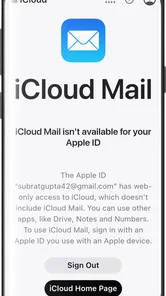
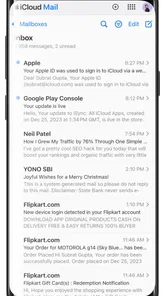
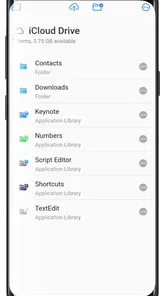
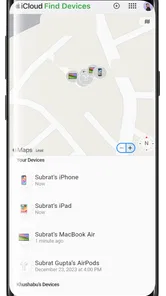
Analysis by Reviewed
When an Android phone has to coexist with an iCloud-centered routine, the awkward part is often not the phone itself but the small daily tasks scattered across accounts and apps. iSync Premium: All iCloud Apps is aimed at that gap: it gives Android users a route to iCloud services without asking them to reorganize everything around a different ecosystem. I see its strongest case as practical access, not a reason for every Android owner to pay for another productivity app.
A bridge for a particular kind of device mix
This is most relevant when the people, calendars, or information I need are already tied to iCloud, while the device in my hand runs Android. That might describe someone who has switched phones but still shares plans with family, or a worker using an Android handset in a team that keeps certain information in Apple’s ecosystem. In those situations, preserving the existing routine can be easier than persuading everyone to move services just to accommodate one device.
The distinction is important: access to an ecosystem is not the same as replacing every app in it. I would approach the app as a convenient Android entry point and judge it against the tasks I actually need to do. If all I want is to check something quickly, a hub can save friction. If my work depends on a specialized workflow, I would not assume that a single doorway will feel identical to a dedicated service.
Where a central access point can help
Imagine leaving home and realizing that you need to check a family appointment before agreeing to another commitment. If the household’s plans live in iCloud and I’m carrying Android, having a direct way to reach that information can spare me from asking someone else to check or switching to a different calendar system. The benefit is small in any one moment, but it can matter when the same mismatch comes up repeatedly.
A useful habit is to treat the first visit as a setup check rather than assuming that the view on screen is the one I need. I would verify the account and the particular calendar or contact list before relying on it, especially when personal and shared information sit side by side. That is not busywork: choosing the wrong source can make a perfectly working app appear incomplete or lead to a duplicate entry.
I would also be cautious about making a time-sensitive change and immediately assuming it has appeared everywhere. For an appointment or contact I cannot afford to mishandle, I’d check the source service after editing. This quick confirmation is a practical way to separate an access convenience from a guarantee about how every part of a cross-device routine behaves.
What the all-in-one approach trades
Putting several services within reach can reduce the mental overhead of remembering which separate app to open. That is especially useful for occasional checks: looking up a detail, finding the right service, or getting to information while away from a computer. It can be less compelling for someone who spends a large part of the day working deeply in one service and already knows its dedicated interface well.
More From Our News Desk

 Gmail
GmailGmail in a Busy Inbox: Who Benefits Most?
From first account to crowded workday, Gmail earns its place through dependable search and flexible sorting—but its best fit depends on how much inbox maintenance you can tolerate.

 Prime Video
Switching to Prime Video: What Changes in Your Viewing Routine
Prime Video can make a compelling second home for streaming, but switching means learning a different catalog, rental layer, and route from browsing to playback.

 Universal TV Remote Control
Universal TV Remote Control Works Best as a Reliable Backup
A phone remote earns its place through quick setup and reliable habits. Here is how to get more from Universal TV Remote Control—and where its limits show.

 Weather - By Xiaomi
Weather by Xiaomi Review: Clear at a Glance, Less Clear Up Close
Xiaomi’s weather app makes everyday forecasts quick to scan, but its calm surface can leave useful details and recovery paths harder to find than they should be.

 X
XX Under Pressure: Can It Recover When Posting Goes Wrong?
A resilience-focused review of X, examining setup, mistaken posts, interruptions, weak connections, and the gaps that matter when recovery needs to be dependable.

 Clash of Clans
Clash of Clans Is Won Between the Battles
Its raids are quick; its community is a long-term project of coordination, teaching, rivalry, and shared responsibility—with all the friction that entails.
Latest News



There is also a choice between keeping the existing ecosystem and moving to the tools built into Android. Google’s calendar, contact, and file tools may be the simpler route when I can freely move information and everyone involved is comfortable with that change. But switching can create a new coordination problem if family members or colleagues already depend on iCloud. I’d compare the effort of maintaining two ecosystems with the effort of moving, rather than assuming either option is automatically cleaner.
In other words, the app’s value depends on the shape of the user’s life more than on the number of services they might theoretically reach. Someone who checks one shared calendar every few days may value a low-friction doorway. Someone who does not use iCloud at all has no similar problem to solve, and someone who needs advanced, frequent editing may prefer a dedicated workflow. That is the central trade-off I’d keep in mind before paying.
What’s the Deal with iSync Premium?
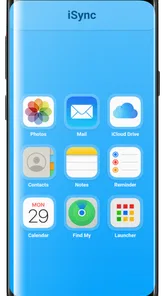
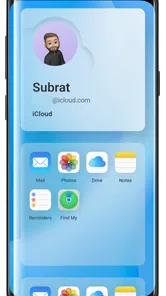
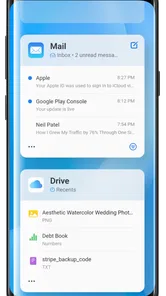
Picture this: you’ve got your photos in one app, notes scattered across another, and let’s not even get started on those random documents you can never seem to find. Enter iSync Premium. This app acts like a Swiss Army knife for all things iCloud, streamlining your digital life right from your smartphone.
In practical terms, I’d consider it most useful when an Android phone is part of a household or work setup that already relies on iCloud. For example, if a family shares Apple-based calendars and contacts but one person carries Android, having a single place to reach those services can be more convenient than repeatedly switching between separate tools. The key question is whether you actually need that bridge: if your daily routine is already handled comfortably by Google services, paying for another layer may add more than it saves.
Easy Peasy Interface
First off, let’s talk about the user interface. It’s as smooth as a fresh jar of peanut butter. Seriously, even my grandma could navigate it without asking for help every five minutes. Everything is laid out in a way that just makes sense, from syncing your photos and contacts to managing your calendar events. You don’t need a degree in rocket science to figure this one out!
There is a useful trade-off to keep in mind with an all-in-one approach. Fewer app switches can make quick checks easier, but a hub is not automatically a replacement for every dedicated iCloud app or its familiar workflow. I’d use it to locate the service I need and handle straightforward tasks, then move to the relevant tool when a job depends on a more specialized interface. That distinction matters most for people who edit or organize a lot of content rather than simply check it.
Features That Make Life Simpler
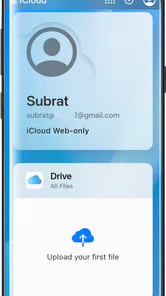
The app isn’t just about syncing; it’s about making your life easier. With the integration of all your iCloud apps, you can manage your data seamlessly. Need to switch devices? No problem! Your data is just a tap away, ready to be accessed whenever and wherever you need it.
A realistic example is checking a shared calendar while away from a computer, then making sure the same appointment is reflected in the routine you use on your phone. For a smoother handoff, I’d first confirm that the correct account is connected and that the calendar or contact list I need is the one being viewed; a central entry point cannot help if I’m looking at the wrong account. If something looks out of date, I’d check the original service before assuming a change has synced. That small habit prevents duplicate edits and confusion.
One particularly cool feature is the ability to sync your contacts and calendars across devices. Ever had that awkward moment when you forget to add an important meeting to your calendar? Well, those days are over. With iSync Premium, everything updates in real-time, so you’re always in the loop.
Compared with using separate apps for each service, the appeal here is convenience: one Android-focused route into an iCloud-centered setup. The usual productivity alternatives, such as relying on Google’s own calendar, contacts, and file tools, may be simpler if you are free to move your information and do not need to stay tied to iCloud. If you are coordinating with people who already use iCloud, though, switching ecosystems just to suit one phone can create extra work. I’d decide based on where the shared information already lives, not on the promise of having everything in one place.
Security You Can Trust
Let’s be real, security is a big deal. The app employs top-notch encryption methods to ensure your data stays safe and sound. So, whether you’re syncing sensitive work documents or your precious family photos, you can rest easy knowing they’re protected.
Because this kind of app sits between an Android device and services associated with an Apple account, I would be deliberate about which account I connect and avoid treating a broad access point casually. For work, I’d follow my organization’s rules before linking any account, especially if documents or contacts are sensitive. A convenience app is not a substitute for checking the account and service I’m using, and that is a sensible precaution regardless of the security claims.
Who It Suits, and What It Costs
iSync Premium is a productivity app from AppCollection.in, and its purpose makes the most sense for someone who owns an Android phone but still depends on iCloud services. It is rated for Everyone, has a 4.7 average from around 960 ratings, and has passed 10,000 installs. Version 1.0.4 is listed for Android 5.0 and later. The asking price is $6.49, so I’d treat it as a paid convenience rather than an essential download: it earns its place only if it solves a recurring cross-device problem.
The app was released on December 29, 2023, and has 94 written reviews. Those figures offer some context, but they do not tell me whether every individual service will fit a particular workflow. Before relying on it for an important task, I’d test the exact things I use most—such as finding a calendar entry or checking a contact—rather than assuming that a broad iCloud hub behaves exactly like Apple’s own apps. That quick trial is a better way to judge whether the price makes sense for me.
Deciding whether it belongs in your routine
I’d put this on the shortlist if my Android phone is a deliberate choice but my household or workplace still organizes important details through iCloud. It is also worth considering if I am helping a family member keep using shared information without asking everyone else to change their habits. The strongest use case is recurring access to familiar services, not occasional curiosity about what an iCloud hub can do.
By contrast, I’d skip it if I have already moved my calendar, contacts, and files into tools that work naturally on Android, or if I rarely need to consult iCloud. It is also a poor fit for anyone who wants to minimize the number of accounts and intermediaries involved in handling personal information. In that case, using one ecosystem consistently—or simply checking iCloud from a device already suited to it—may be the less complicated choice.
Before committing, I’d make a short list of the two or three tasks that cause the most friction and try those first. Can I find the shared appointment I need? Can I identify the right contact list without confusion? Does the route feel convenient enough that I would use it again next week? Those are more revealing tests than browsing every available entry point. They also make the purchase decision concrete instead of relying on a broad promise of convenience.
Another practical question is whether this can take over the role of the Apple apps I already know. I would not plan around that assumption. A single access point may be handy for reaching services, while a dedicated app can remain preferable for detailed work or a familiar set of controls. Keeping both approaches available is not necessarily redundant: one can serve quick checks on Android, while the other remains the better choice for tasks that demand more attention.
Likewise, people often want to know whether connecting an account means every item will always be current on every device. I would treat any cross-device workflow as something to verify, especially after making an important edit. Check the account, confirm the relevant list, and look at the source if an entry seems missing. That routine is sensible whether I use a hub or separate apps, and it prevents a small synchronization doubt from becoming a scheduling mistake.
Final Thoughts
In a world where our lives are increasingly digital, having an app like iSync Premium: All iCloud Apps is a game-changer. It’s like having a personal assistant in your pocket, ensuring everything is where it should be. And let’s face it, who wouldn’t want that?
So, if you’re tired of jumping between apps and just want everything in one easy-to-manage place, give iSync Premium a try. Trust me, your future self will thank you!
My recommendation is narrower than that enthusiastic pitch: I’d consider it if iCloud is already central to my life and Android is the device I carry, especially when quick access to shared information saves repeated app-hopping. I’d skip it if I rarely use iCloud, prefer to keep my accounts separate, or need a dedicated tool for detailed editing. At $6.49, the decision comes down to whether the bridge is useful often enough to justify its cost. For the right person, that focused convenience is the point; for everyone else, the usual tools may be enough.
iSync Premium: All iCloud Apps Frequently Asked Questions
What devices and operating systems can run iSync Premium?
iSync Premium is an Android app for accessing iCloud apps and services. It requires Android 5.0 or later, so check your device’s operating-system version before downloading. The app is listed for everyone and is developed by AppCollection.in. If your device meets the requirement, you can consider whether its iCloud-focused features suit the way you want to use your Android phone or tablet.
What does iSync Premium cost, and what should I know before buying it?
iSync Premium costs $6.49, so it is worth considering whether you need its iCloud access before purchasing. Its stated purpose is to bring iCloud apps and services to Android, making it relevant to people who want to access those services from an Android device. The app has a 4.7 average from 961 ratings, but ratings are individual opinions and cannot guarantee that it will meet your particular needs.
What features does iSync Premium offer for iCloud apps?
iSync Premium provides a comprehensive suite of tools to enhance your iCloud experience. It allows seamless synchronization across multiple devices, ensuring all your data, including contacts, photos, and documents, are up-to-date. The app also offers advanced backup options, secure data transfer, and user-friendly management tools to keep your iCloud storage organized and efficient.
Is iSync Premium secure for managing my iCloud data?
Yes, iSync Premium prioritizes the security and privacy of your iCloud data. It uses advanced encryption techniques to protect your information during synchronization and backup processes. Additionally, the app complies with industry-standard security protocols, ensuring that your data remains confidential and inaccessible to unauthorized parties.
Can I use iSync Premium on multiple devices?
Absolutely, iSync Premium is designed for multi-device compatibility. You can install and use it on any of your iOS devices, such as iPhones and iPads, and it ensures that your data is consistently synchronized across all platforms. This feature is particularly beneficial for users who switch between devices frequently, maintaining data integrity and accessibility.
Pros
- Seamless integration with iCloud services.
- User-friendly interface and navigation.
- Reliable data syncing across devices.
- Offers data backup and recovery options.
- Supports multi-device management.
Cons
- Requires paid subscription for full features.
- Limited offline functionality.
- Occasional sync delays reported.
- High battery consumption on some devices.
- No Android version available.











