iHerb: Vitamins & Supplements
- 6.70K
- 4.8
- Installs
- 10.00M
- Price
- Free

Screenshots

Analysis by Reviewed
I use iHerb when I want to compare wellness products from one place rather than jump between individual brand sites. It’s a free shopping app from iHerb, with a focus on vitamins, supplements, nutrition, personal care, and related goods. That breadth is useful, but it also means the app is best approached as a shopping tool—not as advice about what your body needs. I’d still make health decisions with a qualified professional, especially when a supplement could interact with medication or an existing condition.
Who benefits most from a specialist shopping app
I find this kind of catalog most useful when I have a specific reason to browse: replacing something I already use, comparing two forms of a familiar ingredient, or adding a personal-care item to a planned order. If you shop across several wellness brands, keeping that search in one place can be more convenient than opening separate brand stores. The benefit is less convincing if your buying habits are limited to one product that’s easy to pick up locally.
It also suits people who like to read labels and compare options at their own pace. If you want someone else to tell you which supplement to take, though, a shopping app is the wrong starting point. Product descriptions and customer comments can help with shopping decisions, but they are not a substitute for individualized medical guidance. I would settle the health question first, then use the app to compare products that meet the recommendation.
A practical way to narrow the choices
A large selection can turn a simple restock into a long browsing session. I avoid that by deciding what matters before searching: the ingredient or product type, the form I can use, and any label detail that matters to me. Once I have a shortlist, I compare the product pages rather than scanning every result. That makes it easier to notice that two items with similar names may differ in serving size, formulation, or other details that affect whether they are a sensible match.
Reviews are most useful when I read them for concrete, everyday observations—such as taste, texture, packaging, or whether the product was easy to use. I don’t treat a string of positive experiences as proof of a health benefit, and I don’t assume a highly rated item is right for my situation. For repeat purchases, I also check the exact product page rather than relying on memory; a familiar brand name alone is not enough to confirm that I have selected the same formulation.
Browsing a large wellness catalog
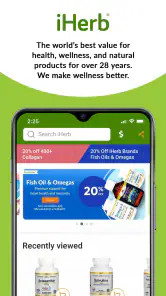
First off, the user interface is super friendly. You don't have to be a tech wizard to navigate through the app. It's quite intuitive, and everything is categorized neatly. Whether you're searching for some Vitamin C or a new herbal tea, the app's search function is spot on. Plus, you can filter your search by brand, rating, or even price, which is a lifesaver for budget-conscious folks like me.
Finding the right product, not just a familiar label
When I’m comparing supplements, I try to search by the specific ingredient or product type before settling on a brand. That makes it easier to see alternatives side by side and notice differences in serving size, formulation, or other details on the product page. Reviews can help reveal practical experiences, but I treat them as personal reports rather than proof that a product will work for me. For anything I take regularly, I check the label carefully and ask a health professional if I’m unsure.
More From Our News Desk

Weather by Xiaomi Review: Clear at a Glance, Less Clear Up Close

X Under Pressure: Can It Recover When Posting Goes Wrong?

Clash of Clans Is Won Between the Battles

Android Auto Makes the Case for Quieter Car Software

MobiOffice: Transforming Mobile Productivity with Seamless Integration

EA SPORTS FC™ Mobile Soccer: Redefining Mobile Sports Gaming
The app is particularly handy for people who already know what they want to replenish, or who like browsing across nutrition and personal care in the same order. It may be less useful if you only need one common item and your nearby shop is quicker, or if you prefer to buy directly from a single brand. A broad catalog saves searching across stores, but it can also make choosing feel like work when you don’t have a clear starting point.
Shopping Experience
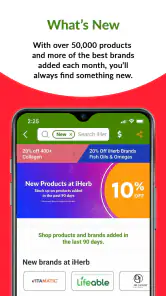
Shopping on iHerb: Vitamins & Supplements feels like a breeze. The app offers a range of payment options, including PayPal, which I find super convenient. One of the coolest features is the ability to read through user reviews before making a purchase. It's like having a friend give you a heads-up about a product before you buy it. And let's not forget the deals - the app frequently has flash sales and discounts, so you can stock up without breaking the bank.
For a more deliberate purchase, I’d put a few comparable products in view before checking out instead of letting a discount decide for me. A lower price only matters if the item fits the need and the label suits the person who will use it. I also find it sensible to review the cart before paying: recurring household staples are easy to confuse with a new product that still needs a closer look. That small pause can prevent an impulse buy from turning into clutter.
As a shopping app, iHerb sits between a general marketplace and a single-brand store. Compared with a broad marketplace, its wellness focus makes relevant product discovery feel more direct; compared with a brand’s own shop, it gives me more room to compare different labels. The trade-off is that a specialist catalog can still be overwhelming, and the app can’t replace informed advice about supplements or guarantee that a popular choice is suitable for everyone.
Making a restock work for a household
When I shop for more than one person, I find it helpful to keep each person’s requirements separate while browsing. A product that works for one household member should not become the default choice for everyone just because it is already in the cart. I check the intended user and product details before checkout, especially when replacing a familiar item alongside something new. This simple routine matters more than chasing the largest order or the most tempting offer.
For a shared list, I’d also agree on acceptable alternatives before placing an order. If the exact product is unavailable or a different format appears more suitable, that decision is easier when the person who will use it has already weighed in. It keeps the app’s broad selection from becoming a reason to make assumptions on someone else’s behalf.
Delivery and Customer Service
Now, let's talk about delivery. The app offers international shipping, which is a huge plus if you're living outside the US. I was pleasantly surprised by how quickly my order arrived. Plus, they offer a tracking feature, so you can easily keep tabs on your package. As for customer service, it's pretty solid. I had a few questions about a product, and the response was quick and helpful.
For an everyday scenario, imagine noticing that your usual personal-care item and a familiar supplement are both running low. You can search each separately, compare the available options, then check the cart and delivery details before placing one order. If timing matters, I’d check the displayed delivery estimate and tracking after checkout rather than assume an international parcel will arrive as quickly as a local purchase. That’s one place where a nearby retailer may be the better choice when you need something immediately.
What to check before relying on a delivery
I’d treat delivery as part of the shopping decision, not an afterthought. Before paying, I check the destination and the estimate shown for that order, then consider whether I have enough of the item left to allow for a parcel taking longer than hoped. Tracking is useful for following an order, but it doesn’t make a shipment a good fit for an urgent need. If I’m buying a routine staple, planning ahead gives the convenience of combining items without making the household depend on a last-minute arrival.
For a first purchase, I’d keep the basket focused and make sure I understand what I’m ordering before adding extras. That makes it easier to assess whether the product selection and delivery experience suit me, without turning a trial into a large commitment. If the order includes a supplement I have not used before, I would resolve suitability separately rather than treating delivery convenience or customer reviews as a reason to try it.
What the app’s track record tells me
The app has been available since November 22, 2013, and its current version is 11.11.1127. That establishes a long-running product and a current version identifier, but it doesn’t tell me by itself which features changed between releases, so I wouldn’t infer a particular redesign or new capability from those facts alone. The practical question for an existing user is whether the current app still makes familiar tasks—searching, comparing, and checking an order—straightforward on their device. iHerb has an average rating of 4.8 from around 713,000 ratings, with over 10 million installs; those figures suggest broad adoption, though they can’t predict whether every order or product will suit an individual.
The app is rated for Everyone and requires Android 9 or later. If you already use it, I’d keep the app current through your device’s store and check that your saved shopping details and order information are present when you need them. If you’re considering installing it, the free entry point makes browsing easy, while the real decision is whether the catalog and delivery options fit how you shop. The developer is iHerb, and the app’s scale is reassuring as a sign that it is an established shopping destination, not a guarantee of a particular experience.
What version details can—and can’t—tell an existing user
A current version number is useful for identifying the build you are using, but it is not a change log. I wouldn’t assume that a particular screen, payment option, or ordering step has recently changed just because the version is current. If you rely on the app for repeat purchases, the practical check is straightforward: open it after updating, confirm that the account and order information you need are accessible, and review the cart before submitting a new order.
That approach is especially helpful if you are returning after a while or moving to a different device. I would verify that I am signed into the intended account and that the delivery destination is correct before placing an order. Those are ordinary shopping checks, but they matter more than guessing how a release has altered the experience. For shoppers who prefer not to manage purchases in an app, using a retailer’s website or visiting a local store may feel more comfortable.
Where I’d be cautious
There are a few sensible limits to keep in mind. Product reviews are useful for spotting taste, packaging, or ease-of-use comments, but they shouldn’t be treated as medical guidance. Likewise, a search result or product description can help narrow choices without resolving whether an ingredient is appropriate for a particular person. I’d skip browsing for a supplement when I’m unsure what I need and start with professional advice instead. And if I’m buying something time-sensitive, I’d favor a nearby shop over relying on shipping.
One useful habit is to make a short list before opening a large catalog: the exact item to replace, any ingredient or format requirement, and a budget. Then use search and filters to compare only plausible matches, and read reviews for recurring practical details rather than simply choosing the highest-rated option. This keeps discovery useful without turning a routine restock into an endless scroll.
When I’d choose another route
I would not use a wellness store as my first stop for a health concern that needs diagnosis, or for deciding whether a supplement is appropriate alongside medication. In those cases, professional advice comes first, and the app is only useful afterward if I want to compare products that meet that guidance. I’d also choose a local shop when I need an item today, or a direct brand store if I already know I want one particular brand and have no reason to compare alternatives.
General marketplaces can be more convenient when a basket contains many unrelated kinds of goods. The iHerb approach is more focused on wellness shopping, which can reduce irrelevant browsing for this particular kind of order, but a focused catalog is not automatically simpler when I am uncertain what to buy. The best choice depends on the task: focused comparison for several wellness items, a nearby retailer for urgency, or a clinician for questions about health.
In terms of product variety, iHerb: Vitamins & Supplements doesn’t disappoint. From daily vitamins to specific dietary supplements, the selection is vast. You can even find organic and non-GMO options, which is great for those of us trying to lead a healthier lifestyle.
Overall, my experience with the app has been pretty positive. It's a handy tool for anyone looking to improve their health with quality supplements. Just a heads-up, though, always make sure to consult with a healthcare professional before starting any new supplement regimen. But if you're ready to explore, this app might just become your new best friend in the wellness world!
iHerb: Vitamins & Supplements Frequently Asked Questions
Is iHerb easy to use for browsing and comparing products?
The app is built around shopping, so you can browse health and wellness products in one place and review product descriptions and customer feedback as you compare options. This can be useful when you are weighing different supplements or personal care items before adding anything to your cart. If you already have particular products in mind, searching the catalog can help you get to them more directly.
Can I read customer reviews before buying products through iHerb?
Yes, customer reviews are part of the product-browsing experience and can offer additional perspectives alongside product descriptions. Reading them may help you understand what other shoppers noticed and decide which items are worth comparing. Reviews reflect individual experiences, however, so it is sensible to consider them as one source of information rather than a substitute for checking product details or seeking appropriate health advice.
Is iHerb free to download, and what devices can run it?
iHerb is free to download and is available for Android and iOS devices. On Android, the app requires version 9 or later. Its Everyone content rating makes it suitable for a broad audience, while the shopping experience is focused on health and wellness products. Before installing, check that your device meets the operating-system requirement and that you are downloading the app from your device’s official app store.
What is iHerb and what can I buy on the app?
iHerb is a comprehensive app designed for purchasing a wide variety of vitamins, supplements, and health-related products. The app offers an extensive catalog of products ranging from dietary supplements to personal care items. Users can browse through various categories, read detailed product descriptions, and access customer reviews to make informed purchasing decisions. Its range also includes active nutrition and other wellness products, so it can serve as a place to explore several kinds of health-related shopping in one app.
Is iHerb available for both Android and iOS devices?
Yes, the iHerb app is available for download on both Android and iOS platforms. Users can easily find it on Google Play Store for Android devices and the Apple App Store for iOS devices. The app is designed to provide a seamless shopping experience across different mobile platforms. The current Android version is 11.11.1127, and the app has been available since November 22, 2013.
Pros
- Wide variety of health products available.
- User-friendly interface and easy navigation.
- Frequent discounts and special offers.
- International shipping available.
- Detailed product descriptions and reviews.
Cons
- Shipping can be slow at times.
- Some items may be out of stock.
- High shipping costs for small orders.
- Limited customer service support.
- Occasional app crashes reported.
- Category
- Shopping
- Version
- 11.11.1127











