ID.me: Wallet & Rewards
- 46.00
- 4.1
- Installs
- 50.00K
- Price
- Free

Screenshots
Analysis by Reviewed
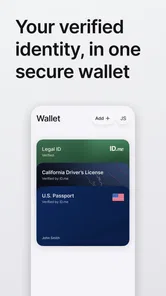
I found ID.me: Wallet & Rewards most useful when I treated it as a practical identity-and-savings tool rather than as a general-purpose wallet. Its job is straightforward: help prove who you are, keep supported identification details together, and surface rewards or savings connected with your eligibility. That combination makes sense for people who regularly need to verify themselves on a phone, especially when an offer or service depends on a qualifying status.
The app is free, belongs in the productivity category, and is developed by ID.me. It has a 4.1 average from around 124 ratings, with over 50,000 installs, so it has a modest but established presence rather than the reach of a mainstream banking app. I reviewed it as a mobile companion for identity checks and discounts, and my overall impression is that its value depends less on how often you open it than on whether it fits the services you already use.
How ID.me fits into real mobile routines
The most convincing use case is a situation where you are away from a computer and need to complete an identity-related step without searching through email, photographs, or physical documents. A phone is already the device people reach for when signing up, checking an account, or looking for an eligible saving. Having a dedicated place for the relevant ID.me material can make that process feel more deliberate and less scattered.
I would not describe it as a replacement for every document in your life. Its usefulness is tied to the identity information and savings experiences supported by the service. That distinction matters. A conventional password manager is better for login credentials, a banking app is better for payments and account balances, and a normal photo gallery is better for storing arbitrary images. ID.me: Wallet & Rewards occupies a narrower space: verification, stored identity-related information, and access to savings you have earned or qualify for.
That narrow focus is also its main strength. When an app tries to handle identity, shopping, payments, coupons, and document storage all at once, the result can become confusing. Here, the central purpose is easier to understand. I can imagine opening it before starting a process that asks me to prove eligibility, rather than browsing it casually every day.
The app is rated for Everyone, which makes its presentation approachable for a broad audience. Still, an age rating should not be confused with a promise that every identity workflow will feel simple. Verification tasks can involve careful reading, accurate personal information, and patience. The app may be accessible in general, but the responsibility attached to using an identity service remains significant.
Where the network becomes part of the experience
Connectivity is not a minor background detail here. Identity verification and reward discovery are the kinds of activities that naturally depend on current information. When I am connected, the app makes more sense as a live doorway into verification and savings. When the connection is weak, the experience can become less predictable because the app may need to communicate with online services before it can show current information or move a task forward.
More From Our News Desk

Weather by Xiaomi Review: Clear at a Glance, Less Clear Up Close

X Under Pressure: Can It Recover When Posting Goes Wrong?

Clash of Clans Is Won Between the Battles

Android Auto Makes the Case for Quieter Car Software

MobiOffice: Transforming Mobile Productivity with Seamless Integration

EA SPORTS FC™ Mobile Soccer: Redefining Mobile Sports Gaming
This changes how I would use it in practice. I would not wait until I am standing in a crowded store, rushing through checkout, or sitting somewhere with unreliable reception to begin an important verification step. A better workflow is to open the app earlier, review what is available, and complete the parts that require attention while I have a stable connection and enough time to respond to prompts.
That is one of the less obvious lessons of this app: the best time to use it is often before the moment when you need the result. If a saving matters to a planned purchase, checking beforehand gives you time to understand the process instead of discovering a connectivity problem at the last second. The app is more useful as preparation than as a panic button.
I also found that a connection-dependent identity tool encourages a different mindset from a paper card or a saved screenshot. A screenshot may open instantly, but it can be outdated and may not satisfy a live verification request. A current app session is more appropriate for an online identity workflow, yet it is also more vulnerable to signal quality, service availability, and interruptions. That is a real trade-off rather than a flaw unique to this product.
Using it while travelling or moving between places
Mobile context matters because this is not an app I would use only at a desk. You may open it in a car park, at a public counter, in an airport, or while switching between cellular data and Wi-Fi. Those environments are convenient but distracting. I recommend avoiding identity work while walking or multitasking. A small mistake in a verification flow can create more delay than simply waiting until you are somewhere stable.
For planned errands, I would check the app at home first. I would look at the relevant reward or verification task, make sure I understand what I am trying to accomplish, and then use the phone in public only for the final step. This reduces screen time in awkward places and avoids repeatedly loading the same information over an uncertain connection.
The mobile format is particularly helpful when a service needs your attention away from a computer. You already have the camera, network connection, and notifications in one device, which can make a phone-based identity workflow feel more natural than moving files between a laptop and a handset. At the same time, a phone is easier to lose, share, or leave unlocked, so I would treat the device itself as part of the security picture.
Another practical point is battery. An identity app may not seem demanding, but a low battery combined with a weak signal is a poor moment to start anything important. I would keep the phone charged before using it for a time-sensitive verification or reward claim. That advice sounds basic, but it is more relevant here than it would be for a simple offline notes app.
What to do when a verification or reward step stalls
When an online identity process fails, the instinct is often to tap the same button repeatedly. I would avoid that. First, I would check whether the phone has a stable connection, then confirm that the app is still open on the correct screen. Switching between networks or moving to a stronger signal can help, but repeatedly restarting without noticing the current state can make it harder to know what has already been submitted.
A calmer recovery sequence is more useful: pause, read the message carefully, return to the last clear screen, and try again only once the connection is steady. If the task involves personal information, I would also avoid completing it on an unfamiliar public network unless I had a good reason to trust that connection. The convenience of a café or public hotspot is not worth rushing through a sensitive process.
This is where ID.me differs from a simple coupon app. A coupon app can often be abandoned and reopened without much consequence. An identity workflow deserves more care because the information involved is more sensitive and because an incomplete attempt may leave you unsure whether you need to repeat a step. The app’s productivity value therefore comes with a need for deliberate use.
I would also keep an alternative plan for an important purchase or appointment. That does not mean carrying every document everywhere; it means knowing that a mobile verification flow may not be the only route accepted by the service you are visiting. If the saving is optional, I would not let a stalled connection ruin the whole errand. If the verification is essential, I would start earlier and leave enough time to recover.
Privacy-minded habits for a data-conscious user
An identity wallet should be approached differently from a shopping list. I would install it only on a phone I control, keep the operating system updated, and use a screen lock that I actually trust. I would also avoid leaving the app open when handing my phone to someone else. These are simple habits, but they matter more when an app is connected to identity information and eligibility-related rewards.
I would be selective about what I save or present through the app. The fact that a service asks for verification does not mean I should casually share more information than the task requires. Before confirming a step, I would read the wording and check that I am in the intended service. This is especially important when moving from a reward listing to an external checkout or account process.
A useful habit is separating discovery from commitment. I can browse a saving opportunity first, decide whether it is genuinely relevant, and only then begin a verification process. That prevents me from handing over attention and personal details for an offer I would not use anyway. In my view, this is one of the best ways to make the app feel less intrusive: use it with a clear purpose rather than opening every available reward out of curiosity.
I would also avoid relying on screenshots as a substitute for the app’s current state. A saved image may be convenient for remembering a screen, but it may not reflect a changed offer or a completed verification. Keeping a note of what I intended to use is fine; treating an old image as proof is much less dependable. The live, connected nature of the service is part of its usefulness, and also part of the reason to check information close to the time of use.
Who will get the most from the app
ID.me: Wallet & Rewards is a good match for someone who encounters ID.me-supported verification often enough to dislike repeating the same search for documents or eligibility information. It can also suit people who actively look for savings tied to their circumstances and prefer having those opportunities gathered in one mobile experience instead of hunting across unrelated websites.
I see particular value for a person who manages several errands from a phone and wants a consistent place to begin an identity-related task. The app may reduce the mental clutter of remembering where a relevant credential or reward path was found. Its benefit is not that it makes every process instant; it is that it gives those processes a recognizable home.
On the other hand, I would skip it if you rarely need identity verification or do not use the kinds of services connected to ID.me. Installing another app simply because it offers rewards is not automatically worthwhile. If your main need is storing passwords, use a password manager. If you want to pay in shops, use a payment wallet. If you only need occasional document backup, secure cloud storage may be a better fit. Choosing the narrower tool for the actual job will save space and reduce confusion.
I would also hesitate if you are uncomfortable managing identity information on a mobile device. The app can make access more convenient, but convenience does not remove the need to protect the phone, review prompts, and think carefully before confirming a request. Someone who prefers physical documents or a desktop-only process may find the mobile-first approach less comfortable.
How it compares with ordinary alternatives
The usual alternative is a mixture of browser bookmarks, email messages, paper documents, screenshots, and separate retailer accounts. That approach can work, but it spreads the process across too many places. ID.me offers a more focused starting point for identity and savings, which is useful when the same type of task appears repeatedly.
Compared with a browser, the dedicated app feels more purposeful on a phone. A browser is better when you need to research broadly, compare several unrelated offers, or use a service that has no connection with ID.me. The app is better when you already know that your task belongs within its identity-and-rewards ecosystem.
Compared with a conventional digital wallet, the distinction is even clearer. Payment wallets are built around cards, tickets, passes, and transactions. This app is about proving eligibility and finding associated savings. I would not choose one expecting the other to replace it. They can sit on the same phone because they solve different problems.
Compared with storing photographs of documents, the app has a more appropriate role for an active verification workflow. A photograph is quick to view but offers little structure and may be rejected when a service requires a current identity check. The app’s connected approach is more suitable for a live process, while a secure document-storage solution may still be preferable for records that are unrelated to ID.me.
Version, cost, and everyday practicality
The current version is 1.16.0, and the app runs on Android 8.0 or later. That gives it a reasonably broad device range for people using older Android phones, although the quality of the experience will still depend on the handset, camera, battery condition, and network connection. I would update it through the normal app channel before relying on it for an important task, particularly if the phone has been unused for a while.
There is no purchase price to budget for because the app is free. That makes trying it relatively low-risk, but free does not mean frictionless. The real cost can be time spent completing verification, maintaining secure access, and checking whether a particular saving is relevant to you. I would judge it by the time and uncertainty it removes from my own routine, not simply by the fact that it costs nothing.
The install base of over 50,000 suggests that it is not an obscure experiment, while the rating gives a generally positive but not flawless impression. I read that combination as a reason to try it with realistic expectations. It is a specialized productivity app, not a universal solution for every identity, shopping, or payment need.
My connectivity verdict
After using it as a mobile identity and savings companion, I think ID.me: Wallet & Rewards works best when you plan ahead and have a reliable connection. Its strongest moment is before an errand or online task, when you can calmly review what you need, complete the relevant verification, and avoid searching through several unrelated apps.
Its weakest moment is an urgent, last-minute attempt in a crowded or poorly connected place. The app’s purpose naturally involves current online information, so I would not treat it like an offline card that is guaranteed to display everything whenever the screen turns on. Instead, I would prepare early, protect the phone, and keep a sensible backup plan for anything important.
My recommendation is therefore specific: try it if ID.me verification and eligible savings are already part of your life, especially if you want one focused mobile starting point. Skip it if you are looking for payments, password storage, or a general document vault. The best reason to install it is not curiosity about rewards; it is a recurring need to prove eligibility with less scattered preparation. Used that way, this free productivity app feels practical, focused, and worth keeping available on a compatible Android phone.
ID.me: Wallet & Rewards Frequently Asked Questions
Is ID.me: Wallet & Rewards free to download?
Yes. ID.me: Wallet & Rewards is free to download and is intended for managing identity credentials and finding eligible savings. The app itself is listed as free, but individual offers can have their own terms or purchase requirements. Check the details of a promotion before relying on a discount, since access and conditions can vary by partner and by the type of offer.
Which devices can run ID.me: Wallet & Rewards?
ID.me: Wallet & Rewards requires Android 8.0 or later. Before downloading, check your device’s operating-system version and make sure you have enough available storage for the installation and app updates. The app is a productivity tool for keeping credentials and accessing rewards, so a compatible device is important for completing identity checks and using its features smoothly.
Who develops ID.me: Wallet & Rewards, and what is the app experience like?
The app is developed by ID.me and focuses on proving your identity, keeping IDs in a wallet, and finding savings you have earned. It has a 4.1 average rating from 124 ratings, giving prospective users a snapshot of other users’ overall impressions. Individual experiences may differ, particularly because identity checks and available offers depend on each user’s circumstances.
What is ID.me: Wallet & Rewards used for?
ID.me: Wallet & Rewards is designed to help users verify their identity, securely manage digital credentials, and access eligible discounts or benefits. Depending on the service, you may use it to prove eligibility for government programs, education offers, military discounts, employment-related benefits, or other partner promotions without repeatedly submitting the same documents.
Is ID.me: Wallet & Rewards safe for storing personal information?
The app is built around identity verification and uses security measures intended to protect sensitive information, including account authentication and encrypted handling of data. However, users should still enable available security features, use a strong and unique password, keep the app updated, and review permissions carefully. No online service can guarantee that risk is completely eliminated.
Pros
- Conveniently stores verified credentials for supported services.
- Rewards offers can add value when shopping through eligible partners.
- Biometric login can make account access quick on compatible devices.
- Useful for users managing multiple government or employment-related verifications.
- Digital wallet reduces the need to repeatedly submit identity documents.
Cons
- Support for services and credentials varies by country and provider.
- Identity verification may require sensitive personal information and documents.
- Rewards availability and terms can change without much notice.
- Some users may find verification steps lengthy or difficult to complete.
- Access can be inconvenient if you lose your phone or cannot use biometric login.












