

Ice Report
- 98.00
- 3.7
- Installs
- 50.00K
- Price
- Free

Screenshots

Analysis by Reviewed
Ice Report is a focused weather app from Split Rock Software LLC, built around one practical question: what are the ice conditions like before I head out? I found its appeal less in broad forecasts and more in the way it encourages people on frozen lakes to share useful local information with other ice anglers. That narrow purpose is also its biggest strength. It does not try to replace a full weather service, but it can add a community view that ordinary forecast apps usually do not provide.
The app is free to install and is suitable for Everyone, so it is easy to try without committing to a subscription. It has reached over 50 thousand installs and holds a 3.7 average from around 170 ratings, with roughly 98 written reviews. Those figures suggest a small but active audience rather than a mainstream weather platform. I would approach it as a specialist companion for winter outings, not as my only source of safety information.
How Ice Report works in everyday use
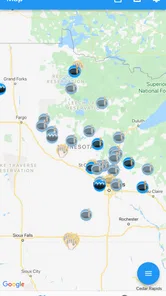
The central idea is simple: users can share lake ice information quickly, giving the ice fishing community a place to compare recent observations. That makes the app most useful when several people contribute from different parts of a region. A report from a nearby lake can help me decide whether a trip deserves more research, whether conditions may have changed since my last visit, or whether I should ask someone local for more detail.
That community approach changes how I read the information. A report is not the same thing as a guarantee for every part of a lake. Ice can vary around inlets, outlets, shorelines, pressure cracks, vegetation, bridges and areas affected by wind or current. I would use Ice Report to build an initial picture, then confirm conditions through current local knowledge and careful on-site judgment. The app is a planning aid, not a substitute for ice safety decisions.
A realistic use case is a weekend angler checking several possible destinations on Friday evening. Instead of relying only on a general weather app, I could look for recent community observations, compare the lakes that appear better documented, and contact a local source before packing the vehicle. On the morning of the trip, I could check again because a previous observation may no longer represent current conditions. This two-stage habit is more valuable than treating any single report as permanent.
Readability and navigation for quick checks
Ice Report benefits from having a narrow subject. There are fewer reasons to wander through unrelated forecast screens, radar layers or long climate charts. For someone who already knows the lake or area they want to investigate, a dedicated ice-reporting tool can feel more direct than opening a large weather platform and searching through several menus.
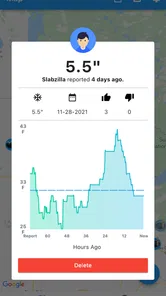
That simplicity also means the quality of the experience depends heavily on how clearly reports are presented. When I am checking conditions before leaving home, I want the location, timing and practical meaning of an observation to be immediately understandable. A report that is technically present but difficult to scan is less helpful when I am wearing gloves, moving between tasks or making a quick decision in a parking area.
More From Our News Desk

 Gmail
GmailGmail in a Busy Inbox: Who Benefits Most?
From first account to crowded workday, Gmail earns its place through dependable search and flexible sorting—but its best fit depends on how much inbox maintenance you can tolerate.

 Prime Video
Switching to Prime Video: What Changes in Your Viewing Routine
Prime Video can make a compelling second home for streaming, but switching means learning a different catalog, rental layer, and route from browsing to playback.

 Universal TV Remote Control
Universal TV Remote Control Works Best as a Reliable Backup
A phone remote earns its place through quick setup and reliable habits. Here is how to get more from Universal TV Remote Control—and where its limits show.

 Weather - By Xiaomi
Weather by Xiaomi Review: Clear at a Glance, Less Clear Up Close
Xiaomi’s weather app makes everyday forecasts quick to scan, but its calm surface can leave useful details and recovery paths harder to find than they should be.

 X
XX Under Pressure: Can It Recover When Posting Goes Wrong?
A resilience-focused review of X, examining setup, mistaken posts, interruptions, weak connections, and the gaps that matter when recovery needs to be dependable.

 Clash of Clans
Clash of Clans Is Won Between the Battles
Its raids are quick; its community is a long-term project of coordination, teaching, rivalry, and shared responsibility—with all the friction that entails.
Latest News



The app is a better fit for users who prefer a focused screen over a feature-heavy dashboard. People who need large weather maps, hourly forecasts, storm alerts and detailed meteorological explanations will probably find a conventional weather service easier for those jobs. Ice Report should be opened with a specific question in mind: is there recent local ice information worth considering for this outing?
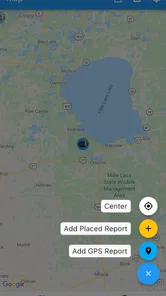
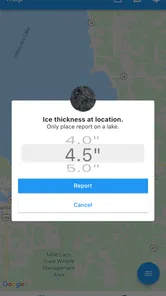
For a first-time user, I would spend a few minutes learning the reporting flow before depending on it outdoors. That preparation matters because the best time to discover where information appears is at home, not beside a lake in cold weather. I would also avoid assuming that a blank or quiet area means poor ice; it may simply mean that few people have recently contributed there.
Motor and sensory considerations in the field
Outdoor use creates challenges that are easy to miss when judging a weather app indoors. Cold hands, thick gloves, glare, snow, wind and a dim screen can all make tapping and reading harder. A focused app may reduce the number of steps compared with a broad weather platform, but that does not remove the physical difficulty of using a phone in winter conditions.
Users with limited fine-motor control may prefer to prepare their search before arriving and keep interaction to a minimum on the ice. If I were helping someone who finds small touch targets difficult, I would suggest using the app from a warm, stable place, taking screenshots or notes for planning, and avoiding repeated phone handling near unsafe terrain. I would not treat the application as something that must be operated continuously during the outing.
For people with low vision or sensitivity to glare, the practical question is whether the current device settings make the report text and controls comfortable to read. Increasing system text size, adjusting brightness and choosing a high-contrast display mode may help, although those changes can affect how much information fits on screen. I would test the setup before traveling rather than discovering that a bright snowy background makes the app tiring to use.
People with hearing loss are not placed at a disadvantage by relying on written ice reports in the same way they might be with an audio-only service. At the same time, written information still needs context. A short observation may be easy to read but hard to interpret if it does not explain where on the lake it applies or how recent it is. That is a community-reporting issue as much as a sensory one: clarity from the person submitting the report directly improves access for everyone.
Users with cognitive disabilities may appreciate the app’s single-purpose design, especially when a large weather app feels overwhelming. I would still recommend a consistent routine: check the location, check how recent the observation is, compare it with current weather, and confirm with a trusted local source. A repeatable sequence reduces the chance of confusing a community note with a complete safety assessment.
Situational access: signal, weather and attention
Ice Report is most useful when I have enough connectivity to retrieve current community information. Remote lakes can create a practical gap between having an app installed and being able to use it reliably. I would research and save the important details before leaving coverage, then treat the phone as one part of the preparation rather than assuming that the shoreline will provide dependable access.
This matters particularly for users who depend on digital text, magnification or other phone-based assistance. A device battery that is already weakened by cold can reduce the time available for checking information or calling for help. Keeping the phone protected and charged is sensible for every angler, but it is even more important for someone who relies on it as an accessibility tool.
Situational access also includes language, literacy and local terminology. Ice anglers may describe conditions in ways that make perfect sense to regular visitors but confuse newcomers. The app can support information sharing, yet the usefulness of a report depends on the contributor explaining enough for another person to understand the situation. I would look for specific, recent observations and be cautious with vague statements that lack location or context.
There is a social accessibility benefit in a community-focused tool: a person who cannot easily visit several lakes personally may still gather local observations in one place before choosing where to go. That can save travel, effort and exposure to difficult conditions. However, it should not create false confidence. Remote information is helpful precisely because it supports better planning, not because it removes the need for judgment.
What the app does well for ice-fishing decisions
The strongest feature is its specialization. Most weather apps tell me about air temperature, precipitation, wind and forecasts. Those details are important, but they do not necessarily tell me what another person recently observed on the ice. Ice Report addresses that missing local layer by giving users a way to share information with people who have a similar interest.
That makes it especially useful in three situations. First, it can help me compare possible destinations before committing to a long drive. Second, it can give returning anglers a place to contribute what they have just seen, making their trip useful to others. Third, it can help a newcomer understand which lakes have an active flow of local information and which ones require more direct research.
A less obvious benefit is that contributing a report can improve the quality of my own trip notes. Instead of keeping an observation only in a private message or memory, I can place it where other anglers may find it. That creates a habit of recording conditions while they are fresh. The trade-off is that every contributor has a responsibility to be precise and timely; careless wording can be more harmful in this context than an ordinary inaccurate weather comment.
Another useful workflow is to combine the app with a standard weather service rather than choosing one over the other. I would use Ice Report for local observations, a conventional forecast app for changing weather, and direct local advice for final confirmation. This division of labor is more realistic than asking a specialist community app to provide every type of information needed for a winter outing.
Remaining barriers and reasons to choose another app
The community model can be uneven. An area with frequent contributors may offer more useful context than a place with few recent reports. That means the app’s value may change from one lake to another and from one week to the next. A user who expects a complete, consistently updated database may be disappointed, especially when planning an unfamiliar destination.
There is also a natural risk in reading a report too literally. Ice conditions are not uniform, and a statement about one access point should not automatically be applied to the opposite shore. The interface can encourage discovery, but it cannot turn a limited observation into a lake-wide measurement. I would pay attention to recency and location, and I would avoid making a trip based on one isolated entry.
The free download lowers the barrier to trying it, but optional in-app purchases range from $9.99 to $12.99 per item. That does not make the initial installation expensive, yet it is worth checking what an optional purchase adds before paying. Someone who only wants to browse occasional local observations may prefer to stay with the free experience, while a frequent contributor may decide that an added function is worthwhile.
The app is currently at version 2.7.1 and supports devices running Android 7.0 or later. That gives owners of older compatible Android phones a chance to use it, although an older device may still present practical problems outdoors, such as a dim display, slow performance or a battery that struggles in freezing temperatures. I would judge the phone and the conditions together, not just the operating-system requirement.
Ice Report is not the right choice for someone seeking a general-purpose weather replacement. If my main needs were radar, severe-weather notifications, detailed hourly forecasting or broad international coverage, I would choose a well-established weather platform first. It is also a poor fit for anyone who wants certainty without checking the source, timing and location of an observation. The app is most valuable to people willing to interpret community information carefully.
Who benefits most from the focused design
Regular ice anglers are the clearest audience. They already understand that conditions can change and are more likely to recognize the value of a recent local observation. They can use the app both as readers and contributors, which gives the community model a practical purpose rather than making it a one-way information feed.
Newer anglers may also benefit, but I would pair the app with guidance from experienced local people. The focused interface can help them discover what others are discussing, while direct advice can explain details that a short report may leave out. The app should support learning, not replace it.
Families and occasional winter visitors can use it during planning, provided an adult handles the final safety judgment. The Everyone age rating makes the app broadly approachable, but an age label is not a safety recommendation for independent activity on ice. Children and inexperienced users still need supervision and clear rules away from the screen.
People with mobility limitations may find value in checking conditions before traveling, because better information can help them avoid unnecessary journeys or identify a more suitable destination. Yet the app cannot assess whether a particular access route, shoreline or fishing setup is physically usable for an individual. That decision still requires location-specific planning and, when possible, firsthand confirmation.
My inclusive verdict
After looking at Ice Report through the lens of different abilities and real winter conditions, I see a useful specialist tool with a clear audience. Its focused purpose can reduce the clutter found in broad weather apps, and community reports can add local context that forecasts do not normally provide. The best experience comes from treating it as an early planning step and as a way to share observations responsibly.
Its limitations are equally important. Information may vary by location and freshness, connectivity may be unreliable near remote lakes, and cold-weather phone use can be physically awkward. Users who need large-scale forecasting, strong alert systems or consistently deep coverage should keep a conventional weather app in their routine. Those who have visual, motor or cognitive needs should test their device setup at home and use a simple checking sequence before relying on the app outdoors.
My recommendation is conditional but positive: if you ice fish, follow local lake conditions, or want to contribute useful observations to other anglers, Ice Report is worth trying because its narrow focus serves a real purpose. I would not use it alone, and I would not interpret a report as proof that every section of a lake is safe. Used alongside current weather information, local knowledge and personal caution, it can make winter-trip planning more informed without pretending to solve every part of the decision.
Split Rock Software LLC has kept the concept straightforward: share and find ice information quickly. That simplicity is what makes the app approachable for many users, including people who may find a full weather dashboard tiring or confusing. It also sets the boundary of the product. Ice Report works best as a community layer for ice fishing, not as a complete weather or accessibility solution. For the right audience, that honest, limited role is enough to make it useful.
Ice Report Frequently Asked Questions
Who develops Ice Report, and is it available for my device?
Ice Report is a weather app developed by Split Rock Software LLC. It is available for Android devices running version 7.0 or later, making it worth checking your device’s operating system before downloading. The app is free to install, and its content rating is Everyone. These details can help you decide whether it is suitable for your phone and the people who may use it.
What is Ice Report, and what can I use it for?
Ice Report is designed to provide information related to ice conditions, helping users check relevant reports before traveling, working, or participating in outdoor activities in areas affected by ice. Its usefulness depends on the coverage available for your location and the freshness of the published data. Before relying on it, review the report details, date, and location carefully.
Does Ice Report provide real-time or regularly updated information?
The application may display reports that are updated periodically rather than continuously in real time. Update frequency can vary depending on the region, data source, and availability of new observations. When using Ice Report for safety-related decisions, do not assume that an older report reflects current conditions. Always check the timestamp and confirm important information through official local sources.
Can I use Ice Report without an internet connection?
Ice Report may require an internet connection to download current reports, maps, or location-based information. Some previously loaded content might remain available temporarily, but offline access should not be assumed unless the app clearly provides a download or offline mode. If you expect to travel to an area with limited connectivity, check the needed information in advance and keep alternative resources available.
Is Ice Report accurate enough for travel or outdoor safety decisions?
Ice Report can be a convenient reference, but it should not be treated as the only source for decisions involving personal safety. Conditions can change quickly because of weather, traffic, water movement, or local activity, and reports may be delayed or incomplete. Compare the app’s information with official warnings, local authorities, and direct observations before proceeding.
Pros
- Clear ice condition updates help users plan trips with confidence.
- Useful for checking multiple locations before heading outdoors.
- Simple interface makes essential information quick to find.
- Can support safer decisions for boating
- fishing
- and winter activities.
- Convenient access to reports without relying on printed local notices.
Cons
- Coverage may be limited to selected regions or reporting stations.
- Conditions can change faster than the latest available report.
- Some reports may depend on local authorities or user submissions.
- Location permissions may be needed for nearby report suggestions.
- Less useful in areas with infrequent or outdated ice observations.











