Harbor Freight Tools
- 14.09K
- 4.7
- Installs
- 1.00M
- Price
- Free

Screenshots
Analysis by Reviewed
I find the Harbor Freight Tools app most useful when I know roughly what I need but want to check the options before making a trip. It’s a free shopping app from Harbor Freight Tools USA, Inc., focused on tools and related gear. The catalog and coupons make it handy for planning a project, though I wouldn’t treat it as a substitute for checking whether a particular item is available at the store I intend to visit.
Where browsing can get stuck
Searching by a broad term can bring up several kinds of products, so I get better results when I use a specific tool name or add a detail such as the task I’m tackling. If I’m comparing storage options, for example, I first narrow down what needs to fit rather than choosing from pictures alone. Product descriptions and customer feedback can help, but I still read carefully: a review reflects one person’s use, not a guarantee that an item suits every project.
The app is free, rated for Everyone, and has a 4.7 average from around 48,000 ratings. Its 1 million-plus installs suggest it’s a familiar destination for shoppers who already buy from Harbor Freight. The current version is 11.16.0, and it runs on Android 8.0 or later. Those details make it easy to judge whether it fits your phone and shopping habits; they don’t tell you whether a specific product will be right for your job.
Discover a Universe of Tools
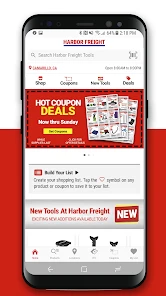
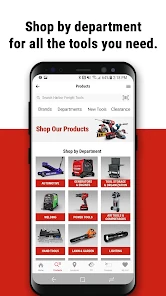
From the moment you open the Harbor Freight Tools app, you're greeted with a user-friendly interface that's as straightforward as it gets. The home screen showcases a variety of tools, accessories, and even exclusive deals that you won't find anywhere else. Browsing through the categories, you'll find everything from power tools to hand tools, and even some unexpected gems like welding equipment. It's like having a mini hardware store right in your pocket.
Easy Navigation and Search Features
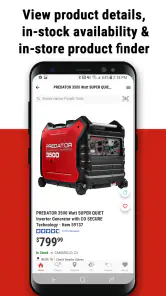
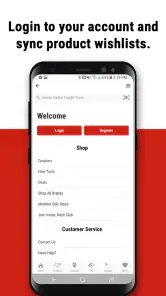
One of the first things I noticed was how intuitive the navigation is. With a well-organized menu and a powerful search feature, finding what you need is a breeze. Just type in the tool you're looking for, and the app will present you with a list of options, complete with images and detailed descriptions. It's almost as if you can hear the sound of those tools revving up in anticipation.
Setup checks before a store run
When I’m using the app to plan a same-day repair, I separate product research from the final store decision. I’ll search for the item, compare the descriptions, and note the exact product name before checking the store’s current information through the app. That small pause can prevent an avoidable trip if the item I had in mind isn’t the one I actually need. For a project with several parts, I also make a short list first instead of relying on memory while browsing.
If the app seems slow or a page doesn’t load, I start with ordinary checks rather than assuming the catalog is broken: confirm the phone has a working connection, close and reopen the app, and try the search again. Keeping the app up to date can also be a sensible first step when something behaves unexpectedly. I avoid making a purchase decision from a half-loaded page; a clear product description matters more than rushing through checkout or planning.
More From Our News Desk

Clash of Clans Is Won Between the Battles

Android Auto Makes the Case for Quieter Car Software

MobiOffice: Transforming Mobile Productivity with Seamless Integration

EA SPORTS FC™ Mobile Soccer: Redefining Mobile Sports Gaming

How Microsoft OneDrive Became a Mobile Productivity Giant

How Google Translate Breaks Language Barriers Effortlessly
Coupons work best with a plan
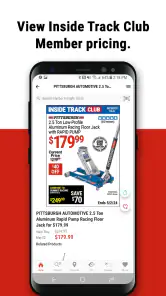
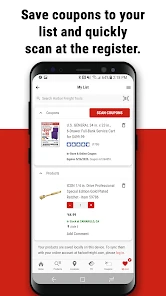
Who doesn't love a good deal? The app is packed with exclusive coupons and promotional deals that can save you a ton of money. I found myself browsing the deals section more often than I care to admit, but hey, who can resist a bargain? Plus, the app notifies you of flash sales and new product launches, so you're always in the loop.
My practical tip is to begin with the job, not the coupon. I decide what tool or supply would solve the problem, then see whether a deal applies to something on that list. That keeps a discount from nudging me toward an unnecessary purchase. If a coupon or offer doesn’t appear to match the item I’m considering, I recheck the wording and product details before relying on it. The app is useful for spotting offers, but the shopper still needs to confirm the terms that apply to a particular purchase.
Reviews, comparisons, and trade-offs
Another feature I appreciate is the customer reviews and ratings. Before making a purchase, you can read what other users have to say about a product. It's like having a community of fellow DIYers right at your fingertips, offering advice and sharing experiences. This feature adds a layer of trust and reliability that’s often missing from online shopping experiences.
I use reviews to look for repeated, practical comments rather than treating a high score as a verdict. Details about fit, ease of use, or how an item handled a particular task can help me decide what to investigate further. For an important or specialized job, I’d compare those comments with other sources or ask someone experienced; reviews alone can’t replace knowing the requirements of the work.
Compared with general shopping apps, this one is more useful when I’m already considering Harbor Freight and want to browse its selection and offers in one place. A broad retailer marketplace may be a better choice if I want to compare many brands or shops at once. Likewise, if I need immediate certainty about stock or a technical answer, contacting the store or checking in person may be more dependable than relying only on an app screen.
Planning a project without overbuying
The catalog is most helpful when I treat it as a way to turn a vague task into a defined shopping list. Before browsing, I write down what the job actually requires: the material, the kind of tool, and any size or compatibility details that matter. Then I search those terms and compare descriptions. This order is useful for a small home repair, but it matters even more for a project involving several tools, because it reduces the chance that an appealing offer or product photo will distract me from what the job calls for.
For instance, if I’m preparing to work on a storage rack, I would first check what needs fastening and what tools I already own. I can then use the app to explore possible tool options and see whether a coupon is relevant. I wouldn’t assume that buying the first item with a promising name settles the question; the product details still need to match the material and task. That distinction is one of the app’s practical limits: it can support research, but the user has to bring the project knowledge.
Workflow recovery when a page misbehaves
If a search becomes frustrating, I don’t keep repeating the same broad query. I try a more precise product name, remove extra words, or return to browsing by category. Those small changes help separate a poor search phrase from a page that genuinely isn’t loading. If the problem seems temporary, I close and reopen the app and retry when the connection is stable. I also make a note of the item I was looking for so I don’t have to reconstruct the whole project list if I need to start again.
That approach is especially useful when I’m shopping with a time limit. I can save the exact product name or write it down, then check the relevant store information separately rather than assuming that a search result guarantees local availability. If the app continues to behave oddly, I switch to another way of checking rather than making a rushed choice. A catalog is a convenience, not a reason to compromise on confirming the item.
When the app isn’t the problem
There are limits to what a shopping app can solve. A search result can help identify an option, but it can’t tell me whether I’ve diagnosed a repair correctly, whether a tool is suitable for a demanding job, or whether I have the skill and safety equipment to use it. If I’m unsure about compatibility, I verify the specifications and seek knowledgeable advice before buying. For urgent work, I also keep a backup plan rather than assuming browsing will settle every question.
The app is a good fit for Harbor Freight regulars, DIYers who like to compare tools before shopping, and people who want to check available coupons while organizing a project. It’s less compelling if you rarely shop there, need a cross-store comparison, or expect the app itself to provide expert repair guidance. In an everyday scenario, I might notice a loose hinge at home, search for the relevant tool, compare a couple of choices, and check for an applicable offer before deciding whether to make a store trip. That’s a useful planning workflow, not a promise that every step of the repair happens on the phone.
Who benefits most, and who may prefer another route
I’d recommend it most readily to someone who already visits Harbor Freight and wants to prepare before walking into a store. Browsing the catalog on a phone is convenient when a project is still at the “what do I need?” stage, and the coupon section can be a useful final check once the shopping list is settled. It also suits occasional DIYers who want to compare a few Harbor Freight options without making a special trip just to look at them.
It is a less natural fit for shoppers who want to compare every retailer, brand, or local seller in one search. A general marketplace is better for that broader comparison, while a specialist shop or experienced tradesperson may be a better source when the choice depends on technical requirements. I would also skip using the app as the main decision-maker for a safety-critical or demanding job. It can help find products, but a product listing and customer comments are not a substitute for expertise.
Making the shopping trip more deliberate
One small habit makes the app more useful: separate “research” from “buy.” I browse first, note the exact item and any alternatives, and then make a fresh check of the details before leaving. That helps when I’m shopping for a set of supplies rather than a single tool, because I can catch a mismatch while still at home instead of discovering it after arriving. For larger projects, I keep the list grouped by task rather than by the order items appear in search results. It makes the final run easier to review and less vulnerable to impulse browsing.
I also avoid treating a coupon as proof that an item is the best choice. A discount is only useful if it applies to something I already intended to consider and the product fits the job. If the terms are unclear, I check them before building a plan around the offer. This is a modest but important trade-off: the app can make deals easier to notice, yet the extra convenience can encourage unnecessary browsing if I open it without a purpose.
A practical verdict
In conclusion, the Harbor Freight Tools app is not just an app; it's a game-changer for anyone who loves tools. With its extensive catalog, user-friendly interface, and unbeatable deals, it's a must-have for anyone serious about their DIY projects. So next time you're in the middle of a project and realize you're missing a tool, don't fret. Just reach for your phone and let the app do the heavy lifting for you. Happy building!
I’d put it on my phone if I regularly shop at Harbor Freight or want a convenient way to research tools and offers before heading out. I’d skip it if my main goal were comparing the whole market or getting a definitive answer about a technical problem. Used as a catalog and planning aid—with a little care around coupons, reviews, and store checks—it can make a tool-shopping errand more organized without pretending to make the decision for you.
Harbor Freight Tools Frequently Asked Questions
What can I browse in the Harbor Freight Tools app before deciding what to buy?
The app centers on Harbor Freight’s shopping experience, with access to its product catalog and offers. Its store summary highlights coupons, generators, air compressors, tool storage, and more, making it useful for browsing several kinds of tools and equipment in one place. You can explore products and deals before deciding whether to make a purchase.
Can I use the Harbor Freight Tools app to shop online as well as browse offers?
Yes. The Harbor Freight Tools app is designed to let users browse and purchase tools directly through the app, alongside viewing Harbor Freight’s product catalog, deals, and coupons. It can be a convenient way to explore available items on your phone and continue to checkout if you find something you want. Purchases themselves require payment.
Is the Harbor Freight Tools app available for my device?
The Harbor Freight Tools app is available for Android devices running version 8.0 or later. It is a shopping app from Harbor Freight Tools USA, Inc., and it is rated for Everyone. If your device meets the minimum operating system requirement, you can download the free app and browse Harbor Freight’s tools and offers from your phone.
What is the Harbor Freight Tools app used for?
The Harbor Freight Tools app is designed to provide users with easy access to Harbor Freight's product catalog, exclusive deals, and coupons. It allows users to browse and purchase tools directly through the app, find the nearest store locations, and stay updated with the latest sales and promotions, making it a convenient tool for DIY enthusiasts and professionals alike.
Is the Harbor Freight Tools app free to download and use?
Yes, the Harbor Freight Tools app is free to download and use. While the app itself does not charge for its features, purchases made through the app, such as buying tools or equipment, will require payment. Users can enjoy browsing the extensive product catalog and accessing exclusive deals without any subscription fees.
Pros
- Extensive tool selection available.
- Affordable prices for budget shoppers.
- User-friendly interface for easy browsing.
- Frequent sales and special discounts.
- Loyalty program offers additional savings.
Cons
- Limited online customer support options.
- Shipping can be slow at times.
- Some tools may lack durability.
- In-store inventory can be inconsistent.
- App notifications can be excessive.

- Category
- Shopping
- Version
- 11.16.0











