Happiest Baby, makers of SNOO
- 643.00
- 3.4
- Installs
- 100.00K
- Price
- Free

Screenshots
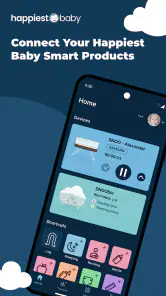
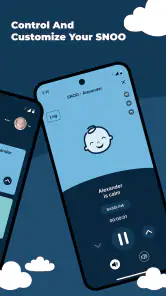
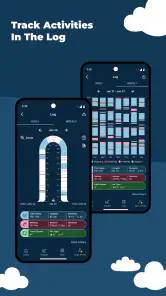
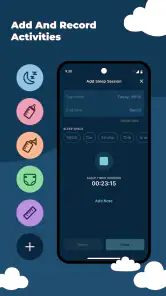
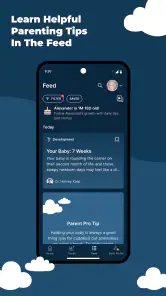
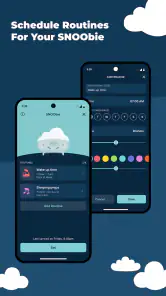
Analysis by Reviewed
When a newborn’s sleep space comes with its own mobile companion, the first question is usually simple: will this make daily life easier, or will it become another app to manage? I spent time with the Happiest Baby App, the parenting app from Happiest Baby, Inc., and found that its value depends heavily on whether you use SNOO or SNOObie. It is not a general baby tracker that tries to cover feeding, diapers, milestones, and every other part of family life. Its purpose is much narrower and more practical: it serves as the phone-based companion for those products.
That focus is both its strongest quality and its clearest limitation. If you are bringing home a SNOO, the app gives you a dedicated place to interact with that part of your routine instead of relying on scattered notes or repeatedly checking the hardware. If you are looking for a broad parenting organizer, this will feel incomplete by design. I would approach it as a control and support layer for a specific sleep setup, not as an all-purpose digital baby journal.
What to expect before you begin
The app replaces the earlier SNOO App, so existing SNOO users should think of it as the current mobile home for that experience rather than an unrelated parenting download. The store identifies it as a free app, with optional in-app purchases ranging from $19.99 to $149.99 per item. That distinction matters: installing it does not mean every part of the wider Happiest Baby experience is automatically included at no cost.
On the store, it has an Everyone age rating and a 3.4 average from around 1.8 thousand ratings, with more than 100 thousand installs. I would not read those figures as a complete verdict on the product. A companion app is judged in a very particular context: someone using the associated hardware may find it essential, while someone without that hardware has little reason to keep it installed. The rating can therefore reflect the whole ownership experience, not just how pleasant the mobile interface feels.
The app is listed as version 3.0.3 and requires an operating system version 10 or newer. For a first-time user, the practical lesson is to check your phone before you are tired and holding a newborn. A compatibility problem discovered during a late-night settling attempt is much more frustrating than one found during a calm afternoon setup.
I also recommend deciding what job you want the app to perform before opening it. If your goal is to connect and manage a SNOO, keep the phone near the product and allow yourself a few uninterrupted minutes. If your goal is to learn general newborn sleep advice, the app may not be the right first stop. Its usefulness comes from being tied to the SNOO and SNOObie ecosystem, not from replacing a pediatrician, a sleep professional, or a complete family organizer.
The first setup is easier when you treat it as a household task
My biggest practical recommendation is to set up the app before the first difficult night. Do it while the baby is settled, the phone has enough battery, and the person who will use the product most often is present. This is not glamorous advice, but it avoids a common mistake: one parent completes the setup, while the other is left guessing how the app fits into the bedtime routine.
Because this is a companion app, the useful starting point is not browsing every screen. Begin with the connection between the app and the SNOO or SNOObie product. Keep the physical device identifiable, have the relevant account information ready, and follow the on-screen sequence rather than jumping ahead. If more than one caregiver will use it, agree on who will handle the initial setup and who will test the everyday controls afterward.
I found that this division of labor makes a difference. One person can hold the baby or prepare the sleep space while the other confirms that the app is communicating properly. Then switch roles and let the second caregiver try the same basic action. That small test exposes confusion early, especially when both adults assume the other person already understands what the app is showing.
Do not judge the app solely by the installation screen. The real test is whether you can move from the phone to the physical product without hesitation. A companion app succeeds when its instructions, status information, and controls make sense at the moment you need them. If you have to search through menus every time, the setup has not really finished, even if the account is technically connected.
Finding the first meaningful success
The first meaningful success is not completing registration. It is using the app to make one ordinary bedtime task feel more predictable. After setup, choose a calm moment to inspect the main controls and status information. Learn where you would look when the baby is unsettled, where you would check the connected product, and which action you would use first rather than experimenting during a cry.
For a realistic example, imagine that your baby has just been fed and changed, but does not settle immediately. Instead of turning on bright lights and repeatedly approaching the sleep space, you can use the app as your first point of reference for the connected SNOO setup. The benefit is not that a phone solves every sleep problem. The benefit is that it gives you a consistent workflow: check the app, understand the current state, make the appropriate adjustment, and then give the baby a quiet moment.
That pause is an important habit. New parents often tap repeatedly because they are anxious and want instant reassurance. In my experience, a companion app is more useful when it reduces frantic decision-making rather than encouraging constant intervention. Use it to confirm what is happening and to perform a deliberate action, not as a screen to stare at continuously beside the bassinet.
A second useful test is to try the app when the baby is not crying. Explore the controls in daylight, identify the information you personally find helpful, and decide where the phone will live at night. A charging spot within reach but outside the sleep space is more practical than leaving the phone in another room. This kind of preparation is easy to overlook, yet it determines whether the app feels like a support tool or an obstacle.
The first win is a repeatable routine, not a perfect night. If you can open the app, understand the connected setup, and take the next sensible action without waking everyone in the room, it is already doing its intended job.
How I would use it during an ordinary day
During the day, I would use the app for brief checks rather than keeping it open constantly. A quick look before a nap can confirm that the connected product is ready. After placing the baby down, the app can become the place to make a considered adjustment if one is needed. The point is to reduce unnecessary trips and uncertainty, especially when the household is already juggling feeding, laundry, visitors, and short stretches of rest.
At night, the best workflow is even simpler. Keep the phone accessible, dim the screen, and avoid turning every small sound into a reason to intervene. If the baby resettles, let the process finish. If the baby remains unsettled, use the app to guide the next step you already learned during setup. This approach keeps the technology in the background, where a sleep companion belongs.
One non-obvious advantage of a dedicated companion is shared language between caregivers. Instead of saying, “I think something is wrong with the bassinet,” one parent can describe what the app is showing and what action was taken. That makes handoffs clearer after a long night. It also helps a caregiver who was not present for the original setup become comfortable more quickly.
There is a trade-off, though. The more your routine depends on the app, the more important your phone becomes. A nearly empty battery, an outdated operating system, or a caregiver who has never practiced the controls can turn a convenient system into a source of stress. I would always keep the physical product usable as a physical product and avoid assuming that the phone is the only way to handle every situation.
Common confusion and the limits of the experience
The first confusion is often about scope. The app belongs to the Parenting category, but that does not mean it behaves like a complete parenting dashboard. It is centered on SNOO and SNOObie. If you want one place for feeding records, diaper changes, medicine reminders, growth notes, and shared family logs, you will probably need another solution or a separate routine alongside this one.
The second confusion concerns the word “free.” The app itself is free to install, but optional purchases are part of the experience. Before spending money, I would identify exactly which part of the wider service you are considering and whether it addresses your immediate need. Parents are especially vulnerable to buying extra tools when they are exhausted, so a short pause before purchasing is sensible.
The third issue is that a connected sleep product cannot remove the unpredictability of a newborn. If you expect the app to guarantee longer sleep or eliminate every difficult settling period, you are likely to be disappointed. Its role is to make interaction with the associated product more organized and accessible. It cannot account for hunger, illness, discomfort, developmental changes, or the many reasons a baby may wake.
Another point worth understanding is that the app is not a substitute for medical advice. If a baby seems unwell or you have concerns about safe sleep, contact an appropriate healthcare professional. The app can support a routine around the product, but it should not be used to diagnose a problem or to justify ignoring a concern.
I also think the 3.4 average deserves a measured interpretation. It suggests that the experience is not universally smooth, and companion apps can be affected by connection problems, account friction, device compatibility, or expectations created by the hardware itself. For me, that means keeping the workflow simple and testing it before relying on it. A few minutes of practice can reveal whether the interface feels natural on your particular phone.
Small habits that make the app more useful
My first tip is to teach the second caregiver before the first emergency. Have them open the app, identify the connected product, and perform the basic action themselves. Watching someone else do it is not enough when the room is dark and the baby is crying. Shared practice turns the app from one parent’s specialist tool into a household tool.
My second tip is to separate observation from intervention. Open the app to understand the current situation, but do not immediately change settings simply because the baby makes a noise. Give the existing routine a chance to work. This reduces overcorrection and helps you learn which moments actually require your attention.
My third tip is to use the app as part of a handoff ritual. When one parent goes to sleep, briefly explain the current state of the SNOO setup and any action already taken. That is more reliable than assuming the next caregiver will infer everything from the phone. The app provides information, but a clear human handoff prevents misunderstandings.
My fourth tip is to review your dependence on the app after a week. Ask whether it is saving steps or adding them. If you are opening it repeatedly without taking useful action, simplify the routine. If it helps you check the product quietly and consistently, keep that narrow role. This is a better measure of value than how many screens or settings the app contains.
These habits also reveal when the app is not right for you. If you do not use SNOO or SNOObie, the central reason to install it disappears. If you prefer paper notes or a broad baby-tracking app, this focused companion may feel like an extra layer. And if your household has unreliable phone access, a system that depends on mobile interaction may create more friction than it removes.
How it compares with ordinary alternatives
The usual alternatives fall into two groups: general baby-tracking apps and no app at all. A general tracker is better when your priority is recording feeding, diaper changes, sleep periods, or information shared across several caregivers. It gives you a wider picture of the baby’s day, but it may not provide the same focused connection to a SNOO or SNOObie product.
Using no app is also a legitimate choice. Some families prefer to operate the physical product, keep the phone away during bedtime, and rely on a simple verbal routine. That approach has fewer technical dependencies and can feel calmer. Its weakness is that caregivers may have less shared visibility into the connected setup, particularly when one person handles most of the overnight care.
The Happiest Baby App sits between those options. It is more specific than a general tracker and more connected than a purely manual routine. I would choose it when the SNOO or SNOObie is already central to your home and you want the phone to support that product. I would choose a general tracker when the family needs a complete record of daily care. I would choose the manual approach when reducing screens and account management matters more than mobile convenience.
That comparison also explains why different parents can reach opposite conclusions. Someone may call the app indispensable because it fits an existing SNOO routine perfectly. Another person may call it unnecessary because they want one broad app or no digital layer at all. Neither reaction is surprising; the product is highly dependent on the surrounding setup.
Who should install it first
I would recommend starting with it if you are a first-time SNOO owner, if two caregivers need a shared way to interact with the product, or if you want to practice the routine before the baby arrives. The app’s focused design can be reassuring when you are learning a new sleep environment and do not want to search through unrelated parenting features.
It is also a reasonable choice for families already using SNOObie who want the current companion rather than an older app. The fact that it replaces the SNOO App makes the transition especially relevant for existing users. I would still approach the move patiently: install it, learn the current workflow, and make sure every regular caregiver is comfortable before treating it as the household default.
I would skip it if you do not own the associated products, if you are specifically shopping for a full baby log, or if optional purchases would be an unwelcome surprise. I would also avoid making it your only source of reassurance about a baby’s health or sleep. A connected app can organize a routine, but it cannot replace judgment, supervision, or professional guidance when something seems wrong.
My next step for a new user
After installing, I would not try to master every possibility in one sitting. First, confirm that your phone meets the operating-system requirement and that the relevant SNOO or SNOObie product is nearby. Next, complete the connection calmly, then ask another caregiver to repeat the basic workflow. Finally, use the app during one daytime nap so you can learn without the pressure of a midnight wake-up.
Once that feels comfortable, keep the routine narrow: check the connected setup, take only the action you understand, and give the baby time before changing course. If the app helps you do those things with less uncertainty, it has earned a place in your day. If it creates more tapping, confusion, or dependence than convenience, a simpler routine may suit your family better.
Overall, I see this as a specialized parenting companion rather than a universal must-have. Happiest Baby, Inc. has made a tool aimed at people using SNOO and SNOObie, and that focus is useful when it matches your home. The free installation lowers the barrier to trying it, while the optional purchases mean you should examine the value of anything extra before committing. For a first-time SNOO household, the best reason to use it is practical consistency: one familiar path from checking the product to handling the next bedtime moment.
My recommendation is therefore conditional but positive. If the hardware is already part of your family’s plan, install the app before you need it, practice with both caregivers, and judge it by whether it makes real nights calmer. If you are searching for a broad baby-care organizer or a solution to every sleep concern, choose a different tool and keep your expectations grounded. Used in its proper role, this companion can remove a little friction at exactly the moments when new parents have the least energy to spare.
Pros
- Personalized sleep guidance helps parents establish consistent routines.
- Tracks sleep patterns to make changes in soothing strategies easier.
- Clear educational content is useful for first-time parents.
- Works alongside SNOO products for a more connected experience.
- Helpful reminders can support feeding
- nap
- and bedtime schedules.
Cons
- Many features may require a paid subscription or SNOO ownership.
- Sleep tracking depends on accurate manual entries and device data.
- Advice may feel repetitive once your baby’s routine is established.
- Limited usefulness for families using other bassinets or sleep products.
- The amount of guidance can feel overwhelming during exhausting nights.

- Category
- Parenting
- Version
- 3.0.3











