GTL | GettingOut
- 10.63K
- 3.3
- Installs
- 1.00M
- Price
- Free

Screenshots
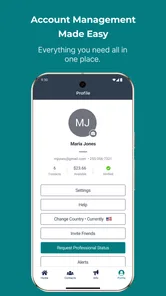
Analysis by Reviewed
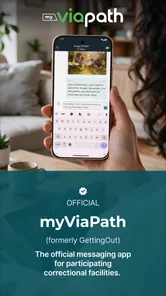
GTL | GettingOut is a communication app built for a very specific situation: helping inmates stay in touch with friends and family. I approached it less like a general chat service and more like a practical bridge between people whose communication may otherwise be difficult to manage. That distinction matters, because its usefulness depends heavily on whether your contact and facility are supported by the service.
In my experience, the app makes the most sense when you need a dedicated place to manage communication rather than relying on ordinary messaging tools. It is free to install, aimed at Everyone, and developed by Viapath. Its store summary describes simple and reliable communication between inmates, friends, and family, and that focus comes through in the way the app is positioned: it is not trying to replace every social app on your phone.
The Android version has been available since July 30, 2013, and the current version is 3.4.3. It requires Android 7.0 or later. Those details make it accessible to people using older Android phones, although an older operating system can still affect the wider experience if the device itself is slow or no longer receives regular updates.
How the everyday workflow feels
The first useful habit is to treat GTL | GettingOut as a communication workspace, not as a casual messenger that you open only when a notification appears. The practical workflow starts with setting up your account carefully, identifying the person you want to contact, and then checking the available communication options before assuming that every feature will work in every situation.
That last point is important. Services connected to correctional facilities often depend on arrangements involving the particular facility, the person inside, and the approved contact. I would not install this expecting the same instant, unrestricted behavior as a mainstream chat app. Instead, I would first confirm that the intended recipient can use the service and that your account is ready for the kind of communication you need.
For a family member, a realistic routine might look like this: open the app at a planned time, check for current messages or account prompts, respond in one focused session, and then close it rather than repeatedly checking throughout the day. That approach reduces confusion and makes it easier to notice whether a message is pending, whether an action needs attention, or whether you are simply waiting for the other person’s availability.
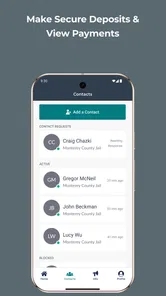
I also recommend keeping contact details consistent. Use the same name and identifying information you normally use with the recipient, and avoid creating multiple entries for the same person unless the app clearly requires it. Duplicate contacts are an easy way to lose track of conversations or select the wrong person when you are moving quickly.
More From Our News Desk

Weather by Xiaomi Review: Clear at a Glance, Less Clear Up Close

X Under Pressure: Can It Recover When Posting Goes Wrong?

Clash of Clans Is Won Between the Battles

Android Auto Makes the Case for Quieter Car Software

MobiOffice: Transforming Mobile Productivity with Seamless Integration

EA SPORTS FC™ Mobile Soccer: Redefining Mobile Sports Gaming
The app’s value is strongest for communication that benefits from structure. If you need a reliable channel for maintaining an ongoing relationship, a dedicated service can feel more manageable than trying to coordinate through phone calls, email, social networks, and separate facility procedures. On the other hand, someone who only wants spontaneous group chats, media sharing with many friends, or the broad social features of a conventional messenger will probably find the experience narrow.
What I would do before sending the first message
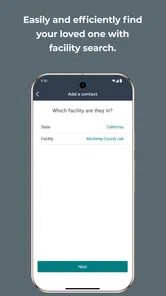
I would begin by checking the account profile and making sure the contact information is accurate. Then I would look through the recipient-selection screens slowly instead of tapping through them quickly. This is one of those apps where a few minutes of setup can prevent repeated frustration later, especially if more than one family member is involved or if names are similar.
Next, I would read every on-screen instruction connected to the selected communication method. The wording may tell you whether an action is immediate, requires approval, or depends on the recipient’s circumstances. I would also keep expectations realistic: the app provides a channel, but it cannot make another person available at the moment you want to communicate.
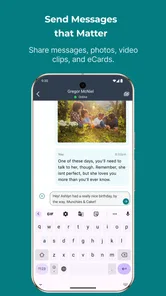
Finally, I would send a short, clear first message rather than a long emotional update. A concise message makes it easier to confirm that the workflow is working and gives you a clean starting point for future conversations. Once that routine is dependable, longer messages become easier to manage.
Settings and account habits worth checking
Experienced users should spend time reviewing the app’s available account and notification settings instead of accepting the initial setup without thought. I would check how alerts appear, whether they are easy to distinguish from other notifications, and whether the phone’s own battery or background restrictions are preventing timely updates. The exact controls can vary by device, but the principle is the same: an important communication app should not be hidden among dozens of unrelated alerts.
Notification control is a trade-off. Turning everything on may help you notice activity, but too many alerts can make the app feel noisy and encourage constant checking. I prefer a repeatable schedule: allow the notifications that matter, silence distractions elsewhere, and review the app at predictable times. That is especially useful for relatives who are balancing work, childcare, or long-distance travel with the responsibility of staying in contact.
I would also review the phone’s permission and security settings after installation. This is not because the app should be treated with suspicion, but because communication accounts contain personal information and deserve the same care as email or banking apps. Use a device lock, avoid leaving the account open on a shared phone, and sign out or protect access when other people regularly use the handset.
Another worthwhile check is storage and device behavior. If the phone is nearly full, apps that handle messages or account data can become unpleasant to use even when the app itself is functioning normally. Clearing unrelated clutter, updating the operating system when the device supports it, and restarting a sluggish phone are simple steps that can prevent you from blaming the service for a wider device problem.
I would not assume that reinstalling is the first solution whenever something looks wrong. Before doing that, check the connection, confirm that the correct account is active, reopen the relevant conversation, and look for an in-app instruction or status message. Reinstalling can create another setup task, and it is better reserved for cases where ordinary troubleshooting has failed.
Small routines that make communication faster
The fastest users are not necessarily the people who tap the quickest. They are the people who remove repeated decisions. I would keep a short personal checklist: confirm the intended recipient, review any visible status, write the message, reread names and details, and send only after checking that the action matches the goal. This sounds basic, but it is valuable when emotions are high or several contacts are involved.
For recurring updates, prepare the information mentally before opening the app. If you need to share news about a family event, appointment, or household change, decide what matters most first. A focused message is easier to compose and less likely to require several follow-up corrections. It also helps the recipient understand the main point without sorting through unnecessary background.
I would keep a private note outside the app for practical reminders, such as the last subject discussed or a question that needs an answer. That note should not contain sensitive account credentials. Its purpose is simply to prevent conversations from becoming repetitive and to help you continue naturally when communication is separated by time.
Another useful pattern is to separate urgent matters from routine conversation. If something needs immediate attention, make that clear in the opening sentence rather than burying it at the end. For ordinary updates, group related points together. This makes the limited communication window easier to use and reduces the chance that an important detail is overlooked.
Families can also benefit from a shared household routine. One person can maintain the account while another prepares questions or news to pass along, provided everyone respects account privacy and the app’s rules. This avoids several people independently sending overlapping messages and gives the recipient a clearer, calmer conversation.
Where the app’s focused design becomes a limitation
The same specialization that makes GettingOut useful can make it unsuitable for other needs. I would skip it if your main goal is a general-purpose messenger for large groups, rapid back-and-forth conversation, broad file sharing, or social discovery. Apps designed around ordinary consumer messaging usually offer a more familiar experience for those tasks.
I would also avoid treating it as a guaranteed replacement for every other form of contact. A communication app can be convenient, but important family matters may still require another approved channel or a direct process outside the app. Keeping contact information for the relevant facility or organization separately is sensible, particularly when timing matters.
There can also be emotional friction. When a message does not receive a quick response, it is tempting to assume the app failed or the recipient ignored you. That conclusion may be wrong. Availability, review procedures, schedules, connectivity, and account issues can all affect the timing of communication. The app is best used with patience and with a backup plan for genuinely urgent situations.
Its rating sits at about 3.3 from more than 20 thousand ratings, with over 11 thousand written reviews. I read that as a sign that the experience is mixed rather than universally smooth. The large audience also shows that the app serves a real need: it has passed one million installs. Still, popularity should not be confused with suitability. The right question is whether your particular communication need matches the service.
Because the app is free, the barrier to trying it is low, but free does not mean effortless. You may still spend time setting up an account, learning the workflow, checking eligibility, and adjusting your phone’s notification behavior. The real cost is attention and patience, not the download itself.
How it compares with ordinary alternatives
Compared with SMS, GettingOut offers a more specialized route for communication involving inmates and approved contacts. SMS is familiar and quick when both people have ordinary mobile access, but it is not designed around this particular relationship or the procedures that may surround it. If the recipient cannot use standard texting in the normal way, SMS is not a meaningful alternative.
Email can be better for long, carefully organized updates, especially when you need to keep a personal record or attach broader context. However, email lacks the focused workflow of a service intended for inmate communication. Social networks are useful when both people already share an active account and want casual interaction, but they bring distractions and are not a dependable substitute for a dedicated channel.
Traditional phone communication may remain preferable when tone and immediacy matter more than written detail. A voice conversation can resolve misunderstandings quickly, while a written message gives both people time to think. I see GettingOut as most useful when written communication is the practical fit and when the recipient’s access is connected to the service.
Who will get the most from it
I would recommend trying it to relatives, close friends, and approved contacts who need a straightforward way to maintain communication with an inmate. It is particularly suitable for people willing to establish a routine, read instructions carefully, and accept that the app operates within a specialized environment rather than the open-ended world of consumer chat.
It is less suitable for someone who expects instant replies, a polished social feed, or a large set of entertainment features. It may also frustrate users who dislike account setup or who need communication tools that work identically for every person and every location. In those cases, a normal messaging app, email, or phone service may be a better companion, depending on what the recipient can access.
My final view is practical rather than enthusiastic: this is a focused tool that can be genuinely important when it fits your circumstances. I like the idea of using it with deliberate habits—careful contact setup, controlled notifications, concise messages, and a regular checking routine—because those choices address the real friction better than simply opening the app more often.
My recommendation is to use GettingOut as one dependable part of a communication plan, not as the only answer to every situation. Viapath’s app earns its place when you need this specific connection and the recipient is able to participate. If that describes your situation, the free download is worth evaluating. If you only want a general chat app, its specialized design will likely feel restrictive rather than helpful.
GTL | GettingOut Frequently Asked Questions
Can I use GettingOut if the person I want to contact is in a different state or facility?
GettingOut is intended for communication connected to participating correctional facilities, so the facility matters more than where you live. Before installing, check that the person’s facility is supported and that it offers the service you want to use. If the facility or contact is not available in the app, you may not be able to connect through GettingOut.
What information should I have ready before signing up?
It helps to have your own contact details and accurate information about the person you want to connect with, including their name and facility. GettingOut may require account verification or contact approval, and facilities can have additional registration rules. Preparing the details carefully can reduce the chance of a delayed request or a connection being made to the wrong person.
Is GTL | GettingOut the right app for my situation?
GTL | GettingOut is a communication app for inmates, friends, and family. It is most relevant if you want to stay connected with someone held in a participating correctional facility. Because services and facility rules can differ, check that the facility and the type of communication you need are supported before you install the app or begin setting up an account.
What is GTL | GettingOut used for?
GTL | GettingOut is designed to help approved users communicate with people held in participating correctional facilities. Depending on the facility and available services, the app may support messaging, photo sharing, video visits, account management, and other communication features. Before downloading, check whether the specific facility you need is supported, because available services can vary significantly by location and local regulations.
How do I create an account and connect with an incarcerated person?
You generally need to create a GettingOut account using your personal details, verify your email or phone information, and then search for or add an approved contact. Some facilities require identity verification, contact approval, or additional registration steps before communication is enabled. Make sure the incarcerated person’s name, identification details, and facility information are entered accurately to avoid delays or failed connection requests.
Pros
- Keeps messaging
- video visits
- and account details in one place.
- Video visitation can help maintain face-to-face contact from a distance.
- Available on both Android and iOS devices.
- Useful notifications can help users track messages and scheduled visits.
- Supports communication without requiring traditional phone calls.
Cons
- Availability and features vary depending on the correctional facility.
- Messages and visits may require separate paid credits or service fees.
- Video calls depend heavily on a stable internet connection.
- Account verification and facility approval can take time.
- Users may encounter occasional login
- loading
- or notification issues.












