GettingOut Visits
- 12.12K
- 3.3
- Installs
- 1.00M
- Price
- Free

Screenshots
Analysis by Reviewed
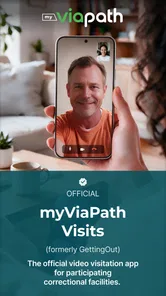
When someone close to you is in a facility, keeping in touch can take more planning than an ordinary call. I see GettingOut Visits as a practical option for families who want face-to-face contact without making every visit depend on travel. It is a communication app from Viapath, and its focus is specific: video visits at select facilities. That focus is useful, but it also means the first question is whether the facility and your circumstances suit a remote visit.
Start with the facility and the visit plan
Before relying on an app-based visit, I’d make sure the person you want to reach can use video visits at their facility and find out what arrangements are expected there. The app is not a replacement for every form of contact, and availability is tied to select facilities. Treating that check as the first step can save you from setting aside time and preparing your phone for a visit that cannot go ahead as planned.
For a family member who lives far away, has limited transport, or is balancing work and caring duties, remote contact can make a meaningful difference. It can also help when a short conversation matters but a trip would take much of the day. If an in-person visit is important to you, though, I’d think of video as another way to stay connected rather than a substitute for being there.
Staying Connected Made Simple
With GettingOut Visits, the days of lengthy phone calls and scheduling headaches are gone. The app’s primary function is to facilitate video calls, allowing you to see and speak with your loved ones without the need to travel to the facility. This is especially handy if you live far away or have a packed schedule. The user interface is pretty straightforward, ensuring that even those who aren’t tech-savvy can navigate through it without any issues.
How It Works
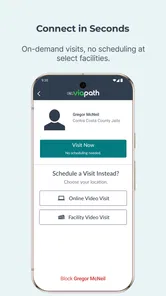
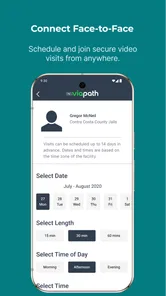
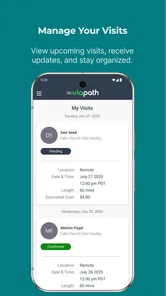
Setting up the app is a breeze. Once you download it, you’ll need to create an account and get verified. This step might seem a bit tedious, but it’s crucial for security reasons. After that, you can easily schedule visits through the app. It sends reminders and updates, so you don’t miss out on any appointments. Plus, the app has an option to chat, making communication even more seamless.
What’s awesome is that the app supports both iOS and Android, so no worries about compatibility issues. All you need is a stable internet connection, and you’re good to go!
Make the handoff less stressful
A useful way to approach a scheduled visit is to treat it as a small shared appointment, not just a button to press when the time arrives. I’d agree on a time with the other person, check the device and connection beforehand, and keep the phone charged. If another relative is helping, make sure they know who is managing the booking and reminders; having one person coordinate can prevent crossed messages or duplicate plans.
More From Our News Desk

Weather by Xiaomi Review: Clear at a Glance, Less Clear Up Close

X Under Pressure: Can It Recover When Posting Goes Wrong?

Clash of Clans Is Won Between the Battles

Android Auto Makes the Case for Quieter Car Software

MobiOffice: Transforming Mobile Productivity with Seamless Integration

EA SPORTS FC™ Mobile Soccer: Redefining Mobile Sports Gaming
For an everyday example, imagine a relative who works shifts and cannot reliably reach the facility in person. They can plan around a video visit, arrange a quiet spot before the appointment, and avoid trying to troubleshoot while the other person is waiting. The chat option can help with coordination, but I wouldn’t assume it replaces a conversation or carries every detail the family needs; keep essential arrangements clear between the people involved.
What it does better than ordinary calls
Compared with a standard phone call, a video visit adds expressions and visual presence, which can make a conversation feel more personal. Compared with visiting in person, it can reduce the burden of distance and travel. Neither comparison makes the app universally better: a phone call may be easier when bandwidth is unreliable, while an in-person visit may matter more when physical presence is the point. I’d use this as a targeted communication option, not as the only channel for staying close.
The practical trade-off is that a video conversation depends on more than the app itself. You need a working connection, a suitable time, and the visit to be available through the facility. A weak or unstable connection can interrupt a moment that matters, so it’s sensible to choose a place with dependable internet and avoid relying on mobile video while moving between locations. If a visit does not connect, having a separate way to coordinate with family helps reduce confusion.
Plan for different family roles
One less obvious challenge is that the person arranging the visit may not be the person who joins it. A relative who handles the account and scheduling can help another family member prepare, but it is worth agreeing in advance who will take responsibility for checking the appointment and getting the device ready. That small handoff matters when several people are involved, because an unclear plan can leave everyone assuming someone else has checked the details.
If more than one relative wants to join or help, I’d avoid treating the chat option as a shared family noticeboard unless everyone has confirmed how they will communicate. Use a separate family conversation for practical coordination, and keep the actual visit focused on the person you are contacting. This is especially helpful when relatives live in different places or have different work hours: it separates the emotional conversation from the logistics surrounding it.
Why You’ll Love It
One of the key highlights of GettingOut Visits is its focus on maintaining personal connections without the stress. It’s not just about video calls; it’s about bridging the gap and making sure that families can share those precious moments, even if they’re apart. The app does a fantastic job in delivering on its promise.
GettingOut Visits also provides a sense of normalcy and comfort during challenging times. It’s like having a piece of home right there with you. The app’s design is user-friendly and optimized for speed, which means less waiting time and more quality time spent with loved ones.
Make the conversation count
Because a facility-based video visit is planned rather than an open-ended call, I’d think ahead about what would make the time feel comfortable. A simple topic or a family update can help everyone settle in, particularly if the conversation has been difficult to arrange. I would not turn the visit into a checklist, though. The point is to make visual contact possible, not to make a personal conversation feel like another appointment to manage.
It can also help to prepare for the possibility that the call is shorter or less smooth than you hoped. Have the most important thing you want to say in mind, but leave space for ordinary conversation. If the connection is poor, repeating a long update can become tiring for both people; a brief message and a plan to reconnect through an appropriate channel may be kinder than struggling through every detail.
Who should choose it, and what to expect
I’d recommend considering it if you’re arranging remote contact at a participating facility and want a visual conversation without travel. I’d be more cautious if you need a general-purpose video calling app for friends and relatives, since this one is built around facility visits rather than everyday calls. Its audience rating is 3.3 from around 27,000 ratings, so it’s worth going in with practical expectations instead of assuming every part of the process will feel effortless.
The app is free, rated for Everyone, and has passed one million installs. It was released in 2017, and version 4.0.1 is the current version. Those details make it easy to identify the app, but they don’t remove the need to confirm that it fits your particular visit. If you’re helping someone less comfortable with phones, walk through account setup and the visit plan together before the first appointment rather than leaving them to manage the handoff alone.
The installation process is quick, and the app runs smoothly on most devices. However, it’s always good to keep your app updated to enjoy the best performance and features. Trust me, once you start using it, you’ll wonder how you ever managed without it.
Who may be better served by another option
This is most useful when the goal is a video visit supported by a participating facility. If you want spontaneous calls throughout the day, a familiar general-purpose calling app is a more natural fit where both people can use it. If seeing facial expressions is not essential, a regular phone call can be less demanding on the connection. And when being physically present is important to you or the person you care about, remote contact should not be treated as an equivalent replacement for an in-person visit.
I’d also be careful about choosing this as the first app for someone who is uncomfortable with account setup, verification, or scheduled appointments and has no one to help them through those steps. A family member can make the first attempt less stressful by sitting together during setup and reviewing the plan before the visit. That support does not remove the facility-related requirements, but it can prevent avoidable confusion caused by unfamiliar menus or a missed reminder.
Where the process can break down
The main limitation is the dependence on facility availability and a stable connection; the app cannot make a video visit possible in every situation. Account verification and scheduling also add steps that ordinary video calling apps generally avoid. That extra structure can make sense for a facility-based visit, but it may feel like friction when you just want to start a quick call. I’d keep another appropriate contact method in mind for changes or technical trouble, and avoid making the app your sole plan for time-sensitive communication.
For a first visit, I’d allow time before the appointment to check that the app is installed, the account is ready, and the device has enough charge. This is not because every session will have a problem; it is simply a sensible way to avoid discovering a basic setup issue at the moment you want to connect. If something does go wrong, note what happened and coordinate with the other person or facility through an appropriate route rather than repeatedly restarting without knowing whether the visit itself is still available.
People often want to know whether they can use a service like this from any location, whether they can call whenever they want, and whether it replaces in-person contact. I would not assume any of those things. The practical starting point is to establish that video visits are available for the person’s facility and to follow the arrangements for the visit. Treat it as a scheduled way to connect, not as an unrestricted calling service, and keep other suitable contact options for moments when timing or technology gets in the way.
It is also worth thinking about the emotional side of the handoff. A remote visit can be easier to fit into a busy week, but a dropped connection or a changed plan may feel especially disappointing when everyone has prepared for it. I’d avoid promising a child or another family member that a visit will definitely happen until the appointment is confirmed, and I’d have a calm backup plan for the day. That could simply mean knowing how you will share an update if the video conversation cannot proceed.
If you’re deciding whether to install it, ask yourself what you need most: seeing someone remotely, or having the flexibility of an unrestricted call at any time. For the first need, this focused service can be useful; for the second, a standard calling app may be a better fit where both people can use one. The key is to confirm availability, prepare before the appointment, and choose the contact method that matches the moment.
In conclusion, GettingOut Visits is more than just an app; it’s a lifeline for those who want to stay connected with their incarcerated loved ones. It’s reliable, convenient, and definitely a game-changer in the world of prison visitation. Whether you’re a tech wizard or a newbie, this app is designed to make your life easier. So, why not give it a try and see for yourself? You might just find it’s exactly what you’ve been looking for.
GettingOut Visits Frequently Asked Questions
Can I install GettingOut Visits on an older Android device?
GettingOut Visits supports Android devices running version 5.0 or later, so it may be an option for older phones that still meet that requirement. It is also worth checking that your device can connect reliably to the internet and use its camera and microphone, since those are important for video visits. The app is free to download.
Is GettingOut Visits suitable for someone who only wants to send messages?
GettingOut Visits is focused on video visits with loved ones at select facilities. If your main goal is text messaging or another type of communication, check whether that service is offered separately for the facility and person you want to contact. The app’s stated purpose is video visitation, so it is best suited to people preparing to connect by video.
Can I use GettingOut Visits at any correctional facility?
GettingOut Visits is intended for video visits with loved ones at select facilities, so availability depends on the institution. Before downloading, check whether the facility where your loved one is held supports visits through the app. You will also need to follow that facility’s procedures and rules for setting up and taking part in a visit.
What should I have ready before setting up a visit?
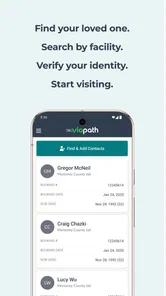
Plan to create an account and connect it with the relevant facility and the person you want to visit. You will need a compatible device and a reliable internet connection for video calls, as well as access to the device’s camera and microphone. The facility’s own instructions will guide you through any additional steps required before a visit can be arranged.
What is GettingOut Visits and how does it work?
GettingOut Visits is an app designed to facilitate video visitation for family and friends of inmates in correctional facilities. The app allows users to schedule, manage, and conduct video calls from their compatible devices. Before using the app, users need to create an account and link it with the inmate's facility, ensuring they follow all rules and guidelines set by the institution.
Pros
- User-friendly interface simplifies scheduling.
- Allows secure video call visits.
- Supports multiple device compatibility.
- Easy account management and payment options.
- Real-time notifications for visit updates.
Cons
- Requires stable internet for video calls.
- Limited customer support hours.
- Some features require additional fees.
- Occasional app crashes reported.
- Limited language support.












