G2A
- 3.08K
- 4.6
- Installs
- 5.00M
- Price
- Free

Screenshots

Analysis by Reviewed
For me, the useful idea behind G2A is being able to browse deals and shop away from home rather than waiting until I’m back at a computer. That makes it less of a dedicated gaming tool and more of a mobile storefront for people who already know what they want to look for. I’d treat it as a place to compare offers, not as a guarantee that every listing is the right fit: a quick check of the seller and the checkout total matters more than the headline bargain.
A mobile shop for deal hunting
G2A is a free shopping app from G2A.COM, and its central appeal is straightforward: it puts the marketplace in reach when I’m out and about. The app has a 4.6 average from around 68,000 ratings, with over 5 million installs, which suggests plenty of shoppers use it. It is rated Teen, and version 4.0.124 is listed for devices running OS 9 or later.
The mobile format is most helpful when I have a specific item in mind. If a game has caught my attention, I can use the app to look for it while I’m away from my desk, then pause to compare the available offers instead of buying the first one I see. I wouldn’t browse casually just to fill time if I’m trying to stick to a budget; an interesting deal can still be an unnecessary purchase.
What is G2A All About?
So, let’s talk about what G2A actually is. In a nutshell, it's an online marketplace where you can buy and sell game keys, software, and even gift cards at prices that often beat the official stores. Think of it like a digital flea market where gamers flock to find those hidden gems or that killer bargain. It's like being on a treasure hunt, but from the comfort of your couch.
My Experience Navigating the Platform
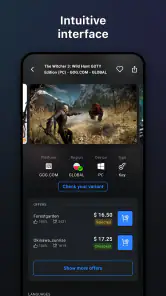
Jumping into G2A, the first thing I noticed was how slick and user-friendly the interface is. It didn’t take long for me to find my way around. The search bar is a lifesaver if you know what you're looking for, but just browsing through different categories can be a fun way to stumble upon something unexpected.
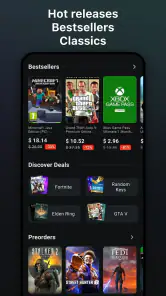
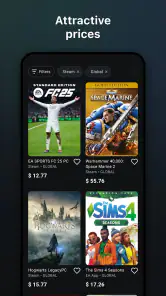
I was particularly impressed by the sheer variety of games available. From the latest AAA titles to beloved indie games, there’s something for everyone. And the best part? The prices are often significantly lower than what you'd find elsewhere. I managed to snag a couple of games on my wishlist without burning a hole in my pocket. Score!
Checking a listing before buying
One practical habit I’d keep is to treat the listing as a small checklist rather than a price tag. Confirm the exact product and edition, check that it suits the platform you plan to use, and read the seller’s reputation before committing. A low price is only useful if the item matches what you intended to buy. This is especially worth doing on a phone, where it is easy to tap quickly and overlook a detail.
More From Our News Desk

Weather by Xiaomi Review: Clear at a Glance, Less Clear Up Close

X Under Pressure: Can It Recover When Posting Goes Wrong?

Clash of Clans Is Won Between the Battles

Android Auto Makes the Case for Quieter Car Software

MobiOffice: Transforming Mobile Productivity with Seamless Integration

EA SPORTS FC™ Mobile Soccer: Redefining Mobile Sports Gaming
For a realistic use case, imagine I have a few minutes during a commute and remember that I wanted a particular game. I can search, compare offers, and leave the purchase for later if I haven’t had time to inspect the details carefully. That pause is a useful part of mobile shopping: convenience should make checking easier, not pressure me into an impulse decision.
A Few Handy Tips
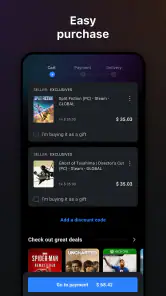
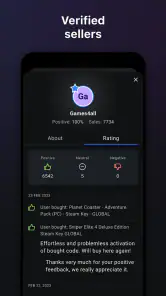
Shopping on G2A can be a bit of a wild ride, so here are a few tips from my experience. First up, always check the seller ratings. Much like other online marketplaces, the reputation of the seller is crucial. Also, keep an eye out for any additional fees that might pop up at checkout. It’s always good to know exactly what you're paying for!
Another handy feature is the G2A Plus subscription. It’s a monthly service that offers extra discounts and benefits. If you find yourself shopping on the platform regularly, it might be worth considering. I tried it out for a month, and the savings on just a couple of purchases covered the cost of the subscription itself.
Where it fits among shopping alternatives
Compared with buying directly from an official game store, a marketplace can be useful when I want to compare multiple seller offers in one place. The trade-off is that I need to pay closer attention to who is selling and what exactly is included. If I value a direct purchase and a simpler decision more than searching for a deal, the official store is the cleaner choice. If I’m comfortable comparing listings and taking time over checkout, this app is more appealing.
I’d also separate occasional bargain hunting from regular spending before considering G2A Plus. A subscription only makes sense if its benefits suit the way I actually shop; I wouldn’t sign up just because a discount looks tempting on one purchase. Checking the final total first helps me judge the offer on its own merits, without letting a membership change what I planned to spend.
Who will get the most from it
I’d recommend the app most to shoppers who already have a shortlist and enjoy comparing offers, especially people who want to check a purchase while away from home. It is less suited to someone who wants every transaction to be a direct purchase from a game publisher or who finds seller comparisons tiring. The app makes access convenient, but it doesn’t remove the judgement involved in marketplace shopping.
One question I’d ask before installing is whether it suits my device; the listed minimum is OS 9. Another is whether I need a particular edition or platform, which I’d verify on each listing rather than assume from a product name. Those are small checks, but they can prevent the main frustration of a bargain hunt: finding out that the offer isn’t the one I meant to buy.
Final Thoughts
Overall, my experience with G2A was pretty positive. It’s a fantastic resource for gamers looking to score great deals, and the vast selection means you’re likely to find whatever you’re looking for. Just remember to do your homework, check those seller ratings, and you’ll be golden.
So, if you haven’t checked out G2A yet, I’d say it’s definitely worth a look. Whether you’re hunting for a new game or some budget-friendly software, it’s a platform that’s hard to beat.
G2A Frequently Asked Questions
Does the G2A app let me browse offers while I’m away from home?
Yes. G2A’s app is intended for shopping on the go, so you can browse its marketplace from your phone rather than needing to be at home. Its store summary highlights the convenience of being able to catch offers while away. The app is free to download, though buying products and choosing optional marketplace services are separate decisions.
Who makes G2A, and what kind of app is it?
G2A is a shopping app developed by G2A.COM. It provides mobile access to the G2A marketplace, where shoppers can explore digital products and offers. The app is designed for browsing while away from home, making it a convenient option for people who prefer to use a phone when looking around a marketplace. It is free to download.
Is G2A suitable for teenagers?
G2A has a Teen content rating, which can help families decide whether the app is suitable for a younger user. That rating is a general guide, so parents and guardians may still want to consider how the marketplace works and what products a teenager might browse or purchase. The app is a shopping service, and purchases are separate from downloading it.
Can I use G2A on my phone, and what is the app for?
G2A is a free shopping app from G2A.COM for browsing the marketplace on the go. Its store summary emphasizes that you do not need to be at home to catch offers, making the app useful when you want to look through digital products from your phone. The app is rated for Teen users and requires Android 9 or later on Android devices.
What is G2A and what services does it offer?
G2A is an online marketplace that specializes in digital products such as video games, software keys, and gift cards. It connects buyers and sellers from around the world, offering competitive prices and a wide variety of products. Users can purchase game keys for platforms like Steam, Xbox, and PlayStation, often at discounted rates. Additionally, G2A provides services like G2A Plus, a subscription that offers extra discounts and benefits.
Pros
- Wide selection of digital products
- Competitive pricing on popular games
- User-friendly interface for easy navigation
- Frequent discounts and promotions
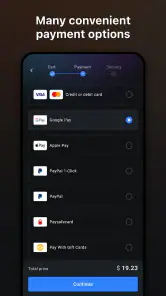
- Secure payment methods available
Cons
- Occasional issues with key validity
- Customer support can be slow
- Marketplace sellers vary in reliability
- Fees may apply on some transactions
- Limited refund policy
- Category
- Shopping
- Version
- 4.0.124











