FOX Sports: Watch Live Games
- 17.06K
- 3.8
- Installs
- 10.00M
- Price
- Free

Screenshots




Analysis by Reviewed
When a live sports stream refuses to start, I find it helps to separate the app’s job from the conditions around the broadcast. A match can be listed without being immediately watchable on your current connection or setup, and repeatedly tapping play rarely solves that. FOX Sports: Watch Live is most useful when I treat it as a place to check what is available, then give the stream a moment to load rather than assuming the first delay means the app is broken.
Where the first snags tend to appear
The app is built around live sports, but that does not make every viewing attempt frictionless. A stream depends on a stable connection, and a phone moving between Wi-Fi and mobile data can interrupt playback. If a video stalls, I first check whether other apps can load normally, then try the stream again once the connection is steady. That simple order is more useful than repeatedly closing and reopening the app without knowing what changed.
It also helps to distinguish a live event from related coverage. News, scores, and clips can be useful while a broadcast is unavailable, but they are not substitutes if the point is to watch the game itself. I would open the event page before settling in, confirm that the live option is present, and avoid waiting until the opening minutes to discover that my intended viewing route is not ready.
Small setup checks before kickoff
Before a game I care about, I make sure the app is up to date through the device’s normal app store and check that the phone has enough battery for a long session. I also test playback while I still have time to change networks or move closer to a stronger Wi-Fi signal. These are ordinary checks, but they matter more for a live match than for a short clip: once the action starts, troubleshooting becomes a distraction.
FOX Sports is a free sports app from FOX Sports Interactive, though in-app purchases are offered. It has a 3.8 average from around 61,000 ratings and more than 10 million installs. Its Teen age rating is worth noting for families sharing a device, particularly because sports coverage and related material can include mature themes. I would review the app’s current on-screen options with a younger viewer rather than assuming every item is appropriate for every age.
Your Gateway to Live Sports
The first thing you’ll notice about the FOX Sports: Watch Live app is its sleek and modern interface. It’s like walking into a sports bar with all the necessary updates and matches right at your fingertips. The app provides you with live streaming of a wide range of sports, from football and basketball to NASCAR and golf. You name it, and it's probably there. And trust me, it doesn’t just stop at live streaming. You get the latest news, highlights, and even expert analysis which makes you feel like you have your own personal sports analyst.
Navigation and User Experience
Now, I’ve used a fair share of sports apps, and navigating through them can sometimes feel like running a marathon. But with this app, it’s as smooth as a Tom Brady touchdown pass. The main menu is intuitively designed, offering easy access to live events, scores, news, and more. Plus, the video quality is top-notch, and I’ve rarely experienced any lag or buffering while streaming. That’s a big win in my books!
More From Our News Desk

Weather by Xiaomi Review: Clear at a Glance, Less Clear Up Close

X Under Pressure: Can It Recover When Posting Goes Wrong?

Clash of Clans Is Won Between the Battles

Android Auto Makes the Case for Quieter Car Software

MobiOffice: Transforming Mobile Productivity with Seamless Integration

EA SPORTS FC™ Mobile Soccer: Redefining Mobile Sports Gaming
Features That Stand Out
One of the coolest features is the personalized updates. You can tailor the app to send you notifications about your favorite teams and sports. It’s like having a sports concierge at your beck and call. Another highlight is the app’s compatibility with various devices. Whether you’re watching on your phone, tablet, or streaming to your TV, the viewing experience remains seamless. Also, if you miss a game, the app provides you with highlights and replays to catch up on what you missed.
Putting the coverage to work
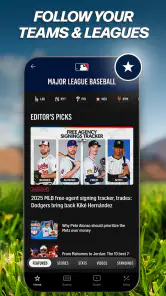
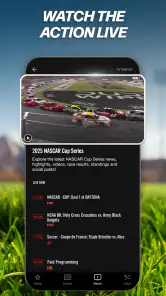
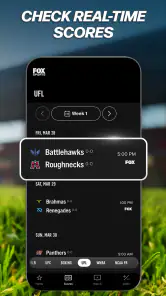
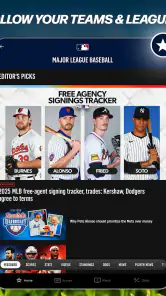
The lineup is particularly handy if your interests cross leagues: I can check in on baseball, motorsports, college basketball, soccer, MLS, and UFL coverage without treating each sport as a separate app hunt. That breadth is the main reason I would keep it alongside a team-specific score app. For example, on a busy evening I might follow a college basketball score, then open a live soccer event when I have time to watch; the app serves both quick check-ins and longer viewing sessions.
For a realistic weekday routine, I’d use notifications sparingly. I’d select only the teams or sports I genuinely follow, so an alert can prompt a quick score check without turning the phone into a constant stream of distractions. Before commuting or stepping into a meeting, I’d check the schedule and available coverage; if I can’t watch live, I’d use news or highlights later to get the key context. That is a more dependable plan than assuming every missed broadcast will be available in exactly the same form afterward.
Who gets the most from it
I see the best fit in someone who follows more than one of the sports it covers and moves between watching and checking scores. A fan who keeps up with baseball through the season but also wants to catch motorsports or college basketball has a clear reason to open one app instead of maintaining a separate video destination for every interest. It is also useful for a household where people follow different events, provided they are comfortable browsing a shared sports hub rather than expecting a single-team home screen.
Picture a Saturday when I have errands in the afternoon and a game I care about later. I can check the event before leaving, follow the score when I have a spare minute, and settle down to watch when I’m back on a reliable connection. If plans change, quick updates are still useful even when a full broadcast no longer fits. That mix of short visits and longer viewing is a more practical use than keeping the stream running in the background all day.
The trade-off is that a broad sports menu asks me to do a little filtering. If I only follow one club, the extra leagues may feel like clutter rather than a benefit. I would choose a specialist app for deep team coverage or fast, compact score checks, and use FOX Sports when live video or variety matters more. It works best as a sports-viewing hub, not as a universal replacement for every league’s own tools.
How it compares with other sports apps
Compared with a scores-first app, FOX Sports puts more emphasis on video and broadcast viewing; compared with a single-league app, its appeal is the mix of sports. That makes it a sensible companion for a fan who follows several kinds of competition, but not necessarily the best standalone choice for someone who only wants fast notifications or deep coverage of one team. In that case, a specialist app may make scores and team-specific information easier to scan, while FOX Sports is the one I would open when a live event is the priority.
There is a practical trade-off: broad coverage makes discovery convenient, yet it can also mean navigating past sports or stories that are not relevant to me. I would use the app’s personalization to narrow the stream of updates rather than expect its front page to behave like a custom feed from the outset. If I mainly want a quiet scoreboard with no video, this is more app than I need; if I want to move between sports and watch when a live option is available, the broader approach is a real advantage.
When playback needs a reset
If a stream freezes, I avoid changing several things at once. I check the connection, close and reopen the app if needed, and try the event again. If the video still will not play but other online services are working, I check whether the event itself is currently offered for viewing and use the app’s scores or coverage in the meantime. When the problem follows a particular network, trying another reliable connection can help identify whether the issue is local to that setup.
For a longer viewing session, I also think about where I want to watch before the broadcast begins. A phone is convenient for a quick check during a break, while a larger screen is more comfortable when I can settle in; I would test the intended setup ahead of time instead of troubleshooting a TV connection during a close finish. The app’s stated device flexibility is appealing, but a smooth experience still depends on the devices and network working well together.
When the app may not be the problem
A stream failing on one connection but behaving normally on another points me toward the network or device setup before I blame the app. I would check that the phone has not switched networks mid-playback, try a different reliable connection, and avoid running several video-heavy tasks at once. These simple comparisons help isolate the trouble without changing settings blindly. If scores and other pages load while one live event does not, I would also check the event’s viewing option rather than assume every part of the app is unavailable.
There is another useful distinction: a live broadcast and a later recap serve different purposes. If I arrive after the start, I would look for the available highlights or related coverage instead of expecting a live stream to behave like a full on-demand replay. For a close game, scores can help me decide whether to keep troubleshooting or simply follow along until I can watch. That fallback is not the same as seeing every play, but it keeps a technical snag from consuming the whole evening.
When another option makes more sense
I would skip this as my main sports app if I rarely watch video, have limited data, or only care about one competition and want the quickest possible score updates. Live viewing can use a substantial amount of data, so on a metered mobile plan I would favor Wi-Fi and keep the session length in mind. I would also avoid relying on it as the only way to follow a match when I know I’ll be in an area with unreliable reception; a score-focused alternative is a safer backup for that situation.
The app has been around since August 1, 2011, and its free download lowers the barrier to trying it. Still, free access should not be confused with every possible in-app option being free: purchases range from $0.99 to $74.99 per item. I would check the price shown for anything I choose before confirming a purchase, especially if someone else uses the device. That keeps the cost question clear without assuming that a paid item is required to follow every event.
For those who love to dive deeper into the world of sports, FOX Sports offers detailed analysis and exclusive interviews with athletes and coaches. It’s like having backstage access to all the action. And if you’re someone who enjoys betting on games, the app also integrates with FOX Bet, giving you live odds and betting tips.
My practical verdict
In a world where sports fans are always on the go, the FOX Sports: Watch Live app is a game-changer. It’s not just an app; it’s an experience. The combination of live streaming, comprehensive sports coverage, and user-friendly interface makes it a must-have for any sports enthusiast. So, whether you’re catching the game on your lunch break or watching the highlights before bed, this app ensures you never miss a moment of the action. Ready to dive into the world of sports? This app is your ticket in!
My recommendation is more specific: I’d try it if I follow multiple sports and want live coverage, scores, and related viewing in one place, while keeping a score-oriented alternative handy for low-connectivity days. Its best use is not as a promise that every stream will work in every setting, but as a convenient hub when the event, connection, and device are aligned. A quick pre-game check and selective notifications make that hub considerably easier to live with.
FOX Sports: Watch Live Games Frequently Asked Questions
What live sports coverage does the app provide?
FOX Sports is a sports app for following live games and coverage across several competitions. Its lineup includes MLB, NASCAR, INDYCAR, NCAA college basketball, soccer, MLS, and UFL. If you are downloading it mainly to watch a particular sport, check that the competitions you care about are included in this lineup.
What devices should I check for compatibility before downloading FOX Sports?
FOX Sports is a sports app for mobile viewing, and the wider FOX Sports experience is also available on devices such as tablets, smart TVs, and streaming players. Before downloading, check that your phone or tablet supports the app and that you have a reliable internet connection for video. This can help you decide whether it suits how and where you like to watch.
What sports can I watch live on FOX Sports?
FOX Sports offers a wide range of live sports, including NFL, MLB, NBA, NHL, college football, college basketball, NASCAR, and soccer. Users can enjoy live streaming of major tournaments, playoffs, and regular-season games. The app provides comprehensive coverage of both national and regional sports networks, ensuring fans have access to their favorite teams and matches. Its lineup also includes INDYCAR, MLS, and UFL, giving fans more live sports to follow.
Is the FOX Sports app free to use?
The FOX Sports app is free to download, but access to live content and certain features requires a subscription to a participating TV provider. Users can still enjoy some features like highlights, news, and scores for free. However, to unlock live streaming and full access, a valid cable or satellite subscription login is necessary. The app also offers in-app purchases, so review any purchase details shown before confirming a transaction.
Can I watch FOX Sports on multiple devices?
Yes, the FOX Sports app supports multiple devices. Users can stream content on smartphones, tablets, smart TVs, and through streaming devices like Roku, Apple TV, and Amazon Fire TV. This flexibility allows fans to watch their favorite sports wherever they are, making it convenient to catch games on the go or at home. Keep in mind that viewing access may depend on your TV provider and the device you choose.
Pros
- High-quality live streaming of sports events.
- User-friendly interface for easy navigation.
- Wide range of sports covered globally.
- Personalized notifications for favorite teams.
- Access to exclusive sports highlights.
Cons
- Requires subscription for full access.
- Occasional streaming lags reported.
- Limited availability in certain regions.
- Ads can be intrusive at times.
- High data usage for live streaming.
- Category
- Sports
- Version
- Varies with device





