

FOX One: Live News, Sports, TV
- 1.21K
- 4.2
- Installs
- 1.00M
- Price
- Free

Screenshots

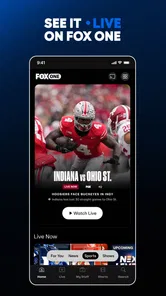
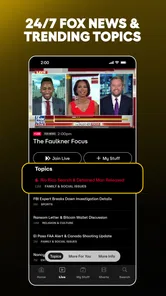
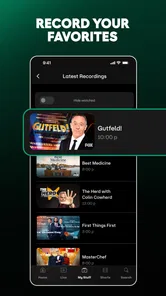
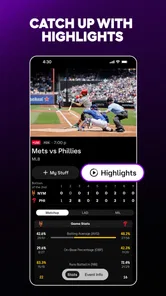



Analysis by Reviewed
I approached FOX One: Live News, Sports, TV as a practical entertainment app rather than just another television shortcut. Its appeal is easy to understand: it brings FOX programming into one mobile destination, with live sports and television at the center of the experience. In my use, the important question was not simply whether it could show something interesting, but how well it behaved when my connection changed, when I moved between Wi-Fi and mobile data, and when I wanted a quick viewing session instead of a full evening in front of a television.
That network angle matters because this is an online viewing service. The quality of the experience depends heavily on the connection available at the moment. A strong home network makes the app feel convenient and immediate, while a crowded public network or weak mobile signal can turn a simple attempt to watch into a sequence of loading pauses and retries. This is best understood as a connected viewing hub, not a replacement for every kind of television access.
FOX One is a free entertainment app from Fox Digital Services, LLC, with optional in-app purchases ranging from $8.99 to $239.88 per item. It is intended for a Teen audience and requires Android 7.0 or later on compatible Android devices. The app has reached over a million installs, with an average rating of 4.4 from around 9,100 ratings and roughly 1,200 written reviews. Those figures suggest that it has found a substantial audience, but they do not remove the need to consider how it fits your own viewing habits.
How FOX One feels when the network is doing the work
The strongest moments come when I already know what I want to watch. A live game, a news segment, or a familiar FOX program is much easier to approach when the app acts as a single starting point instead of making me jump among separate services. The combination of live news, sports, and television gives it a broader purpose than a narrow sports companion, and that is particularly useful for households where different people follow different kinds of programming.
Live content also changes how I judge the app. With an on-demand video, a short delay is annoying but usually manageable. During a live event, a delay can mean missing a key play, a result, or the beginning of a segment. On a reliable connection, the app is at its most convincing because it reduces the number of steps between opening the service and reaching the content. On an unstable network, that advantage becomes less certain.
I found the app most natural for short, intentional sessions. For example, I might open it during a lunch break to check live coverage, then return later for a longer sports viewing session at home. That pattern suits a phone or tablet better than treating the app as a complete substitute for a television setup. The smaller screen is fine for following a broadcast while doing something else, but a major event is more comfortable on a larger display when that option is available.
The broad programming mix is helpful, although it can also make the first decision less obvious. Someone opening the app for a particular game may not want to browse through general entertainment first. I recommend entering with a clear purpose: look for the live event, check current programming, or use the service as a quick way to reach FOX content. That mindset makes the experience feel more focused.
More From Our News Desk

 Gmail
GmailGmail in a Busy Inbox: Who Benefits Most?
From first account to crowded workday, Gmail earns its place through dependable search and flexible sorting—but its best fit depends on how much inbox maintenance you can tolerate.

 Prime Video
Switching to Prime Video: What Changes in Your Viewing Routine
Prime Video can make a compelling second home for streaming, but switching means learning a different catalog, rental layer, and route from browsing to playback.

 Universal TV Remote Control
Universal TV Remote Control Works Best as a Reliable Backup
A phone remote earns its place through quick setup and reliable habits. Here is how to get more from Universal TV Remote Control—and where its limits show.

 Weather - By Xiaomi
Weather by Xiaomi Review: Clear at a Glance, Less Clear Up Close
Xiaomi’s weather app makes everyday forecasts quick to scan, but its calm surface can leave useful details and recovery paths harder to find than they should be.

 X
XX Under Pressure: Can It Recover When Posting Goes Wrong?
A resilience-focused review of X, examining setup, mistaken posts, interruptions, weak connections, and the gaps that matter when recovery needs to be dependable.

 Clash of Clans
Clash of Clans Is Won Between the Battles
Its raids are quick; its community is a long-term project of coordination, teaching, rivalry, and shared responsibility—with all the friction that entails.
Latest News



Why live sports expose connection problems quickly
Sports are the clearest test of network quality because the viewer notices interruptions immediately. A frozen image during a routine studio discussion is frustrating; a frozen image during a decisive moment is much worse. If your home Wi-Fi is shared with several people streaming, gaming, or making video calls, the app may not receive the steady connection it needs for a comfortable session.
My practical advice is to test the app before an important event rather than opening it for the first time at the exact start. Confirm that the selected broadcast loads, check that your device has a comfortable battery level, and avoid placing the phone in a location where the signal is already unreliable. These are simple habits, but they reduce the chance that the app becomes the weakest link in your viewing plan.
News has a different advantage. A short news check is less demanding emotionally than a full game, so brief interruptions may be easier to tolerate. The app therefore makes more sense for people who want a flexible way to check FOX coverage during the day, especially when they are away from their usual television. It is less compelling for someone who only watches recorded programs and does not care about live access.
Using it while moving between places
Mobile viewing is where FOX One earns its place. I can imagine using it on a commute, during a break at work, in a waiting room, or while traveling around the house. The phone format makes the service available in moments when turning on a television would be inconvenient. A tablet is a better compromise for longer sessions because it gives live content more room without requiring a fixed screen.
The trade-off is that mobility creates more variables. A home Wi-Fi connection, workplace network, hotel connection, and cellular connection can each produce a different result. Even when the app itself is functioning normally, the surrounding network may be congested or restrictive. This is why I would not rely on it as my only plan for an event that matters to me unless I had already used it successfully in the same location.
A realistic everyday scenario is watching a portion of a game while preparing dinner. I can keep the phone nearby, follow the broadcast for a few minutes, and stop when I need to return to the task. That is a genuine strength: the app makes FOX content easier to fit into fragmented time. However, the same setup is not ideal if the phone is too far from the router or if the kitchen has a weak signal. Convenience depends on where the device is placed, not just on the app being installed.
Another useful situation is sharing a home viewing routine. One person may want live sports while another wants news or a television program. Having a mobile option can reduce arguments over the main screen, although the value depends on what access is available for the specific content and on the purchase choices presented in the app. I would review those choices carefully before assuming that every desired program is covered in the same way.
What to do when playback does not go smoothly
Connection failures are the part of the experience that deserves the most realistic attention. If a stream stalls, I would first check whether other apps or devices are also having trouble. If everything else is slow, restarting the router or moving closer to it is more sensible than repeatedly reopening FOX One. If only this app is affected, closing and reopening it can be a reasonable next step, followed by checking whether the device and app are behaving normally.
On mobile data, moving a short distance can sometimes make more difference than changing settings. A window, an outdoor area, or a less crowded location may provide a steadier signal. I also recommend avoiding repeated taps while a stream is loading; that can make it harder to tell whether the problem is temporary or whether the playback request needs to be started again.
The important limitation is that a connected service cannot repair a poor connection on its own. FOX One may be the doorway to the broadcast, but the quality of that doorway depends on the network between the device and the service. This is especially relevant for live sports, where starting over or waiting for recovery may mean losing the exact moment you opened the app to see.
If you are planning to watch while traveling, build in a fallback. That might mean knowing where a reliable Wi-Fi connection is available or being prepared to stop and resume later. I would not treat the app as a guaranteed emergency television source in places with uncertain connectivity. It is more dependable when used as part of a planned mobile routine than as a last-minute solution.
Managing mobile data without making the app unpleasant
Watching live video over cellular data can become expensive or restrictive depending on your plan. I would use Wi-Fi for longer sports sessions whenever possible and reserve mobile data for shorter news checks or brief viewing periods. This is not a criticism unique to FOX One; it is a basic consequence of carrying live video around in your pocket. Still, it should influence whether the app is the right choice for your daily routine.
A useful habit is to separate “I want to watch now” from “I just want to know what is happening.” If you only need a quick update, a short visit is more sensible than leaving a live channel running while the phone sits beside you. For a full game, I would choose a stable home connection and keep other heavy network activity to a minimum. That approach protects both viewing quality and your data allowance.
Battery use is another practical consideration during mobile viewing. A long live broadcast can keep the screen and network connection active for an extended period, so I would start with a charged device or stay near a power source. This is particularly important when using cellular data away from home, where both the signal search and video playback can make a phone feel less comfortable to carry through the rest of the day.
I also recommend being deliberate about purchases. The app itself is free to download, but optional in-app purchases are listed from $8.99 to $239.88 per item. That wide range makes it especially important to read the purchase screen carefully and understand what a selected option provides before confirming it. If you only want occasional FOX viewing, compare the cost of the available choice with how often you will actually use the service.
This is one area where FOX One may not beat the usual alternatives for every viewer. Someone who already pays for a television package that includes the FOX content they watch may find a separate mobile purchase unnecessary. On the other hand, a person who values access away from the main television may consider the convenience worthwhile. The right decision depends less on the download price and more on the total viewing pattern.
Where it fits beside familiar alternatives
Compared with watching FOX through a traditional television provider, the app is more flexible in location and device. I can take the viewing experience to a phone or tablet instead of staying near one screen. That is its clearest advantage. The traditional route may still feel better for a household that already has a comfortable television setup, a dependable connection, and no desire to watch elsewhere.
Compared with a general streaming service, FOX One has a more specific identity. It is useful when FOX news, sports, and television are the reason I am opening an app. A broad entertainment service may offer a larger variety of unrelated programs, but it may not be the most direct route to the FOX content I want at that moment. Conversely, viewers who want a wide mixture of studios and genres may find a general service more satisfying as their main subscription.
Compared with separate news and sports apps, the unified approach is convenient. I do not have to begin with one app for news and another for sports when both interests belong to the same FOX-centered routine. The cost is that the experience is tied to one provider’s programming choices and purchase structure. If your viewing is spread across many networks, this app is likely to be one part of your setup rather than the only service you need.
The app is also not automatically the best option for viewers who prioritize offline access or who regularly travel through areas with unreliable connectivity. Since the experience is built around connected viewing, I would choose a different solution for trips where internet access is uncertain and uninterrupted viewing is essential. For a connected home, a commute with dependable coverage, or quick live checks during the day, the balance is more favorable.
Who should install it, and who should pass?
I would recommend FOX One to people who regularly follow FOX live news, sports, or television and want a mobile route to that content. It is also a sensible choice for households that need more than one screen, and for viewers who dislike being tied to the living-room television. The app’s one-place approach is most useful when the same provider already plays a meaningful part in your viewing habits.
I would be more cautious if your connection is inconsistent, your mobile data allowance is tight, or you only watch a small amount of FOX programming. In those cases, the app may be installed but rarely used, and the optional purchase prices deserve careful consideration. It is also not the obvious choice for someone seeking a broad, provider-neutral entertainment library.
The Teen content rating is worth keeping in mind for families. Adults should decide whether the available programming suits younger viewers rather than assuming that a television app is automatically child-focused. The category is entertainment, but live news and sports can include material that parents may prefer to supervise.
My connectivity verdict
After looking at the app through the lens of real mobile use, I see FOX One as a convenient connected companion for FOX viewing rather than a universal television replacement. Its best quality is concentration: news, sports, and television from the same provider are easier to reach when I am away from the main screen. That makes it genuinely useful for short checks, shared households, and planned live viewing on a phone or tablet.
Its weaknesses are equally clear. Network quality can shape the experience more than the app interface does, mobile video can consume valuable data and battery, and the purchase structure means that “free” does not describe every viewing path. I would test the service on my usual networks, think about how often I watch FOX content, and inspect the purchase details before committing to a costly option.
My final recommendation is positive but specific: install it if FOX live programming is already part of your routine and you want more freedom about where you watch. Keep a stable connection for important events, use Wi-Fi for longer sessions, and treat cellular viewing as a deliberate choice rather than an unlimited convenience. For the right viewer, FOX One turns reliable connectivity into useful flexibility; for the wrong viewer, it is simply another app competing for data, battery, and attention.
FOX One: Live News, Sports, TV Frequently Asked Questions
Is FOX One free to download, and what might I have to pay for?
FOX One is free to download, but that does not mean every channel or program is free to watch. The app offers in-app purchases, with listed options ranging from around $9 to around $240 per item. Your actual access depends on the plan or eligible TV-provider account you use, so review the available options before subscribing or making a purchase.
Is FOX One suitable for younger viewers?
FOX One has a Teen content rating, so it is intended for teen and adult audiences rather than being a children’s entertainment app. Its mix of news, sports, and television programming can include topics and material that parents may want to review with younger viewers. Consider the rating and your family’s preferences before installing it on a child’s device.
What is FOX One: Live News, Sports, TV?
FOX One: Live News, Sports, TV is a streaming application that brings FOX programming together in one place. Depending on your location and subscription, you may be able to watch live news, sports coverage, entertainment shows, local content, and on-demand programs. The exact catalog can vary by region, device, and current licensing agreements. Its lineup includes sports such as NFL, MLB, and INDYCAR, alongside other FOX programming.
Do I need a subscription to use FOX One?
Most premium live channels and sports content require a paid FOX One subscription or an eligible television-provider account. Some features, clips, previews, or selected news content may be available without a full subscription, but access can change. Before downloading, check the current plan options, supported providers, trial terms, and whether your preferred channels are included.
Can I watch live sports on FOX One?
The app is designed to provide access to FOX sports programming, but the events available to you depend on your subscription, location, broadcast rights, and blackout restrictions. Major games may require an appropriate package or participating TV provider. It is worth checking the event schedule and regional availability before relying on the app for a specific match or tournament.
Pros
- Combines live news
- sports
- and entertainment in one app.
- Includes access to FOX network programming and selected live events.
- Clean interface makes browsing channels and shows straightforward.
- Supports on-demand viewing for catching up on missed programs.
- Useful option for viewers already subscribed to a participating TV provider.
Cons
- Availability and content vary significantly by location and provider.
- A participating TV subscription may be required for full access.
- Some live streams can be affected by regional broadcast restrictions.
- Sports coverage is not equally comprehensive for every league or event.
- Video quality and data usage may be demanding on mobile connections.












