Flipp: Shop Grocery Deals
- 35.92K
- 4.8
- Installs
- 10.00M
- Price
- Free

Screenshots
Analysis by Reviewed
If you’re like me, always on the hunt for the best deals but dread the thought of clipping paper coupons, then let me introduce you to a game changer: Flipp: Shop Grocery Deals. This nifty app is like having a personal discount butler right in your pocket, helping you save money on your grocery trips without breaking a sweat.
Deciding whether free access fits your routine
I like that Flipp is free to download, so trying it doesn’t require a purchase decision. That makes it easy to see whether the local flyers are useful for your routine before you build your shopping habits around the app. Free access is a clear advantage, but it isn’t the same thing as a guarantee that every item you need will be discounted or that each trip will cost less.
The app is made by Flipp Operations Inc. and is a shopping app for browsing weekly offers. Its audience is broad: it has an Everyone content rating, and the current version is 89.0.0 for devices running Android 7.0 or later. I’d treat those details as practical compatibility context, then check the app store on your own device for the version available there.
Getting Started with Flipp
Let’s dive into what makes Flipp a must-have app for anyone looking to shop smarter. Right off the bat, the app is super user-friendly. You can download it for free on both Android and iOS, which means no excuses, people! Once you have it installed, setting up your profile is a breeze. You just enter your location, and BAM! You’re bombarded with all the local deals and flyers available in your area.
How It Works
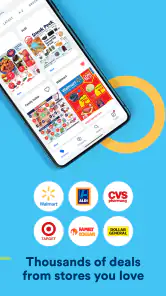
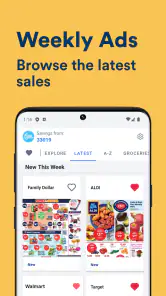
Think of Flipp: Shop Grocery Deals as a digital coupon book that keeps updating itself. The app aggregates flyers from numerous stores around you, letting you flip through them (pun intended) without dealing with actual paper. The app even lets you clip deals directly within it, so you don’t have to worry about losing those precious discounts.
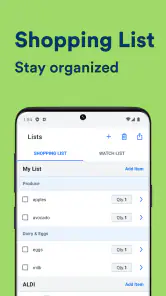
Now, here’s where it gets really cool: you can create a shopping list within the app, and Flipp will automatically match the items on your list with available deals. It’s like magic! This feature not only saves you time but also ensures you’re getting the best bang for your buck every time you shop.
Use the list before opening every flyer
For a realistic grocery run, I’d start by writing down the meals and household staples I already intend to buy. Then I’d use the list to check for relevant offers, rather than scrolling through every page and letting promotions decide what goes into the basket. The difference is subtle but important: the app becomes a way to adjust a plan, not a reason to spend more than planned.
More From Our News Desk

Weather by Xiaomi Review: Clear at a Glance, Less Clear Up Close

X Under Pressure: Can It Recover When Posting Goes Wrong?

Clash of Clans Is Won Between the Battles

Android Auto Makes the Case for Quieter Car Software

MobiOffice: Transforming Mobile Productivity with Seamless Integration

EA SPORTS FC™ Mobile Soccer: Redefining Mobile Sports Gaming
One useful workflow is to separate essentials from flexible choices. If a preferred brand is not on offer but a comparable option is, I can decide whether switching makes sense; for a product where size, ingredients, or brand matter, I can ignore the deal. This keeps a headline discount from disguising a poor fit. I would compare the actual item details in the flyer before treating two products as equivalent.
For a busy weekday, I might check the flyers while planning the next grocery trip, clip a few relevant offers, and leave the list ready to consult in the store. That is more practical than trying to make decisions in the aisle while also remembering what the household needs. If a deal only saves a little but sends me across town, I would count the extra travel and time as part of the cost.
Making a deal search pay off
In my experience, the strongest value comes from using the app before I leave home, not from browsing every flyer in the aisle. I start with a short list of things I already planned to buy, then look for matching offers and clip only the ones I can realistically use. That order matters: it keeps a tempting discount from turning into an unnecessary purchase.
A useful everyday example is planning a grocery run around a few flexible staples. I can check what is on offer, decide whether a nearby deal justifies choosing one store over another, and keep the rest of my list unchanged. If the savings require a special trip for just one item, the extra time and travel may outweigh the discount. Flipp helps surface options; I still make the final comparison.
It also helps to think of the list as a planning tool rather than a promise that every product will match. Item names, sizes, and brands can differ, so I check the actual flyer details before assuming an offer applies to the version I want. For price matching, I would confirm the retailer’s current rules and show the relevant local flyer clearly at checkout; the store, not the app, decides what it accepts.
Where the trade-offs show
One of the standout features of this app is the price matching capability. If you’re shopping at a store that offers price matching, Flipp can help you with that too. You just show the cashier the local flyer in the app, and voila, you’re saving even more money. It’s a lifesaver for those big shopping days when every penny counts.
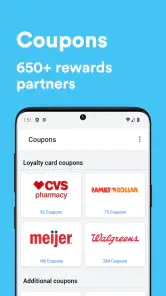
Another feature worth mentioning is the ability to sync your loyalty cards. This means you can keep all your loyalty points and discounts in one place. No more fumbling through your wallet or keychain at checkout. Just scan and save!
There is a small but real planning cost: comparing several flyers takes attention, and the most attractive headline offer may not be the best overall choice once you consider the rest of your basket. A retailer’s own app can be better when I need store-specific account details or a particular checkout offer, while Flipp is more convenient when I want to scan local flyers across stores in one place. Paper flyers still work for shoppers who prefer browsing offline, but they are less convenient to search and carry.
What to check before relying on a deal
A flyer is useful evidence of an advertised promotion, but I would still look closely at its wording. An offer may be tied to a particular size, variety, or date range, and a similar-looking product may not qualify. Keeping the clipped offer beside the list gives me a quick reference, but it does not remove the need to read the details or ask the retailer if a checkout decision is unclear.
I would also treat “matched” results as leads rather than a final shopping decision. The app can help connect list items to offers, but I still check whether the suggested deal suits the quantity I need and whether the store is convenient. A discount on a larger package is not automatically a saving if I would not use it all, and switching stores for several small offers can make the trip less worthwhile.
That distinction matters most for shoppers trying to keep a strict budget. I find it more useful to compare the total planned basket than to count individual discounts. A few low-priced staples at one nearby shop may beat a longer route chasing separate promotions, even if the second plan appears to have more marked-down items.
Comparing Flipp with other ways to shop
Compared with opening several retailer apps, Flipp is appealing when my first question is, “What is being advertised near me this week?” It gives the flyer-browsing task a shared starting point and makes cross-store scanning less scattered. A retailer’s own app can still be the better choice for offers or account tools that are specific to that store, so I see the two approaches as complementary rather than interchangeable.
Compared with paper circulars, the app is easier to carry and search through, and clipping an offer can keep it connected to my shopping plan. Paper can be preferable for someone who wants a screen-free browse or keeps a printed flyer on the kitchen table. The practical advantage depends on how you actually plan: digital is tidy for quick checks, while paper can be easier to scan casually without opening a device.
Compared with simply shopping from memory, Flipp encourages a more deliberate check of local promotions. That can help when prices influence which store I choose, but it also introduces a new task: reviewing offers. If I have no interest in comparing flyers and already know where I shop, a straightforward list and one retailer’s regular routine may be less effort.
Who gets the most from it
I’d recommend Flipp to people who already compare grocery prices, shop at more than one local retailer, or like to plan a list before heading out. It is especially useful when a handful of weekly offers can influence where you shop without changing what you actually need. If you shop at one store, rarely look at promotions, or want a guaranteed lowest price without doing any comparison, the app may add more browsing than value.
It may also suit households where one person plans the shop and another does the shopping, because a prepared list and clipped offers can make the plan easier to follow. I would keep that list focused and readable rather than turning it into a catalogue of every interesting deal. The benefit comes from making the important choices in advance, not from trying to capture every promotion available.
Flipp is less compelling if your shopping is mostly spontaneous, you rely on a narrow set of products, or the available local flyers rarely cover what you buy. In those cases, a retailer’s own tools or a simple notes app may do the job with fewer steps. I would give the app a fair trial against my actual weekly list; if the offers do not change where or what I buy, there is little reason to keep adding a comparison routine.
Its reach is substantial: Flipp has more than 10 million installs and an average rating of 4.8 from around 401,000 ratings, alongside roughly 36,000 written reviews. Those figures suggest that many shoppers find the format useful, but they don’t tell me whether the flyers near your home will fit your habits. Local relevance is the deciding factor, so I’d judge it by the offers you can actually use.
My buy-or-skip verdict
To wrap it up, Flipp: Shop Grocery Deals is a real gem for anyone looking to simplify their shopping experience while maximizing their savings. It’s intuitive, efficient, and packed with features that make grocery shopping less of a chore and more of a treasure hunt for deals.
So, if you're someone who loves saving money and hates unnecessary hassle (and let’s be real, who doesn’t?), do yourself a favor and download Flipp. Your wallet will thank you!
Flipp: Shop Grocery Deals Frequently Asked Questions
Can I search for a particular product or deal in Flipp?
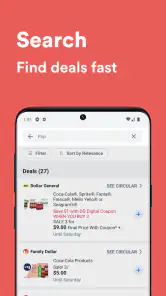
Flipp is useful when you have a specific item in mind as well as when you simply want to browse. You can search for items and look through offers from retailers, then use what you find to help plan your shopping. This makes it easier to focus on relevant promotions instead of paging through every weekly ad.
Can I use Flipp to prepare a shopping list before visiting a store?
Yes. Flipp includes shopping lists, so you can collect items you want to buy while browsing ads and deals. This can make planning a trip more organized and help you keep promotions connected to the products you need. It is a practical feature if you prefer to check offers first and arrive at the store with a clearer plan.
Do I need to create an account to browse deals in Flipp?
Flipp is designed to let shoppers browse weekly ads and look for deals through its app. If you are deciding whether to install it, the main attraction is being able to explore offers from retailers and plan what to buy. Account requirements can depend on the feature you want to use, so you can start by checking the app’s available browsing options.
What is Flipp and how does it work?
Flipp is a mobile application designed to help users save money on grocery shopping by providing access to digital flyers, coupons, and deals from various retailers. Users can browse weekly ads, search for specific items, and create shopping lists. The app aggregates offers from multiple stores, allowing users to compare prices and find the best deals. By using Flipp, shoppers can plan their purchases more effectively and save money on everyday essentials.
Is Flipp available for both Android and iOS devices?
Yes, Flipp is available for download on both Android and iOS platforms. Users can find the app on the Google Play Store for Android devices and the Apple App Store for iOS devices. The app is free to download and use, offering a user-friendly interface that makes it easy for shoppers to access deals and save money, regardless of their device preference. Its listed minimum operating system requirement is Android 7.0.
Pros
- Easy-to-use interface for quick navigation.
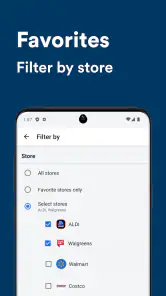
- Access to a wide range of store flyers.
- Features a convenient shopping list tool.
- Helps save money with coupon matching.
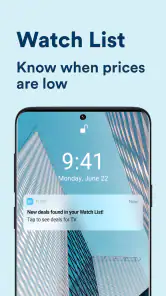
- Customizable notifications for deals.
Cons
- Occasional app crashes reported.
- Some stores may not be available.
- Ads can be intrusive at times.
- Limited support for international users.
- Requires internet for full functionality.
- Category
- Shopping
- Version
- 89.0.0











