Five Below
- 9.97K
- 4.2
- Installs
- 1.00M
- Price
- Free

Screenshots

Analysis by Reviewed
I find shopping apps most useful when they help me make a decision without turning a quick errand into a long hunt. Five Below is aimed at affordable finds, and its browsing experience can suit people looking for small gifts, room accents, party supplies, or an inexpensive treat. I’d treat it as a way to explore what the retailer offers, rather than assume every item will be available wherever I shop.
Where browsing can get frustrating
Even a clearly arranged shop can feel less convenient when I’m searching for one exact item. Categories are handy for browsing, but a search works better when I already know what I want; trying a few simple terms can be more effective than scrolling through a broad section. I also avoid building a plan around a product I have only seen on a screen until I have checked the details that matter to me.
The barcode scanner is most useful as an in-store aid, not a substitute for checking an item in person. If a scan does not give me the information I expected, I would try scanning the product barcode again in good light and make sure I have the right item. A scan can help narrow down a question, but I still use my judgment about quality, size, and whether the product fits the task.
Small checks before placing an order
Before I start shopping, I make sure I’m using the current app version and that my phone has a working internet connection. Five Below is a free shopping app from Five Below, Inc, rated for Everyone, and its current version is 6.04.02.00 for devices running Android 7.0 or later. Those details make it easier to check basic compatibility before troubleshooting a screen that will not load.
For a more focused visit, I decide what I’m shopping for first: perhaps party decorations, a few snacks, or a low-cost gift. Then I use search or the relevant category rather than browsing every section. The app has an average rating of 4.2 from around 27,000 ratings, with over 1 million installs, which suggests it has a sizable audience; I still judge it by whether its shopping flow suits my own needs.
Recovering when a shopping step stalls
If a page or search seems stuck, I give the connection a moment, then retry the action rather than tapping repeatedly. I may close and reopen the app, check that it is up to date, and try again. For a barcode issue, returning to the product page or searching for the item by name is a sensible fallback. These are simple steps, but they help me distinguish a temporary hiccup from a product that needs a closer look.
Getting to Know Five Below
Okay, picture this: an app that brings the vibe of an exhilarating, budget-friendly shopping spree directly to your phone. That’s what Five Below is all about. It’s like having a treasure trove of goodies, all priced $5 and below, right at your fingertips. From quirky gadgets and trendy tees to party supplies and snacks, this app has it all. And the best part? You don’t have to break the bank to enjoy a little retail therapy.
More From Our News Desk

Clash of Clans Is Won Between the Battles

Android Auto Makes the Case for Quieter Car Software

MobiOffice: Transforming Mobile Productivity with Seamless Integration

EA SPORTS FC™ Mobile Soccer: Redefining Mobile Sports Gaming

How Microsoft OneDrive Became a Mobile Productivity Giant

How Google Translate Breaks Language Barriers Effortlessly
Why Five Below Stands Out
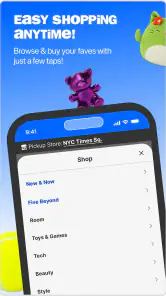
Let’s dive into what makes this app a keeper. First up, the interface. It’s super user-friendly, with everything neatly categorized. You’re not just thrown into a sea of products like some other shopping apps. Here, you can easily navigate through categories like "Tech," "Style," "Room," and more. Plus, there's a handy search bar if you're on a mission to find something specific.
The app also boasts a nifty feature that lets you scan barcodes while you're in-store. This means you can quickly check product details, reviews, and even see if you’re scoring a good deal. It’s like having a personal shopping assistant right in your pocket.
The Experience: Shopping Made Fun
Shopping on Five Below is more than just clicking "add to cart." It's an experience. I’ve found myself browsing the app just for fun, discovering random, delightful items I didn’t even know I needed. And with regular updates and seasonal collections, there’s always something new to explore.
One of my favorite features is the "New & Now" section. It's like the app's way of saying, "Hey, check out the cool stuff we just got in!" And trust me, I’ve found some gems there, from funky phone cases to cozy blankets perfect for a Netflix binge.
Making a browse work for a real errand
A useful way to approach the app is to separate inspiration from the actual shopping decision. If I’m putting together a birthday table, for example, I can browse for a general theme, note a few colors or types of decorations, and then decide what I still need before buying anything. That keeps the app’s discovery element enjoyable without letting an attractive image dictate the whole plan.
I also find it helps to think in terms of a complete small task rather than individual bargains. For a dorm-room refresh, I might be looking for one decorative touch and a practical extra, not a cart full of unrelated novelties. The app is best used to surface possibilities; I still check measurements, materials, and the product description wherever those details affect whether the item will work in my space.
For a parent preparing party bags, the same method can save time. I’d use categories to get a sense of what kinds of items are available, then make a short list based on age and what is appropriate for the event. The Everyone content rating describes the app’s audience suitability, not necessarily every product’s suitability for every child, so I would inspect each item and packaging rather than treating the app rating as a product-safety endorsement.
Using the scanner without over-trusting it
The barcode tool can be useful when I’m already in a store and want to investigate an item without trying to remember its name. I’d first make sure I’m scanning the product’s barcode rather than a shelf label or another printed code, hold the phone steady, and give the camera enough light. If the result doesn’t look relevant, I would not keep scanning the same spot indefinitely; I’d turn the package around, read the name, and use search as an alternative route.
There is a practical trade-off here: scanning can speed up product lookup, but it cannot tell me whether a fabric feels comfortable, whether a container is the right size, or whether a gadget suits the way I plan to use it. I use it to answer a narrow information question, then inspect the item itself for the rest. That makes the scanner a helpful bridge between browsing on a phone and shopping in person, not a replacement for ordinary judgment.
When I’d choose another option
For a realistic quick trip, I might open the app before heading out to get a sense of the kinds of party supplies or small gifts I want, then use the in-store scanner to check a particular item while browsing. That split workflow is more practical than treating the phone as the whole shopping experience: I can compare what catches my eye with my actual needs and avoid filling a basket with impulse finds.
Compared with a broad online marketplace, this app is a more focused way to browse Five Below’s own assortment; it is not where I’d begin if I wanted to compare many retailers, hunt for a specialist product, or evaluate a purchase solely on extensive technical specifications. The low-cost appeal is strongest for casual purchases and add-ons. For something I need to last through heavy daily use, I’d compare alternatives and pay attention to the product itself rather than assume a low price makes it the best value.
It also isn’t my first choice when the shopping decision depends on exact compatibility. If I need a charger for a particular device, a storage item that must fit a measured space, or equipment that will be used frequently, I’d look for detailed specifications and compare suitable options before choosing. The store’s broad mix of inexpensive finds can be fun, but the responsibility to check whether a specific item meets a demanding requirement still rests with me.
For routine browsing, a general retailer’s app may offer a much wider selection across brands, while a specialist store may make it easier to compare products in one narrow area. Five Below sits between those approaches: its appeal is a distinctive, accessible assortment for casual purchases, not an exhaustive catalog or a research tool. I’d pick it when the goal is a small, flexible purchase and pick another retailer when precision, durability, or a broad cross-store comparison matters more.
When the app may not be the cause
If a product page or scan gives me trouble, I don’t immediately assume the app is broken. A weak connection can interrupt a shopping task, while an unclear barcode or an item label that is hard to read can make scanning less straightforward. I’d check the connection, retry once, and use the product name in search if that is easier. If the item itself is unfamiliar, looking at it in person may answer practical questions that a screen cannot.
That distinction matters when shopping for gifts or supplies on a deadline. I can use the app to make a shortlist, but I would not rely on a single search result as proof that a specific item will be ready at a particular place or time. When timing or exact specifications matter, I’d verify those details through the retailer’s current shopping flow or choose a seller whose product information and options meet the need.
If something still appears to be wrong after a basic retry, I try to isolate the problem instead of repeating the same action. I can see whether other pages load, whether search responds, and whether the difficulty is limited to scanning one particular item. That small distinction helps me choose a sensible next step: a connection check for a broader loading problem, another search phrase for a lookup problem, or a closer look at the package when only one scan fails.
I also avoid making a purchase decision while frustrated by a slow screen. A stalled page can tempt me to tap again or start over, which may create confusion about what I have selected. I pause, wait for the current action to settle, and review the visible details before moving on. If I am in a hurry, it can be more efficient to finish checking the physical product in the store than to force a phone-based step that is not helping.
Who will get the most from it
I’d recommend Five Below to people who enjoy browsing inexpensive accessories, seasonal finds, snacks, and small household extras, especially when they are open to discovering something rather than committed to one exact product. Parents planning party bags, students looking for simple room touches, and anyone assembling a modest gift can use the categories and search to narrow the browse. A useful habit is to set a short list before opening the app, then treat “New & Now” as optional browsing rather than a reason to add every appealing item.
It is less suitable for shoppers who want a deep comparison across brands, need detailed guidance before buying a high-stakes product, or prefer a strictly planned shopping session with no browsing. In those cases, a specialist retailer or a multi-store marketplace may make the comparison easier. For casual value shopping, though, the app’s focused assortment is part of its appeal rather than a drawback.
I’d also say it suits people who can enjoy a bargain without assuming that every inexpensive item is automatically useful. If I’m shopping with a tight purpose, I decide what would count as success before I start: perhaps finding a small present that feels thoughtful, or choosing a few decorations that suit an event. That boundary matters because a discovery-led assortment can make browsing entertaining while also making it easy to lose sight of the original errand.
Someone who dislikes browsing, wants extensive product comparisons before even considering a purchase, or needs a dependable solution for a technical or safety-critical task will probably be happier elsewhere. The app can help me explore the retailer’s range, but it does not remove the need to evaluate whether an individual product is appropriate. I’d recommend it most readily to a friend who wants low-cost extras and understands that a little in-person checking is part of making a good choice.
Practical verdict
As a shopping app, Five Below makes the most sense when I want ideas and a convenient way to explore a particular retailer’s inexpensive assortment. Search and categories help me move from casual browsing toward a shortlist, while the barcode scanner can add context during an in-store visit. I would not treat the app as a guarantee of availability or as a substitute for checking product details that matter to me.
My best advice is to begin with a purpose, use browsing to discover a few options, and pause before turning those options into purchases. For small gifts, room accents, party supplies, and similar casual needs, that approach makes the experience useful without letting impulse do all the choosing. If I need wide comparisons or detailed confidence about a specialized item, I choose a different kind of shopping app instead.
Final Thoughts: A Must-Have for Bargain Hunters
In a world where many apps promise much but deliver little, Five Below is a breath of fresh air. It combines affordability with a dash of fun, and honestly, who doesn’t love a good deal? Whether you’re shopping for yourself, looking for gifts, or just want to spruce up your living space without spending a fortune, this app is a game-changer.
So, if you’re on the hunt for an app that’s both practical and entertaining, give Five Below a whirl. You might just find yourself hooked, like I did. Happy shopping!
Five Below Frequently Asked Questions
What kind of shopping can I do with the Five Below app?
Five Below is a shopping app for browsing products and making purchases on a mobile device. Its store summary, “Extreme value!”, reflects its budget-focused identity. You can explore the available selection and decide whether to shop through the app or visit a physical store. Review product information and your order total before placing an order.
Who develops the Five Below app?
The app is developed by Five Below, Inc., the company behind the Five Below shopping experience. Knowing the developer can help you identify the official app when looking for it in your device’s app store. Before installing, check that the app name and developer match, then review the app’s details and permissions using the store page on your device.
What is the latest version of the Five Below app?
The current version is 6.04.02.00. To get the latest available release for your device, check Five Below’s app page in the Google Play Store or Apple App Store and install any update offered there. Keeping an app up to date is a sensible way to use the most recent version available to your device, while checking compatibility before installing.
Is the Five Below app free to download?
Yes. Five Below is a free shopping app, so you can install it without paying a download fee. You can browse the app before deciding whether to make a purchase. As with any shopping app, check the product details and order total before completing checkout, since the cost of items you choose is separate from downloading the app.
Which devices can install the Five Below app?
Five Below is available for Android and iOS devices. On Android, the listed minimum operating-system requirement is version 7.0, so check your device’s software version before installing. The app is developed by Five Below, Inc. If it does not appear as compatible in your device’s app store, check that your operating system is up to date.
Pros
- Affordable products for budget-conscious shoppers.
- Wide variety of items from toys to tech.
- Frequent new arrivals keep inventory fresh.
- User-friendly app interface for easy browsing.
- In-app exclusive deals and discounts.
Cons
- Limited high-end or premium product options.
- App notifications can be frequent and annoying.
- Shipping costs may apply for online orders.
- Some items may have lower quality due to price.
- Occasional stock availability issues online.

- Category
- Shopping
- Version
- 6.04.02.00











