Fetch: America’s Rewards App
- 282.41K
- 4.7
- Installs
- 10.00M
- Price
- Free

Screenshots

Analysis by Reviewed
I find the biggest question with Fetch: America’s Rewards App is not whether receipt scanning sounds simple, but whether it fits naturally into the way you shop. The app can make ordinary purchases feel a little more rewarding, yet its value depends on keeping up with a small after-shopping task. I’d approach it as a low-effort extra for purchases I already planned, not as a reason to buy more.
Where the routine can snag
The basic idea is easy, but a receipt-based routine still depends on having the receipt handy and giving the app a clear view of it. I’d make receipt capture part of unpacking groceries or sorting shopping bags rather than leave a small pile for later. That simple habit makes it less likely that a receipt gets misplaced or forgotten.
For example, after a grocery run, I’d set aside a moment before putting the receipt away, open Fetch, and take the photo while the paper is flat and readable. If a scan does not seem to go through, I’d check the image and try again before assuming the purchase cannot earn anything. Keeping the paper until the app has finished processing it is a sensible backup.
A less obvious source of friction is the household handoff. If one person shops and another usually handles receipts, decide who will scan each one before the paper disappears into a wallet or recycling. It is a simple way to avoid confusion, and it keeps the task from becoming a shared responsibility that nobody actually remembers to do.
I would also avoid treating every receipt as an urgent project. If you are rushing out of a store, it is better to put the paper somewhere safe and scan it when you have a calm moment than to take a hurried, blurry photo. The app is most convenient when the scan is attached to a routine you already have, such as putting groceries away or sorting your shopping bag.
What Fetch Is Like in Everyday Use
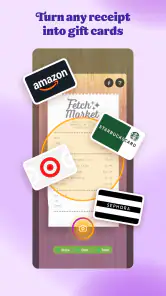
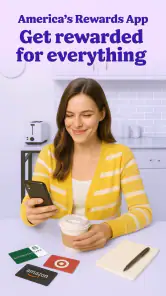
Alright, picture this: you’re out shopping, doing your usual errands, and then bam! You remember you’ve got all these receipts lying around. What if I told you that those receipts could be your golden tickets to some pretty sweet rewards? That’s where Fetch: America’s Rewards App comes in. It’s as easy as snapping a photo of your receipt and watching the points roll in.
That simple premise is the strongest reason I’d recommend giving it a try: there is no need to plan an entire shopping trip around the app. It can sit in the background of a grocery run or an everyday purchase, with receipt capture as a quick follow-up. I would not expect each scan to feel exciting on its own; the appeal is the gradual accumulation and the option to use points toward gift cards.
More From Our News Desk

Weather by Xiaomi Review: Clear at a Glance, Less Clear Up Close

X Under Pressure: Can It Recover When Posting Goes Wrong?

Clash of Clans Is Won Between the Battles

Android Auto Makes the Case for Quieter Car Software

MobiOffice: Transforming Mobile Productivity with Seamless Integration

EA SPORTS FC™ Mobile Soccer: Redefining Mobile Sports Gaming
Setup checks before you scan
Fetch is a free shopping app from Fetch Rewards, with a 4.7 average from around 1.5 million ratings and over 10 million installs. It is rated for Everyone, and version 4.22.1 runs on Android 8.0 or later. I’d check that the phone meets that minimum before troubleshooting an installation problem; an older operating system can be the obstacle, not the receipt workflow.
Once it is installed, I’d start with one recent, readable receipt and follow the in-app prompts rather than trying to process a stack at once. That gives you a straightforward way to see how scanning works on your device and makes it easier to spot a missed step. If you shop with someone else, agree who will handle each receipt so the same purchase is not accidentally treated as two separate tasks.
For a first scan, I’d choose a receipt that is easy to lay flat and photograph, then check that the picture includes the whole paper and its printed details. This is a useful setup test because it separates a basic camera or image issue from questions about how the app handles a particular purchase. Once that first attempt feels clear, you can make scanning part of your regular routine instead of learning the process when you are already in a hurry.
If you are deciding whether to keep the app, give the routine a fair test with purchases you would make anyway. The useful question is not whether you can earn something once, but whether you remember to scan often enough for the rewards to feel worthwhile. Keeping your expectations modest makes it easier to judge the app on convenience rather than on the excitement of a single receipt.
How Does It Work?
Here’s the lowdown: every time you buy something, just take a quick picture of your receipt using the app. Fetch then works its magic and rewards you with points for your purchases. These points can later be redeemed for a variety of gift cards. It’s like turning your everyday shopping into a game where you actually win prizes. And let me just say, it’s oddly satisfying to see those points add up.
The useful trade-off is that this is a small extra step after shopping, not a reason to make a purchase. I’d treat points as a bonus on items I already planned to buy, then browse redemption choices before deciding how much value the rewards have for me. If you need immediate cash back or want rewards tied only to a specific retailer, a dedicated alternative may suit that preference better.
A practical way to keep the habit from becoming a chore is to scan while you are already dealing with the receipt. For instance, after a grocery trip, I’d put the receipt on a clear surface, take the photo, and then file or discard the paper only after the app has processed it. That sequence avoids the common trap of saving several slips for later and then having to sort through them when the details are harder to read.
People often want to know whether Fetch is worth opening for a small purchase. I would not make a special trip or buy an extra item just to create a receipt; I’d scan a purchase when it is already part of my day and the paper is easy to capture. That keeps the rewards in perspective and prevents the points from becoming an excuse for unnecessary spending.
The User Experience
Navigating the app is a breeze, which is a big win in my book. The interface is clean and straightforward, so you won’t find yourself lost in a maze of unnecessary features. Plus, it’s super quick to upload receipts – no fuss, no muss. And the best part? You don’t need to jump through hoops to get your rewards. Fetch keeps it simple, just the way I like it.
If a receipt photo appears unclear or an upload seems interrupted, I’d first check the lighting, flatten the paper, and make sure the full receipt is in the frame. Then I’d retry when the connection is steady and keep the original receipt until the app reflects the scan. Those are practical first checks, not a guarantee that every scan issue will be solved that way; sometimes the delay or problem can be outside the phone camera itself.
Fetch also differs from coupon apps that ask you to plan purchases around offers. Its appeal is that receipt scanning can fit into shopping you already do, while the gift-card redemption gives points a clear purpose. The trade-off is that the payoff is not the same as an instant discount at checkout, so shoppers who want a lower total on today’s bill may prefer a coupon or store promotion.
Compared with a store loyalty app, Fetch is appealing when you shop across different places and do not want your reward routine to be tied to a single retailer. A store’s own program may be a better fit if you mainly shop at one chain and value its direct discounts or account-specific offers. I see the choice as a matter of shopping style: Fetch adds a receipt step across everyday errands, while retailer programs tend to make more sense when loyalty to one store is already part of your routine.
One helpful troubleshooting distinction is whether the issue is with the photo or with the next step after it. If the picture looks cut off, dim, or folded, retaking it is a sensible first move. If the receipt is clearly captured but the app still does not appear to move forward, I would avoid repeatedly submitting the same image in a rush; check the connection, give the process a moment, and follow the app’s on-screen guidance. Keeping the paper nearby gives you a way to retry without guessing at the printed details.
There are also times when the app may not be the real source of a problem. A receipt can be difficult to photograph because it is crumpled, faded, or printed unusually lightly, and a weak connection can interrupt an upload even when the camera did its job. I’d check those ordinary causes before reinstalling the app or assuming the purchase is ineligible. If the issue persists, the app’s own help options are a better next step than repeatedly taking nearly identical pictures.
Who will get the most from it?
If you’re someone who loves getting rewards without putting in too much effort, then Fetch might just be your new best friend. It’s perfect for those who want to make the most out of their shopping trips without having to change their habits. Just shop, snap, and earn. It’s really that simple!
I think it fits people who already keep grocery and everyday shopping receipts and are comfortable taking a few seconds to scan them. It is less compelling if you rarely shop, dislike managing paper receipts, or expect a large reward from a single purchase. A useful routine is to scan after each outing and check points and redemption options occasionally, instead of turning every shopping trip into a hunt for extra spending.
A realistic example is a weekly grocery trip followed by a quick receipt scan while the bags are being unpacked. Later in the week, a receipt from another planned errand can be handled the same way. That approach spreads the effort across moments that already exist, rather than creating a dedicated “rewards session” or keeping a growing stack of paper on the counter. It is a modest workflow change, but it is the difference between a useful habit and an app you forget about.
Fetch is less suited to someone who pays almost entirely without receiving paper receipts, shops infrequently, or wants savings to appear immediately at checkout. It may also frustrate a person who dislikes photographing documents or prefers every reward to be automatically applied without any follow-up. In those cases, a retailer’s own loyalty option, a coupon used before paying, or simply skipping rewards apps may be more practical than adding another task to the shopping routine.
Before deciding what the points are worth to you, look at the gift-card choices available in the app and consider whether they are useful for your spending. The reward has little practical value if you would not use the redemption options. This is a better way to judge fit than focusing only on a growing points balance, because it connects the app’s payoff to something you might genuinely want.
And hey, even if you’re not a frequent shopper, you’d be surprised at how quickly those points can add up. Whether you’re buying groceries, clothes, or even just a quick coffee, every little purchase counts. So, why not turn those everyday buys into something more?
My practical verdict
In a nutshell, Fetch: America’s Rewards App is like having a little rewards fairy in your pocket. It’s easy to use, rewarding, and honestly, a bit addictive in the best way possible. So go ahead, give it a try and see how much you can earn. Happy snapping!
My recommendation is to try it with your normal shopping rather than change what you buy for points. If you can keep the receipt-scanning habit and prefer flexible gift-card rewards over an immediate checkout discount, Fetch is an easy app to add to the routine. If scanning feels like another chore or you want a different kind of payoff, skipping it is reasonable; the app works best when the small effort suits how you already shop.
Ultimately, I’d judge Fetch by whether it quietly fits into your week, not by how often you open it. Make a scan part of putting away groceries, keep a receipt until processing is clear, and check that the gift-card options suit you before investing much attention. For a shopper who values small rewards from ordinary errands, that is a sensible bargain in effort. For someone who wants instant savings or no receipt handling at all, a more direct alternative will feel better.
Fetch: America’s Rewards App Frequently Asked Questions
Do I need an account to use Fetch?
Fetch is built around keeping rewards connected to a user, so you should expect to create an account before you can collect and manage points. That gives the app a place to track eligible shopping activity and your rewards balance. If you prefer not to set up an account with a shopping app, consider that before downloading.
Can I earn rewards without changing where I shop?
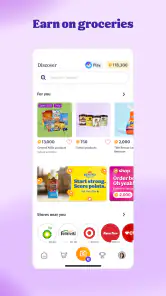
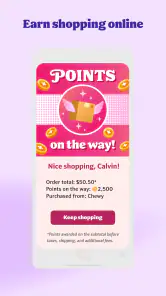
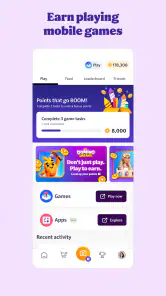
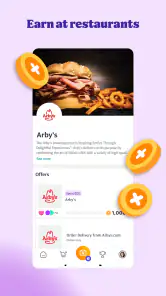
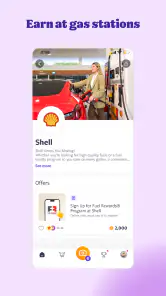
Fetch is intended to work with everyday shopping, rather than requiring you to switch to a particular store. Its rewards approach covers shopping and also includes activities such as playing games and ordering online. The best fit will depend on whether the brands, stores, and activities you already use are represented in the app and suit your routine.
Is Fetch: America’s Rewards App available for my phone?
Fetch is a shopping app for Android and iOS, so you can check your device’s app store to see whether it is compatible with your phone. The Android version requires Android 8.0 or later. It is free to download, and its Everyone age rating makes it suitable for a broad audience.
What can I do in Fetch besides scanning receipts?
Fetch is designed to offer more than receipt-based rewards. Its store description also highlights earning rewards when you play games and order online, giving you additional ways to engage with the app. The core idea is to turn everyday shopping and other eligible activities into rewards, rather than relying only on coupons or sale tracking.
What is Fetch: America’s Rewards App?
Fetch: America’s Rewards App is a mobile application that allows users to earn rewards and cashback by scanning their shopping receipts. The app partners with various retailers and brands, enabling users to collect points on their everyday purchases, which can be redeemed for gift cards and other rewards. It simplifies the rewards process by eliminating the need for clipping coupons or tracking sales.
Pros
- Easy to use interface.
- Earn points on every purchase.
- Wide variety of redemption options.
- Fast and reliable customer support.
- No hidden fees or charges.
Cons
- Limited to U.S. retailers.
- Requires access to personal data.
- Occasional app crashes.
- Some offers have restrictions.
- Points expire after inactivity.
- Category
- Shopping
- Version
- 4.22.1











