FaxReceive - receive fax phone
- 155.00
- 4.4
- Installs
- 50.00K
- Price
- Free

Screenshots

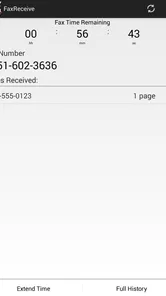
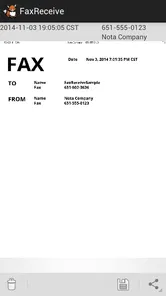
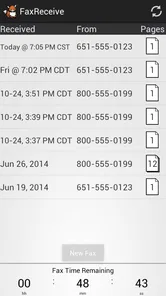

Analysis by Reviewed
I approached FaxReceive as a practical business tool rather than a general messaging app. Its purpose is narrow: it lets me receive faxes on an Android phone or tablet instead of depending on a traditional fax machine. That focus is useful when a clinic, office, insurer, landlord, or public agency still sends documents by fax, but it also means the app makes sense only when incoming fax access is part of my routine.
Developed by Actual Software Inc., this free app sits in the business category and is suitable for everyone. It has been available since October 27, 2015, and its listing shows over 50 thousand installs, with an average score of 4.4 from roughly 483 ratings and about 155 written reviews. Those figures suggest a reasonably established tool, although they do not change the central question: does receiving a fax on a mobile device fit the way I work?
How clearly the app works for different users
I find that the app’s usefulness depends less on how often someone opens it than on whether fax reception remains a recurring part of their work. In this section, I’ll look at how a narrow, mobile workflow can suit different routines, while also considering when a shared machine, email, or a broader fax service is the more dependable fit.
Readability and navigation in a focused business tool
The biggest advantage of a fax-only app is that I do not have to search through a crowded productivity suite to find the relevant function. Someone who already understands why they need fax reception can approach it with a clear goal: open the app, identify the receiving details, and wait for the document to arrive. That limited purpose can be easier to understand than a larger office application filled with unrelated tools.
For readers who depend on clear visual organization, a focused workflow is helpful. There are fewer concepts to learn than in a full document-management platform, and the app’s name immediately communicates its main job. I would still recommend spending a few minutes exploring the available screens before relying on it for an important document. Faxing is often tied to deadlines, and discovering an unfamiliar option while a sender is waiting is avoidable stress.
My practical advice is to prepare the app before the first urgent use. Check where incoming documents appear, how they are opened, and how they can be passed to another app or person. I would also keep the receiving details in a secure note or contact record that I can read easily. This small preparation step matters more than it may seem, especially for users who find rapid switching between screens tiring or confusing.
The app’s business focus also makes it easier to explain to another person. If a family member, assistant, or coworker needs to help, I can describe the task without teaching an entire office system. That is a quiet accessibility strength: a simpler purpose lowers the amount of memory and technical vocabulary required to get started.
More From Our News Desk

Weather by Xiaomi Review: Clear at a Glance, Less Clear Up Close

X Under Pressure: Can It Recover When Posting Goes Wrong?

Clash of Clans Is Won Between the Battles

Android Auto Makes the Case for Quieter Car Software

MobiOffice: Transforming Mobile Productivity with Seamless Integration

EA SPORTS FC™ Mobile Soccer: Redefining Mobile Sports Gaming
Motor and sensory considerations before relying on mobile faxing
Receiving a fax on a phone can remove the need to walk to a machine, handle paper, or operate a small physical control panel. That may be useful for someone with limited mobility, fatigue, or a workspace where a traditional fax machine is inconvenient. A tablet can also provide a larger surface than a phone, which may make reading and tapping more comfortable.
At the same time, mobile use introduces its own demands. I still need to locate controls on a touch screen, keep the device available, and inspect the received document. For users with reduced fine-motor control, a phone may be less comfortable than a computer or tablet, particularly if the workflow involves repeated tapping or moving between apps. I would choose the largest practical screen and use the device’s normal display settings to improve legibility.
Visual access depends heavily on the incoming fax itself. A poorly scanned document can be difficult to read regardless of the receiving app, and a phone screen may exaggerate that problem. I would avoid judging a document only from a small preview. When the content is important, opening it at a larger size or moving it to a device with better viewing space is a sensible part of the workflow.
Hearing-related needs are another consideration. Fax communication is valuable because it is document-based rather than dependent on a voice conversation, which can help people who prefer written communication. However, I would not assume that every status change is equally noticeable to every user. A person who may miss an alert should check the app directly at the expected time or use the phone’s broader notification and visual-alert settings where appropriate.
For users with cognitive or attention-related needs, the narrow purpose is a benefit, but faxing itself can still create uncertainty. A sender may say a document was sent without the recipient immediately knowing whether it arrived correctly. I find it useful to establish a simple routine: record who is sending the fax, note the expected timing, then check the app and the resulting document rather than relying on memory alone.
Situational access: where FaxReceive earns its place
The strongest everyday scenario is a small office or home worker who receives occasional paperwork from organizations that have not moved fully to email or online portals. Imagine waiting for an authorization form from a medical office while away from a desk. Instead of asking someone to monitor a shared fax machine, I can keep the receiving function with me, review the document when it arrives, and decide what needs to happen next.
This can also help people who work from changing locations. A traditional machine ties fax reception to one room, while a phone or tablet can travel with the user. That is valuable for a field worker, a home-based professional, or someone who shares office equipment. The benefit is not that faxing becomes modern in every respect; it is that the physical location of the receiving point becomes less restrictive.
There is a useful privacy angle as well. A document arriving on a personal device may avoid sitting unattended on a communal tray. I would still be careful about who can unlock the device and where the received file is later stored or shared. Mobile convenience does not automatically make sensitive paperwork private. The safest routine is to review documents in an appropriate place and remove unnecessary copies from other apps or folders.
For people who use assistive routines, a phone can fit more naturally into an existing setup than a standalone fax machine. A user may already know how to enlarge text, adjust contrast, use voice interaction, or hand the device to a support person. I cannot treat those general phone capabilities as special functions of this app, but they can make the overall task more manageable than operating unfamiliar office hardware.
Another situational advantage is continuity. If the office fax machine is occupied, out of paper, or located in a room that is difficult to reach, a mobile receiving option provides another route. I would not use it as an excuse to abandon a tested backup process, though. For important business documents, it is wise to confirm that the sender has the correct details and that someone can follow up if the transmission does not appear.
What it does not solve for every user
The app is not the right choice for someone who rarely receives faxes and has a reliable email or online document portal instead. In that situation, adding a fax-specific tool may create another place to monitor without offering a meaningful advantage. I would choose the simpler channel whenever the organization accepts it and the document does not require fax delivery.
It is also a poor fit for a business that needs a complete fax operation rather than reception alone. If I regularly need to send outgoing faxes, manage multiple users, archive documents, apply detailed permissions, or connect fax activity to a broader records system, I would look at a dedicated business service instead. A focused receiving app can be convenient, but it should not be mistaken for a full communications platform.
The free price makes trying it less intimidating, but the presence of in-app purchases ranging from about five dollars to around 140 dollars per item means I would review any purchase screen carefully before committing to a larger workflow. I would not assume that every useful capacity is included simply because installation costs nothing. Anyone managing expenses for a small business should test the basic process first and understand which optional costs may apply to their intended use.
There is also a human barrier that technology cannot remove: the sender must still use fax correctly. A mobile receiver cannot repair a wrong number, an unreadable original, or a transmission that was never completed. When a document matters, I would ask the sender to confirm completion and then inspect the received pages promptly. This two-step habit prevents the common mistake of assuming that “sent” means “usable.”
Users who need highly predictable accessibility behavior should evaluate the actual interface on their own device before making it part of a formal workplace process. Screen size, operating-system settings, input preferences, and personal comfort all affect the experience. I would not describe the app as certified for any particular accessibility standard; its practical value is better judged through a short real-world trial with the people who will use it.
Small workflow choices that make a real difference
My first recommendation is to create a receiving checklist that uses plain language. Include the sender’s organization, the expected document, the date it should arrive, and the person responsible for checking it. This is especially helpful when several people share responsibility or when a user has difficulty remembering whether a task has already been completed.
Second, separate receiving from processing. I prefer to confirm that a fax arrived before immediately forwarding, printing, renaming, or filing it. That pause makes it easier to catch missing pages or an unclear scan. It also reduces the chance of sending sensitive paperwork to the wrong destination while rushing through several touch-screen actions.
Third, use a tablet when the document will be reviewed carefully. A phone is excellent for portability, but a larger display is more comfortable for forms, small type, and multi-page paperwork. If I only need to know that something arrived, the phone is enough; if I need to compare figures or complete a response, I would move to a more suitable screen.
Finally, decide in advance what happens after receipt. A fax app solves arrival, not the whole office process. I would identify whether the document should be printed, stored, forwarded, entered into another system, or deleted after action. This is a particularly important distinction for users who need a predictable routine: the app can be one accessible step in the chain, but it does not replace the chain itself.
How it compares with familiar alternatives
Compared with a physical fax machine, the app is more flexible about location and avoids the need to stand beside a dedicated device. It may be easier for a home worker or someone who cannot comfortably reach shared office equipment. The trade-off is that the user must manage the mobile workflow and the resulting digital document rather than simply collecting paper from a tray.
Compared with email, fax reception is useful only when the other party insists on faxing or when an organization’s process is built around it. Email is usually easier for discussion, searching, and continuing a conversation, while fax can remain necessary in certain administrative settings. I see this app as a bridge for those situations, not as a reason to choose fax over a better digital channel whenever both are available.
Compared with a broad online fax service, FaxReceive may feel less overwhelming for someone whose only requirement is incoming documents. A larger service can be the better choice when a team needs administration, detailed history, or a more complete sending-and-receiving workflow. The decision comes down to scope: this app is attractive when simplicity and mobility matter more than a long list of office controls.
My inclusive verdict
I find FaxReceive most convincing for people who need a straightforward way to receive occasional business faxes on a phone or tablet. Its focused purpose can reduce physical dependence on a fax machine, fit a mobile routine, and support written communication without requiring a voice call. Those are meaningful advantages for home workers, small offices, and users who find a shared machine inconvenient.
Its accessibility value is practical rather than magical. A larger device, readable display settings, a clear checking routine, and careful document handling can make the experience much more inclusive. But users with demanding document workflows, strict administrative requirements, or a need to send faxes regularly should compare it with a fuller service before settling in.
Because it is free to install and aimed at everyone, I think a short, low-risk trial is sensible. I would test it with a non-urgent fax, confirm that the document is easy for the intended user to locate and read, and check the next step for storing or sharing it. If that trial matches the real need, this compact business app can be a useful way to make an old communication method less tied to a particular room or machine.
My final recommendation is therefore measured: choose it when receiving faxes is the specific problem, portability matters, and the people using it are comfortable with the phone or tablet workflow. Skip it when fax is already avoidable or when the organization needs a complete document service. In the right setting, FaxReceive turns incoming fax access into a more flexible mobile task, while still leaving the user responsible for checking, protecting, and processing what arrives.
FaxReceive - receive fax phone Frequently Asked Questions
Is FaxReceive suitable for business use?
FaxReceive is a business app for receiving faxes on a phone or tablet, which can be convenient for people who need to handle paperwork while away from a traditional fax machine. Its focused purpose may suit freelancers and small teams with incoming documents to manage. Consider how you handle confidential files and whether the service fits your organization’s workflow before relying on it for important business communications.
Which devices can I use to receive faxes with FaxReceive?
FaxReceive is intended for use on a phone or tablet, letting you receive faxes directly on a mobile device rather than using a physical fax machine. That makes it a practical option when you want incoming documents available on the go. Before installing, check that your device and operating system are compatible with the version available in your app store, and make sure you can access a reliable internet connection.
What is FaxReceive - receive fax phone used for?
FaxReceive - receive fax phone is designed to let users receive fax documents through a mobile device instead of relying on a traditional fax machine. It can be useful for individuals, freelancers, and small businesses that occasionally need to receive forms, contracts, medical records, or other paperwork. Before downloading, check whether the service supports your country and provides a fax number suitable for your needs.
Can I receive a fax without owning a physical fax machine?
Yes, the main purpose of FaxReceive - receive fax phone is to provide a digital way to receive faxes without purchasing or maintaining a physical fax machine. Incoming documents are generally handled through the app and may be delivered as digital files that you can view or save on your phone. You will still need an internet connection and an active service account or plan, depending on the app’s current requirements.
Is FaxReceive - receive fax phone free to use?
The app is free to download, but receiving faxes can involve subscriptions, credits, trial limitations, or other in-app charges. In-app purchases range from $4.99 to $139.99 per item, and pricing and included features may vary by platform, location, and plan. We recommend reviewing the payment screen carefully before starting a trial, especially the renewal terms, cancellation process, and any limits on the number of pages or incoming documents.
Pros
- Turns your phone into a convenient fax-receiving inbox.
- Useful for receiving documents while away from an office fax machine.
- Digital delivery reduces the need for paper and physical storage.
- Can help separate incoming faxes from personal phone calls.
- Suitable for occasional users who need a dedicated fax number.
Cons
- Availability of fax numbers may depend on your country or subscription plan.
- Incoming fax quality can vary with the sender’s machine and connection.
- You may need to pay for continued access after a trial or limited period.
- Not ideal for sending faxes if you only need the receiving feature.
- Sensitive documents stored in the app may require extra privacy precautions.













