FaxCover Pro Create Cover Page
- 30.00
- 4.9
- Installs
- 5.00K
- Price
- $1.99

Screenshots
Analysis by Reviewed
When a household or small team shares a phone, a fax task can quickly become a matter of coordination: whose document is this, who is allowed to send it, and where should the finished page go? FaxCover Pro Create Cover Page is a paid business app from Actual Software Inc. built around preparing a fax cover page. I see its value less as an all-purpose office suite and more as a focused tool for people who still need to handle occasional paperwork by fax.
A practical shared-device scenario
Imagine a family member needs to send a signed form while another person is using the household phone. A cover page can make the recipient and purpose clear before the form begins, which is useful when papers are being handled by more than one person. The app’s simple role is an advantage here: it helps with the cover sheet, rather than asking everyone to learn a broad office workflow.
That narrow focus also sets expectations. A cover page is not the same as a complete fax-sending service. If the goal is to transmit documents directly from a phone, check that the fax machine or other app in your workflow can accept the page you create. The app’s compatibility with other apps and fax machines is useful, but the actual sending step still depends on the setup you choose.
When the separate cover-page step is useful
I can see this fitting a small office or household that already has a reliable way to send faxes but wants cover sheets to be less improvised. For example, someone handling a school form, an insurance document, or a signed business page can prepare the identifying sheet separately, then pass it to the person or service responsible for transmission. That division can be clearer than handing over a phone with an entire fax workflow open.
The trade-off is that each handoff creates one more place for confusion. Before the page leaves your hands, match the recipient and purpose to the document itself, not just to what someone remembers from a conversation. A cover sheet can make a packet easier to route, but it cannot correct a wrong attachment or an outdated destination.
Making a fax workflow work for more than one person
With FaxCover Pro Create Cover Page, you can say goodbye to the hassle of traditional fax machines. The app offers a seamless and user-friendly interface that guides you through creating and sending a fax. Whether you're a tech whiz or someone who struggles with gadgets, you'll find this app incredibly intuitive. The process is straightforward: simply create a cover page, add your documents, and hit send. It’s as easy as sending an email!
Set clear boundaries before creating a page
On a shared device, I’d agree on a simple handoff routine before entering anyone’s paperwork: identify whose fax it is, confirm the destination details with that person, and avoid leaving a finished page open where the next user might mistake it for their own. This is ordinary device-sharing hygiene, not a special app feature, but it matters when cover sheets can contain personal or business contact details.
More From Our News Desk

Clash of Clans Is Won Between the Battles

Android Auto Makes the Case for Quieter Car Software

MobiOffice: Transforming Mobile Productivity with Seamless Integration

EA SPORTS FC™ Mobile Soccer: Redefining Mobile Sports Gaming

How Microsoft OneDrive Became a Mobile Productivity Giant

How Google Translate Breaks Language Barriers Effortlessly
For recurring household paperwork, keeping a short note of the intended recipient and purpose before starting can reduce last-minute edits. It also helps catch a common mistake: preparing a neat cover page for the wrong document or recipient. If several people use the same phone, take a moment to review the page together before passing it to the app or machine that will transmit it.
One useful habit is to treat each fax as its own small job rather than assuming the next person will understand an unfinished screen. Agree who will prepare the page, who will verify the paperwork, and who will send it. That may sound overly careful for a routine form, but it is especially helpful when one person is comfortable with the phone and another is responsible for the contents.
Customizable Cover Pages
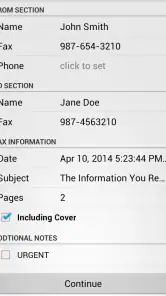
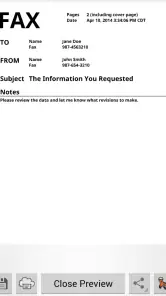
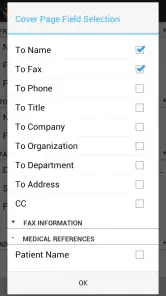
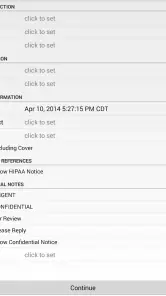
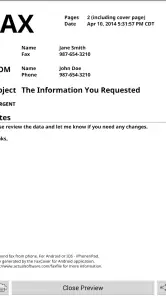
One of the standout features of this app is the ability to create customizable cover pages. You can choose from a variety of templates, or if you’re feeling creative, design your own from scratch. Add your logo, edit the text, and tweak the layout to fit your needs. This level of personalization is something you won’t find in many fax apps, and it can add a professional touch to your communications.
That flexibility is most helpful when the same person sends different kinds of paperwork. A consistent layout can make business correspondence look organized, while a more basic page may be better for a one-off personal form. My practical tip is to keep the cover sheet concise: include only details the recipient needs to route the fax, rather than turning the page into a second copy of the document.
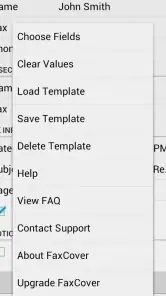
For a shared workflow, I’d also avoid making a template so specific that another household member could accidentally use it for a different purpose. A reusable layout should help with presentation, not silently carry forward the wrong recipient or context. Check editable details each time; consistency is useful only when it does not encourage people to skip that check.
Where it fits beside other fax options
Compared with a general-purpose mobile fax service, a dedicated cover-page tool can be a better fit when you already have access to a fax machine or prefer another app for transmission. You can keep the cover-page task separate and use the sending method that suits your office. The trade-off is that people looking for one place to scan, prepare, transmit, and manage every fax may find this narrower approach less convenient.
It is also different from making a cover sheet in a word processor. A document editor offers broad layout control, but it can take more effort to format a page that looks tidy and is easy to reuse. A focused cover-page app is appealing when speed and a purpose-built format matter more than full design freedom. If you rarely fax anything and already have a template that works, though, another purchase may not improve your routine enough to justify itself.
The deciding question is not simply whether you can make a cover page elsewhere; you usually can. It is whether having a dedicated place for that specific task reduces friction enough to matter. If your current office template is already easy to find, update, and pass between users, staying with it may be the sensible choice. If formatting from scratch is the part that repeatedly slows you down, a focused app has a clearer purpose.
Compatibility and Convenience
FaxCover Pro doesn’t just stop at cover pages. The app supports a wide range of document formats, including PDF and Word, making it incredibly versatile. Whether you’re a business professional needing to send contracts or a student sharing research papers, this app has got you covered. Plus, it works flawlessly on both Android and iOS, so you’re not tied to one platform.
Another great feature is its cloud integration. You can easily pull documents from your favorite cloud storage services like Google Drive or Dropbox. This means you can access and fax your documents from anywhere, anytime. Talk about convenience!
In everyday use, compatibility is only helpful if the document is ready to go. I’d check the source file before building the cover page, especially when a form has multiple pages or needs signatures. A quick review of page order and recipient information can prevent an avoidable second attempt. For a shared phone, it is also sensible to close out of the task once the right person has finished, rather than leaving paperwork visible for the next user.
A practical sequence is to gather the final document first, confirm that it is the version meant to be sent, and only then prepare the cover sheet. This avoids polishing a page around paperwork that later changes. When a document comes from shared storage, make sure the person sending it has selected the intended file rather than a similarly named draft; that simple check is more valuable than rushing through the cover page.
People often wonder whether a cover-page app replaces the equipment or service that actually transmits a fax. It does not change the basic division of work: you still need a compatible sending route, whether that is a fax machine or another app. I would check the handoff in your own routine before relying on it for a deadline, particularly if multiple people or devices are involved.
Age, trust, and sensitive paperwork
The app is rated for Everyone, but fax paperwork can still include private information, so age suitability is not the same as a reason to let children handle adult documents. I’d keep responsibility with the person who owns the paperwork, particularly for medical, financial, or legal forms. The app’s business purpose makes it most appropriate for adults or supervised older users who understand where a document is going.
In a household, the clearest boundary is about ownership rather than technical skill: the person whose information is on the form should approve the recipient and the final packet. A younger family member might be able to help with a routine step, but I would not treat the app’s age classification as permission to expose private records or make decisions on someone else’s behalf.
Security Features
In today’s world, security is paramount, and FaxCover Pro takes this seriously. The app employs robust encryption to ensure your documents are safe during transmission. This peace of mind is invaluable, especially when dealing with sensitive information.
Moreover, the app keeps a record of all your sent faxes, so you can easily track your communications. This is particularly useful for businesses that need to maintain a trail of their interactions.
For sensitive jobs, I would still treat a cover page and a transmission record as only part of a careful process. Confirm the fax destination independently, and make sure the person sending the document is comfortable with the receiving office and the device being used. When people share a phone, clear ownership of the paperwork matters just as much as a tidy record of the task.
That caution is not a reason to avoid digital preparation; it is a reminder not to confuse a polished page with a verified transmission. If the receiving office needs confirmation, the person responsible should check through the appropriate channel and keep whatever confirmation their normal process requires. The app can help organize the cover sheet, while the people handling the document remain responsible for the sensitive decisions.
Who should pay for it—and who can skip it
The app costs $1.99, and its business focus makes that easiest to justify for someone who sends faxes often enough to value a dedicated cover-page workflow. It has a 4.9 average from around 210 ratings, with over 5K installs, but those figures do not tell me whether it suits a particular household’s fax setup. I’d decide based on whether a reusable, purpose-built cover page saves you effort compared with your current method.
The release dates back to Apr 23, 2014, and the current version is 1.18, with Android 5.0 as the minimum operating-system requirement. That makes it worth checking device compatibility before buying, especially if you use an older phone. Someone who needs only a single cover sheet may be better served by a document editor or an existing office template; someone handling repeated business forms may appreciate having a dedicated tool instead.
For a household that faxes only once in a while, I would first compare the purchase with the time it takes to use an existing template. For a small business that repeatedly prepares cover sheets, the calculation is different: a consistent process may be worth more than the cost alone, especially when several people need to understand what belongs on the page. In either case, the app makes most sense when the cover page itself is the recurring bottleneck.
One practical question is whether it suits someone who wants to do everything from a phone. It may be part of that routine, but it should not be mistaken for a complete transmission service. If your priority is scanning, sending, and tracking in one place, choose a broader fax service instead. If you already have that part covered and only want a dedicated way to prepare the cover page, its narrower focus is more compelling.
Another question is whether a shared phone makes it unsuitable. Not necessarily: a clear handoff and careful review can make the workflow manageable. But if people regularly leave documents open, use one another’s files without checking, or cannot agree who is responsible for sending, the app will not solve those household habits. I would sort out that routine before making it part of a sensitive paperwork process.
In conclusion, FaxCover Pro Create Cover Page is a powerhouse app that simplifies the faxing process while offering a host of additional features. Whether you're sending faxes regularly or just occasionally, this app is a must-have. It combines ease of use with professional-grade features, making it a top choice in the realm of faxing apps. So next time you need to send a fax, ditch the old machine and let your smartphone handle the task with ease.
For a household, I’d call it a practical purchase only when someone has a real, recurring need to prepare fax cover pages and a separate way to send them. Its focused purpose can make shared paperwork easier to organize, but it does not remove the need to coordinate who is sending what or to check the destination. If that division of responsibility suits your routine, the app is worth considering; if you want an all-in-one fax service or almost never fax, I’d choose a different option.
FaxCover Pro Create Cover Page Frequently Asked Questions
What should I know about FaxCover Pro Create Cover Page before downloading it?
FaxCover Pro Create Cover Page is a Business app from Actual Software Inc. Its store summary describes it as a tool for creating fax cover pages that works with any app or fax machine. The app costs $1.99, has an Everyone content rating, and is listed as version 1.18, with Android 5.0 or later required.
What is FaxCover Pro Create Cover Page and what does it do?
FaxCover Pro Create Cover Page is a specialized app designed to help users create professional fax cover pages quickly and easily. It offers customizable templates tailored for various professional needs, allowing users to input their information and send faxes efficiently. This app is particularly useful for businesses and individuals who frequently send faxes and need a reliable and straightforward way to generate cover pages.
Is FaxCover Pro Create Cover Page user-friendly for beginners?
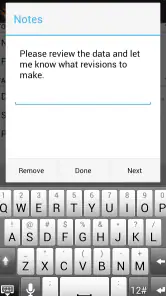
Yes, FaxCover Pro Create Cover Page is designed with a user-friendly interface that caters to both beginners and experienced users. The app features intuitive navigation and simple instructions, making it easy for users to select templates, input their details, and generate cover pages without any hassle. Even those with minimal technical skills can quickly become proficient with the app.
Does FaxCover Pro Create Cover Page offer customizable templates?
Absolutely, FaxCover Pro Create Cover Page provides a range of customizable templates to suit different professional needs. Users can modify the templates by adding their company logo, changing text fields, and adjusting formatting to create a personalized and professional cover page. This flexibility ensures that users can produce cover pages that align with their branding and specific requirements.
Can I use FaxCover Pro Create Cover Page for free or is there a cost involved?
FaxCover Pro Create Cover Page is priced at $1.99. Check the app store listing before downloading to confirm the purchase details for your device. This lets you decide whether the app suits your fax-cover-page needs before you commit to buying it.
Pros
- Intuitive user interface.
- Seamless fax sending feature.
- No ads or distractions.
- High-quality cover page templates.
- Fast processing and delivery.
Cons
- Requires in-app purchases.
- Limited free features.
- Occasional bugs in updates.
- No support for multiple languages.
- Needs internet for full functionality.
- Category
- Business
- Version
- 1.18













