FaxFile - Send Fax from phone
- 6.16K
- 4.9
- Installs
- 500.00K
- Price
- Free

Screenshots


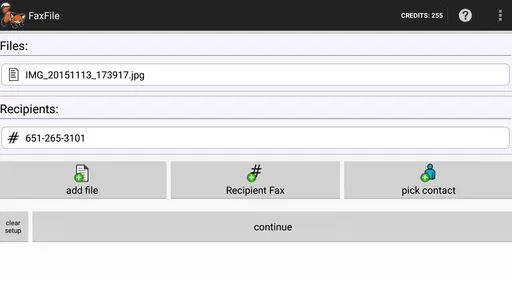
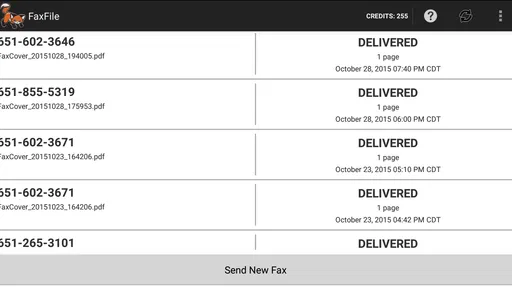
Analysis by Reviewed
Faxing from a phone sounds like the kind of task that should have disappeared years ago, yet many offices, clinics, landlords, schools, and public agencies still accept documents only by fax. That is where FaxFile makes sense. I found it most useful as a practical emergency tool: instead of searching for a fax machine or visiting a shipping store, I could prepare a document on an Android phone and send it from the same device.
My overall view is straightforward: this is a focused business app for people who occasionally need to send a fax and do not want dedicated equipment. It is not trying to replace a full document-management system, and that narrow purpose is actually its biggest strength. The experience is built around getting a file out quickly, especially common documents such as PDFs and Word files.
What using FaxFile feels like in everyday work
The app comes from Actual Software Inc. and belongs to the business category, although I would describe its role more specifically as a mobile fax utility. It is free to install and suitable for Everyone, which makes it approachable for a wide range of users. The product has been available since April 4, 2013, and its long presence is reflected in its established audience: it has passed half a million installs, with an average rating of 4.9 from roughly sixteen thousand ratings.
Those figures do not replace hands-on judgment, but they do match my impression that FaxFile solves a very particular problem reliably enough for people to keep using it. The app is not overloaded with unrelated tools. When I think of it, I think of one job: selecting a document on an Android phone and arranging for it to be faxed.
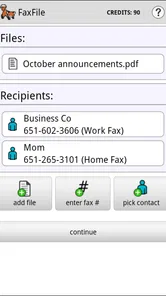
A realistic example would be a renter who receives a form that must be returned by fax before the end of the day. The form may already be stored as a PDF in email or cloud storage, or it may be a Word document downloaded to the phone. With FaxFile, the useful workflow is to locate that file, check that the pages are complete and readable, enter the recipient information carefully, and send it without first moving the document to a computer.
That convenience matters more than it may sound. The usual alternatives involve finding a physical fax machine, printing the document, scanning or feeding it, and possibly paying for each page at a service counter. A desktop fax service can be more comfortable for frequent business use, but it also means managing another account or moving files between devices. FaxFile sits in the middle: more convenient than hardware for occasional needs, but more specialized than a general cloud-storage or office app.
File handling is the practical center of the experience
The store description highlights support for many file types, including PDF and Word documents, and that is the part I would pay attention to before anything else. A phone fax app is only useful if it can work with the files people already have. In practice, I would prepare the document before opening FaxFile rather than trying to edit it at the last moment.
More From Our News Desk

Weather by Xiaomi Review: Clear at a Glance, Less Clear Up Close

X Under Pressure: Can It Recover When Posting Goes Wrong?

Clash of Clans Is Won Between the Battles

Android Auto Makes the Case for Quieter Car Software

MobiOffice: Transforming Mobile Productivity with Seamless Integration

EA SPORTS FC™ Mobile Soccer: Redefining Mobile Sports Gaming
That small change in habit makes the process safer. I would open the source file first, confirm that the text is not cut off, check that signatures or attachments are present, and make sure the pages appear in the right order. Faxing is not the place to discover that a mobile preview hid a missing page. The app can help transmit a file, but it should not be treated as a substitute for reviewing the document itself.
One useful workflow is to keep a clean final copy in the phone’s file storage with a clear name before sending it. For example, instead of choosing among several vague downloads, I would rename the document with the recipient and purpose. This is not a flashy feature, but it reduces the most common human error in mobile document work: sending an older draft simply because it was easier to find.
I also recommend checking whether the original file is genuinely ready for fax transmission. A heavily designed document may look fine on a modern screen but become difficult to read when converted through a fax process. Simple black text, clear spacing, and strong contrast are safer than tiny type, pale graphics, or decorative backgrounds. That is a trade-off of faxing itself, not something a sending app can fully correct.
Where the app saves time compared with a fax machine
The strongest part of FaxFile is the reduction in physical steps. There is no need to print a document merely to place it into a machine, and there is no need to be in the same location as an office fax. For someone working remotely, traveling, or dealing with an urgent form outside business hours, sending from a phone can be the difference between completing a task now and postponing it.
I can also see value for small businesses that fax only occasionally. A company that sends documents every day may prefer a more complete desktop workflow with shared records and centralized administration. A solo professional, however, may not want to maintain a fax machine for a handful of transmissions. In that situation, a focused mobile tool is easier to justify.
The app’s high average rating and large number of users suggest that this convenience resonates with people who have encountered exactly that situation. It is not a broad productivity suite, so its usefulness depends on whether faxing is a real part of your work. If it is, the narrow design feels sensible. If it is not, there is little reason to keep another specialized app around.
The important cost question
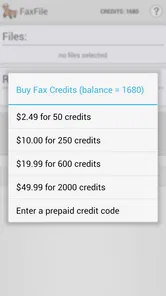
FaxFile is free to download, but in-app purchases range from about three dollars to around fifty dollars per item. That makes the word “free” worth interpreting carefully. You can install the app without paying upfront, but sending documents may involve purchase decisions depending on how much faxing you need to do and which option applies to your use.
I would therefore decide based on frequency rather than assuming it is automatically the cheapest fax method. Someone sending one urgent document may find the convenience worthwhile. Someone sending many pages every week should compare the total cost with a subscription-based online fax provider, an office plan, or a local service. A physical store may be less convenient but could be cheaper for a single short transmission in some locations, while a regular business plan may offer more predictable spending.
This is also where FaxFile differs from a conventional document app. A PDF reader or office editor may be free and excellent for preparing files, but neither one solves the transmission problem. FaxFile is valuable only after the document is ready. I would use a separate editor when changes are needed, then return to this app for the sending step rather than expecting it to provide a complete writing and signing environment.
Small details that deserve attention before sending
The first detail is the destination number. A fax can fail because of a simple dialing mistake, and a phone interface makes it easy to paste an extra character or overlook a regional requirement. I would copy the number from the recipient’s instructions, compare it character by character, and avoid relying on an old contact entry that may no longer be correct.
The second detail is page order. This matters especially when a document has been assembled from several files or downloaded in pieces. I would create one final file whenever possible. Sending separate items may create confusion for the recipient, while one clearly ordered document is easier to identify and review.
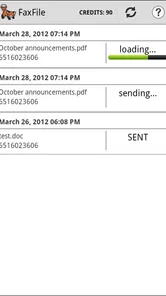
The third detail is confirmation. A user who needs proof of delivery should think about how the recipient will acknowledge the fax and how the sender will retain a record. I would keep the original document, note when it was sent, and save any available result or confirmation information associated with the transmission. That habit is important for medical, employment, housing, and administrative paperwork, where “I sent it” may not be enough if a deadline is disputed.
These steps are not glamorous, but they are where a mobile fax workflow succeeds or fails. The app can make access easier; it cannot correct a wrong number, incomplete attachment, unreadable scan, or missing follow-up.
Where FaxFile is less convincing
The main weakness is that mobile convenience can create false confidence. A phone is excellent for accessing a document quickly, but it is not always the best place to inspect a long or legally important file. Small screens make it easier to miss formatting problems, and a user rushing through the process may send the wrong version.
I also would not choose this app as the central fax system for a larger team without first considering the surrounding workflow. A business that needs shared access, organized archives, repeat templates, detailed administrative controls, or a unified history may be better served by a dedicated online fax platform. FaxFile’s focused approach is attractive for an individual task, but that same focus can feel limited when several people need to coordinate transmissions.
Another limitation is the uncertainty that can surround mobile connectivity. Sending from a phone depends on having a dependable internet connection and a document that the device can access correctly. If you are in a location with weak service, I would not wait until the last minute. Prepare the file earlier, check the connection, and leave enough time to deal with a failed attempt or contact the recipient by another method.
There is also a privacy consideration whenever sensitive paperwork passes through any fax service. I would avoid sending confidential documents casually, verify the recipient’s number, and confirm that the receiving side is ready. This is especially important when the fax machine is in a shared office or public area. The app can help you transmit from a private phone, but privacy at the destination still depends on the recipient’s setup.
Who will get the most from it
I think FaxFile is best for Android users who fax occasionally, already have their documents stored digitally, and value speed over a full office-management system. It suits freelancers, renters, students handling administrative forms, small business owners, and anyone who has been told, “Please fax this back,” while away from a traditional office.
It is particularly useful when the document is already a PDF or Word file and no major editing is required. In that case, the app removes the printer-and-scanner detour. It can also be a sensible backup for a small office that has a fax machine but sometimes needs to send something while staff are working elsewhere.
I would be more cautious about recommending it to people who fax large volumes, need a shared company archive, or require a carefully managed compliance workflow. Those users should compare a dedicated fax service before committing. Likewise, if nearly all your paperwork is created and sent from a desktop, a computer-based solution may feel more natural and provide better visibility over files and records.
For iPhone users, this particular Android-focused experience is not the obvious choice. The product’s appeal is tied to sending from an Android device, so people on another platform should look for an option designed for their phone rather than assuming that every mobile fax app works the same way.
My verdict after weighing convenience against control
FaxFile succeeds because it addresses an awkward but still real task without asking users to rebuild their entire document workflow. Its best quality is not a long list of extras; it is the ability to turn a ready-to-send file on an Android phone into a fax when a physical machine is inconvenient or unavailable.
The right way to use it is deliberately: prepare and inspect the document first, verify the destination, consider the purchase cost, and keep a record of what was sent. If you follow that process, the app can be a genuinely useful safety net for urgent paperwork.
My recommendation is clear: choose FaxFile if you need occasional mobile faxing and want a direct alternative to printing and visiting a service counter. Skip it in favor of a more structured fax platform if you send documents constantly or need team-wide administration. For its intended audience, the focused design is a strength, and the strong user response makes sense. It is a practical tool rather than an all-purpose office suite, and that is exactly why I would keep it in mind when a fax request arrives at the worst possible time.
FaxFile - Send Fax from phone Frequently Asked Questions
Can I use FaxFile to send a document while I’m away from my office?
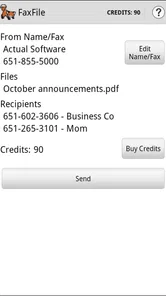
Yes. FaxFile is designed to send files from a phone, so it can be useful when you need to transmit paperwork away from a traditional fax machine. You select a supported file, enter the recipient’s fax number, and submit it through the app. An internet connection is needed, and you should check the document and number carefully before sending.
What kinds of files can I send with FaxFile?
FaxFile’s summary highlights sending files such as PDF and Word documents. It is intended for faxing documents from a phone, which can be handy for forms, contracts, and other paperwork. Before submitting a file, make sure it opens properly and its text or images are legible. Checking the file and recipient details first can help avoid an unnecessary resend.
Who develops FaxFile, and what do users think of it?
FaxFile is developed by Actual Software Inc. It has an average rating of 4.9 from around 16,000 ratings, with roughly 6,200 reviews, and it has over 500,000 installs. Those figures suggest that many people use the app, but ratings are only one part of deciding whether it suits your needs. Consider the supported files and the cost of sending faxes as well.
Is FaxFile available for Android and iOS?
FaxFile is described as a way to send faxes from a phone, and its summary highlights faxing files from Android. It is a business app for people who need to transmit documents without using a traditional fax machine. Before downloading, check that the version in your device’s app store supports your phone and operating system, since availability and compatibility can vary.
What does FaxFile cost, and are there in-app purchases?
FaxFile is free to download, but sending faxes can involve in-app purchases. The available purchases range from $2.99 to $49.99 per item, so the total cost depends on what you need to send and which purchase option you choose. Review the purchase details in the app before confirming a fax, particularly if you expect to send multiple documents or use the service regularly.
Pros
- Send faxes directly from your phone without a physical fax machine.
- Supports documents and images from several common file formats.
- Useful for sending faxes while traveling or away from the office.
- Delivery confirmation helps verify whether a fax was transmitted.
- Simple interface makes occasional faxing relatively straightforward.
Cons
- Fax credits can become expensive for frequent or lengthy transmissions.
- A reliable internet connection is required to send documents.
- Large files or many pages may take longer to process and upload.
- International fax availability and pricing may vary by destination.
- Some advanced business features may require additional purchases.













