Family Dollar
- 14.11K
- 3.7
- Installs
- 10.00M
- Price
- Free

Screenshots

Analysis by Reviewed
When I open the Family Dollar app for the first time, I expect a practical companion for shopping at Family Dollar rather than a replacement for every way I buy household essentials. It is a free shopping app from Family Dollar Stores, and its basic appeal is straightforward: help me plan a visit, check offers, and keep a short list of things to pick up. The app has a 3.7 average from around 39,000 ratings, so I’d approach it as a useful store-specific tool, not assume every shopper will find it flawless.
What to expect from a store-focused app
The main difference from a general shopping or grocery app is its close connection to Family Dollar’s own stores and offers. That focus can be handy when I already know I’m shopping there, but it makes the app less useful for comparing prices across several retailers. It is rated for Everyone and has been available since 2017; with over 10 million installs, it clearly serves a broad audience. I still think the best reason to try it is practical: you want to make one Family Dollar trip more organized.
For a first-time user, I’d keep the goal modest. Start by checking the weekly ad and searching for one item you already planned to buy. That gives you a quick feel for how the app presents its shopping information before you spend time building a longer list. The current version is 8.1.12, and the app’s overall purpose is simple enough that you don’t need to learn a complicated system to get started.
Shopping Made Simple
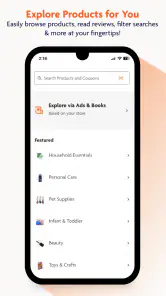
The first thing I noticed about the Family Dollar app is how user-friendly it is. Navigating through the app feels like a breeze. It’s got a clean, simple interface that doesn’t overwhelm you with unnecessary options. Whether you’re looking for groceries, household goods, or personal items, everything is just a few taps away. I particularly love the search function; it’s fast and accurate, so you can find exactly what you need in seconds.
Deals and Discounts Galore
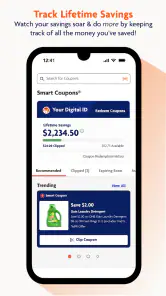
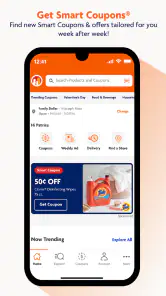
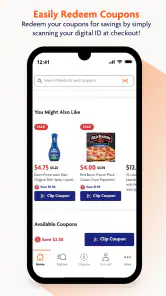
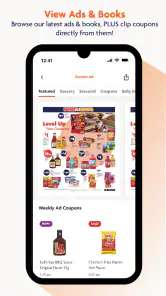
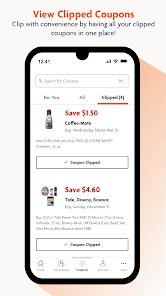
Who doesn’t love saving a few bucks? The app features a plethora of deals and discounts that are updated regularly. You can easily access these offers through the weekly ad section. Plus, the app allows you to clip digital coupons, which means you can save even more on your purchases. I’ve found this feature incredibly handy, especially when planning my shopping trips. It’s like having a personal assistant reminding you to save money!
My useful habit is to check the ad before making the list, then clip only coupons that match items I genuinely need. That order keeps the trip focused: an advertised deal is less persuasive when it sends me home with something I wouldn’t otherwise buy. I also glance over the list before leaving, since a coupon is only helpful if I remember the item and can find it in the store.
Seamless Shopping Experience
One of the standout features of the app is the seamless shopping experience. You can create a shopping list within the app, ensuring you don’t forget any of your essentials. Once you’re in the store, the app’s barcode scanner becomes your best buddy. Just scan the items to check prices and see if there are any applicable discounts. This feature is a game-changer, making your shopping trips not just effortless but also smarter.
More From Our News Desk

Weather by Xiaomi Review: Clear at a Glance, Less Clear Up Close

X Under Pressure: Can It Recover When Posting Goes Wrong?

Clash of Clans Is Won Between the Battles

Android Auto Makes the Case for Quieter Car Software

MobiOffice: Transforming Mobile Productivity with Seamless Integration

EA SPORTS FC™ Mobile Soccer: Redefining Mobile Sports Gaming
I’d use the scanner as a quick check, not as a promise that every item will have a deal. For a small basket, that can help me pause before choosing between similar products; for a rushed visit, scanning each item may slow me down more than it helps. A practical first success is simpler: add a few planned essentials to the list, check an offer, and use the list as a reminder once you arrive.
Picture a weekday evening when I’m already near a Family Dollar and realize I’m out of a couple of household basics. I can check the store locator, confirm which nearby location is convenient, and make a short list before heading in. That is where this app makes the most sense: it supports a specific errand without turning a quick stop into a full shopping project. If I need broad grocery comparisons or a retailer-neutral list, I’d use a general shopping app instead.
One point worth keeping in mind is that a store locator helps with choosing a destination, while the list and offers help with preparation; neither removes the need to check the actual shelf and checkout total. I’d treat the app as a planning aid and verify the item and price in person, especially when the purchase depends on a particular deal. That small bit of caution makes the savings tools more useful and avoids building a trip around an assumption.
The app suits people who visit Family Dollar often enough to benefit from its weekly ad, digital coupons, and store-specific planning. It is less compelling if you shop at many chains, prefer to compare a large range of retailers, or rarely use Family Dollar. The app is free, so trying it for a planned trip is a low-commitment way to see whether its workflow fits your habits; I wouldn’t install it expecting it to manage every part of a household budget.
If you’re wondering what to do after the first search, I’d save a short list for the next visit and build the habit of checking the ad before leaving home. Keep the list realistic, and use coupons only when they fit your needs. Family Dollar Stores says it continually evaluates the app experience, but my recommendation is based on what the tools are useful for today: straightforward preparation for a store visit, with some extra effort required to check offers and scan items.
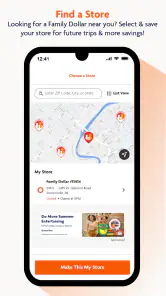
Another cool thing is the store locator. If you’re ever in an unfamiliar area, finding the nearest Family Dollar store is just a tap away. This is especially useful for those spontaneous shopping trips when you’re out and about.
Making the first visit smoother
For a first trip, I’d avoid trying to use every tool at once. Open the app while you have a few quiet minutes, choose a single purpose—say, locating a store or checking whether the weekly ad has anything relevant—and then stop when that task is done. This gives you a fair test of whether it saves effort without making the app itself another chore. If the store is already familiar, the list may be the better starting point; if you’re somewhere new, finding a convenient location can matter more than browsing offers.
A small but useful planning trick is to separate “must buy” items from “only if the deal is worthwhile” items in your own thinking, even if you keep them together in the app’s list. That prevents a coupon from changing the purpose of the trip. I’d also check the list before entering the store rather than trying to reconstruct it while moving through aisles. The app can hold the reminder, but deciding your priorities in advance is what keeps a quick errand quick.
Where the savings tools need a human check
Digital offers are most useful when I treat them as prompts to verify, not as automatic proof of the final price. Before relying on a coupon, I’d read its conditions in the app and make sure the product I intend to buy matches what the offer covers. Then I’d check the shelf label and the checkout total. This is especially sensible when there are similar package sizes or varieties: a familiar brand name alone may not be enough to tell whether a specific offer applies.
That extra attention is the trade-off with store-specific coupon features. They can make planning more deliberate, but they also ask me to spend time reviewing the terms and remembering to use the offer. If I’m buying only one or two basics and the trip is urgent, I may skip coupon hunting altogether. The best outcome is not collecting the most offers; it is finding a relevant saving without buying something unnecessary or adding friction to the errand.
Choosing between this and other shopping apps
Compared with a general grocery list app, this one is more useful when the destination is already Family Dollar because its ad, coupons, store locator, and shopping tools are tied to that retailer. A neutral list app is usually a better fit for a household that shops at several chains and wants one shared place to plan everything. Likewise, broad price-comparison tools are the more natural choice when the main question is where an item costs less across different stores.
I would not expect a store-focused app to replace checking other retailers when a purchase is expensive, specialized, or not time-sensitive. For everyday basics on a planned Family Dollar run, though, the focused approach can be more convenient than searching through a large marketplace full of unrelated options. The deciding question is simple: do you want help preparing for this particular store, or do you want to compare and coordinate shopping across many places?
Who will get the most from it
I can see the strongest fit for someone who makes repeat visits, likes to look at the weekly ad before leaving, and wants a reminder list that stays connected to a particular store. It can also suit an occasional shopper who is already heading to Family Dollar and wants to check the offers or find a nearby location without opening several separate tools. For a first-time user, the free price makes a short trial on a real shopping trip an easy way to judge whether those conveniences matter.
I’d skip it if you rarely shop at Family Dollar, already have a routine that works well with a different store, or need a single app to coordinate shopping across multiple retailers. I’d also avoid making it the center of a strict spending plan: a list and coupons can support good decisions, but they do not replace setting a budget or checking the total. Its value depends on how closely your real shopping habits match the store it serves.
Final Thoughts
In conclusion, the Family Dollar app is more than just a shopping tool; it’s a gateway to convenience and savings. With its intuitive interface, robust features, and fantastic deals, it’s a must-have for anyone looking to make the most out of their shopping experience. So, the next time you’re planning a shopping spree or just need to stock up on essentials, give this app a whirl. I promise, once you start using it, you’ll wonder how you ever shopped without it!
Family Dollar Frequently Asked Questions
Is Family Dollar available for both Android and iOS?
Family Dollar is a shopping app developed by Family Dollar Stores. Before downloading, check that your phone’s operating system meets the app’s compatibility requirements. On Android, it requires version 7.0 or later. The app is free to download and is rated for Everyone, making it suitable for a broad audience.
How much storage space does the Family Dollar app need?
The amount of storage an app uses can vary with its version and device, so it is sensible to check the download details on your device before installing Family Dollar. Once installed, you can decide whether its shopping tools are useful enough to keep. Family Dollar is free to download, and its store summary says the app is continually evaluated to provide the best possible experience.
Do I need a Family Dollar account to use the app?
Family Dollar is focused on shopping, and the app includes features described for accessing coupons and shopping. If you plan to use account-based features, you may need to sign in or create an account when prompted. You can download the app for free and explore its available options to see which ones fit the way you shop.
Can I shop in-store with the Family Dollar app, or is it only for online shopping?
Family Dollar is designed to support shopping from a mobile device, and its tools are relevant to both online and in-store shopping. The app includes digital coupons and a store locator, which may be useful when planning a store visit. Whether you prefer browsing on your phone or shopping at a nearby location, the app brings Family Dollar shopping features together in one place.
Is Family Dollar free to download, and what devices can run it?
Family Dollar is a free shopping app from Family Dollar Stores. It is rated for Everyone and requires Android 7.0 or later, so it is worth checking your device’s software before downloading. The app is intended to make shopping more convenient from a mobile device, while its store summary says the experience is continually evaluated.
Pros
- Easy to navigate interface.
- Regularly updated deals and discounts.
- Wide range of products available.
- Quick and efficient checkout process.
- Accessible customer support.
Cons
- Occasional app crashes.
- Limited online payment options.
- Requires frequent updates.
- Might have slow load times.
- Notifications can be overwhelming.
- Category
- Shopping
- Version
- 8.1.12











