

Fallout Pip-Boy SE Watch Face
- 357.00
- 4.7
- Installs
- 100.00K
- Price
- $1.99
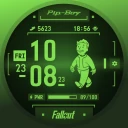
Screenshots

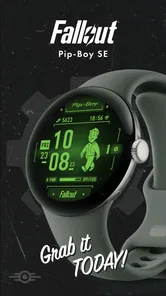
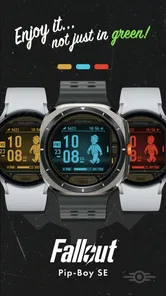

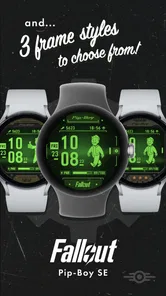
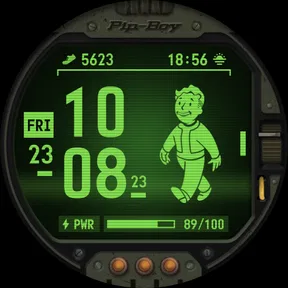
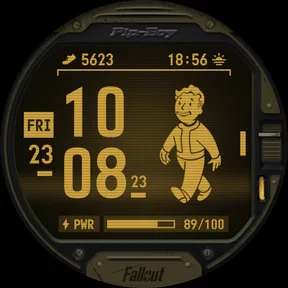
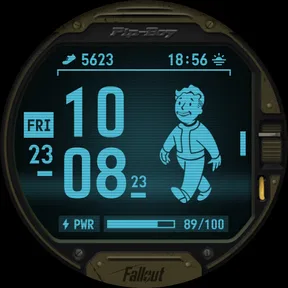
Analysis by Reviewed
I judge a watch face by more than its theme: I want to know whether I can read it quickly, whether the look suits daily wear, and whether it asks me to trade useful information for decoration. Fallout Pip-Boy SE Watch Face is aimed squarely at people who enjoy seeing the series’ retro-futuristic style beyond a game screen. It’s a paid personalization app from Facer Studios, priced at $1.99, and its Everyone age rating makes the presentation approachable for a broad audience. I’d think of it as a themed accessory, not a standalone Fallout game or a general smartwatch utility.
Trust, controls, and everyday use
There is a practical question before installing any watch-face app: will it work with my particular watch, and what will I need to do to make it useful? The experience described here is for Android smartwatches, so iPhone owners should not buy it expecting an iOS watch-face installation. Before paying, I’d check that my watch and its companion setup support the face. That simple compatibility check matters more than the theme, because a watch face is only worthwhile if it can actually be applied to the device I wear.
Useful details beneath the green look
This app is a nifty little gem that turns your Android smartwatch into a Pip-Boy from the Fallout universe. If you’re a fan of the series, this is like a dream come true. It’s got that classic green hue and retro-futuristic design that just screams post-apocalyptic chic.
First things first, it’s all about that authentic look. The creators did a fantastic job at capturing the essence of the Pip-Boy. Every time you glance at your watch, you’re reminded of those long nights exploring the wasteland. The app displays time, date, battery level, and even weather conditions, all wrapped up in that nostalgic Fallout style.
For day-to-day use, I’d treat the information on the face as a quick glance rather than a replacement for a phone weather app or a detailed battery screen. A fast look before heading out can help me check the time and whether the weather information is useful to me, while the battery indicator gives a reason to think about charging later. If weather matters for a specific plan, I’d still open my usual source for the fuller forecast; a themed watch face is best at making essentials visible, not at handling every detail.
Customization is a trade-off, not just decoration
One feature that I particularly enjoyed is the customizable interface. You can tweak the settings to show different stats, just like in the game. Plus, it has this cool animation that kicks in when you tap the watch face, adding a bit of flair to your daily routine.
That flexibility is worth using deliberately. I’d start by choosing the information I genuinely check while moving around, then leave out anything that turns the face into a crowded dashboard. A display that looks richly detailed in a still image can be harder to scan during a commute or while carrying bags. The tap animation adds character, but it’s a flourish rather than a reason to buy; if quick readability matters more to you than theme, a plain digital face may be the better everyday choice.
More From Our News Desk

 Gmail
GmailGmail in a Busy Inbox: Who Benefits Most?
From first account to crowded workday, Gmail earns its place through dependable search and flexible sorting—but its best fit depends on how much inbox maintenance you can tolerate.

 Prime Video
Switching to Prime Video: What Changes in Your Viewing Routine
Prime Video can make a compelling second home for streaming, but switching means learning a different catalog, rental layer, and route from browsing to playback.

 Universal TV Remote Control
Universal TV Remote Control Works Best as a Reliable Backup
A phone remote earns its place through quick setup and reliable habits. Here is how to get more from Universal TV Remote Control—and where its limits show.

 Weather - By Xiaomi
Weather by Xiaomi Review: Clear at a Glance, Less Clear Up Close
Xiaomi’s weather app makes everyday forecasts quick to scan, but its calm surface can leave useful details and recovery paths harder to find than they should be.

 X
XX Under Pressure: Can It Recover When Posting Goes Wrong?
A resilience-focused review of X, examining setup, mistaken posts, interruptions, weak connections, and the gaps that matter when recovery needs to be dependable.

 Clash of Clans
Clash of Clans Is Won Between the Battles
Its raids are quick; its community is a long-term project of coordination, teaching, rivalry, and shared responsibility—with all the friction that entails.
Latest News



Setup, compatibility, and the purchase decision
Setting up the Fallout Pip-Boy SE Watch Face is a breeze. Even if you’re not tech-savvy, you’ll find the process as simple as pie. Just download the app, sync it with your smartwatch, and voilà, you’re ready to roam the wasteland. The app runs smoothly without any noticeable lag, which is always a plus in my book.
One thing to note is that this app is exclusive to Android, so iOS users, unfortunately, won’t be able to join the fun. But hey, if you’re on Android, this is a fantastic way to add a touch of gaming nostalgia to your day-to-day life.
The listing shows a 4.5 average from around 2,600 ratings, alongside 100,000-plus installs. I see that as a sign that the design has found an audience, not as a guarantee that it will suit every watch or taste. The $1.99 price is a modest but real commitment for a single themed face: it makes sense if you expect to wear the Fallout look often, while anyone who changes faces constantly may get more value from a broader collection or a free option.
Where it fits in a routine
A realistic use case is a fan who puts the watch on before work, checks the time and battery while making coffee, and enjoys the Pip-Boy styling during the day without needing to open a game or phone app. The benefit is personal rather than essential: it turns a routine glance into a small bit of fandom. If you want neutral styling for formal settings, maximum simplicity, or a face that prioritizes information density over atmosphere, I’d choose another option. If you want your watch to feel like a recognizable piece of Fallout, this is much more specific than the usual minimalist digital faces.
What I would check before settling in
Because a watch face sits on a device you rely on, I’d make the setup a short trial rather than assuming the first layout is ideal. Check that the time is easy to read in your normal lighting, decide whether the displayed stats are the ones you actually use, and see whether the tap animation feels charming or distracting after repeated glances. If weather is important to your routine, confirm that the way it appears is convenient enough for a quick check. Those small tests help answer the practical question of whether the face is a daily choice or a novelty you’ll soon replace.
On trust, I keep my judgment within what I can assess from the experience: the visible watch-face controls let me adjust its presentation, but I wouldn’t treat customization as proof of anything about permissions, account settings, or data handling. Before installation, I’d review the permission prompts and any choices shown during setup, allowing only what I’m comfortable with. That’s a sensible habit for any connected watch app, especially one whose main appeal is visual rather than a service I need to use constantly.
A fan-focused recommendation with clear limits
To wrap it all up, the Fallout Pip-Boy SE Watch Face is a delightful addition to any Fallout fan’s gadget collection. It’s a quirky, fun way to keep track of time while paying homage to one of the most beloved franchises in gaming. So, if you’re looking to show off your love for Fallout, or just want a unique watch face to make your smartwatch stand out, give this app a whirl. Trust me, you won’t be disappointed.
My recommendation is for Android smartwatch owners who care about the Fallout aesthetic enough to use it regularly and are happy to spend $1.99 for that specific look. Facer Studios has released it as a focused personalization app, rather than a general-purpose dashboard, and its appeal depends on that focus. I’d skip it if iOS support, understated styling, or a purely practical display is essential to you. For the right fan, though, the memorable design and adjustable information make it a more personal choice than a standard clock face.
Fallout Pip-Boy SE Watch Face Frequently Asked Questions
What does the Everyone age rating mean for this watch face?
Fallout Pip-Boy SE Watch Face has an Everyone content rating, so it is presented as suitable for a broad audience. It is a personalization app built around the Pip-Boy look from Fallout, rather than a game to play on your watch. If you are choosing it for a younger user, the rating can help inform your decision alongside your usual preferences for apps and wearable content.
Who makes Fallout Pip-Boy SE Watch Face, and what kind of app is it?
Fallout Pip-Boy SE Watch Face is made by Facer Studios and belongs to the personalization category. Its purpose is to change the appearance of a compatible smartwatch with a Fallout-inspired design. The short description identifies it as Fallout Pip-Boy, while its main appeal is the Pip-Boy Special Edition watch face for users who want that distinctive interface on their wrist.
What features does the Fallout Pip-Boy SE Watch Face offer?
The Fallout Pip-Boy SE Watch Face offers a unique design inspired by the Fallout game series. It displays time, date, and customizable widgets like weather updates and step counts directly on your smartwatch. The interactive design replicates the Pip-Boy interface, adding a touch of nostalgia for Fallout fans.
Is the Fallout Pip-Boy SE Watch Face compatible with all smartwatches?
The Fallout Pip-Boy SE Watch Face is primarily designed for Android Wear OS watches. Users should verify compatibility with their specific smartwatch model before downloading. It's always recommended to check the app description and user reviews to ensure it works smoothly on your device.
Does the Fallout Pip-Boy SE Watch Face consume a lot of battery?
While the Fallout Pip-Boy SE Watch Face is designed to be efficient, it may use more battery compared to simpler watch faces due to its interactive elements and detailed graphics. Users can manage battery consumption by adjusting the watch face settings and limiting animations if needed.
Pros
- Authentic Fallout style
- Interactive widgets
- Customizable display
- Battery efficient
- Easy to navigate
Cons
- Limited to watch OS
- No voice commands
- Initial setup complex
- Paid app
- Limited language support













