Ductulator Pro
- 15.00
- 4.3
- Installs
- 5.00K
- Price
- $2.99

Screenshots
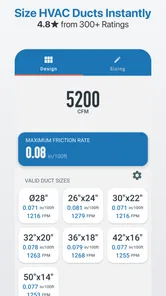
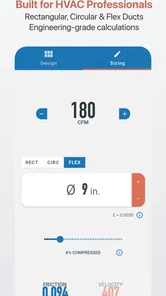
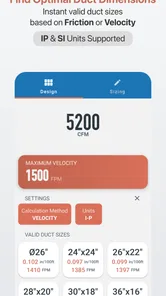
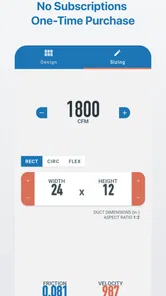
Analysis by Reviewed
On a small HVAC job, the sizing question often comes up before anyone is ready to sit down at a desk: a room layout changes, a route looks tighter than expected, or someone wants to compare a round duct with a rectangular option. That is the kind of moment when I see the value in Ductulator Pro. It puts a focused duct-sizing calculation on a phone, where I can check an option and then bring the result back to the people making the design or installation decisions.
I would use it as a practical calculator, not as a shortcut around engineering judgment. A result only helps if the airflow target, units, and project assumptions are right, and the app cannot decide whether a proposed route fits the building or suits the whole system. Its best role is narrower and more useful: helping me work through a duct-size question without losing the thread of the job.
Starting with the design question
Before opening a calculator, I want to know what decision I am trying to make. Am I checking a size already shown on a drawing, comparing shapes because ceiling space is limited, or getting a first estimate for a conversation? Those are different tasks, even if they begin with the same airflow requirement. Keeping the question clear helps me avoid treating a calculated dimension as a final answer.
A realistic example is a site discussion where a ceiling void turns out to be shallower than expected. I can use the app to explore a duct-size option while the team discusses the route, then take that result back to the drawing for a proper check. The useful outcome is not simply a number on a screen; it is a more informed conversation about what might fit and what needs further review.
I also make a point of checking units before entering values. Switching between metric and imperial work is convenient, but it creates an easy opportunity for a preventable input mistake. When a result looks reasonable, that can make a unit error harder to notice, so I treat the unit setting as part of the calculation rather than a minor preference.
How the calculation fits into a real workflow
Ductulator Pro is a focused productivity app for working out duct sizes from factors such as airflow, friction loss, and straight-line velocity. For me, that makes it useful at the point where a design question needs a quick calculation, while leaving the wider decisions about system design and installation to the people responsible for them.
From the job brief to a first calculation
The app is most useful when I already know what air-flow requirement I’m working toward and need to compare duct dimensions without breaking the flow of a job. Picture checking a proposed route while discussing a room layout: I can work through the sizing question on the phone, then take the result back to the drawing or conversation. That makes it a practical companion for a quick design check, not a replacement for deciding what the system actually needs.
More From Our News Desk

 Gmail
Gmail in a Busy Inbox: Who Benefits Most?
From first account to crowded workday, Gmail earns its place through dependable search and flexible sorting—but its best fit depends on how much inbox maintenance you can tolerate.

 Prime Video
Switching to Prime Video: What Changes in Your Viewing Routine
Prime Video can make a compelling second home for streaming, but switching means learning a different catalog, rental layer, and route from browsing to playback.

 Universal TV Remote Control
 Works Best as a Reliable Backup
A phone remote earns its place through quick setup and reliable habits. Here is how to get more from Universal TV Remote Control—and where its limits show.

 Weather - By Xiaomi
Weather by Xiaomi Review: Clear at a Glance, Less Clear Up Close
Xiaomi’s weather app makes everyday forecasts quick to scan, but its calm surface can leave useful details and recovery paths harder to find than they should be.

 X
X Under Pressure: Can It Recover When Posting Goes Wrong?
A resilience-focused review of X, examining setup, mistaken posts, interruptions, weak connections, and the gaps that matter when recovery needs to be dependable.

 Clash of Clans
 Is Won Between the Battles
Its raids are quick; its community is a long-term project of coordination, teaching, rivalry, and shared responsibility—with all the friction that entails.
Latest News



Before relying on any calculator, I’d make sure the inputs reflect the design brief and that the units match the project. A subtle but worthwhile habit is to check the unit setting before entering figures, especially when switching between a local job and plans prepared in another measurement system. That simple pause helps prevent a plausible-looking result from being carried forward with the wrong assumptions.
Choosing a shape and checking what the result means
One of the useful choices here is being able to work with both rectangular and round duct sizes. That matters when the available space is driving the discussion: a round option may suit one route, while a rectangular one may be easier to consider in a restricted ceiling area. The calculator can help compare sizes, but I would still check the actual route, fittings, clearances, and project requirements separately. A size that works on paper is not automatically a size that can be installed cleanly.
When I compare options, I try to change one decision at a time and keep the airflow target constant. That makes it easier to understand what the shape or dimension change is doing, instead of mixing several assumptions and losing track of why the result moved. It is a small working habit, but it makes a quick phone calculation more useful when I later explain it to a colleague.
What is Ductulator Pro?
It is a dedicated mobile tool for duct-sizing work rather than a general engineering notebook. The app is available for Android and iOS, and its purpose is specific: help users calculate duct dimensions from the conditions they are working with. I like that focus for a quick check, though anyone expecting a complete HVAC design environment should look elsewhere or pair it with broader software.
A straightforward interface, with a professional’s checks
The interface is clean, straightforward, and incredibly user-friendly. As soon as you open the app, you’re greeted with a simple menu that guides you through the process of entering your parameters. Whether you're a seasoned professional or a beginner, you’ll find the layout intuitive. The developers have done a fantastic job ensuring that the app is easy to navigate, and you won’t find yourself fumbling through endless options.
That simplicity is useful on a phone, where a long menu would slow down a quick comparison. It does not remove the need to know what values belong in the calculation, though. A student can use the tool to test how a sizing choice changes a result, but should still learn the underlying method and have their work checked. A professional can move faster, but remains responsible for confirming that the inputs represent the design brief.
Working across units and keeping projects together
Another feature worth mentioning is the ability to save your projects. This means you can return to your calculations anytime without having to start from scratch. It’s a small feature, but trust me, it makes a big difference in workflow efficiency.
The option to switch between metric and imperial units is handy when projects or references use different systems. I would avoid relying on memory when returning to saved work: record the purpose of a calculation in the project context, and check that the units still match the drawing or brief you are using. That is especially helpful when a calculation is revisited after a design change rather than made and passed along immediately.
Passing a result to the next person
Saved work is especially handy when a design is being revised. I’d keep calculations organized around the job or design decision they belong to, rather than treating every result as an isolated number. When a colleague, installer, or client asks why a size was chosen, having the relevant project calculation to revisit makes that handoff clearer. The app helps retain the working reference; the person passing it along still needs to explain the assumptions behind it.
For a handoff, I would pair the result with a short note about what question it answers: for example, whether it was a comparison for a particular route or a check against a known airflow requirement. That context reduces the risk of someone reading a useful calculation as blanket approval for the entire layout. The app supports continuity, but clear communication is still part of the work.
For a quick on-site check, I’d also note the conditions that matter outside the calculator, such as the intended route and any constraints in the space. A calculated size is a useful starting point, but it doesn’t decide whether a duct can physically fit or whether the whole layout works. That distinction is important for DIY users too: the app can support a sizing decision, while installation planning and code or system requirements still need proper attention.
Where the workflow can break
The main friction is not navigating the app; it is knowing whether the calculation is being used in the right context. If the airflow target is uncertain, the units are wrong, or the route has constraints that have not been considered, a tidy result can create false confidence. I would stop and verify the brief before using the output in a design discussion, especially if the result would affect an installation decision.
Another limitation is scope. The app is a calculator, not an automatic plan review or a substitute for a complete HVAC design process. It will not settle questions about the full system, site conditions, or whether an installation meets the requirements that apply to a project. If the task is to coordinate many drawings, track revisions across a team, or manage a complete design, a broader engineering tool is the better fit.
How it compares with familiar alternatives
For an occasional estimate, a general web calculator can be enough, particularly if I am already at a computer and do not need to keep a calculation with a project. A spreadsheet offers more freedom to build a custom workflow, but it also depends on someone setting up and checking the formulas. A manual reference can be valuable for understanding the method, though it may take longer when I simply want to compare a couple of duct options during a site conversation.
This app sits between those choices: more focused and portable than a broad spreadsheet, but less comprehensive than design software. That trade-off makes sense if duct sizing is a recurring part of my work. It is less compelling if I rarely need the calculation, or if my main need is drawing coordination rather than sizing. I would not choose it because I expect it to replace the rest of an HVAC toolkit; I would choose it to make one specific step easier to repeat.
Who is likely to get value from it?
This is a focused productivity app from welmurr, and that focus is both its appeal and its limit. HVAC professionals and engineering students who regularly size ductwork are likely to get more from it than someone handling a one-off home project. If you only need an occasional estimate, a general web calculator may be enough; if you need a repeatable mobile tool for comparing round and rectangular options, a dedicated calculator is easier to keep within reach than a broad spreadsheet or a manual reference.
It is also a reasonable companion for someone who needs to discuss duct dimensions away from a desk, provided they already understand the inputs and treat the output as part of a larger design process. DIY users may find it useful for learning what a sizing calculation involves, but I would not recommend using it as the sole basis for a home installation. If the task calls for professional design review, compliance checks, or coordinated plans, the right next step is expert help or dedicated design software.
It is not a full HVAC design package, and I wouldn’t treat a duct-size result as a complete design approval. You still need to interpret it in context and check the larger system and installation constraints. People looking for automatic plan takeoffs, collaboration features, or a complete project-management workflow should choose a broader tool instead. The app’s focused approach is valuable precisely when the task is calculation, not when the job requires those wider capabilities.
Cost, compatibility, and expectations
The app costs $2.99, carries an Everyone age rating, and has an average rating of 4.3 from around 250 ratings, with over 5,000 installs. It was released on October 29, 2022, and version 1.3.2 requires Android 8.0 or later. I’d consider the price most worthwhile if duct sizing comes up repeatedly in my work; for a single calculation, it may be harder to justify than using an alternative already available to me.
That price decision is really about frequency and convenience. If I am regularly checking dimensions in meetings or on site, having a dedicated calculator close at hand can save the stop-start of finding a reference or reopening a spreadsheet. If I only encounter duct sizing once in a while, the convenience may not justify paying for a specialized tool. I would also check that my device meets the Android requirement before deciding, while iOS users should assess availability on their own device.
What I would expect from a good result
I would expect the app to help me reach a usable sizing comparison, not to tell me that a design is ready to build. After a calculation, I would take the result back to the drawing, check the route and surrounding space, and confirm the assumptions with whoever owns the design. That sequence keeps the calculation useful without giving it more authority than it deserves.
For a student, the best use may be comparison: hold the brief steady, try a different duct shape or size, and consider how the output changes. For a working engineer, the best use may be speed: answer a narrow sizing question while keeping the job conversation moving. In either case, the result becomes more valuable when it is attached to its purpose and reviewed alongside the rest of the system.
My recommendation for the right kind of job
If you’re in the HVAC industry or even dabbling in home improvement projects that involve ductwork, Ductulator Pro is an app you should seriously consider. It’s like having a trusty sidekick that ensures your duct sizing is spot on, saving you time and potential headaches down the road.
In conclusion, Ductulator Pro is a must-have app for anyone who needs reliable and quick duct sizing calculations. Its user-friendly interface, robust features, and reliable performance make it a standout choice in its niche. Give it a try and see how it can streamline your projects!
My recommendation is strongest for someone who will use the saved calculations and unit switching as part of a regular workflow, then pass the result into a separate design or installation process. If you’re deciding whether it suits you, ask yourself whether you need a dedicated duct-sizing calculator often enough to value having one on your phone. For that specific job, it offers a direct route from inputs to a result; for broader HVAC planning, I’d pair it with the appropriate design tools rather than expecting this app to do everything.
Ductulator Pro Frequently Asked Questions
How much does Ductulator Pro cost, and what should I know before purchasing it?
Ductulator Pro is a paid productivity app priced at $2.99. It is intended for duct-sizing work in HVAC design, so consider whether that purpose matches your needs before downloading. Its Everyone content rating makes it suitable for a broad audience, while its focused function is most relevant to people who need a duct size calculator.
What is Ductulator Pro and what are its main features?
Ductulator Pro is a highly efficient app designed for HVAC professionals to quickly calculate duct sizes and airflow. It features an intuitive user interface, supports both imperial and metric units, and allows users to perform calculations with precision. Its robust database and real-time updates ensure accurate and up-to-date results, making it an essential tool for anyone in the HVAC industry.
Is Ductulator Pro available for both Android and iOS devices?
Yes, Ductulator Pro is available for download on both Android and iOS platforms. Users can easily find the app on Google Play Store for Android devices and the Apple App Store for iOS devices. This cross-platform availability ensures that HVAC professionals can access the app on their preferred device without any hassle.
Does Ductulator Pro require an internet connection to function?
No, Ductulator Pro does not require an internet connection to perform its core functions. Users can calculate duct sizes and airflow offline, making it convenient for use in areas with limited or no internet access. However, an internet connection might be needed for receiving updates and accessing additional online resources.
Are there any in-app purchases or subscriptions in Ductulator Pro?
Ductulator Pro operates on a freemium model, where the basic version of the app is free to download and use. However, it offers additional features and tools through in-app purchases or a subscription plan. These additional features are designed to enhance user experience, providing more detailed analytics and customizability for advanced users.
Pros
- Intuitive user interface
- Accurate calculations
- Lightweight and fast
- Offline functionality
- Comprehensive duct sizes
Cons
- Limited free features
- No cloud sync
- Requires technical knowledge
- Occasional bugs
- No customer support chat