

Drive Weather With Live Radar
- 663.00
- 4.6
- Installs
- 100.00K
- Price
- Free
Screenshots
Analysis by Reviewed
For me, the useful question before a road trip is not just whether it will rain, but where the weather might become difficult while I’m actually on the road. Drive Weather is built around that planning problem: instead of treating a forecast as a snapshot of one town, it lets me consider conditions along a journey. That makes it most interesting to drivers who want to make a more informed departure-time or route decision, rather than people looking for a general-purpose forecast to check once and forget.
What I expect from its speed
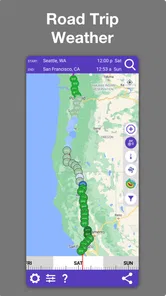
A route forecast has more to communicate than a single local-weather screen, so I judge its speed by how quickly I can get from a planned trip to information I can act on. The basic workflow is easy to understand: enter a start and destination, review the route, and consider what the weather may look like along it. The map-first approach helps me orient myself without having to mentally combine forecasts for several separate places.
That said, a map is a heavier thing to load than a short list of temperatures. The published experience notes that maps can occasionally lag on slower networks, and that is a meaningful caveat if I am trying to plan while travelling or using a weak connection. I would prepare the route before leaving rather than wait until I am already on the road and in a hurry. I also would not treat a momentary delay as a reason to keep interacting with the phone while driving; the useful work belongs before departure or during a safe stop.
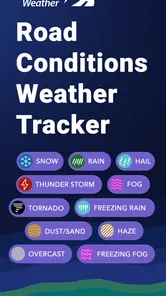
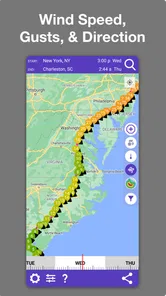
The app’s focus on road conditions, radar, wind, snow, and weather along a route gives it a different job from a basic forecast app. It is not necessarily the quickest option for answering “Is it raining where I am right now?” A standard local forecast may be more direct for that. Drive Weather earns its place when the question is instead, “What could I meet between here and there, and would shifting my plans help?”
Navigating Through Weather with Confidence
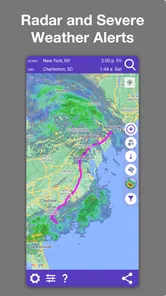
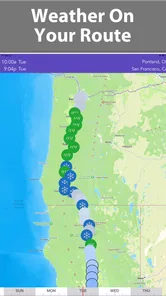
When it comes to planning a road trip, the weather can often be the most unpredictable factor. With Drive Weather, you get a visual representation of the weather conditions you'll encounter along your route. The app pulls weather forecasts from the National Weather Service, ensuring that you get the most accurate and up-to-date information.
Easy to Use Interface
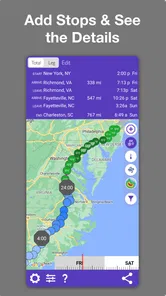
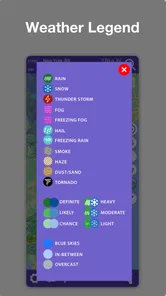
One of the first things that struck me about this app is its intuitive user interface. Upon launching the app, you're greeted with a clean and straightforward map. Simply input your starting point and destination, and voila! The app swiftly provides you with a detailed forecast, marked by various icons representing different weather conditions like rain, snow, or sunshine.
For a practical trip-planning routine, I would check the route once when I first decide to travel, then revisit it closer to departure if the weather looks unsettled. That second check is useful because the first forecast is a planning aid, not a guarantee that conditions will stay unchanged. I would also look at the route as a sequence of places and times rather than reading one symbol as a verdict on the entire drive. A patch of rain on one stretch may matter differently from snow or strong wind where I expect to spend more time exposed to the road.
More From Our News Desk

 Gmail
GmailGmail in a Busy Inbox: Who Benefits Most?
From first account to crowded workday, Gmail earns its place through dependable search and flexible sorting—but its best fit depends on how much inbox maintenance you can tolerate.

 Prime Video
Switching to Prime Video: What Changes in Your Viewing Routine
Prime Video can make a compelling second home for streaming, but switching means learning a different catalog, rental layer, and route from browsing to playback.

 Universal TV Remote Control
Universal TV Remote Control Works Best as a Reliable Backup
A phone remote earns its place through quick setup and reliable habits. Here is how to get more from Universal TV Remote Control—and where its limits show.

 Weather - By Xiaomi
Weather by Xiaomi Review: Clear at a Glance, Less Clear Up Close
Xiaomi’s weather app makes everyday forecasts quick to scan, but its calm surface can leave useful details and recovery paths harder to find than they should be.

 X
XX Under Pressure: Can It Recover When Posting Goes Wrong?
A resilience-focused review of X, examining setup, mistaken posts, interruptions, weak connections, and the gaps that matter when recovery needs to be dependable.

 Clash of Clans
Clash of Clans Is Won Between the Battles
Its raids are quick; its community is a long-term project of coordination, teaching, rivalry, and shared responsibility—with all the friction that entails.
Latest News



This way of reading the map is one of the app’s more useful subtleties. It encourages me to ask where a problem could occur and whether timing gives me a safer alternative, instead of reducing the whole trip to a single “good” or “bad” weather label. It cannot make the driving decision for me, but it can help me identify the part of the journey that deserves another look.
Features That Stand Out
What I absolutely adore about this app is the ability to adjust your departure time to see how the weather changes. If you're like me and prefer to avoid driving in heavy rain or snow, this feature is a game-changer. You can tweak your start time and see a revised forecast, helping you choose the best time to hit the road.
I find that most useful when a trip is flexible by an hour or two. Rather than immediately cancelling a journey because one forecast looks unpleasant, I can compare a later start and think about whether the weather along the route may be more manageable. The trade-off is that a revised forecast should inform a decision, not promise that the roads will be safe. If conditions are severe, waiting, changing the trip, or following local safety guidance is more sensible than relying on a map to settle the question.
Another noteworthy feature is the option to switch between different routes. The app doesn’t just show you one way to get to your destination; it offers alternatives, each with its own weather forecast. This gives you the flexibility to choose the safest or most scenic route, depending on your preference.
A non-obvious way to use that choice is to compare the weather cost of a route with its practical cost. A detour might avoid a rougher forecast, but it may also add time or take me away from the roads I know. I would use the route alternatives to surface that trade-off, then decide whether the weather difference is significant enough to justify changing plans. This is especially helpful for a long drive where conditions can vary across a broad area, but less valuable for a familiar short commute with only one sensible road.
Handling a busy travel day
Consider a realistic weekend drive: I have a family visit planned, rain is expected somewhere along the way, and I can leave either early or later in the morning. I would enter the trip before the day begins, compare the departure options, then check whether an alternate route changes the weather I might encounter. If the map suggests the difficult patch lines up with the busiest or least convenient part of the drive, that gives me a concrete reason to discuss leaving earlier, delaying, or taking another road.
For a driver who regularly crosses different weather zones, this is more useful than opening a town-by-town forecast and trying to piece together a moving picture. It can also help someone carrying passengers or time-sensitive belongings plan sensible breaks and avoid making a rushed choice at the last moment. The app does not replace navigation judgment or on-the-road awareness; its value is in giving me a more focused planning conversation before the engine is running.
During heavier planning, I would avoid trying to evaluate every possible route and departure combination. Too many comparisons can create a false sense of precision, especially because forecasts are not promises. I would narrow it to the route I expect to take, one realistic alternative, and a small number of departure times that I could actually manage. That keeps the app’s information useful instead of turning trip preparation into endless map-checking.
For a one-off drive, the route view may be all I need. For a longer journey, I would treat it as a checkpoint tool: plan before setting out, reassess only when safely stopped, and use current road information and common sense if conditions change. A weather-planning app is most helpful when it reduces uncertainty; it becomes a distraction if I keep looking at the screen while moving.
Where it fits beside other weather apps
Compared with the usual local-weather app, Drive Weather is more route-oriented. A standard forecast is often simpler for checking today’s temperature, deciding what to wear, or seeing whether rain is likely near home. A navigation app, meanwhile, is usually the natural choice for turn-by-turn directions and traffic decisions. Drive Weather sits between those habits: its distinct purpose is to help me think about weather across the drive, including how a different departure time or route could change the picture.
I would not replace every weather or navigation tool with it. Someone who mainly wants radar for a walk, a quick local forecast, or directions through city traffic may be better served by an app focused on that task. Drivers planning longer trips through changing conditions are the stronger fit. Used alongside a navigation app, it can inform the decision before departure without pretending to be a substitute for navigation itself.
There is also a useful distinction between planning detail and certainty. Seeing weather on a route can make a forecast easier to apply, but it cannot remove the limits of forecasting or account for every road-level change. I would use the information to compare options and prepare, then stay willing to revise the plan if conditions on the day differ from what I expected.
Reliability, connection, and device fit
The main reliability concern I would keep in mind is the stated occasional map-loading lag on slower networks. Since maps are central to the experience, a weak connection can make the part I most want to inspect less convenient. My practical workaround is simple: do the planning while I have a dependable connection, allow time for the map to load, and avoid leaving the first route check until the last minute. If I need to make a change during the drive, I would pull over safely before using the phone.
On a compatible device, the minimum operating system requirement is Android 7.0, so people using older Android phones should check compatibility before building a routine around it. The app is also available on iOS. I would not assume that any phone will feel equally responsive, particularly when map loading depends on the network as well as the device. For a driver with an older handset or limited connectivity, testing a short route at home is a sensible way to learn whether the experience suits their setup.
Drive Weather is free to download, with in-app purchases listed from $5.99 to $17.99 per item. I would start by trying the basic planning workflow on a route I already know, then consider any purchase only if the app’s approach fits how often I travel. Its age rating is Everyone, which makes the store’s content classification broadly accessible, though the app is still most useful to the person doing the trip planning.
Concept Elements LLC is the developer. The app has an average rating of 4.6 from around 1.1 thousand ratings, alongside 568 written reviews, and has been installed over 100 thousand times. It was released on December 28, 2018, and its current version is 10.19.1. Those figures offer context about its presence in the category, but I would put more weight on whether its route-based view answers my own travel question clearly.
Who will get the most from it
I think it is a good match for people who make longer drives, travel through regions where conditions vary, or need to decide whether shifting a departure time is worthwhile. It is also useful for cautious drivers who want to inspect weather before committing to a route, provided they understand that a forecast is guidance rather than a safety guarantee. The route and timing perspective is the reason to choose it, not simply the fact that it displays weather.
I would skip it if I rarely drive beyond my local area and only need a quick answer about the weather outside. I would also look elsewhere if my priority is live traffic directions, detailed local radar, or a forecast for outdoor activities rather than road planning. In those cases, a focused weather or navigation app is likely to feel more direct. And if I have unreliable connectivity and cannot check the route in advance, the map-loading limitation matters more than it would for someone who usually plans at home.
One question people may have is whether they need to change their route every time the app shows a weather concern. I would not use it that way. A forecast is one input alongside road conditions, the length and importance of the trip, and my own comfort driving in those conditions. Often, the useful outcome is simply choosing a more convenient departure time or deciding to check again before leaving.
Another practical question is whether it is worthwhile for a short drive. It can be, if the route crosses an area where weather could change the decision, but the extra planning may be unnecessary for a routine trip with little flexibility. I would reserve the detailed comparison for journeys where the route, timing, or conditions give me a real choice to make.
Why You Should Consider It
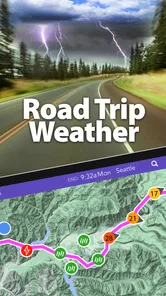
Imagine setting off on a road trip without worrying about sudden weather changes. With Drive Weather, that dream becomes a reality. It’s like having a personal weather forecaster riding shotgun with you. The peace of mind this provides is invaluable, especially if you're traveling with family or for business.
Moreover, the app is available on both Android and iOS, making it accessible to a wide range of users. Whether you're a seasoned traveler or someone who just enjoys the occasional weekend getaway, this app is tailored to enhance your driving experience.
If there's one thing that could be improved, it’s the occasional lag when loading maps on slower networks. But honestly, that’s a minor hiccup compared to the wealth of benefits this app brings to the table.
In conclusion, Drive Weather is more than just a weather app; it’s a travel companion that ensures you reach your destination safely and comfortably. So next time you're planning a trip, remember to check the weather—or better yet, let Drive Weather do it for you.
Drive Weather With Live Radar Frequently Asked Questions
Can Drive Weather help me decide when to start a long drive?
It is designed to help with weather-aware trip planning by showing road conditions along a driving route, including rain, snow, wind, and other conditions. Reviewing those details before departure can help you compare the forecast across your journey and decide whether your timing or plans need attention. Weather information can support a decision, but it should not replace careful driving or current road-safety guidance.
What is Drive Weather and how does it work?
Drive Weather is a mobile application designed to help users plan their driving routes by providing detailed weather forecasts along the chosen path. The app uses up-to-date weather data to show conditions such as rain, snow, wind, and temperature at various points along your route, enabling you to make informed decisions about when and where to travel.
Is Drive Weather available for both Android and iOS devices?
Yes, Drive Weather is available for both Android and iOS platforms. Users can download the app from the Google Play Store for Android devices and the Apple App Store for iOS devices. This ensures that a wide range of smartphone users can access the app's features regardless of their device preference.
Does Drive Weather offer real-time weather updates?
Drive Weather provides real-time weather updates by integrating with reliable weather data providers. This means that as weather conditions change, the app will update its forecasts to reflect the most current information. This feature is particularly useful for drivers who need to adapt their travel plans due to unexpected weather changes.
Can I customize my route preferences in Drive Weather?
Yes, Drive Weather allows users to customize their route preferences based on their specific needs. You can input your starting point and destination, and the app will provide several route options with varying weather conditions. This flexibility helps you choose the safest and most convenient path, taking into account your personal preferences and any potential weather-related hazards.
Pros
- Provides real-time weather updates.
- User-friendly and intuitive interface.
- Customizable travel routes.
- Supports multiple languages.
- Offers weather alerts and notifications.
Cons
- Requires constant internet connection.
- Limited offline functionality.
- Can be data-intensive.
- In-app purchases for premium features.
- Ads in the free version.











