DJI Store - Try Virtual Flight
- 385.00
- 3.7
- Installs
- 5.00M
- Price
- Free

Screenshots



Analysis by Reviewed
When I judge DJI Store - Try Virtual Flight, I look at two distinct jobs it tries to do: help people explore DJI products and offer a virtual way to get a feel for flying. That pairing can be handy if you are curious about drones but not ready to buy or fly one. It also shapes my expectations: this is a brand-focused shopping app with a flight experience alongside it, not a broad marketplace or a replacement for learning how to operate a real drone.
Finding your way around with less effort
The app is a free shopping app from Take off, and its layout makes the two main reasons to open it—the store and virtual flight—easy to distinguish. I appreciate that kind of direct navigation when I have a specific task, such as checking a product before buying, rather than wanting to explore a complicated menu. The app has a 3.7 average from around 6,900 ratings and more than 5 million installs, so it has clearly reached a sizable audience, though those figures alone cannot tell you whether its current interface will suit your habits.
Its single-brand focus is both practical and limiting. If I already know I am interested in DJI gear, having product browsing and flight practice in one place can reduce app switching. If I am comparing DJI with several other manufacturers, a general shopping app or each brand’s own resources may make side-by-side research easier. I would use this app to understand DJI’s range, then compare alternatives separately before making an expensive purchase.
Readability, control, and real-world access
The app is rated for Everyone, runs on Android 7.0 or later, and version 7.8.0 is its current release. Those details make its basic availability easy to judge, but they do not guarantee that every screen or activity will work equally well for every person. I would treat the simulator as an optional way to explore, not as a requirement for using the shopping side.
Diving into the Virtual Flight Experience
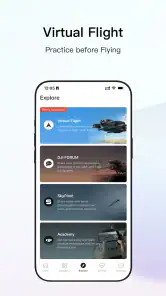
The star of the app is undoubtedly the virtual flight simulator. Once you start, it feels like you are in the cockpit of a drone, experiencing the thrill of flight without the fear of crashing an actual drone. The graphics are surprisingly good, providing a realistic environment that mirrors real-world conditions. You can practice flying in different scenarios, from open fields to crowded urban landscapes. It’s a perfect playground for both beginners learning the ropes and seasoned pilots wanting to hone their skills.
Moreover, the controls are responsive and mimic the actual DJI drone controls. This makes it a perfect training ground for those who own or plan to purchase a DJI drone. The app offers a variety of missions and challenges that keep the experience engaging and educational. I found myself spending hours trying to master the different maneuvers and complete missions, which speaks volumes about its addictive nature.
When virtual practice fits—and when it does not
For someone curious about drone controls, the simulator can make an unfamiliar hobby feel less intimidating. I would use it in a short, quiet session to get comfortable with the idea of steering before deciding whether to pursue real-world flying. A practical tip is to treat a successful virtual session as a chance to notice which controls feel natural and which need practice, not as proof that you are ready to fly outdoors. A simulated environment cannot replace learning the rules and conditions that apply where you plan to operate a real drone.
More From Our News Desk

Clash of Clans Is Won Between the Battles

Android Auto Makes the Case for Quieter Car Software

MobiOffice: Transforming Mobile Productivity with Seamless Integration

EA SPORTS FC™ Mobile Soccer: Redefining Mobile Sports Gaming

How Microsoft OneDrive Became a Mobile Productivity Giant

How Google Translate Breaks Language Barriers Effortlessly
The experience also has a sensory trade-off: on-screen flight can be engaging, but it asks for visual attention and active input. If you find fast-moving imagery uncomfortable, or if touch controls are tiring or difficult for you, the simulator may be less accessible than browsing product information at your own pace. The store side is the more sensible starting point in that situation; you can still use the app’s shopping features without making virtual flight the center of your visit.
In everyday use, I can imagine opening the app during a lunch break to check whether a DJI product matches a need, then trying a brief virtual session later at home when I have time to focus. That split is a real advantage over a shopping-only app, but it is also a reason to keep expectations clear: the simulator is for exploration and practice, while the store is where product research and purchasing happen.
Exploring the DJI Store
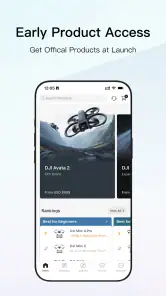
While the virtual flight is the highlight, the app also seamlessly integrates the DJI store. This section of the app is a haven for drone enthusiasts looking to shop for the latest DJI products. You can easily browse through a wide range of drones, accessories, and spare parts. The search function is pretty handy, making it effortless to find exactly what you’re looking for. Plus, the app provides detailed product descriptions and reviews, so you can make informed purchases.
One aspect I particularly appreciated is how the app offers exclusive promotions and discounts for users. It’s like having a VIP pass to the DJI world. So, if you’re contemplating buying a DJI product, this app might just save you a few bucks!
Shopping with a plan
I would use the store search to narrow a visit around a specific product or accessory rather than browse indefinitely. Before buying, it is worth checking whether the item fits the DJI equipment you already own and comparing its details with your actual use case. Product descriptions and reviews can help with that first pass, while a broader shopping service may be better if you want to compare several brands, sellers, or kinds of gear in one sitting. A brand-owned shop keeps the focus relevant, but it naturally gives less room for neutral cross-brand comparisons.
For a more useful comparison than simply looking at product names, I would write down what I need the equipment to do before browsing: casual travel footage, a particular kind of creative project, or replacing an accessory I already use. Then I can judge the product information against a real requirement instead of being drawn toward the most elaborate option. Reviews can add context, but I would look for comments that match my intended use rather than treating a generally positive impression as proof that a product suits every pilot.
That workflow also helps separate product research from the simulator. A virtual session can tell me whether the idea of controlling a drone feels appealing, while the store can help me investigate DJI’s offering. Neither step settles practical questions about where flying is permitted or whether a particular product is appropriate for my circumstances. If those questions matter to a purchase, I would check them independently before committing.
Who benefits from having both sides together
The combined approach is most useful for a person at an early decision point: someone who has seen drone footage, is considering the hobby, and wants to explore both the equipment and the basic feel of flight without immediately buying hardware. It can also suit an existing DJI owner who wants one convenient place to browse products and spend a little time with virtual controls. The value is less obvious if you already have a dedicated flight-practice routine or only want to compare prices across many brands.
I would not recommend treating the simulator as the main reason to choose a real drone. It can make controls less mysterious, but a screen-based experience is not the same as handling a physical device, judging the surroundings, or making decisions during an actual flight. In the other direction, a shopper who has no interest in virtual flying can simply focus on the store; the two parts do not need to be used together for the app to make sense.
A practical everyday example is planning a gift for someone who already owns DJI equipment. I could use the store to identify possible accessories, then check the recipient’s existing setup before buying rather than guessing from a product image. If I do not know whether a product will fit their needs, that uncertainty is a reason to pause and compare details, not to assume that the app’s brand focus makes every item an appropriate choice.
Small habits that make browsing more useful
When researching a purchase, I would keep a short list of questions beside me: what equipment the item must work with, what job it needs to do, and which details I still need to verify. This keeps a focused search from turning into aimless browsing. It is especially helpful when looking at accessories, where a product may seem broadly useful but only makes sense in relation to equipment already owned.
I would also treat the store and virtual flight as different kinds of evidence. Product information and customer reviews can help me understand an item, while practice on screen can help me notice whether I enjoy the basic idea of steering. Neither is a substitute for the other, and neither should be stretched into a promise about real-world results. That distinction is a small but important way to use the app without overestimating what it can teach or confirm.
For someone who is easily distracted, I would choose one task before opening it: research a product, or spend a few minutes trying virtual flight. The store can invite browsing, while the simulator can hold attention longer than intended. A clear stopping point makes the app more useful, particularly when I am shopping with a budget or trying to compare options methodically instead of making an impulse decision.
Remaining barriers and sensible expectations
Convenience does not automatically mean access for everyone. A shopping interface still depends on being able to read product details, move through its controls, and make sense of the information presented. I would take time to adjust any relevant device settings I already use, such as text size or display contrast, and check whether the result remains comfortable while browsing. Those adjustments may help, but they cannot guarantee that every screen will be easy to use.
The simulator adds a different barrier: it asks the user to follow movement and actively control the experience. Someone who needs a slower pace, prefers audio-led guidance, or finds touch interaction uncomfortable may get more from the shopping section—or from another way of exploring drone controls. I would not push through discomfort just to complete a virtual session; stopping and returning to product research is a perfectly reasonable way to use the app.
There is also a context issue. A quick store check can fit into a spare moment, but comparing technical details or reading reviews carefully is easier when I have enough time and attention. Virtual flight is better approached when I can focus on the screen rather than multitask. The app’s two purposes therefore suit different moments, and choosing the right one matters more than trying to use every part in one visit.
Final Thoughts
In conclusion, the DJI Store - Try Virtual Flight app is a brilliant blend of entertainment and practicality. Whether you're a novice looking to get a taste of drone flying or a seasoned pilot wanting to refine your skills, this app delivers a fulfilling experience. The combination of a realistic flight simulator and a comprehensive store makes it a must-have for anyone interested in drones. So why not give it a try? Who knows, you might just find yourself hooked on the thrill of virtual flight!
My recommendation is more measured: I would try it if DJI products are already on your shortlist or if a low-pressure introduction to virtual flying sounds appealing. I would skip it as a primary shopping destination if I need neutral comparisons across brands, and I would look elsewhere for practice that better matches my access needs or real-world training goals. For the right person, its value is the convenient combination; for everyone else, the store or simulator may be too narrow to justify keeping both in regular rotation.
Overall, I see it as an optional starting point rather than a complete drone-buying or learning solution. Use the shop to research with a clear list of needs, and use virtual flight only if the visual and hands-on format feels comfortable. That gives the app a useful, realistic place in the process without asking it to do more than it can.
DJI Store - Try Virtual Flight Frequently Asked Questions
Is DJI Store - Try Virtual Flight a shopping app or a drone simulator?
DJI Store is described as DJI’s official one-stop platform, and its category is Shopping. The title also points to a virtual-flight experience, which is why users may approach it expecting a drone simulator. It is free to download, so you can explore the app and see how its shopping features and virtual-flight content fit what you are looking for.
Who develops DJI Store, and what is its age rating?
DJI Store is developed by Take off and has an Everyone content rating, making it suitable for a broad audience. As with any app, parents may want to review how a child uses its shopping features and virtual-flight content. The app is available for Android, and checking that your device meets its operating-system requirement is a useful step before installing.
What is DJI Store - Try Virtual Flight?
DJI Store - Try Virtual Flight is a mobile application designed for both Android and iOS platforms. It offers users a virtual experience to simulate flying DJI drones. This app is perfect for beginners who want to practice flying without the risk of crashing a real drone. It provides realistic flight simulations with various scenarios and challenges. It is also presented as DJI’s official one-stop platform, bringing the DJI Store identity together with the virtual-flight concept.
How does the virtual flight simulation work in the DJI Store app?
The virtual flight simulation in the DJI Store app allows users to control a digital drone using their mobile device. It replicates real-world physics and environmental conditions, providing an immersive experience. Users can practice different maneuvers and learn to navigate through various terrains. It's an ideal tool for honing your flying skills before using an actual drone. The app’s shopping focus is part of its broader identity, so it may appeal both to people exploring DJI products and to those curious about virtual flight.
Is DJI Store - Try Virtual Flight suitable for beginners?
Yes, DJI Store - Try Virtual Flight is particularly suitable for beginners. The app offers a comprehensive tutorial mode that guides new users through the basics of drone flying. It provides step-by-step instructions and feedback on your flying techniques. This helps in building confidence and understanding the controls before attempting to fly a real DJI drone. Beginners interested in DJI can also use the app as a way to explore the brand’s official store platform.
Pros
- Easy-to-use interface for beginners
- Offers a realistic flight simulation
- Comprehensive tutorial for new users
- Supports a variety of DJI drone models
- Regular updates and improvements
Cons
- Requires a high-performance device
- Limited free content available
- Occasional bugs and crashes
- Large app size requires ample storage
- In-app purchases can be expensive

- Category
- Shopping
- Version
- 7.8.0











