DICK'S Sporting Goods
- 2.76K
- 4.9
- Installs
- 1.00M
- Price
- Free

Screenshots

Analysis by Reviewed
I’d treat the DICK’S Sporting Goods app less like a shared family shopping list and more like a useful place to research and buy sports gear together. One person can compare options while another checks what they need for practice, a trip, or a new season. That works best when everyone agrees on the item and size before checkout; shopping on one phone doesn’t automatically solve the household question of who is buying what.
Make shared shopping easier before checkout
A practical routine is to browse together, then pause before placing an order to confirm the product, size, and intended wearer. That small check matters with athletic shoes and apparel, where a wrong fit can turn a convenient purchase into extra work. I’d also keep personal account details and payment decisions with the person responsible for the purchase rather than passing a logged-in device around casually.
For a household comparing sports retailers, this app is most useful when DICK’S is already on the shortlist. A general marketplace may offer a wider mix of unrelated products, while a brand’s own app can be a better place to focus on that brand. Here, the appeal is browsing sporting goods from multiple familiar labels in one retailer’s shopping environment, rather than opening several brand apps just to compare categories.
Choose the right moment to use it
Imagine a child’s practice is coming up and their shoes are wearing out. I’d use the app at home to narrow down suitable options, then check the details together instead of making a rushed choice in the parking lot. If the household needs to see an item in person or compare fit directly, going to a store may be the better next step; the store locator can help with that part of the plan.
The app is a stronger fit for shoppers who know they want sporting goods and like having apparel, sneakers, and equipment shopping in one place. It is less compelling if you rarely shop for sports-related items, prefer to try everything on before considering a purchase, or are committed to a specific brand’s direct shopping experience. In those cases, a physical store or a brand-specific option may suit the task better.
Keep expectations grounded
Promotions can be a reason to check the app, but I wouldn’t make a purchase just because a deal appears time-sensitive. First decide what the household actually needs, then compare the available choices and total cost before buying. Notifications can make a limited-time offer easier to notice, but they can also add noise, so I’d only enable them if timely sale reminders are genuinely useful to you.
It’s also worth separating browsing from account management. A shared device can make it easy for another person to see shopping activity or reach checkout, so I’d avoid leaving a session open where other household members can use it freely. The app is a shopping tool, not a substitute for a family agreement about spending, account access, or who handles returns.
More From Our News Desk

Clash of Clans Is Won Between the Battles

Android Auto Makes the Case for Quieter Car Software

MobiOffice: Transforming Mobile Productivity with Seamless Integration

EA SPORTS FC™ Mobile Soccer: Redefining Mobile Sports Gaming

How Microsoft OneDrive Became a Mobile Productivity Giant

How Google Translate Breaks Language Barriers Effortlessly
Plan purchases around what the household actually needs
One useful way to avoid duplicate or unsuitable purchases is to make a quick list before opening the app: the sport, the intended wearer, the item, and any fit or feature requirements. That gives a shared browsing session a purpose. If two people are shopping for different activities, finish one search before starting the next so that a promising pair of running shoes does not get confused with gear for a team practice.
I’d also treat the product page as a comparison point, not an automatic answer. For shoes, consider how the person will use them and whether they need to try them on; for apparel, agree on the size before placing anything in the cart. When a purchase is for someone who is not present, confirm their preferences first rather than relying on memory. That extra minute is especially worthwhile for household orders where the person paying may not be the person wearing the item.
If you are deciding whether to install a dedicated retailer app at all, the practical question is how often you shop for sports gear. DICK’S Sporting Goods is a free shopping app from DICK’S Sporting Goods, and its focus makes it more relevant to recurring needs such as replacing athletic wear or preparing for a season than to a one-off search for an unrelated household product. It has an average rating of 4.9 from around 15,000 ratings, with more than a million installs, which suggests many shoppers find a reason to keep it available, though personal fit still matters more than popularity.
Use a shared device without sharing every account decision
In a household, the phone used to browse and the account used to pay do not have to be treated as the same thing. I’d let family members help compare options while keeping checkout, saved details, and spending decisions with the adult or account holder responsible for the order. This is a simple boundary, not a special app setting: it reduces accidental purchases and avoids making a child responsible for account activity they may not understand.
For a practical handoff, write down or say the product name and chosen size rather than leaving a cart open for someone else to complete later. A cart can be a convenient staging area, but it should not replace confirming who will pay or whether the item is still needed. If several people share one device, closing the shopping session when finished is a sensible habit, especially before handing the phone to a child.
Another small trade-off is that a shared screen makes discussion easy but can make private preferences visible. A teenager may want to choose their own apparel, while a parent needs to approve the budget. I’d browse together for the options that matter, then let the person responsible for payment make the final account decision. That keeps the app useful for coordination without assuming that every household member should have identical access.
Compare retailers by the job, not just the headline deal
Compared with a broad online marketplace, this app is a more focused place to look when the shopping task is clearly about sports. That focus can reduce the distraction of unrelated categories, and the presence of multiple sporting brands is useful when you want to compare choices within one retailer. The trade-off is that a marketplace may be more convenient for combining sports gear with groceries, home items, or other purchases in one checkout.
A brand’s own app has a different advantage: it keeps attention on that brand’s products and may make sense if you already know exactly what label and model you want. I’d start there when the decision is brand-specific, and use DICK’S when I’m still comparing across sporting categories or labels. Neither route is automatically better; it depends on whether your priority is a single brand, a broad assortment of unrelated goods, or a sporting-goods retailer.
For a purchase where fit is the main uncertainty, neither app should be treated as a substitute for trying the item on. Online browsing is helpful for narrowing the field and checking what to consider, but a store visit is more useful when comfort, feel, or an in-person comparison will decide the purchase. The store locator can support that transition from research to an actual visit.
Consider the account and age context
The app is rated for Everyone, which makes its general shopping context suitable for a broad audience, but that is not the same as a reason to hand over an adult’s account or payment method. For younger shoppers, I’d keep product choice collaborative and leave purchases under the supervision of whoever manages the household spending. The age rating describes the app’s audience; it does not replace sensible family rules about accounts and money.
That distinction matters when sports shopping involves growing children. A parent may need to weigh budget and durability, while the child cares most about comfort or style. I find the app most useful in that conversation when each person’s role is clear: the child identifies what feels right for their activity, and the adult checks the final selection and handles checkout. It is a better process than asking a young user to navigate a purchase alone.
What the app is good at—and where I’d be cautious
The strongest reason to keep it around is convenience for people who return to sports shopping. Rather than beginning from scratch each time a season changes or a piece of gear wears out, I can use one retailer’s app to look across relevant apparel, sneakers, and other sporting needs. Its current version is 6.1.2, and the app has been available since April 21, 2014; for me, the more important point is that it serves an established, specific shopping purpose rather than trying to be a general-purpose store.
My caution is not to confuse convenient browsing with guaranteed savings or a perfect fit. A promotion can be appealing without being the best choice for the wearer, and a familiar brand name does not remove the need to check sizing and intended use. I’d compare the final options against the household’s actual needs and budget, then use a physical store when touch, fit, or confidence matters more than the convenience of shopping from home.
If your question is whether this works for a whole household, my answer is yes as a shared research tool, with sensible account boundaries. If you are wondering whether it replaces a store visit, I would say only when you already know what you want and feel comfortable choosing online. And if you are deciding between this and a brand app, I’d choose based on whether you want to compare several sporting labels or focus on one brand. Those distinctions make the decision clearer than treating one shopping app as the right answer for every purchase.
Hey there, fellow sports enthusiasts! I recently got my hands on the DICK'S Sporting Goods app, and let me tell you, it's quite the game-changer for anyone who loves staying active and keeping up with the latest in sports gear. Whether you're a seasoned athlete or just someone who enjoys the occasional jog, this app has something for everyone.
First Impressions Matter
So, the first thing I noticed about the DICK'S Sporting Goods app is its sleek and user-friendly interface. Navigating through the app is a breeze, and I appreciate how everything is neatly organized. From the moment you open it, you're greeted with a clean design that makes finding what you need super easy.
Features That Stand Out
One of the standout features of this app is its personalized shopping experience. You can easily set your preferences, and the app curates a selection of products that match your interests. It's like having a personal shopper, but without the extra cost!
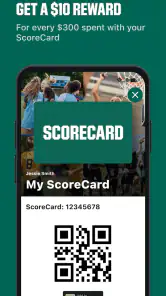
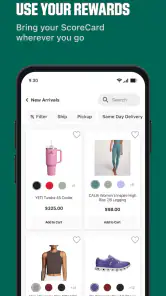
Another cool feature is the app's integration with the ScoreCard program. If you're a member, you can easily track your points and rewards right from the app. No more fumbling around with cards or trying to remember your login details – it's all right there at your fingertips.
In-App Exclusives and Promotions
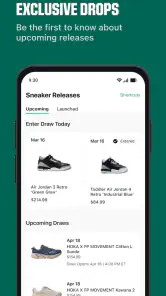
Let's talk about deals, because who doesn't love a good bargain? The app regularly features exclusive promotions and discounts that you won't find anywhere else. Plus, they sometimes have flash sales that are only available for a limited time, so it's worth keeping an eye on those notifications!
Convenience at Your Fingertips
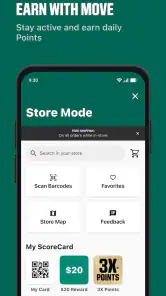
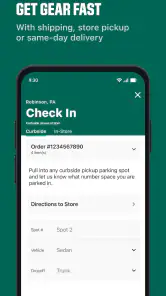
I also love how the app offers a store locator feature. If you're ever out and about and need to pop into a store, this feature will guide you to the nearest DICK'S Sporting Goods location. It's perfect for those last-minute shopping trips when you realize you need a new pair of sneakers or some fresh gear for your next game.
And for the tech-savvy shoppers, the app supports Apple Pay and other digital wallets, making the checkout process seamless and secure. It's a small touch, but it's these little conveniences that make the app a joy to use.
Final Thoughts
All in all, the DICK'S Sporting Goods app is a must-have for anyone looking to elevate their shopping experience. With its user-friendly interface, personalized features, and exclusive deals, it's a no-brainer for sports enthusiasts. Whether you're hunting for the latest athletic gear or just browsing for inspiration, this app has got you covered. So, if you haven't already, give it a download and see for yourself why it's a slam dunk in the world of sports shopping apps!
DICK'S Sporting Goods Frequently Asked Questions
What is the DICK'S Sporting Goods app, and who might find it useful?
DICK'S Sporting Goods is a shopping app for people browsing sportswear, sneakers, and apparel from brands such as Nike, Adidas, Hoka, and New Balance. It may be useful if you like comparing sporting goods on your phone or want a mobile way to explore products from the retailer. The app is developed by DICK'S Sporting Goods and is rated for Everyone.
How much space should I leave for the app, and what should I check before installing?
Before downloading, check that your phone or tablet’s operating system meets the app’s requirements and that you have enough available storage for installation. The Android minimum is version 9, while the app is also available for iOS devices. Keeping your device’s software up to date can help you avoid installation problems and use the app comfortably.
What devices can run the DICK'S Sporting Goods app?
The DICK'S Sporting Goods app is available for Android and iOS devices, making it accessible on many smartphones and tablets. On Android, the minimum operating system requirement is version 9. Before downloading, check your device’s software version and available storage so installation can proceed smoothly. The app is a shopping companion for browsing sportswear, sneakers, and apparel from brands such as Nike, Adidas, Hoka, and New Balance.
What can I shop for in the DICK'S Sporting Goods app?
The app is designed for shopping, with a selection that includes sportswear, sneakers, and apparel from brands such as Nike, Adidas, Hoka, and New Balance. You can browse products, search for gear, read customer reviews, and explore recommendations. It offers a convenient way to look through sporting goods on a mobile device, whether you are comparing options or checking out the latest gear.
What features does the DICK'S Sporting Goods app offer?
The DICK'S Sporting Goods app provides a seamless shopping experience with features like product search, customer reviews, and personalized recommendations. Users can easily track their orders, explore the latest gear, and receive exclusive offers and discounts through the app. Additionally, the ScoreCard system allows users to earn points on purchases, which can be redeemed for rewards.
Pros
- Wide range of sports equipment.
- User-friendly interface.
- Exclusive in-app discounts.
- Quick and easy checkout.
- Secure payment options.
Cons
- Limited international shipping.
- Frequent app updates needed.
- Occasional login issues.
- Limited customer service hours.
- Geolocation sometimes inaccurate.

- Category
- Shopping
- Version
- 6.1.2











