

Deluxe Moon - Moon Calendar, P
- 547.00
- 4.9
- Installs
- 50.00K
- Price
- $3.99
Screenshots
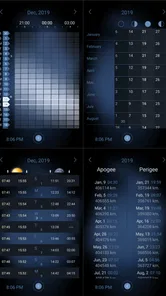
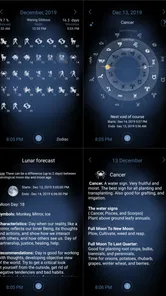
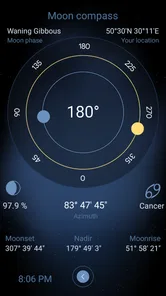
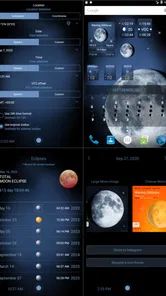
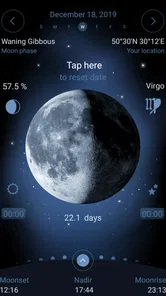
Analysis by Reviewed
I rarely recommend paying for a weather app unless it does something more focused than showing a temperature and a rain icon. Deluxe Moon earns that attention by treating the Moon as the main subject rather than as a small extra on a conventional forecast screen. It is a lunar calendar app from LWS Research, designed for people who want to follow lunar phases, plan around the visible Moon, and understand how the cycle changes from day to day.
My overall impression is quite clear: this is a specialist tool, not a replacement for a daily weather service. Its appeal comes from concentration. Instead of trying to cover radar, hourly forecasts, warnings, and pollen, it gives lunar information room to be explored. That makes it unusually useful for skywatchers, photographers, gardeners, anglers, night hikers, and anyone who simply enjoys having a more practical connection with the Moon.
The important question is whether you will actually use lunar information often enough to justify a paid app. At $3.99, the cost is modest, but the value depends on your habits. If you only want to know whether tonight is a full moon, a free calendar may be enough. If you like planning observations or checking the Moon as part of a routine, this app feels much more purposeful.
What makes the lunar calendar useful in everyday life
I find a lunar calendar most useful when I treat it as a planning aid rather than a forecast: it can help me choose an evening to observe the Moon or think about natural light before heading out. I’d still check the weather separately, then use the calendar to make a better-informed plan. That distinction makes it easier to judge where a dedicated lunar app earns a place in an everyday routine.
A focused view instead of a crowded forecast screen
The strongest part of the experience is the way the app keeps attention on the lunar cycle. A regular weather app may include a small Moon icon somewhere in its forecast, but that information is usually secondary and easy to ignore. Here, the lunar calendar is the reason to open the app, so the changing phase becomes something you can inspect rather than a decorative detail.
I found that focus helpful because it changes the way I use the information. Rather than checking once and forgetting it, I can look ahead and think about how much natural light will be available on a particular evening. That is relevant when planning a walk, choosing a time for casual stargazing, or deciding whether a night landscape photograph will have a bright Moon in the frame.
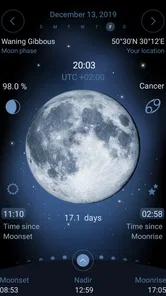
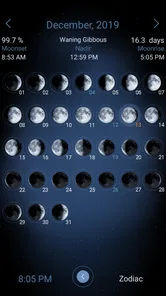
The app also suits people who prefer visual patterns to isolated facts. A calendar makes the lunar cycle easier to understand than a single daily label. You can see the gradual movement from one phase to the next and connect a date with the appearance you expect in the sky. That is more useful than simply being told that a phase is occurring today.
More From Our News Desk

 Gmail
GmailGmail in a Busy Inbox: Who Benefits Most?
From first account to crowded workday, Gmail earns its place through dependable search and flexible sorting—but its best fit depends on how much inbox maintenance you can tolerate.

 Prime Video
Switching to Prime Video: What Changes in Your Viewing Routine
Prime Video can make a compelling second home for streaming, but switching means learning a different catalog, rental layer, and route from browsing to playback.

 Universal TV Remote Control
Universal TV Remote Control Works Best as a Reliable Backup
A phone remote earns its place through quick setup and reliable habits. Here is how to get more from Universal TV Remote Control—and where its limits show.

 Weather - By Xiaomi
Weather by Xiaomi Review: Clear at a Glance, Less Clear Up Close
Xiaomi’s weather app makes everyday forecasts quick to scan, but its calm surface can leave useful details and recovery paths harder to find than they should be.

 X
XX Under Pressure: Can It Recover When Posting Goes Wrong?
A resilience-focused review of X, examining setup, mistaken posts, interruptions, weak connections, and the gaps that matter when recovery needs to be dependable.

 Clash of Clans
Clash of Clans Is Won Between the Battles
Its raids are quick; its community is a long-term project of coordination, teaching, rivalry, and shared responsibility—with all the friction that entails.
Latest News



Useful for planning, not just checking the current phase
A good lunar calendar becomes valuable when it helps you make decisions several days in advance. For example, imagine planning a weekend walk on a trail with limited artificial lighting. A bright Moon can make the route feel very different from the same walk under a thinner crescent. I would still carry proper lighting and check the local forecast, but the lunar view adds a planning detail that an ordinary weather app often treats as an afterthought.
Photographers can use the same idea in a more deliberate way. A nearly full Moon may provide soft illumination for a landscape, while a darker lunar period can make the sky feel less washed out. The app does not replace a complete photography planner, but it gives a quick way to think about the Moon before committing to a location or departure time.
There is also a quieter use case: building awareness of the natural calendar. People who already notice sunrise, sunset, or seasonal changes may enjoy checking the lunar cycle as part of their morning routine. I would not describe that as essential information, but it can make the app feel worthwhile even when there is no specific event to plan.
Where it fits beside a normal weather app
It is important not to confuse this product with a general forecast service. If I need rain timing, wind, temperature, storm alerts, or a reliable answer about what to wear, I reach for a conventional weather app. Those services are built around immediate conditions and changing forecasts. This one is built around the Moon and the calendar.
That difference is not a flaw, but it does affect the buying decision. Someone searching for one app to handle every outdoor question will probably be better served by a broader weather application. Someone who already has a favorite forecast app and wants deeper lunar information may find this a sensible companion rather than a competitor.
The distinction also prevents unrealistic expectations. Lunar information can support a plan, but it cannot tell you whether clouds will hide the Moon or whether strong wind will make an outdoor activity unpleasant. I would check both apps before making a serious plan: the lunar calendar for the Moon’s cycle and a weather service for the atmosphere around it.
Small workflows that make it more valuable
One practical workflow is to check the calendar before choosing dates for a night activity, then confirm the forecast separately on the day itself. This two-step habit avoids a common mistake: assuming that a favorable lunar phase guarantees a favorable evening. The Moon may be ideal while cloud, rain, or poor visibility makes observation disappointing.
A second useful approach is to compare the lunar phase with your personal schedule rather than waiting for a famous phase. A full Moon attracts attention, but a partial phase can sometimes be better for seeing surface detail because shadows create contrast across the lunar landscape. If you are learning to observe the Moon, checking several dates may be more rewarding than focusing only on the brightest night.
A third tip is to use the app as a reminder for preparation, not as the whole plan. If I see a promising evening, I can arrange a camera, binoculars, warm clothing, or a suitable location ahead of time. That turns a simple calendar check into a repeatable routine. The app’s value is highest when it helps me act, rather than when I open it only to confirm something I already know.
What the reputation suggests, and what it does not
The app has a 4.9 average from around 3.1 thousand ratings, with roughly 547 written reviews. It has also passed 50 thousand installs. Those figures suggest that it has found a loyal audience, especially among people looking for a dedicated lunar tool rather than a general-purpose forecast.
I would still interpret that response carefully. A high rating in a specialized category often means the app satisfies its intended audience very well; it does not necessarily mean every phone owner needs it. A person who values a simple, free, glanceable weather widget may not enjoy paying for a more focused calendar, even if existing users appreciate its depth.
The main limitation: specialization narrows the audience
The biggest weakness is also the app’s central design choice. Because it concentrates on lunar information, it cannot serve as the single weather companion many people expect. If your daily routine is built around commute forecasts, precipitation alerts, or hourly temperature changes, opening a lunar calendar may feel like an extra step rather than a solution.
There is another kind of friction in specialized apps: the benefit grows slowly. A general weather app can prove its usefulness the first time it helps you avoid a downpour. A lunar calendar may need several weeks of use before you discover how it fits your routines. Until then, it can feel like an interesting reference that you admire more than you use.
The paid model may also divide users. At $3.99, it is not an expensive purchase, but free alternatives exist for basic phase checking. I would pay for this one only if I wanted a dedicated lunar reference, enjoyed browsing the calendar, or had a real activity that benefited from planning around Moon conditions. For an occasional curiosity, the purchase is harder to justify.
Compatibility is reasonably broad for older devices because the current version, 1.110, requires Android 6.0 or later. That is useful if you keep an older phone for outdoor use or photography. Still, anyone using a newer device should not assume that age alone makes the experience ideal; the more important issue is whether the app’s focused purpose matches your needs.
Who should install it, and who should skip it
I think the best audience includes amateur astronomers, casual skywatchers, landscape photographers, and people who plan evening activities with natural light in mind. It can also appeal to users who enjoy calendars with an environmental or seasonal character. For these groups, the Moon is not just trivia, so a dedicated view makes sense.
It is especially suitable for someone who already uses a separate weather service. That combination is more practical than trying to force one app to do everything. Use this app to choose promising lunar dates, then use the weather app to decide whether the conditions are actually suitable.
I would be more cautious about recommending it to a user who wants instant simplicity. If your only question is “Is the Moon full tonight?” you may not explore enough of the calendar to get your money’s worth. The same applies if you rarely spend time outdoors after dark or have no interest in lunar cycles. In those situations, a free calendar reference or the small Moon indicator inside another app may be sufficient.
Families may appreciate that the content rating is Everyone, particularly when using the calendar as a simple way to introduce children to observing the night sky. I would frame it as an educational reference rather than a game, though. Its usefulness comes from looking, comparing, and planning, not from rewards or entertainment mechanics.
Questions I would ask before paying
The first question is whether it replaces my existing weather app. In my view, no. It complements one. Keep a conventional forecast service for weather conditions and use this app when lunar timing or phase information matters.
The second is whether it is useful outside full-Moon nights. Yes, provided you care about planning. Different phases can change the appearance and brightness of the sky, and viewing the whole cycle is more informative than waiting for one headline event. The app makes more sense when you treat the Moon as a repeating calendar rather than a once-a-month curiosity.
The third is whether it helps with serious observation. It can be a useful planning aid, but I would not treat it as a complete replacement for specialized astronomy software, detailed sky maps, or local observing information. Its strength is the lunar calendar itself, not an all-purpose observatory toolkit.
The fourth is whether the purchase remains sensible for occasional users. That depends on how often you revisit the information. If you plan even a handful of outdoor or photographic sessions around lunar conditions, the price may feel reasonable. If you open it only when someone asks about the next full Moon, a simpler option may be the better choice.
My final take on Deluxe Moon
Deluxe Moon is a focused, paid weather-category app that understands its niche and stays close to it. Developed by LWS Research and released on July 8, 2010, it has had time to establish a clear identity as a lunar calendar rather than another crowded forecast dashboard. That clarity is its greatest strength.
I like it most as a planning companion. It helps me think ahead about visibility, natural light, and the rhythm of the lunar cycle, while leaving rain and temperature to a proper weather service. The experience is more meaningful when connected to an activity, such as photography, a night walk, or casual observation, than when used as a one-second fact checker.
My recommendation is therefore specific: buy it if the Moon regularly influences what you do, where you go, or when you look outside. Skip it if you want a free, general forecast or only need occasional phase information. For the right user, the 4.9 average is understandable because the app delivers a dedicated experience with little distraction. For everyone else, its specialization may feel like a limitation rather than a benefit.
Deluxe Moon - Moon Calendar, P Frequently Asked Questions
Who develops Deluxe Moon - Moon Calendar, and what kind of app is it?
Deluxe Moon - Moon Calendar is a weather app developed by LWS Research, focused on lunar information rather than everyday forecasts. Its emphasis is on the Moon’s phases, position, illumination, and calendar details, which makes it relevant to sky watchers and anyone curious about lunar cycles. The app is rated for Everyone, so its subject matter and presentation are intended for a broad audience.
What is Deluxe Moon - Moon Calendar mainly used for?
Deluxe Moon - Moon Calendar is designed for people who want to follow the Moon’s phases, position, illumination, and related astronomical information. After exploring the app, I found it useful for planning observations, checking upcoming full and new moons, and learning how lunar cycles relate to dates and locations. It is more of an informative astronomy and planning tool than a traditional calendar or horoscope app.
Does Deluxe Moon provide accurate lunar and astronomical information?
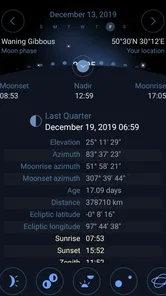
The app presents detailed lunar data based on the selected location and date, including moonrise, moonset, phase, illumination, and zodiac-related information. In my experience, the interface makes these details easy to access, although results can vary slightly from official observatories because of location settings, time zones, and calculation methods. Users who need scientific precision should still verify important observations with professional astronomical sources.
Can I use Deluxe Moon without an internet connection?
Many of the app’s core features, such as viewing the Moon’s phase and browsing calendar information, may remain available after the relevant data has loaded. However, some functions can depend on device location, updated astronomical information, advertisements, or other online services. Before relying on it during travel or outdoor activities, it is best to open the app in advance and confirm that the required location and calendar data are accessible offline.
Is Deluxe Moon suitable for beginners who know little about astronomy?
Yes, beginners can use Deluxe Moon, but the amount of information may initially feel overwhelming. The visual Moon display and calendar layout make basic features understandable, while additional details allow curious users to explore further. I recommend starting with the current lunar phase, illumination percentage, and moonrise or moonset times before moving on to the more specialized astronomical and zodiac-related sections.
Pros
- Detailed lunar calendar with moon phases
- illumination
- and rise/set times.
- Includes zodiac
- lunar day
- and astronomical information in one place.
- Interactive moon visualization makes daily changes easy to understand.
- Useful for planning observations
- photography
- gardening
- or personal routines.
- Clean interface with customizable location and date settings.
Cons
- Some advanced astronomical details may feel overwhelming for casual users.
- Accurate results depend on granting location access or entering a location manually.
- Certain features or content may require a premium purchase.
- The amount of information can make navigation less intuitive at first.
- Widgets and notifications may use additional battery when enabled.











