DealDash - Bid & Save Auctions
- 17.98K
- 4.3
- Installs
- 5.00M
- Price
- Free

Screenshots


Analysis by Reviewed
Shopping through an auction can be exciting, but it asks more of you than browsing a sale and tapping “buy.” I think DealDash - Bid & Save Auctions makes most sense when you understand the cost of participating before you get caught up in a close timer. It’s a free shopping app from DealDash.com, available on Android and iOS, and its mix of live bidding and everyday products gives bargain hunters a different experience from a standard online store.
Where new bidders can get stuck
The first hurdle is understanding that a bid is not simply a free offer. As the original experience makes clear, you pay for each bid you place, while the displayed auction price rises in small increments. That means a low-looking price alone does not tell you what you have spent to compete. I’d treat bids as a limited budget and decide what you are willing to spend before joining an auction, rather than making that decision while a timer is counting down.
It also helps to separate the excitement of winning from the value of the purchase. An auction can be fun even when it is not the cheapest way to get an item. Before bidding, I would compare the product’s ordinary retail price with the total cost you might incur, including the bids used along the way. If the item is something you do not really want, a tempting price is not a good reason to chase it.
Getting Started with DealDash
First things first, downloading DealDash is a breeze, available on both Android and iOS. Once you've got it on your device, setting up an account is quick and painless. You dive right into a world of auctions. The app's interface is sleek and user-friendly, which makes the whole bidding process feel less intimidating, especially if you’re new to the auction scene like I was.
Setup checks that make bidding clearer
Before placing a bid, I’d take a moment to check that I’m signed into the account I intend to use and that the bid balance shown in the app matches what I expect. If something looks wrong, pausing is safer than tapping repeatedly; repeated actions can make it harder to tell whether a bid went through. I’d also read the details shown for the specific item and auction instead of assuming every listing works identically.
DealDash is free to download, but that does not mean participating in auctions has no cost: bids are paid for. This distinction matters if you are comparing it with ordinary shopping apps, where you usually pay only for the product you choose to purchase. The app is rated for Everyone, but I would still approach bidding as a spending decision and keep the account activity in view.
Bidding Wars and How to Win Them
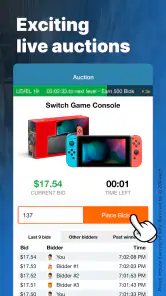
Now, let’s talk about the real action – the bidding wars! The concept is simple: place a bid and if no one else bids before the timer runs out, you win. But, and this is a big but, it’s not as easy as it sounds. Each bid increases the price by a tiny amount and you have to pay for each bid you place. It’s a strategic game, almost like chess, where you have to outsmart other bidders without burning through your bids.
More From Our News Desk

Weather by Xiaomi Review: Clear at a Glance, Less Clear Up Close

X Under Pressure: Can It Recover When Posting Goes Wrong?

Clash of Clans Is Won Between the Battles

Android Auto Makes the Case for Quieter Car Software

MobiOffice: Transforming Mobile Productivity with Seamless Integration

EA SPORTS FC™ Mobile Soccer: Redefining Mobile Sports Gaming
What I found particularly thrilling was the social aspect of it. You’re not just bidding against a faceless system; these are real people, and sometimes it feels like you’re in a virtual room, battling it out to see who really wants that new iPad more.
Workflow recovery when something seems off
If a bid balance or auction status looks unexpected, I’d stop interacting for a moment, check the relevant screen again, and avoid placing another bid simply to test whether the first one registered. For a connection hiccup, reopening the app or checking the connection before trying again is a sensible first step. If the account still appears inconsistent, the customer-support experience described below is a more reliable route than guessing or continuing to bid.
That pause is useful for another reason: auctions reward attention, and switching between screens while a close is underway can make it easy to lose track of what you intended to do. I’d browse first, choose a single item to follow, and only then decide whether to participate. That approach is less thrilling than jumping between several auctions, but it makes the spending easier to understand.
What Makes DealDash Stand Out?
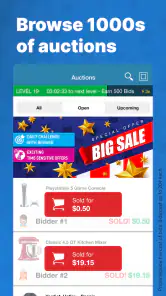
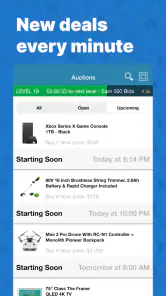
So, what’s the secret sauce? For starters, the variety of products is impressive. Whether you’re looking for the latest tech gadget, a new kitchen appliance, or even gift cards, DealDash has it all. Plus, they have a unique feature called "Buy It Now" where if you don’t win an auction, you can buy the item at retail price and get your bids back. It’s like a safety net, ensuring your bids never go to waste.
That option changes how I would approach a near miss, but I would not treat it as a reason to bid carelessly. Check the Buy It Now terms shown for the item and make sure buying it at retail is genuinely acceptable to you. It is most useful when you already wanted the product at that price; it is much less reassuring if you are only considering the item because the auction made it feel urgent.
Compared with a conventional shopping app, DealDash puts the competition and uncertainty in the foreground. A regular retailer is usually the better choice when you know exactly what you need, want a predictable checkout, or are comparing prices quickly. DealDash is a better fit when you enjoy following an auction and are comfortable treating bid spending as part of the experience, not as a guaranteed route to a discount.
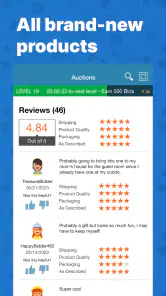
Another highlight is the app’s customer service. I had a minor hiccup with bid credits not showing up, and let me tell you, their support team was on it in a flash. It’s always reassuring to know that if things go awry, there’s a helpful team ready to sort things out.
And, let’s not forget the thrill of winning. There’s nothing quite like the rush of seeing that “You Win!” banner flash across your screen. It’s the little things, right?
Who should use it—and when another option is better
I can see this working for someone who enjoys a little strategy in shopping and can stop when a bid budget is used. For example, if I were browsing after dinner and spotted a kitchen item I had already planned to replace, I could check its retail price, decide how much bidding I am willing to risk, and follow that one auction. If the numbers stop making sense, I can leave rather than turn an ordinary purchase into a contest.
I would skip it if I am shopping under time pressure, need a specific item by a particular date, or find competitive bidding stressful. It is also not ideal for anyone who tends to chase losses or treats every low auction price as proof of a bargain. In those situations, a fixed-price store gives more control and makes it easier to compare the final amount before committing.
The app has an average rating of 4.3 from around 51,000 ratings, with more than 5 million installs. Those figures suggest plenty of people have tried it, but they do not tell me whether a particular auction will suit my budget or taste. I’d use them as context, not as a reason to bid without checking the item and the cost of participating.
Making a realistic plan for an auction session
I’d treat a DealDash session more like entertainment with a possible purchase at the end than like a quick way to fill a shopping list. Before opening an auction, I would write down the item I actually need, the price I would accept from an ordinary retailer, and a firm limit for paid bids. That gives me a stopping point I can follow even when the countdown makes another bid feel tempting.
A useful habit is to compare the full outcome, not just the displayed auction price. If I win, I would account for both the winning amount and the bids I spent; if I do not win, I would count the bids as a real cost rather than dismissing them because the item was not purchased. The Buy It Now option can affect that calculation when its terms fit, but it should not turn a purchase at retail into an automatic bargain.
For a busy evening, I would avoid following several auctions at once. Keeping one item in view makes it easier to notice what I have already spent and to stop when the limit is reached. If I cannot watch attentively, I would leave the auction alone and come back when I have time, rather than trying to bid between errands or while doing something else.
What the app is—and is not—good for
DealDash suits shoppers who like the uncertainty and small decisions of a live auction, especially when the item is something they would be happy to buy anyway. It may also appeal to someone who enjoys learning how a particular auction behaves over time, as long as observation does not turn into a reason to spend more. The key advantage over a standard marketplace is the participatory format; the trade-off is that the final value is less predictable.
By contrast, I would use a regular retailer or comparison-shopping app for necessities, gifts with a deadline, or products where I need to weigh exact specifications and total checkout cost calmly. Auctions are a poor fit when a low displayed price is the only reason I am interested, or when I would be upset about spending on bids without taking home the item. Knowing that distinction before signing in is more useful than trying to decide mid-auction.
One question a new user may have is whether the app itself costs anything. It is free to download, but paid bids mean the activity can still involve spending. Another practical question is whether a low auction price guarantees a good deal: it does not, because the bids used to compete belong in the total-cost calculation. I would also check the details attached to each auction and any Buy It Now terms before making a decision, rather than carrying assumptions from one item to the next.
Final Thoughts
Would I recommend DealDash - Bid & Save Auctions? Absolutely, especially if you love the thrill of the hunt and the satisfaction of a good bargain. It’s not just about the deals; it’s about the experience – the strategy, the competition, and the community. But a word to the wise: keep an eye on your bids and know when to stop. It’s easy to get swept up in the excitement.
The app was released on January 15, 2014, and its current version is 7.1.3; it requires Android 7.0 or later. I would keep the app updated where possible and make sure I’m using a compatible device before troubleshooting an issue. For me, the clearest rule is simple: decide what an item is worth before the auction starts, and do not let the timer make that decision for you.
DealDash is developed by DealDash.com and has been around long enough to have a substantial audience, with about 18,000 written reviews alongside its ratings. That gives me a sense of an established shopping app, though popularity cannot tell me how a particular bidding session will go. I’d still judge it by whether its auction format suits my habits and whether I can keep my spending decisions deliberate.
So, if you’re ready to dive into a world where shopping meets strategy, give DealDash a whirl. Who knows, your next great deal might just be a bid away!
DealDash - Bid & Save Auctions Frequently Asked Questions
Can I browse DealDash auctions before creating an account?
Browsing first can help you get a feel for DealDash’s live-auction shopping format and the kinds of products featured before you decide whether to participate. Take time to read the rules for an auction and understand how bids affect the price and timer. When you are ready to bid, you will need an account and bid packs.
What should I understand about bid packs before using DealDash?
Bid packs are required to participate in DealDash auctions, so bidding involves more than simply downloading the free app. Each bid increases the item’s price by one cent and extends the auction timer, which means bids can add up as other shoppers participate. Set a spending limit that works for you and make sure you understand the auction rules before placing bids.
Is DealDash free to download, and what should I know about its age rating?
DealDash is free to download and is a shopping app for Android and iOS. It is rated for Everyone, so its stated content rating is suitable for a broad audience. Keep in mind that downloading the app and participating in auctions are different things: bidding requires bid packs, so review how bidding works and your own spending limits before taking part.
What is DealDash and how does it work?
DealDash is a unique auction platform where users can bid on products to win them at a fraction of their retail price. Unlike traditional auctions, each bid increases the item's price by one cent and extends the auction time, allowing others to bid. The last bidder when the timer runs out wins the item. It's a fun and strategic way to shop online.
Is DealDash safe and legitimate to use?
Yes, DealDash is a legitimate and safe platform to use. It has been operating since 2009 and has millions of satisfied customers. The site uses secure payment methods and has a comprehensive privacy policy to protect user information. Additionally, DealDash offers a money-back guarantee if you're not satisfied with your experience.
Pros
- User-friendly interface that's easy to navigate.
- Wide variety of products available for bidding.
- Unique auction concept with potential savings.
- In-app purchase options enhance experience.
- Regular promotions and deals for users.
Cons
- Requires time commitment for successful bidding.
- Limited availability of certain high-demand items.
- Can be addictive due to competitive nature.
- Shipping fees may apply to purchased items.
- Some users report occasional technical glitches.
- Category
- Shopping
- Version
- 7.1.3











