Daniel Tiger: Play at Home
- 28.00
- 3.3
- Installs
- 10.00K
- Price
- $2.99

Screenshots

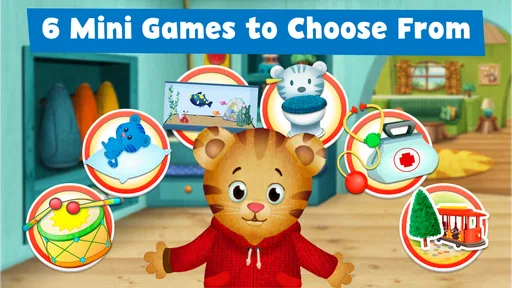
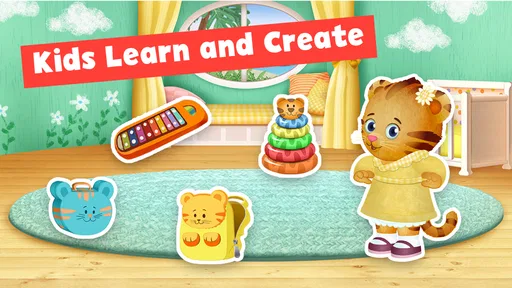
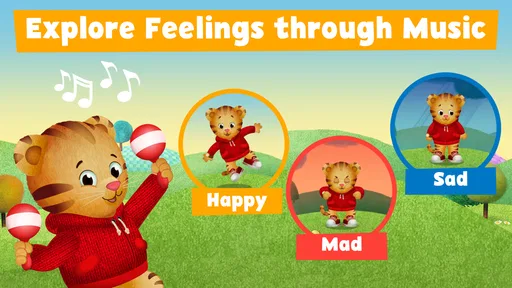
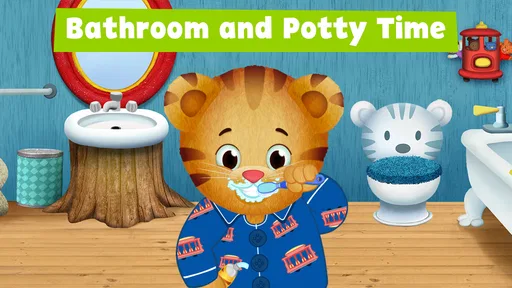

Analysis by Reviewed
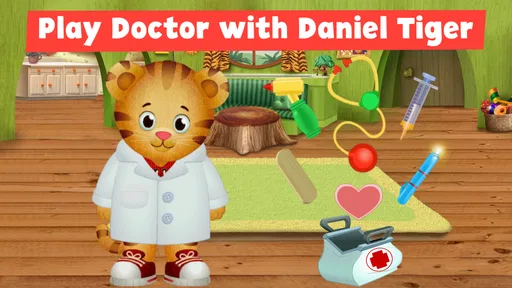
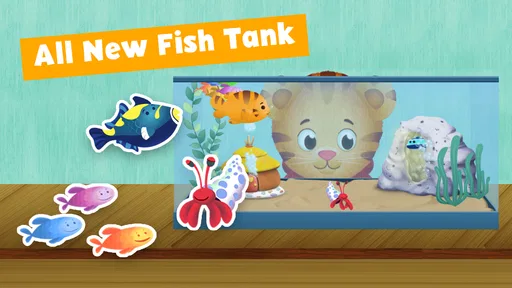
Choosing a quiet activity for a preschooler is often less about finding the most elaborate game and more about finding one a child can understand without a long setup. Daniel Tiger: Play at Home is an Education app from PBS KIDS built around familiar pretend play: children can visit Daniel’s home, play doctor, make music, and feed fish. I see its strongest use as a small, character-led activity for a child who already enjoys Daniel Tiger, rather than as a broad collection of lessons for every young learner.
A practical starting point at home
Imagine a child has a few minutes to fill while dinner is being prepared. Instead of handing over a general video app with a stream of unrelated choices, a parent can open this one and invite the child to choose a pretend activity. That simple starting point matters: the setting is recognizable, and the play ideas are concrete enough for a preschooler to grasp. For a child who needs help settling into independent play, a familiar character can make the first tap feel less intimidating.
The app costs $2.99, so I would treat it as a small paid activity rather than assume it is a free sampler. It is rated Everyone, and its 3.2 average from around 70 ratings suggests that families’ experiences are mixed. That number alone does not tell me why someone liked or disliked it, but it is a useful reminder to keep expectations measured. I would consider whether the child is already drawn to Daniel Tiger before paying, since that familiarity is a big part of the appeal.
From choosing an activity to finishing play
In use, I would keep the routine uncomplicated: let the child choose an activity, give them a moment to explore, then join in with a question or a bit of pretend play. The point is not to rush through a sequence or turn every interaction into a lesson. A parent can follow the child’s lead, whether that means making up a story around a doctor visit or pausing to talk about caring for a pet fish. That handoff from screen play to conversation is where the app has the most potential to feel worthwhile.
What the play can lead to
The activities are better approached as prompts than as a complete learning plan. After playing doctor, a child might want to check a toy’s pretend symptoms; after making music, they may want to keep tapping out a rhythm away from the screen. These transitions are useful because they give the parent a natural way to end device time without abruptly cutting off the fun. I would make the next step part of the invitation from the start: “Let’s play, then we’ll try it with your toys.”
That approach also helps keep expectations realistic. This is a character-based play app, not a replacement for books, hands-on toys, or time with an adult. A child who wants open-ended construction, a wide range of subjects, or a more structured teaching path may be happier with a different kind of children’s app or an offline activity. For a Daniel Tiger fan who enjoys imaginative play, though, a focused choice can be more appealing than a large menu of unrelated games.
Small choices that make a difference
I would offer one activity at a time rather than leave a young child to browse indefinitely. That gives them a clear starting point and makes it easier to notice whether they are enjoying the play or simply tapping through it. If the child is reluctant to stop, agree on a final activity before opening the app; a clear endpoint can make the handoff back to dinner, bath time, or bedtime calmer. These are simple routines, but they matter more than trying to squeeze a particular lesson out of every session.
More From Our News Desk

 Gmail
Gmail in a Busy Inbox: Who Benefits Most?
From first account to crowded workday, Gmail earns its place through dependable search and flexible sorting—but its best fit depends on how much inbox maintenance you can tolerate.

 Prime Video
Switching to Prime Video: What Changes in Your Viewing Routine
Prime Video can make a compelling second home for streaming, but switching means learning a different catalog, rental layer, and route from browsing to playback.

 Universal TV Remote Control
 Works Best as a Reliable Backup
A phone remote earns its place through quick setup and reliable habits. Here is how to get more from Universal TV Remote Control—and where its limits show.

 Weather - By Xiaomi
Weather by Xiaomi Review: Clear at a Glance, Less Clear Up Close
Xiaomi’s weather app makes everyday forecasts quick to scan, but its calm surface can leave useful details and recovery paths harder to find than they should be.

 X
X Under Pressure: Can It Recover When Posting Goes Wrong?
A resilience-focused review of X, examining setup, mistaken posts, interruptions, weak connections, and the gaps that matter when recovery needs to be dependable.

 Clash of Clans
 Is Won Between the Battles
Its raids are quick; its community is a long-term project of coordination, teaching, rivalry, and shared responsibility—with all the friction that entails.
Latest News



The app is on version 3.1.1 and requires Android 7.0 or later. It has over 10,000 installs, a modest reach compared with widely used children’s entertainment apps. I would check device compatibility before making a purchase, especially if the child will use an older tablet. The age rating of Everyone makes it broadly suitable by rating, but in practice a preschooler may still benefit from an adult nearby to help choose an activity and connect the play to real life.
Where it may not fit
One limitation is that its appeal depends heavily on the child’s interest in Daniel Tiger and pretend play. A child who wants fast challenges, a competitive goal, or a constantly changing set of activities may lose interest. Likewise, if you are looking for a comprehensive early-learning curriculum, this is not the app I would choose as the main resource. Its focused home-play premise is a strength for the right child, but it also narrows the audience.
I would also avoid promising that every session will be independent or frustration-free. Young children vary in how comfortably they navigate any screen activity, and a parent may need to help them get started or redirect them when they lose interest. The most reliable use case is a short, shared stretch of play, with the adult available but not necessarily leading every moment. If you need an activity that reliably occupies a child for a long period without involvement, I would look elsewhere.
A measured recommendation
For a family deciding whether to try it, the key question is whether Daniel Tiger’s familiar world will make pretend play more inviting. If the answer is yes, this can be a pleasant way to turn a spare moment into a small activity and then carry the idea into play away from the device. If the child is unfamiliar with the character or prefers hands-on toys, I would start with those instead of expecting the app to create interest on its own.
My recommendation is cautious but positive for preschoolers who already like Daniel Tiger and enjoy make-believe. PBS KIDS is the developer, and the app’s modest rating is a reason to approach it as a specific, paid activity rather than a guaranteed favorite. Used in a short routine with a parent nearby, it can offer a gentle bridge from screen play to conversation and imaginative play. It is less convincing as a standalone educational program or a one-size-fits-all distraction.
Choosing between screen play and other options
When I compare this with the usual choices for a preschooler, I see a clear trade-off. A video offers a more passive break, while a broad game collection can provide more variety but may ask a child to navigate several unrelated activities. This app sits between those options: it gives a familiar pretend-play setting, but its appeal is narrower than a general library of games. I would choose it when a child wants to act out a simple idea, not when they are asking for a long, changing sequence of entertainment.
It can also work as a bridge for a child who is hesitant about starting play alone. Rather than asking, “What do you want to do?” and offering an overwhelming number of toys, I would let the child pick from the home activities and then use that choice to suggest a matching real-world prop. A toy animal can become the patient after the doctor activity; a spoon or small container can help extend pretend care for the fish. The useful part is not needing special equipment: the app gives the play a starting cue, and ordinary household objects can take over afterward.
Making a short session feel complete
A realistic routine might be a few minutes before a meal: the child chooses music, explores it, and then the adult asks them to make a rhythm on the table while waiting. Another day, the fish activity could lead to a quick conversation about feeding a pet or looking after a stuffed animal. I would keep these transitions optional rather than turn them into assignments. If the child wants to stop after the screen activity, that is fine; the app works best as an invitation, not a promise that every tap will lead to a teachable moment.
One small but useful tip is to make the stopping point concrete before handing over the device. For example, tell the child they can choose one activity and then decide whether to repeat it or move on to an offline game. That gives them some control while helping the adult avoid an abrupt interruption. It also makes it easier to see whether they are absorbed in the pretend idea itself or mainly interested in continuing to tap through choices. That distinction can guide whether this is worth keeping in the family’s regular rotation.
Parents may wonder whether it is suited to a child who has never watched the show. I would not rule it out, since the play ideas are understandable on their own, but the familiar character is an important part of its draw. If the child does not connect with Daniel Tiger, I would try a hands-on pretend activity or a different app they already recognize before expecting this one to hold attention. Likewise, an older child looking for more complex goals may outgrow the gentle, simple premise quickly.
What to expect from the purchase
The one-time cost is easy to judge against the child’s interests: if they return to Daniel Tiger and enjoy role-play, a focused paid app may be a reasonable addition; if they only want occasional screen time, a book or toy they already own may be better value for that household. The 25 written reviews and the average score suggest it is not universally loved, so I would avoid buying it on the assumption that a familiar brand guarantees a hit. For me, the strongest reason to consider it is a specific child’s enthusiasm, not the promise of a broad educational package.
Its release date is October 18, 2019, so I would be especially careful about checking that the device still meets the Android requirement before purchasing. The listed version is 3.1.1; that tells me which version is identified for the app, but it does not change the practical advice to test compatibility on the device the child will actually use. If a parent plans to share a phone or tablet, I would also choose the moment and activity in advance, rather than hand over the device during a rushed transition and hope the child finds a satisfying path alone.
When I would pass
I would skip it if the main goal is a structured course in early literacy or numeracy, a wide subject range, or a long stretch of independent occupation. For those needs, a curriculum-focused resource, a carefully chosen video, or a simple offline activity may be a better fit. I would also pass if the child is not interested in pretend play; no amount of adult prompting can make a narrow theme feel compelling when the child wants something entirely different.
For the right family, though, its limits are also part of its usefulness. There is a small set of recognizable play ideas rather than an invitation to wander through a sprawling catalog. That can make choosing easier when an adult is present to guide the first step. I would treat the app as one option in a rotation, then let the child’s response decide whether it earns another turn. If they repeatedly leave the activity to play with toys, I would take that as a successful handoff rather than a failure of the app.
A gentle bridge into make-believe
Have you ever wished you could bring the magic of Daniel Tiger's Neighborhood right into your living room? Well, with the Daniel Tiger: Play at Home app, that’s exactly what you can do! If you’re a parent with a preschooler, you probably know the magical world of Daniel Tiger. This app takes that beloved world and puts it right at your child's fingertips. Let’s dive into what makes this app a must-have for parents and kids alike.
Interactive Fun and Learning
One of the most delightful features of the app is its interactive nature. The app is designed to be educational while being incredibly fun. Your child can join Daniel in a variety of activities that not only entertain but also teach important life skills. From brushing teeth to bedtime routines, Daniel Tiger is there to guide your little ones through daily activities with catchy songs and friendly advice.
Engaging Activities
What’s really cool is the range of activities available. The app includes games that encourage creativity, like drawing and playing pretend. There’s a musical instrument section where kids can explore their musical talents. And let’s not forget the storytelling section – a perfect way to wind down after a day full of play.
Each game and activity is thoughtfully crafted to help children develop skills like empathy, sharing, and cooperation. It’s amazing how seamlessly these lessons are incorporated into the play. As a parent, you’ll love seeing your child engage with such positive content.
Easy Navigation for Little Hands
Let’s face it, not all apps are created equal when it comes to usability for young children. However, Daniel Tiger: Play at Home shines with its simple and intuitive navigation. The interface is straightforward, making it easy for kids to explore on their own or with minimal supervision. This means you can feel comfortable letting your child play, knowing they can navigate the app without getting frustrated or needing constant help.
Trustworthy Content
As a parent, I know how important it is to have content you can trust. The app is developed by PBS Kids, a name synonymous with quality children’s programming. The app is ad-free, which is a huge plus, ensuring that your child can play without interruptions. Additionally, it provides a safe environment for kids, free from in-app purchases and other unwanted surprises.
Overall, Daniel Tiger: Play at Home offers a rich, engaging experience that’s both fun and educational. It’s a wonderful tool for parents looking to introduce their kids to the digital world in a healthy way. Whether it’s learning new skills or just spending some quality time with their favorite tiger friend, this app is sure to be a hit in your household.
So, if you’re on the hunt for an app that combines fun, education, and your child’s favorite TV character, look no further. Download it today and watch as your child embarks on a delightful journey with Daniel Tiger!
Daniel Tiger: Play at Home Frequently Asked Questions
How much does Daniel Tiger: Play at Home cost?
Daniel Tiger: Play at Home costs $2.99. It is a paid app rather than a free download, so consider that upfront cost before installing it. The app is listed in the Education category and is made by PBS KIDS, which may help parents decide whether its child-focused activities are a good fit for their family.
What devices can run Daniel Tiger: Play at Home?
The app requires an operating system version 7.0 or later. Before downloading, check that your device meets this requirement so the installation can proceed smoothly. Daniel Tiger: Play at Home is available for Android and iOS users, and its simple, child-oriented activities are intended to be explored by young children with a parent or caregiver nearby.
What is Daniel Tiger: Play at Home?
Daniel Tiger: Play at Home is an engaging educational app designed for young children, inspired by the popular PBS Kids show 'Daniel Tiger's Neighborhood.' The app provides a collection of mini-games and interactive activities that help children learn important social-emotional skills, such as empathy, self-control, and problem-solving, all while having fun in a safe digital environment.
Is Daniel Tiger: Play at Home suitable for my child?
Yes, Daniel Tiger: Play at Home is designed for children aged 2 to 5 years old. The app's content is developed with the help of child development experts to ensure it is age-appropriate and educational. It focuses on nurturing social and emotional development through interactive play, making it a suitable choice for young children.
Does Daniel Tiger: Play at Home have in-app purchases?
Daniel Tiger: Play at Home is designed to be a parent-friendly app with no in-app purchases. Once you download the app, you will have access to all of its features and games without any additional costs. This allows children to explore and enjoy the app without the risk of accidental purchases.
Pros
- Engages children with educational content.
- Colorful and appealing graphics.
- Interactive activities enhance learning.
- User-friendly interface for kids.
- Inspires creativity and imagination.
Cons
- Limited free content available.
- Requires internet for some features.
- Can be repetitive for older kids.
- In-app purchases can be costly.
- May not engage children for long.