Cupixel: Make art with a twist
- 86.00
- 3.4
- Installs
- 100.00K
- Price
- Free

Screenshots

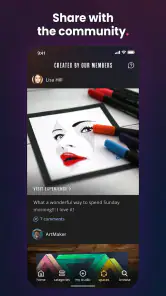
Analysis by Reviewed
I approached Cupixel: Make art with a twist as someone who enjoys drawing but does not always know what to do with a blank page. My overall impression is that Cupixel is less about replacing an artist’s imagination and more about giving that imagination a practical starting point. It belongs to the art and design category, comes from Cupixel Inc., and focuses on guided creation rather than simply handing you a collection of brushes and expecting you to teach yourself.
That distinction matters. Many drawing apps are essentially digital canvases: powerful, flexible, and sometimes intimidating. Cupixel takes a more directed route. Its central appeal is the feeling of having a lesson beside you while you work. I found that approach especially useful when I wanted to make something recognizable without spending a long time searching for tutorials, references, or a suitable starting exercise.
The app is free to install and is suitable for Everyone, which makes it approachable for casual users and families. At the same time, optional in-app purchases range from $7.99 to $99.99 per item, so I would not treat the free download as a guarantee that every part of the experience is available without additional spending. Its average rating is 3.4 from roughly 329 ratings, with about 86 written reviews, and that mixed reception fits my view: the idea is appealing, but the experience will depend heavily on how much structure you want and how comfortable you are with a guided format.
How the guided art experience feels in everyday use
The strongest part of Cupixel is the way it reduces the pressure of starting. When I use a conventional sketching app, I often spend more time choosing a brush, adjusting opacity, importing a reference, and wondering whether the canvas should be a portrait or landscape than actually drawing. Cupixel’s expert-led approach gives the session a clearer purpose. Instead of asking me to invent a complete project, it encourages me to follow a path and build the image gradually.
That makes it a good fit for a realistic everyday situation: imagine having half an hour after work, wanting to relax, but not having the energy to plan a full illustration. A blank canvas can feel like another task. A guided activity feels lighter. I could sit down with a simple goal, follow the progression, and finish with something more satisfying than a few disconnected marks. The value is not only the final image; it is the removal of the first obstacle.
I also think the format is useful for people who learn by watching and copying before experimenting independently. Written instructions can explain what to do, but visual guidance helps with proportion, placement, and sequence. Seeing an image develop in stages makes it easier to understand why one part should be added before another. That is more helpful than a brush library alone, particularly for beginners who are still learning how to break a subject into manageable shapes.
One practical tip is to treat each guided project as a study rather than a test. I would not try to reproduce every mark perfectly. Instead, I would pause mentally at each stage and ask what changed: was the form defined by an outline, a block of color, a shadow, or a small detail? That habit turns a single session into a reusable drawing method. It also prevents the common beginner problem of copying the surface of an example without understanding its construction.
More From Our News Desk

Clash of Clans Is Won Between the Battles

Android Auto Makes the Case for Quieter Car Software

MobiOffice: Transforming Mobile Productivity with Seamless Integration

EA SPORTS FC™ Mobile Soccer: Redefining Mobile Sports Gaming

How Microsoft OneDrive Became a Mobile Productivity Giant

How Google Translate Breaks Language Barriers Effortlessly
Another useful workflow is to complete a first pass quickly and then repeat the same subject with small personal changes. On the second attempt, I would alter the colors, simplify a section, or change the background rather than starting from nothing. This is where Cupixel can become more than a lesson viewer. The guided structure supplies the scaffolding, while the second pass gives the user room to develop a personal style.
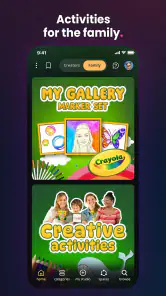
For family use, the accessible age rating is reassuring, but I would still approach it as a shared creative activity rather than an unattended digital babysitter. A child may enjoy the immediate direction, while an adult can help turn the exercise into a conversation about color, shapes, and observation. The app’s value in that setting comes from doing the activity together, not merely from keeping a screen occupied.
Why it stands apart from a normal drawing app
The obvious alternative is a general-purpose drawing app with layers, brushes, selections, and extensive editing controls. Those tools are usually better when I already know exactly what I want to make. They offer more freedom and often support a more professional workflow, but that freedom can become friction for a beginner. Cupixel’s advantage is its narrower focus: it gives the user a reason to draw now.
A second alternative is watching free art tutorials elsewhere and drawing along on a separate canvas. That route can work well, especially for people who like to choose their own teacher and subject. The trade-off is that switching between a video and a drawing workspace can make the process feel disjointed. Cupixel is more appealing when I want the instruction and the creative task to feel like one experience rather than two apps competing for attention.
It also differs from coloring apps. Coloring is relaxing because the composition is already prepared, while Cupixel asks me to participate in creating the image. If I want a completely passive activity, a coloring app may be more comfortable. If I want the satisfaction of making decisions and practicing visual skills, Cupixel has more to offer.
Compared with professional illustration software, Cupixel is not the choice I would make for detailed commercial artwork, advanced compositing, or a carefully managed production pipeline. The guided format is the point, and that same focus naturally limits how much control I expect. I would use a professional tool after the learning stage, especially when I need precise editing or a highly customized result.
The limitation that affects the whole experience
The main weakness is that guided creativity can become restrictive. Some users will enjoy being told what to try next, but others will quickly want to ignore the lesson and work on an unrelated idea. If I open an art app specifically to explore freely, a structured experience may feel like a detour. Cupixel works best when I accept its teaching rhythm instead of expecting an unrestricted studio.
There is also a motivational risk. Finishing a guided piece can feel rewarding, but it may not automatically teach every skill needed for independent drawing. A user who follows instructions without reflecting on the choices may produce a pleasant result and still feel lost when facing a new subject. That is why I recommend using the app actively: pause, compare stages, make small variations, and occasionally attempt a related sketch without the same guidance.
The purchase range is another point worth considering before committing to regular use. The app itself is free, but optional items can reach $99.99, with individual purchases beginning at $7.99. I would decide in advance how much I am willing to spend and avoid assuming that an appealing preview means the entire catalog is included. This is particularly important for parents or anyone trying the app as a low-cost hobby.
The age rating of Everyone makes the app broadly approachable, but suitability is not the same as identical usefulness for every age. A young child may need help with the controls or with following a sequence, while an adult beginner may want more explanation about technique. I see Cupixel as accessible rather than universally comprehensive. It can welcome a wide audience, but each person may need to bring a different level of patience and curiosity.
Device compatibility is reasonably broad: the current version is 10.15.3 and requires Android 8.0 or later. That makes it practical for many Android users, although I would still check the operating system on an older phone before planning to use it. For a drawing-focused app, screen size also matters in everyday comfort. A larger display is likely to make following visual guidance and placing marks easier than working on a very small phone, even when both devices meet the software requirement.
Small habits that make the guided format more useful
I found that the best results come from preparing the session instead of opening the app with an unrealistic goal. I would choose a quiet period, keep the first project modest, and allow time for experimentation after the guided portion. Trying to create a polished masterpiece immediately can turn a relaxing exercise into a frustrating comparison with the example.
It is also worth keeping a simple record of what changed between attempts. I might save a first version, repeat the project with a different palette, and then compare the two. This makes progress easier to notice because improvement is not always visible while drawing. The comparison can reveal whether I am getting better at proportion, color choices, or simply working with more confidence.
A less obvious benefit is that the guided sequence can help diagnose what kind of learner I am. If I understand a subject once I see it broken into stages, I may benefit from more process-based art education. If I prefer to experiment immediately and dislike following an example, I may be better served by an open canvas and independent references. Cupixel can therefore function as a useful test of learning preference, not just as a place to make finished images.
I would also avoid judging the app solely by the first project. The first session mainly answers whether the teaching style feels comfortable. The more important question is whether I can take one technique from that session and apply it elsewhere. If I can use the same approach to simplify a different object, adjust a composition, or choose colors with more intention, the app is doing meaningful educational work. If every result feels dependent on following an exact example, its long-term value may be limited for me.
Who should download it, and who should look elsewhere
Cupixel is best for a beginner who wants direction, a casual artist who needs help getting started, or someone looking for a creative activity that feels more active than passive entertainment. It is also a sensible option for people who become overwhelmed by the number of tools in traditional drawing software. The free entry point makes it easy to test whether expert-led guidance matches the way you like to learn.
I would recommend it to a friend who says, “I want to draw, but I do not know what to draw.” That sentence describes its strongest audience almost perfectly. The app gives that person a practical starting point and a reason to return. It may also suit someone who wants to practice regularly without designing a curriculum from scratch.
I would be more cautious recommending it to an experienced illustrator who wants total control, advanced editing, or a fast route from concept to finished professional asset. That person will probably be happier with a dedicated illustration tool. I would also suggest skipping it if the main attraction is unrestricted doodling, because the guided structure may feel like unnecessary supervision.
Before spending on optional content, I would complete enough free material to answer three questions for myself: Do I enjoy following the instruction? Do I learn something I can reuse? And do I want more projects badly enough to justify the purchase? Those questions are more useful than judging the app by its install count or by a single attractive result.
Cupixel has reached over 100K installs since its release on Jul 10, 2019, which suggests that the guided-art idea has found a real audience. The numbers do not change my central judgement, but they do place the app in the category of an established creative tool rather than an entirely untested experiment. Its rating of 3.4 also encourages realistic expectations: this is not a perfect fit for everyone, and its focused design is likely to be the reason some people enjoy it while others move on.
My final recommendation
My verdict is positive, with a clear condition: Cupixel is worth trying if you want help beginning an artwork, not if you want the most open-ended drawing studio. I like the way it turns uncertainty into a sequence of manageable actions, and I think its expert-led approach can make art feel less intimidating. Used thoughtfully, it can teach more than a single finished picture by showing how a complex image can be built in stages.
Its weaknesses are equally clear. The guided format may feel restrictive, optional purchases require attention, and following instructions alone will not guarantee independent artistic growth. I would use it as a structured practice companion, then carry the lessons into a more flexible drawing app when I want to explore beyond the exercise.
For a beginner, a family creative session, or a lapsed hobbyist searching for momentum, Cupixel is a friendly starting point rather than a complete art studio. That is a modest promise, but it is a useful one. If you accept the structure and make time to experiment beyond the examples, the app can turn a blank screen into a genuinely enjoyable place to learn.
Cupixel: Make art with a twist Frequently Asked Questions
What devices and operating systems can run Cupixel?
Cupixel is an art and design app for mobile devices, with support for iOS versions 8.0 and later. Before downloading, check that your device’s operating system meets that minimum and that you have enough room for the app and its lesson content. Keeping your device’s software current can also help provide a smoother experience when following guided creative activities.
Who develops Cupixel, and how widely is it used?
Cupixel is developed by Cupixel Inc. It has more than 100,000 installs, with an average rating of 3.4 from 329 ratings and 86 written reviews. Those figures offer a quick sense of its reach and user feedback, though individual experiences can differ. If you are deciding whether it suits your creative routine, consider the guided art-learning approach and the features you want from an art app.
What is Cupixel: Make Art with a Twist?
Cupixel is a guided art-learning app designed to help beginners and creative users draw, paint, and create illustrated projects with step-by-step instruction. It combines video lessons, visual guidance, and practical exercises, often using a smartphone or tablet as part of the learning experience. The app focuses on making art approachable rather than requiring advanced drawing skills from the start.
Do I need artistic experience or special equipment to use Cupixel?
No advanced artistic experience is generally required, which is one of Cupixel’s main advantages. The lessons are structured for users who want clear guidance while learning new techniques. Depending on the project, you may need basic supplies such as paper, pencils, markers, paints, or other craft materials. The required tools can vary, so it is worth checking each lesson before beginning.
Is Cupixel free to download and use?
Cupixel is free to download, but some content or features may require in-app purchases, which range from $7.99 to $99.99 per item. Access to the complete lesson library or premium experiences can depend on what you choose to buy. Before making a purchase, review the price and terms displayed in the app so you understand what is included and whether it suits your budget.
Pros
- AI-guided lessons make drawing approachable for beginners.
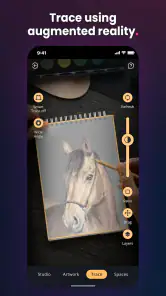
- Augmented-reality overlays help users trace proportions accurately.
- Creative challenges encourage experimentation beyond basic sketching.
- Progress can be saved and revisited as skills improve.
- Suitable for short
- relaxing art sessions on mobile devices.
Cons
- Some advanced lessons or features may require a subscription.
- The experience depends heavily on a compatible device camera.
- Tracing assistance may limit freehand practice for experienced artists.
- Small screens can make detailed drawing and controls feel cramped.
- Results can vary with lighting
- positioning
- and camera stability.

- Category
- Art & Design
- Version
- 10.15.3