craigslist
- 30.77K
- 4.7
- Installs
- 10.00M
- Price
- Free

Screenshots



Analysis by Reviewed
When I reach for a local classifieds app, I usually have a practical problem to solve: find a used item nearby, pass something on instead of storing it, or check whether a local service is available. Craigslist suits that kind of unpolished, get-to-the-point search. It is a free shopping app from craigslist.org, and its broad mix of local listings makes it useful when I care more about seeing what people nearby are offering than browsing a carefully curated storefront.
I would not treat it as a one-stop shop for every purchase. The experience depends on the listing and the person behind it, so browsing is only the first part of the job. You still need to judge whether an offer makes sense, ask the right questions, and agree on a safe way to complete the exchange. That hands-on approach is both the app’s appeal and the main reason it will not suit everyone.
First Impressions and Usability
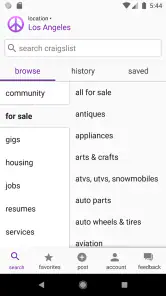
When I first opened up the app, I was hit with a wave of nostalgia. The interface is simple and straightforward, much like the original website. While some might say it's a bit too plain, I appreciate its no-fuss design. It’s kind of like that comforting old sweater you just can’t throw away. The app keeps things minimal, focusing more on functionality than flashy graphics.
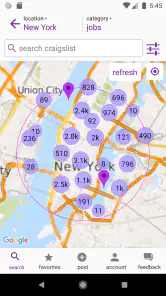
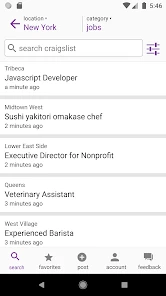
Navigating through the app is a breeze. The menu is intuitive, making it easy to switch between categories, whether you’re hunting for a new apartment or trying to sell that old bike gathering dust in your garage. The search function is pretty robust too, letting you filter results by location, price range, and date posted. It feels like the developers really wanted to make sure users could find what they’re looking for without jumping through hoops.
That straightforward layout is handy when I have a specific need, but it also means I have to bring my own search discipline. For a used desk, for example, I would try a few ordinary ways of describing it rather than assume every seller uses the same wording. I would also check the location and posting date before getting invested in a listing. Those small checks can save time, especially when nearby results are more useful than a perfect-sounding offer that is inconvenient to collect.
Features and Functionality
Now, let's talk about what you can actually do with this app. One of the standout features is the ability to save searches and favorite listings. This is perfect if you're on the lookout for something specific but aren’t ready to pounce on a purchase just yet. You can easily keep tabs on listings and get alerts when something new that matches your criteria pops up.
I find saved searches most useful when I am flexible about timing but not about the kind of item I need. Rather than repeatedly rebuilding the same search, I can keep it available and compare new possibilities with the listings I have already bookmarked. Favorites also help me avoid making a rushed decision: I can revisit an option, weigh its condition and location against another, and contact a seller once I have a focused question. I would still open each listing and check its details; a saved result is a reminder, not a guarantee that the offer remains suitable.
More From Our News Desk

Weather by Xiaomi Review: Clear at a Glance, Less Clear Up Close

X Under Pressure: Can It Recover When Posting Goes Wrong?

Clash of Clans Is Won Between the Battles

Android Auto Makes the Case for Quieter Car Software

MobiOffice: Transforming Mobile Productivity with Seamless Integration

EA SPORTS FC™ Mobile Soccer: Redefining Mobile Sports Gaming
Posting an ad is also pretty straightforward. The app walks you through each step, from writing a captivating title to uploading your photos. It’s all about making the process as painless as possible, which is a huge plus for anyone trying to sell their stuff without the hassle.
For a seller, I would treat the title and photos as the first handoff between the app and a potential buyer. A clear title that names the item, paired with honest pictures and a description that answers likely questions, gives people a better basis for deciding whether to get in touch. Before posting, it is worth deciding what details you are comfortable sharing and how you want interested people to contact you. That bit of preparation can make the follow-up less awkward and reduce avoidable back-and-forth.
However, it’s not all sunshine and rainbows. There are a few areas where the app could improve. For instance, it lacks a built-in messaging system. You’ll have to rely on your email or phone number for communication, which might not be ideal for everyone. Still, it’s a small price to pay for the convenience the app offers.
That communication step matters in everyday use. If I were arranging to collect a bike after work, I would confirm the item is still available, ask any important condition questions, and agree on the pickup details before setting out. Moving the conversation outside the app can feel less seamless than a marketplace with integrated chat, and it means I need to be deliberate about protecting personal contact details. If a seller’s replies are vague or the arrangement keeps changing, I would rather walk away than let a promising listing pressure me into a poor decision.
Security and Community
Given the nature of buying and selling online, security is always a concern. The app does a decent job of keeping things safe, with a strong emphasis on user privacy. However, it's always wise to follow best practices when meeting up with strangers or sharing personal information.
My practical rule is to keep the exchange simple and cautious: ask enough questions to understand what is being offered, avoid sharing more personal information than the arrangement needs, and choose a meeting plan that feels comfortable. A listing is not a substitute for checking an item in person when condition matters. For a bulky purchase, I would also think through transport and whether I can inspect it before committing; the app can help me discover an option, but it cannot make those real-world details disappear.
What's interesting about Craigslist is its community-driven approach. There’s something for everyone, whether you’re looking to nab a deal or connect with local services. It feels like a digital marketplace where people come together to help each other out, which is pretty refreshing in today’s fast-paced digital world.
That range makes the app especially appealing if I want to look beyond standard retail listings, or if I am offering something that makes sense to someone nearby. It is less compelling when I want a polished shopping journey, consistent product descriptions, or a familiar checkout experience. Retail and resale platforms with more structured catalogs can be easier for comparing similar items, while Craigslist’s strength is the variety and local, person-to-person nature of its listings. The trade-off is that I must do more of the screening and coordination myself.
For a newcomer, the useful question is not simply whether the app is easy to open, but whether local listings are active enough for the specific thing they want. I would start with a narrow search, check how current and relevant the results look, then broaden the wording or location if needed. If I am browsing casually, favorites help me keep track; if I need something urgently, I would not assume a saved search will produce a suitable offer in time. That distinction helps set realistic expectations.
The app has an average rating of 4.7 from around 252,000 ratings, and it has been installed over 10 million times. Those figures suggest broad use, but they do not remove the need to evaluate individual listings. It is free, carries a Teen content rating, and version 1.26.1 supports Android 7.0 and later. I see those details as useful context, not a promise that every local transaction will be smooth.
Making a Listing Work in Everyday Life
One realistic use is furnishing a room on a limited schedule. If I needed a desk before the weekend, I would search nearby first, save a few plausible options, and compare their condition, collection distance, and posting dates. I would contact only the strongest candidates with specific questions, such as whether the pictured damage is the only damage and whether the desk can be collected at a workable time. That sequence is more effective than messaging every seller with a generic “Is this available?” and then trying to sort out the replies.
The same local focus can help when clearing out a garage. A seller can group the work into small decisions: choose one item, take photographs that show its actual state, write a direct description, then decide how to handle enquiries and collection. I would avoid bundling unrelated things into a vague listing if I wanted a quick, clear handoff. Being precise may mean fewer casual messages, but it gives serious buyers enough information to decide whether to travel.
For services or rental searches, I would use the listings as a starting point for conversations rather than as a substitute for checking credentials, terms, or suitability. A short listing can point me toward a local contact, but I still need to ask what is included and clarify arrangements before agreeing. This is where the app’s breadth is useful: it can bring different kinds of local needs into one place. The corresponding trade-off is that each kind of listing calls for its own judgement, rather than one uniform shopping checklist.
Choosing the Right Marketplace
Compared with a large retail app, Craigslist feels less like a catalog and more like a noticeboard connecting people who happen to be in the same area. That is an advantage when the item is second-hand, awkward to ship, or best inspected in person. A retailer’s checkout and delivery process is usually a better fit when I want predictable fulfilment, standardized product details, or a straightforward way to return something. For a used table, though, a local listing can make more sense than browsing a national catalog and arranging delivery.
Other resale marketplaces may offer a more guided buying flow, including in-app conversation or payment features. I would favor those when I want more of the transaction managed in one place. Craigslist suits me better when I am comfortable coordinating directly and the local listing itself is the main thing I need. Neither style removes the need for care, but the amount of work shifts: a structured platform can handle more of the process, while this app leaves more decisions and follow-through to me.
It is also worth deciding what a good outcome means before searching. If I need the lowest-cost option and can be flexible about timing, browsing and waiting for a suitable local offer can be worthwhile. If I need a particular model by a firm deadline, the uncertainty of person-to-person availability may outweigh any benefit. I would not keep refreshing a broad search in the hope that it will solve an urgent need; I would compare it with a more dependable source and choose based on how much time I have.
Where the Process Can Stall
The weakest point is often not the search itself but the handoff from finding a listing to completing a real-world exchange. A seller may take time to reply, a buyer may change plans, or the item may no longer be available by the time I make contact. I treat a listing as an invitation to ask, not as a reservation. Before travelling, I would confirm the details again and make sure the pickup plan still works for both sides.
Photos and descriptions also have limits. A picture can show the general shape of a chair but may not reveal a loose joint or a smell that matters to the buyer. For condition-sensitive purchases, I would ask for the detail I need and inspect the item myself before committing. If the seller cannot answer a basic question clearly, that uncertainty is part of the offer and should affect whether I proceed. The app makes discovery quick; it cannot make an incomplete description reliable.
People who dislike direct negotiation may find this tiring. So may anyone who wants a guaranteed payment flow, a clear returns process, or customer support to resolve a disagreement between buyer and seller. I would skip this approach for high-stakes purchases where I need stronger safeguards or consistent after-sale service. For low-cost household items, local services, and straightforward clear-outs, the effort can feel reasonable as long as I leave room for messages that go nowhere.
As a practical habit, I keep the first contact brief and useful: identify the listing, ask one or two decision-making questions, and suggest a clear next step if the answers work. That helps both sides avoid a long conversation before establishing whether the item, timing, and location are a fit. I also avoid sending unnecessary personal details in an initial message. The goal is not to distrust every person; it is to keep the arrangement proportional to what I actually need to share.
The app is developed by craigslist.org, and its long-running, straightforward character is reflected in its current version, 1.26.1. Its average rating is 4.7, with around 252,000 ratings, and it has more than 10 million installs. It is free, rated Teen, and runs on Android 7.0 or later. Those details make it easy to try, but the local usefulness will depend on what people near me are posting and how carefully I handle each exchange.
In conclusion, if you’re a fan of the website, you’ll likely appreciate what the app brings to the table. It’s a handy tool for anyone looking to buy or sell on the go. Sure, it might not have all the bells and whistles of some modern apps, but it gets the job done. After all, sometimes simplicity is exactly what we need in a world that’s constantly shouting for our attention.
I would recommend it to patient shoppers, casual sellers, and people who are comfortable making arrangements directly with other people. I would steer someone toward a more structured marketplace if they need built-in communication, predictable checkout, or an easier way to compare standardized products. For me, Craigslist works best as a local discovery tool: it can lead to a useful find or a successful handoff, provided I stay selective, communicate clearly, and accept that the final result depends on the people involved.
craigslist Frequently Asked Questions
What should I know about Craigslist’s Android version and recent release details?
Craigslist is a shopping app developed by craigslist.org, with an Android release dated December 2, 2019. Its current version is 1.26.1. If you are deciding whether to install it, check that your device meets the Android requirement and remember that the app’s listings and usefulness depend on what people post in your area.
Can I use Craigslist to find local housing, jobs, or services?
Yes. Craigslist is organized around local classifieds, so it can be useful when you are looking beyond secondhand goods. The store summary describes uses such as finding work, hiring, renting, sharing, and connecting. Browsing locally is central to the experience: available options depend on the listings posted for your area, so the categories you find may vary from place to place.
What can I use the Craigslist app for besides buying and selling?
Craigslist brings together local listings for a range of everyday needs, not just shopping. Its store summary highlights options to buy, sell, work, hire, rent, share, connect, serve, and more. That makes the app useful to people browsing for housing or work as well as those looking to offer items or services. What you find depends on the listings available in your area.
Is the Craigslist app free to download, and what devices can run it?
The Craigslist app is free to download and is listed for Android and iOS. On Android, it requires version 7.0 or later, so check your device’s software before installing. The app is developed by craigslist.org and is rated for Teen audiences. Although downloading the app is free, some kinds of Craigslist postings may involve fees, so review the relevant terms before placing an ad.
What is Craigslist and how does it work?
Craigslist is a popular online platform that functions as a local classifieds service for buying and selling items, posting jobs, and finding housing. Users can browse or post ads across various categories such as electronics, furniture, cars, and jobs. The app simplifies these processes by providing a straightforward interface where users can post listings, search for items, contact sellers or buyers, and manage their account settings.
Pros
- Wide range of categories available.
- User-friendly interface.
- Free to use for most listings.
- Large user base for buying and selling.
- Local-focused for easier transactions.
Cons
- High risk of scams and fraud.
- Limited customer support.
- No built-in payment system.
- Outdated design and features.
- Inconsistent ad quality.
- Category
- Shopping
- Version
- 1.26.1











