Cox Panoramic Wifi
- 5.77K
- 3.8
- Installs
- 1.00M
- Price
- Free

Screenshots
Analysis by Reviewed
I judge a home-network app by whether it helps me answer practical questions quickly: what is connected, who needs access, and where should I look when the signal feels unreliable? Cox Panoramic Wifi is a free productivity app from Cox Communications, Inc., built for people managing a Cox home Wi-Fi setup. Its audience is fairly specific: if you use a different internet provider or prefer to manage a third-party router directly, this is unlikely to replace the tools you already have.
Who benefits from having network controls on a phone
I can see the app being most useful in a busy household, where phones, computers, televisions, and other connected devices compete for attention. Instead of walking to the router or searching through technical settings, a household manager can use the app for everyday oversight. That convenience matters most when a small task—checking a connection or managing a visitor’s access—would otherwise interrupt work or family time.
It is less compelling for someone who rarely changes network settings and is already happy with a router’s own management tools. It also should not be treated as a cure for every slow connection: an app can make network controls easier to reach, but that does not mean it can fix an internet service problem or make weak hardware perform differently. I would start by asking whether I want simpler control of a Cox setup, rather than expecting a general-purpose Wi-Fi optimizer.
Everyday control, with a few important boundaries
Ever found yourself stuck in that classic Wi-Fi dead zone at home? Well, you're not alone. Enter the Cox Panoramic Wifi – a game-changer for anyone tired of buffering and weak signals. This app promises to optimize your internet experience, and I was eager to see if it lived up to the hype.
Getting Started with Cox Panoramic Wifi
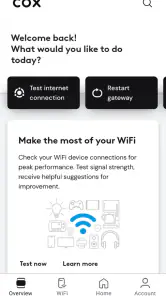
Setting up the Cox Panoramic Wifi app was a breeze. After downloading it from the app store, I was greeted with a straightforward interface that even my grandma could navigate. The app guides you through the installation process step-by-step, ensuring your network is up and running in no time.
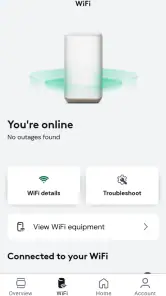
The real magic begins once you're all set up. The app provides a comprehensive view of your network, showing all connected devices. It's fascinating to see just how many gadgets are hogging your bandwidth! With a few taps, I was able to prioritize my devices, ensuring my laptop gets the best signal while I'm working from home.
Features Worth Highlighting
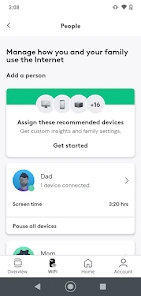
One of the standout features of this app is the ability to pause the internet on specific devices. Imagine this – it's family movie night, but your teenager is hogging all the bandwidth playing online games. With a simple tap, you can pause their connection and ensure uninterrupted streaming for everyone else. It's a parent’s dream come true!
More From Our News Desk

Clash of Clans Is Won Between the Battles

Android Auto Makes the Case for Quieter Car Software

MobiOffice: Transforming Mobile Productivity with Seamless Integration

EA SPORTS FC™ Mobile Soccer: Redefining Mobile Sports Gaming

How Microsoft OneDrive Became a Mobile Productivity Giant

How Google Translate Breaks Language Barriers Effortlessly
Another neat feature is the coverage map. It shows you where your Wi-Fi signal is strongest in your home, allowing you to strategically place your router for optimal coverage. No more guessing games or relying on trial and error.
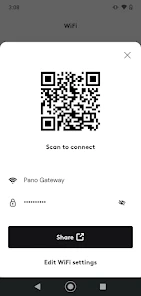
For those of us who are a bit forgetful, the app also offers a guest Wi-Fi option. You can set up a separate network for visitors, ensuring they don't have access to your main network. Plus, you can easily change the guest password as often as you like, keeping things secure.
Small workflows that make the controls more useful
I would use device prioritization deliberately rather than treating it as a permanent speed boost. If I have an important video call, prioritizing the work laptop is a reasonable short-term choice; afterward, I would check whether another device needs attention. This is a practical way to manage competing demands, but it is not a substitute for a stronger signal or a faster service plan.
The connected-device view can also help with a simple household audit. When an unfamiliar device appears, I would first check whether it belongs to a guest, a family member, or a device that reconnects under a surprising name before taking action. Pausing a connection is useful for a clear, temporary need, but it is a blunt tool if the real issue is identifying an unknown device or solving a recurring network problem.
The coverage map is most helpful as a guide for testing locations, not as a promise that moving a router a few feet will solve every dead zone. I would compare the areas where the connection feels weak with the map, then try a sensible placement change and check again. Walls, the layout of a home, and the location of the equipment can all affect results, so I would treat the map as a way to narrow down experiments rather than a definitive diagnosis.
A practical routine for a shared home
For a household with changing schedules, I would make the app part of a short check-in rather than constantly adjusting settings. Before a remote-work day, I might look at the device list, confirm that the laptop is recognizable, and reserve prioritization for a meeting that genuinely needs a steadier connection. This keeps the controls purposeful and avoids creating the expectation that every device can receive special treatment at once.
When someone reports a problem, I would ask whether it affects one device or several before changing anything. If only one phone is struggling while other devices work normally, inspecting that phone’s connection is a more sensible first step than pausing other household devices. If several devices have trouble in the same area, the map can help identify where to test, while a problem affecting the whole home may point beyond what an app control can solve.
Device names are worth tidying up when the household has a moment. A list full of generic names makes later checks harder, especially when visitors’ devices come and go. Recognizable labels help me distinguish a family member’s tablet from an unfamiliar connection without jumping straight to blocking or pausing it. That small bit of housekeeping makes the app’s device view more useful over time.
How it compares and where it falls short
Compared with the usual alternatives—logging into a router’s settings page, using a manufacturer’s router app, or relying on basic device settings—Cox Panoramic Wifi puts a set of home-network controls in a Cox-focused app. That can be less intimidating than navigating technical menus, especially for a household that wants to manage device access and guest Wi-Fi without learning networking terminology. A router’s own app may be a better fit for people who use non-Cox equipment or want controls tied to a different manufacturer’s hardware.
There is a trade-off in that provider-specific focus. The app makes the most sense when your home network is built around Cox’s service and setup; it is not a universal dashboard for every router and internet account. Nor would I assume that a pause or priority control explains why a connection is slow. If the entire home is having trouble, the app may help you inspect the network, but the underlying cause could require a different fix.
A realistic use case is a guest arriving while you are preparing dinner: you can offer a separate guest network rather than sharing the password used by your household. Later, changing that guest password can make access easier to manage without having to update every device at home. That separation is a useful habit, though it still depends on keeping the main network credentials private and choosing a password guests can enter correctly.
Questions I would settle before relying on it
Can I use it with any router? I would not assume so. Its purpose is tied to a Cox home Wi-Fi setup, so I would first check that the equipment and account in my home fit that setup. If I use a different provider or prefer a separate router ecosystem, that manufacturer’s app or its own settings page is likely the more relevant place to manage the network.
Will pausing a device improve everyone else’s internet? It can remove that device from the household’s current network activity, but I would not treat it as a guaranteed fix for buffering or a slow connection. The cause may be signal coverage, the service itself, or something happening on the device that is having trouble. I would use the control for access management, not as a diagnosis.
Does the guest network mean visitors need the household password? The point of the separate guest option is to avoid sharing the main network credentials. I would give guests the guest details and change them when access no longer needs to remain available. That is more convenient than changing the main password and reconnecting every household device, though it still calls for sharing access thoughtfully.
Is the app useful if I only want to fix a dead zone? It can help me compare a weak spot with the coverage map and test a different equipment position, but it cannot guarantee a remedy. If the problem persists across the home, I would look beyond the app’s controls and consider whether the equipment or service needs attention. A map is a helpful clue, not a substitute for troubleshooting.
Current state, evolution, and what I would watch
The app was released on March 29, 2019, and its current version is 5.63.0-6. Those details show that it has continued through multiple version changes, but a version number alone does not tell me which controls have changed or whether a particular update will alter an existing household’s setup. For current users, my practical advice is to review the controls they already rely on after updating, especially device names, priorities, and guest access, rather than assuming every familiar setting behaves differently.
For prospective users, I would check that the Cox equipment and account setup in the home are compatible with the app before making it the center of a network routine. The app is rated for Everyone, has an average rating of 3.8 from around 24,000 ratings, and has been installed over a million times. Those figures suggest broad use alongside a mixed reception; they are useful context, not a guarantee that every household will find setup or troubleshooting smooth. It requires Android 10 or later, so an older Android device may not be suitable.
For an existing user, the useful question after an update is not simply whether the version number changed, but whether the things you depend on still make sense in your home. I would revisit the device list after equipment changes, check guest access when visitors no longer need it, and avoid changing several network controls at once when investigating a problem. Making one adjustment and observing what happens gives a clearer picture than treating every new version as a reason to redo the setup.
What I would watch over time is whether the app continues to make common household tasks straightforward: recognizing devices, managing guest access, and finding a sensible starting point when coverage feels uneven. Those are the reasons I would keep it within reach. I would judge changes by their practical effect on those routines, not by the version number alone or by an assumption that an update can improve the underlying internet connection.
Why I Think It's a Must-Have
Living in a digital age, having a reliable internet connection is crucial. The Cox Panoramic Wifi app not only enhances your home network but also provides peace of mind. With its user-friendly interface and robust features, it’s hard to imagine going back to a standard router setup.
What truly sets this app apart is its ability to adapt to the needs of its users. Whether you're a tech-savvy individual or someone who struggles with technology, the app caters to all. And, let's be honest, who doesn't love the idea of having control over their home network at their fingertips?
In conclusion, if you're looking to boost your home internet experience, the Cox Panoramic Wifi app is definitely worth considering. It’s like having a personal IT technician right in your pocket. So, why not give it a try and say goodbye to those pesky Wi-Fi dead zones once and for all?
My recommendation
I would recommend it to Cox customers who want an easier way to see connected devices, manage guest access, and make quick adjustments from a phone. I would skip it if I need a provider-neutral network manager, depend on equipment it does not support, or expect an app to resolve persistent service or hardware problems by itself. For the right household, its value is straightforward: it makes several useful controls easier to reach, while leaving the bigger job of maintaining a dependable connection to the network, equipment, and service behind it.
Cox Panoramic Wifi Frequently Asked Questions
Can I use Cox Panoramic Wifi if I’m not a Cox customer?
Cox Panoramic Wifi is intended for managing the Panoramic Wifi experience, so it is most relevant to people using Cox’s service and equipment. If you use a different internet provider or a standard router, the app is unlikely to offer useful controls for your home network. Before installing, consider whether your home connection uses the Cox Panoramic Wifi system.
What can I check before downloading Cox Panoramic Wifi?
First, make sure you use the Cox Panoramic Wifi service and have a compatible Android or iOS device. The app is free to download and is rated for Everyone, which may make it suitable for a household device. It is published by Cox Communications, Inc., so checking the developer name can help you identify the intended app when browsing an app store.
Does Cox Panoramic Wifi let me control access for children or guests?
The app is designed to provide access to and control over your wifi experience, and its network tools include options such as parental controls and guest-network management. These features can be useful when you want to manage how household members or visitors use your connection. Their relevance depends on having the Cox Panoramic Wifi setup, so consider your home network before downloading.
Will the app replace my internet service or router?
No. Cox Panoramic Wifi is an app for managing a wifi experience, rather than an internet connection on its own. Its controls are tied to the Panoramic Wifi system, which may include a gateway and optional wifi pods. You should think of the app as a companion to compatible Cox equipment, not as a replacement for an internet plan or a standalone router.
Can Cox Panoramic Wifi help me decide whether the app suits my household?
The app is aimed at people who want to access and control their Cox Panoramic Wifi experience. Network management can be useful in a household where people want to check connected devices, manage access, or adjust wifi settings. If you do not use the Panoramic Wifi system, the app may not fit your needs. Its focus is practical home-network control rather than general productivity features.
Pros
- User-friendly interface
- Seamless connectivity
- Customizable settings
- Parental control options
- Secure network
Cons
- Limited coverage range
- Occasional connectivity issues
- Subscription required
- Complex initial setup
- Limited device compatibility

- Category
- Productivity
- Version
- 5.63.0-6












