Copart - Online Auto Auctions
- 3.37K
- 4.7
- Installs
- 5.00M
- Price
- Free

Screenshots

Analysis by Reviewed
When I’m looking for a car, I usually start with a rough idea of what I need, then discover that the hard part is comparing listings and deciding which ones deserve closer attention. Copart is aimed at a different kind of search than a typical local classified app: it brings auto auctions to a phone, where browsing can lead to bidding and a purchase. I’d treat it as a research and auction tool, not as a quick way to buy an everyday used car without doing homework.
Begin with the buyer’s real goal
Before opening an auction app, I’d decide what outcome I’m aiming for. Someone looking for a repair project can accept a different level of uncertainty than a buyer who needs dependable transport for a commute. A vehicle intended for parts has its own priorities, too. This distinction matters because auction browsing can make many cars feel like possibilities, while the right choice depends on what you can realistically repair, store, transport, or use.
I’d also think about the practical constraints before getting attached to a listing: how much time I can spend researching, whether I have access to repair help, and what I would do if the vehicle needs more work than expected. Those questions aren’t exciting, but they help establish whether an auction purchase suits my situation at all. If the only acceptable outcome is a ready-to-drive car with predictable costs, a conventional used-car search is likely a better starting point.
Start with a shortlist, not a winning bid
The most useful first step is to decide what you’re actually shopping for. A project car, a replacement vehicle, and a vehicle bought for parts call for very different standards. With auction listings, a familiar make and model isn’t enough to establish that a vehicle is right for you. I’d narrow the search by the basics, then compare the remaining candidates carefully rather than letting an exciting-looking listing set my budget.
A practical habit is to keep a small shortlist and note why each vehicle made it onto it: its model, apparent condition, and what you would need to check before bidding. That makes it easier to compare candidates when you’re browsing in short bursts during the day. It also helps prevent a common auction mistake: becoming attached to one listing before you’ve thought through the work and uncertainty involved.
Ever found yourself browsing endless car listings, hoping to snag that perfect ride without breaking the bank? Well, let me introduce you to Copart - Online Auto Auctions. If you're into cars like me, or just looking for a good deal, this app is a game-changer.
Discovering Copart
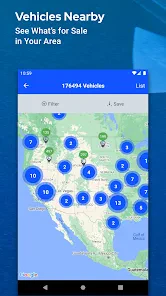
When I first stumbled upon Copart - Online Auto Auctions, I was curious about how it could transform my car-hunting experience. The app opens up a world of auto auctions right at your fingertips. Imagine scrolling through thousands of vehicles, from the comfort of your couch, with just a few taps on your smartphone.
More From Our News Desk

Weather by Xiaomi Review: Clear at a Glance, Less Clear Up Close

X Under Pressure: Can It Recover When Posting Goes Wrong?

Clash of Clans Is Won Between the Battles

Android Auto Makes the Case for Quieter Car Software

MobiOffice: Transforming Mobile Productivity with Seamless Integration

EA SPORTS FC™ Mobile Soccer: Redefining Mobile Sports Gaming
Finding and comparing the right vehicle
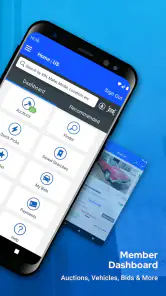
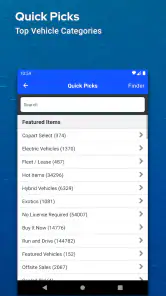
Let's talk about the interface. It's sleek and intuitive, which makes navigation a breeze. Even if you're not tech-savvy, you'll find it easy to browse through categories, filter searches, and place bids. The app's design is straightforward, with clear tabs and a user-friendly layout that ensures you won't get lost in a sea of vehicles.
One of the standout features is the vehicle search functionality. You can narrow down your options by make, model, year, and even the type of auction. This means you can find exactly what you're looking for without wading through irrelevant listings.
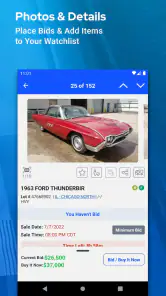
That filtering is most helpful when you use it to eliminate unsuitable options, not just to hunt for a particular badge or model year. I’d compare several candidates and check the listing details closely before treating any one of them as a serious prospect. A damaged or salvage vehicle can look like a bargain on a phone screen, but the purchase only makes sense if its condition and likely repair needs fit your skills, budget, and intended use.
A more careful way to compare candidates
I find it useful to separate the first pass from the serious evaluation. On the first pass, I’d remove vehicles that obviously don’t match the intended use. On the second, I’d look at the remaining listings one at a time and write down the questions each raises. For example, if the visible condition is the main reason a car looks attractive, I’d ask what information I still need before I could judge the likely work involved.
This is also where patience can save money. Rather than treating the first plausible listing as the answer, I’d compare it with alternatives that meet the same broad need. A shortlist makes it easier to see when I’m responding to genuine fit and when I’m simply excited by a low-looking bid or an appealing model. If none of the candidates feels clear enough to assess, waiting for another search session is a reasonable decision, not a failure to use the app.
From browsing to bidding
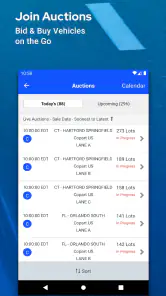
Another cool feature is the virtual bidding. You get to participate in real-time auctions, giving you the thrill of a live auction from wherever you are. Plus, the app sends you notifications, so you never miss out on a bid opportunity. It's like having a personal car auctioneer in your pocket.
For me, notifications are a prompt to return to a listing, not a reason to bid immediately. Before entering an auction, I’d set a firm ceiling based on what the vehicle is worth to me after allowing for repairs, transport, and other costs I may need to handle. The app can bring the bidding activity to you, but it can’t decide whether a final price still makes sense. If you’re new to auctions, watching how bidding unfolds before committing is a sensible way to learn the pace without letting the live moment make the decision for you.
Build a decision routine before the auction
A useful routine is to set the maximum I’m willing to spend before the auction becomes urgent, then avoid revising that ceiling just because bidding is active. I’d keep the vehicle’s intended role in view: a project can justify some uncertainty, but only if the work is part of the plan rather than an unexpected burden. This gives a notification a clear purpose. It brings me back to a decision I’ve already considered instead of pushing me into a new one on the spot.
I’d also make sure I know what my next action would be if the bid succeeds. That might mean reviewing the listing again, coordinating with someone who can assess or repair the vehicle, or planning how to handle the vehicle after the auction. Thinking through those handoffs in advance is especially useful for a first-time bidder, because winning is not the same as having a usable car. The app can make the auction accessible from a phone, but the decision still has consequences beyond the screen.
Where the app fits—and where it doesn’t
If you're wondering whether Copart - Online Auto Auctions is worth downloading, let me put it this way: it can save you time and money. The app provides access to a wide range of vehicles, including salvage titles, which can be a goldmine for car enthusiasts or anyone looking to restore a car.
Moreover, the app's community is vast, which means the auctions are competitive but also fair. You have the chance to score some incredible deals if you're patient and strategic with your bids.
Copart is a better fit for someone comfortable evaluating auction vehicles than for a buyer who simply wants a straightforward, ready-to-drive car. Compared with ordinary classified marketplaces, its auction focus makes bidding central to the experience; a conventional dealer or local listing may be a better route if you want to inspect a typical used car and negotiate a direct purchase. For a restoration enthusiast, by contrast, the chance to search auction inventory from a phone can make it easier to identify candidates before investing time in a closer assessment.
The difference from a general shopping app is important: here, the central task isn’t simply finding a low price and checking out. You’re considering vehicles in an auction setting, and the appeal of a candidate has to be weighed against its condition and what you can do with it afterward. I’d use a general classified marketplace when I want a more familiar direct conversation with a seller, or a dealer when convenience and a more ordinary buying process matter more than auction access.
Picture a realistic evening search: I have half an hour, a particular type of project in mind, and no intention of buying on impulse. I filter for relevant vehicles, save a few candidates mentally or in my own notes, and revisit their details before deciding whether to follow an auction. If one looks promising, I check what I still need to learn and whether I can arrange the practical next steps. That workflow turns casual scrolling into useful research; skipping those checks turns the same convenience into a risk.
One small but helpful discipline is to make a note of why I rejected a candidate as well as why I kept another. If I pass on a car because its apparent condition doesn’t fit my repair plans, that reason can stop me from circling back later just because it remains visually appealing. It also gives me a more useful comparison when I return to the search: I’m judging the next listing against a real requirement, not just against whatever caught my eye most recently.
There’s also a handoff that matters: finding a vehicle in the app is only the beginning. A bidder still needs to make a considered decision about the car and handle whatever comes after a successful auction. I wouldn’t assume that a mobile bid removes the need to understand the vehicle, plan for collection, or budget for work. The app is strongest when it helps you manage discovery and bidding while you handle those real-world responsibilities deliberately.
Think beyond the winning bid
A useful question before bidding is not only “Would I buy this vehicle?” but also “What would I do the day after I win?” I’d want a practical plan for the next handoff, whether that involves getting the vehicle to a place where it can be assessed, arranging repair work, or deciding that the candidate is better suited to parts. If I can’t picture that next step, I’m not ready to treat the listing as a realistic purchase.
This is where auction browsing can be less convenient than a standard local listing. A typical direct purchase may let a buyer focus on one vehicle and work through the details with a seller, while an auction workflow asks the buyer to make decisions under bidding conditions and then manage what follows. That trade-off is worthwhile for people who specifically want auction inventory, but it’s a real cost in time and planning for anyone who mainly wants a simple way to replace a car.
Who should download it
Copart is free, and it’s developed by Copart. Its Shopping app has a 4.7 average from around 54,000 ratings, with about 3,400 written reviews, and has passed 5 million installs. It’s rated for Everyone, so the store age classification is broad; the auction decisions themselves still call for adult judgment and careful research. The app was released on July 2, 2015, and version 6.6.2 requires OS 9 or later.
I’d recommend it to car enthusiasts, restorers, and buyers who already understand why auction condition and repair planning matter. I’d skip it if I need a predictable daily driver quickly, dislike competitive bidding, or don’t have room in my budget for uncertainty beyond the amount I bid. The key question isn’t simply whether a vehicle looks affordable; it’s whether I can live with the full process of buying and dealing with it.
Questions worth settling before you commit
Is it useful if I’m only researching? Yes. Browsing and comparing candidates can help me understand what kinds of vehicles appear in the auction environment before I decide whether bidding makes sense for me. I’d use that time to learn what details matter to my intended project and to decide what I still need to check, rather than treating browsing as a promise to buy.
Can the app make a car a good deal by itself? No. It can bring search and bidding together on a phone, but the buyer still has to judge whether a candidate fits the plan and whether the likely total commitment is acceptable. A bid that seems manageable on its own may not reflect the work or practical arrangements involved after the auction.
What if I’m new to auctions? I’d start by observing and comparing rather than bidding on the first interesting vehicle. A patient first session can show whether the pace and uncertainty suit you. And if you mainly need transportation without a restoration project, I’d compare ordinary used-car listings or dealer options instead of assuming auction access is automatically the better bargain.
Final Thoughts
Overall, Copart - Online Auto Auctions is a must-have for anyone serious about buying cars through auctions. Whether you're a seasoned bidder or a newbie, this app caters to all levels of car enthusiasts. It's not just an app; it's a gateway to a whole new world of automotive possibilities. So why not give it a try? You might just find your dream car waiting for you.
My recommendation comes with one condition: use it as a tool for a disciplined search, not as proof that a low-looking bid will become a low-cost car. If you’re willing to compare options, set limits, and think through the handoff from auction to ownership, it offers a focused way to explore Copart’s vehicle auctions. If you want a simple purchase with fewer unknowns, a standard used-car marketplace or dealer is probably the better starting point.
Copart - Online Auto Auctions Frequently Asked Questions
Can I browse Copart listings without placing a bid?
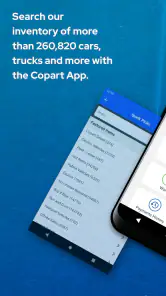
Yes. Copart is built around searching and browsing vehicle listings, so you can explore options before deciding whether to take part in an auction. Its summary highlights over 250,000 cars available to browse from your phone. Reviewing listings first gives you time to compare vehicles and consider their details without rushing into a bidding decision.
Is the Copart app suitable for both casual browsing and regular auction activity?
Copart can be useful whether you are exploring vehicle listings or already intend to participate in auctions. The app brings search, bidding, and buying to a mobile device, making it easier to check activity away from a computer. If you are considering a purchase, use the browsing stage to learn about the vehicle and auction process before committing.
What devices can I use Copart - Online Auto Auctions on?
Copart - Online Auto Auctions is available as a mobile app for Android and iOS users. Its shopping-focused interface puts vehicle search and auction activity on a phone, so you can browse while away from a computer. Before downloading, check that your device meets the app’s minimum operating-system requirement; the current version requires OS 9 or later.
Is Copart - Online Auto Auctions suitable for first-time auction buyers?
The app is designed to make vehicle auctions accessible to both novice and experienced bidders, with browsing and bidding available from a smartphone. First-time buyers should take time to understand the auction process and review the terms of sale before making a commitment. Vehicle auctions can require more preparation than ordinary online shopping, so research each listing carefully and decide what you are comfortable bidding.
What is Copart - Online Auto Auctions and how does it work?
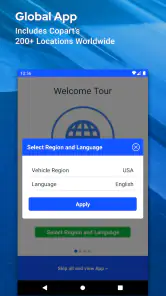
Copart - Online Auto Auctions is a digital platform where users can participate in vehicle auctions via their smartphone. The app connects buyers and sellers across the globe, offering a wide range of vehicles, including cars, trucks, and motorcycles. Users can browse, bid, and win vehicles in real-time auctions. It's designed to streamline the auction process, making it accessible and efficient for both novice and experienced bidders.
Pros
- Easy-to-use interface for browsing auctions
- Wide selection of vehicles available
- Real-time bidding feature
- Detailed vehicle information provided
- Convenient mobile notifications
Cons
- Membership required for bidding
- Limited payment options
- Occasional app crashes
- High competition in bidding
- Limited customer support
- Category
- Shopping
- Version
- 6.6.2











