

Compass: Accurate Compass
- 936.00
- 4.5
- Installs
- 5.00M
- Price
- Free

Screenshots
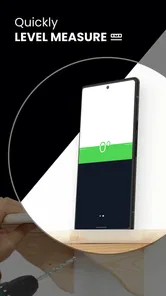
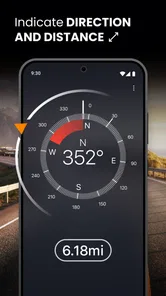
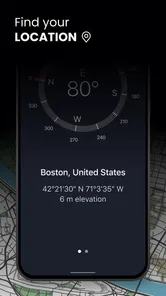
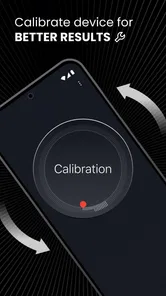
Analysis by Reviewed
When a map app loses signal, the hard part is often not finding a street but working out which way to start walking. That is where I see the value of Compass: Accurate Compass: it gives me a quick directional reference without requiring me to plan a route first. It is a free navigation app from Prometheus Interactive LLC, and its appeal is deliberately narrower than a full mapping service. I would reach for it when I need to orient myself, not when I need turn-by-turn directions.
A simple tool for getting your bearings
A digital compass is most useful when I treat it as one piece of navigation, rather than as a replacement for a map. At a trail junction, for example, I can check which direction I am facing before comparing that with a paper map or a saved route. In a city, it can help me choose the right direction from a station exit when nearby buildings make the map view hard to interpret. The practical benefit is less second-guessing at the moment I set off.
That distinction matters: a compass points, but it does not tell me which turn to take or whether a path is open. For route planning, I would still use a map or navigation app. For a quick orientation check, a dedicated digital compass can be more direct than opening a route screen and waiting to interpret a map.
Getting Started with Compass: Accurate Compass
First things first, downloading and setting up the Compass: Accurate Compass app is a breeze. It's available for both Android and iOS, so no one's left out of the exploratory fun. Once installed, you're greeted with a clean and intuitive interface that, thankfully, doesn't bombard you with ads. I mean, who needs pop-ups when you’re trying to find your way?
Features that Stand Out
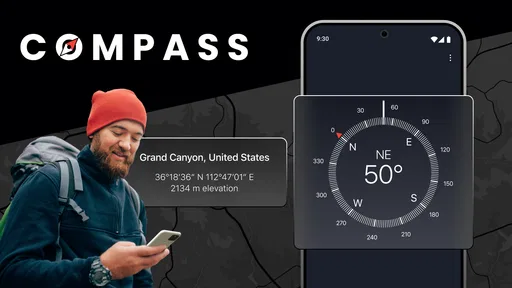
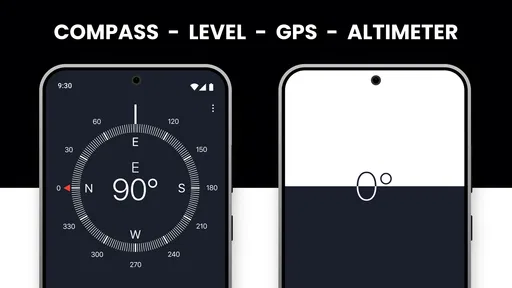
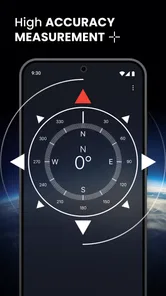
One of the coolest features is its real-time GPS integration. Whether you're hiking in the woods or just trying to find your way around a new city, this app ensures you’re never off track. The compass itself is incredibly responsive and accurate, thanks to the app's clever use of your phone's built-in sensors.
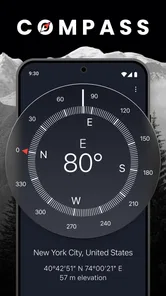
The app also provides detailed geographical data, so you can learn more about your surroundings as you navigate. It's like having a pocket-sized geography teacher with you at all times. And for those who love a bit of customization, you can tweak the compass style to suit your mood or the occasion. Fancy a vintage look or something more modern? It's all there!
Using it sensibly outdoors and around town
On a walk through an unfamiliar park, I would use the compass at a pause rather than stare at it while moving. I can pick a visible landmark in the direction I want to go, then put the phone away and walk toward it. This small habit makes the reading useful without turning a simple outing into a constant screen check. At a trail fork, I would first compare the indicated direction with my map; the compass alone cannot identify the correct branch.
More From Our News Desk

 Weather - By Xiaomi
Weather by Xiaomi Review: Clear at a Glance, Less Clear Up Close
Xiaomi’s weather app makes everyday forecasts quick to scan, but its calm surface can leave useful details and recovery paths harder to find than they should be.

 X
XX Under Pressure: Can It Recover When Posting Goes Wrong?
A resilience-focused review of X, examining setup, mistaken posts, interruptions, weak connections, and the gaps that matter when recovery needs to be dependable.

 Clash of Clans
Clash of Clans Is Won Between the Battles
Its raids are quick; its community is a long-term project of coordination, teaching, rivalry, and shared responsibility—with all the friction that entails.

 Android Auto
Android Auto Makes the Case for Quieter Car Software
The car interface is no longer judged by how much it can do, but by how quietly it helps. Android Auto shows what drivers now expect—and what still gets in the way.

 MobiOffice: Word, Sheets, PDF
MobiOffice: Transforming Mobile Productivity with Seamless Integration
MobiOffice: Word, Sheets, PDF is redefining mobile productivity with a surprising blend of functionality and innovation.

 EA SPORTS FC Soccer Mobile 26
EA SPORTS FC™ Mobile Soccer: Redefining Mobile Sports Gaming
Dive into EA SPORTS FC™ Mobile Soccer, where immersive gameplay and strategic depth transform mobile sports gaming.
Latest News



Phone compasses depend on the device’s sensors, so a reading that looks odd is a reason to stop and recheck rather than blindly follow it. I keep the phone level, move away from nearby metal objects when practical, and compare the direction with a known landmark or map. That is a sensible way to use any phone-based compass, especially when a wrong turn would matter.
User Experience
What I love about this app is how straightforward it is. There's no steep learning curve, which means you can start using it effectively right away. The design is user-friendly, with everything you need just a tap away. Plus, it works offline, a lifesaver for those moments when you're out of signal range but still need direction.
Battery efficiency is another plus point. It doesn’t drain your battery like some other GPS-heavy apps do, which is crucial when you're out and about for extended periods.
Where a compass beats a map—and where it does not
Compared with the usual map apps, this is a more focused tool: it helps answer “which way am I facing?” without making route details the main event. That can be handy when I already know the destination but need to orient myself, or when I want a quick check without tracing a route across the screen. A paper map has a different advantage: it shows terrain and the wider area at a glance, and it does not rely on a phone battery. For a long hike, I would carry that broader context rather than depend on a compass app alone.
There are practical trade-offs. A phone compass is not a substitute for navigation skills, and sensor readings can be affected by the environment or the way the phone is held. I would not choose this as my only aid in an unfamiliar, remote area. If I need live route guidance, traffic-aware directions, or a clear record of where a path goes, a conventional navigation app is the better fit.
A station-exit test for everyday usefulness
Imagine arriving by train in a neighborhood you do not know, then stepping onto a street where tall buildings make it hard to tell which way you are facing. I would check the compass while standing still, match its direction to the street layout on a map, and pick a visible landmark before walking. The compass helps resolve the initial orientation problem; the map still tells me which streets connect and where my destination lies. That division of labour is more dependable than expecting either screen to answer every question.
There is also a useful habit for short walks: decide on the direction you want before taking the phone out. If the goal is simply to head toward a park entrance or a road you recognize, the compass can serve as a quick check rather than an invitation to keep watching the display. If the direction seems inconsistent with the surroundings, I would pause and compare again instead of forcing the reading to fit my assumption.
Small checks that make a phone compass more useful
When I want a reliable directional cue, I first hold the phone still and level, then give the display a moment to settle. If the needle or heading behaves unexpectedly, I rotate the phone slowly and recheck from a spot away from obvious metal structures or objects. These are not special tricks exclusive to this app; they are sensible ways to work with a phone’s magnetic sensors. The important point is not to treat a single odd reading as an instruction.
I also find it useful to think in terms of a sequence: establish direction, identify a landmark, then put the phone away and move. That reduces needless screen checking and helps me notice the environment. On a route with several turns, though, this method is no substitute for checking a map at each decision point. A compass is most helpful when the question is directional and simple, not when the route itself is complicated.
Who is likely to get the most from it?
This app makes the most sense for someone who wants a quick directional check on walks, while travelling, or when stepping out of a station into an unfamiliar neighborhood. It can also be a useful companion for people learning to read a map: check the phone’s direction, then practise matching it to the map rather than expecting the screen to make every decision. If you rarely need to orient yourself and already rely on turn-by-turn navigation, a separate compass may add little to your routine.
It is especially appealing if you often move between map use and looking at the real world. A map can show where you are in relation to streets, paths, or landmarks, but it may take a moment to interpret which side of the screen corresponds to the direction you are facing. A compass gives a more immediate directional cue. For a traveler who wants to orient themselves after leaving a station, or a walker who wants to compare a trail map with the landscape, that small difference can make the first decision less confusing.
On the other hand, I would not recommend choosing this as a primary navigation solution if you need spoken instructions, route recalculation, traffic information, or detailed guidance through a complex city. Those jobs belong to mapping and navigation apps. It is also not the right tool for someone who wants a detailed route record or who expects an app to choose the correct trail at a fork. Its value comes from doing a narrower job simply, not from replacing every other navigation aid.
Offline use, purchases, and practical expectations
One common question is whether it remains useful without mobile service. The offline use described in the app makes it suitable for checking direction when signal is unavailable, though I would still prepare a route and carry another navigation option for remote trips. Another practical question is whether it replaces GPS navigation: no, I would use it for orientation, then switch to a mapping tool when I need a route or destination-specific guidance. The app is free to download, rated for Everyone, and includes optional in-app purchases ranging from $0.99 to $99.99 per item, so I would check purchase prompts carefully if I prefer to keep extras off my bill.
For a casual user, the sensible expectation is straightforward: it can help answer which direction you are facing, but it cannot guarantee that a chosen direction leads to the right place. That depends on reading the surroundings and using a map where the route matters. I would keep an offline map or paper backup ready for a trip where losing signal could leave me without context. For a short urban walk, that may be more preparation than I need; for an unfamiliar trail, it is a reasonable precaution.
Final Thoughts
So, is Compass: Accurate Compass worth the download? Absolutely. It’s reliable, easy to use, and packed with features that make it more than just a basic compass app. Whether you're an avid adventurer or just someone who occasionally loses their way, this app is a must-have.
In a world where we rely heavily on digital maps and navigation systems, having a trusty compass app on your phone is like having an old friend by your side. So go ahead, give it a try. Who knows, it might just become your new favorite travel buddy!
A quick note on its reputation and fit
The app has a 4.7 average from around 40,000 ratings and more than 5 million installs, which suggests many people find this kind of straightforward direction tool useful. It has been available since January 24, 2016, and its age rating is Everyone. Those figures are reassuring context, but I would still judge it by whether I need a compass rather than a full navigation system.
My practical recommendation is to keep it as a lightweight backup for everyday orientation, especially if you already know how to read a map and want a fast directional cue. I would skip relying on it as a sole guide for a demanding trip, where route detail, preparation, and backup navigation matter more. Used within that boundary, it fills a small but genuinely useful role.
Compass: Accurate Compass Frequently Asked Questions
Can I use Compass: Accurate Compass as my only navigation tool on a hike?
Compass: Accurate Compass is best treated as a directional aid rather than a complete navigation system. It can help you check which way you are facing, but it does not replace a planned route, a map, or sound outdoor judgment. Before a trip, consider how you will navigate if your phone runs out of battery or its sensors give an unreliable reading.
Will Compass: Accurate Compass work on any smartphone?
The app relies on a phone’s built-in sensors to determine direction, so the experience depends on the device having suitable sensors and their readings behaving correctly. Before relying on it, open the compass and check that it responds as you turn the phone. Sensor performance and calibration can vary, so test it in a familiar place first.
Does Compass: Accurate Compass provide turn-by-turn directions or maps?
Compass: Accurate Compass is focused on showing directional guidance through a digital compass, not on replacing a full navigation system. It can be useful when you want a quick sense of direction, but it should not be mistaken for turn-by-turn route planning. If you need route instructions or a mapped journey, use a navigation app designed for that purpose alongside it.
Can I customize the compass display or save places in Compass: Accurate Compass?
The app offers different compass designs, allowing you to choose a display that suits your preferences. It also includes the option to save locations for future navigation, which can be handy when you want to return to a place. These options complement its core role as a digital compass and do not change the importance of reliable sensor readings.
Do I need to grant location or sensor permissions to use Compass: Accurate Compass?
Compass: Accurate Compass relies on your phone’s built-in sensors to show direction, so sensor availability and correct calibration matter to its performance. Location access may be relevant to location-related functions, such as saving or sharing a place. Review the permissions requested during setup and allow only those you are comfortable with; the basic purpose of the app is to provide compass guidance.
Pros
- Highly accurate directional readings
- User-friendly interface
- Supports offline use
- Quick calibration
- Minimal battery consumption
Cons
- Ads can be intrusive
- Lacks advanced features
- Limited customization options
- No night mode available
- Requires location permission













