

CloneAI AI Video Generator
- 1.68K
- 2.8
- Installs
- 1.00M
- Price
- Free

Screenshots
Analysis by Reviewed
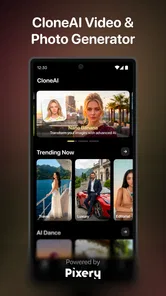
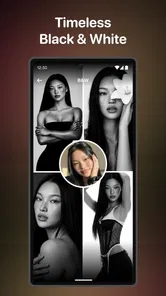
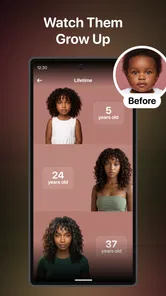
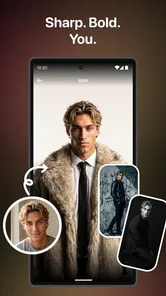
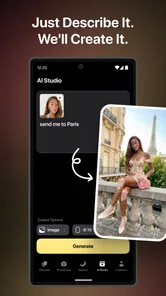
I approached CloneAI as a photography app rather than a conventional video editor. Its main appeal is the use of AI-driven styles and effects to turn ordinary images or creative ideas into playful visual results. That makes the decision less about replacing a complete editing suite and more about deciding whether you want quick, trend-focused transformations without building every effect manually.
In my experience, the app is most interesting for people who enjoy experimenting with portraits, anime-inspired looks, affectionate scenes, imagined family moments, and other social-media-friendly concepts. It is free to install, rated for Everyone, and developed by Pixery Bilgi Teknolojileri. At the same time, its average rating is 2.8 from around 14 thousand ratings, so I would not recommend treating it as a universally smooth or dependable tool. The right question is whether its particular creative shortcuts match the way you want to make images and short visual content.
How I Would Decide Whether CloneAI Fits
I would decide whether CloneAI fits by testing one ordinary portrait and one image that matters less to me, then comparing how each result handles faces and details. That gives me a quick sense of whether its playful transformations are enjoyable or too unpredictable for my taste. From there, I can weigh the app’s creative strengths against the specific trade-offs that matter in everyday use.
Start with the kind of result you want
The first decision is simple: do you want precise control, or do you want to see what an automated effect can do with a photo? If I were preparing a carefully edited portrait, correcting color, removing distractions, and controlling every layer, I would begin with a traditional photo editor. CloneAI makes more sense when the destination is a stylized transformation rather than a technically accurate retouch.
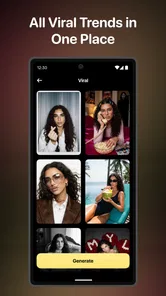
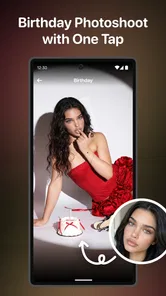
The app’s focus includes anime-style creation, AI effects, hugs, kisses, future-baby concepts, and other trend-based ideas. Those themes give it a more playful identity than a standard camera utility. I would use it when the surprise is part of the fun: upload a suitable picture, choose a concept, and judge whether the generated interpretation feels convincing enough to share.
That approach also changes how I select source photos. A clear face, even lighting, and a simple background usually give an AI effect less visual clutter to interpret. For a two-person effect, I would choose an image where both faces are visible and not heavily covered by sunglasses, hats, or extreme shadows. This is a practical workflow choice, not a guarantee, but it can make the difference between a charming result and an awkward one.
Think about your tolerance for experimentation
AI effects are not the same as predictable filters. A normal filter applies a known visual treatment, while a generative effect may alter facial details, clothing, expressions, or the relationship between people in the frame. I see that unpredictability as part of CloneAI’s entertainment value, but it is also a reason to keep expectations realistic.
More From Our News Desk

 Gmail
GmailGmail in a Busy Inbox: Who Benefits Most?
From first account to crowded workday, Gmail earns its place through dependable search and flexible sorting—but its best fit depends on how much inbox maintenance you can tolerate.

 Prime Video
Switching to Prime Video: What Changes in Your Viewing Routine
Prime Video can make a compelling second home for streaming, but switching means learning a different catalog, rental layer, and route from browsing to playback.

 Universal TV Remote Control
Universal TV Remote Control Works Best as a Reliable Backup
A phone remote earns its place through quick setup and reliable habits. Here is how to get more from Universal TV Remote Control—and where its limits show.

 Weather - By Xiaomi
Weather by Xiaomi Review: Clear at a Glance, Less Clear Up Close
Xiaomi’s weather app makes everyday forecasts quick to scan, but its calm surface can leave useful details and recovery paths harder to find than they should be.

 X
XX Under Pressure: Can It Recover When Posting Goes Wrong?
A resilience-focused review of X, examining setup, mistaken posts, interruptions, weak connections, and the gaps that matter when recovery needs to be dependable.

 Clash of Clans
Clash of Clans Is Won Between the Battles
Its raids are quick; its community is a long-term project of coordination, teaching, rivalry, and shared responsibility—with all the friction that entails.
Latest News



If you need the same person to remain perfectly consistent across several images, I would be cautious. The app is better suited to one-off experiments than to a demanding visual identity project. For a profile picture, a private joke, or a quick post, an imperfect interpretation can be acceptable. For professional portraits, product imagery, or anything where the subject must remain exact, a conventional editor is the safer choice.
Check the practical commitment before you begin
The app is free to download, but it includes in-app purchases ranging from $7.99 to $49.99 per item. That matters because the most tempting part of an AI app is often the moment when you discover a style you want to try immediately. I would decide in advance whether I am only testing the free experience or whether I am comfortable paying for additional access. Doing that before investing time in a particular workflow reduces frustration.
CloneAI supports devices running Android 8.0 or later, and the current version is 10.3.1. On a compatible phone, I would still leave room for the possibility that AI processing takes longer than a basic filter, especially when I am trying several ideas in succession. I would also keep the original photo saved separately, because an experimental transformation should never replace the source image in my personal workflow.
Where the app wins for quick creative prompts
The strongest part of CloneAI is the distance between an idea and a visual result. I do not need to understand masks, layers, keyframes, or manual compositing to explore a concept such as an anime version of a portrait or a playful scene involving two people. That low barrier is valuable when I want to create something entertaining rather than study editing technique.
For example, imagine I am meeting a friend after a long time and want to send a lighthearted message instead of another ordinary selfie. I could choose a clear photo of us, try a hug-themed effect, compare the result with a more stylized option, and send the version that looks most natural. The process is less about producing a flawless image and more about creating a personal visual joke in a short session.
That kind of use also explains why I would not judge the app by the standards of a professional editor. A manual tool may produce a cleaner result, but it would require more decisions and more time. CloneAI’s advantage is the prompt-like experience: pick a direction, let the app interpret it, and decide whether the result is worth keeping.
Its themed effects make it more specific than a general editor
Many photography apps offer broad collections of filters, but CloneAI’s appeal comes from concepts that feel more narrative. Anime transformations are not merely changes in color or contrast. Hugs and kisses suggest an interaction between people, while future-baby ideas invite users to imagine a relationship or family scenario. These concepts give the output a reason to exist beyond “make this photo brighter.”
I would especially recommend trying the app with photos that already carry some emotional context. A picture of siblings, partners, close friends, or a family group can make a themed effect feel intentional. A random image may still work, but it is less likely to produce something that I would actually want to share.
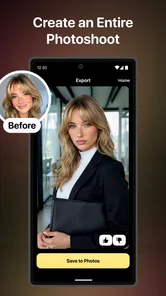
One useful habit is to compare the generated image with the original before deciding what to do with it. AI can make a picture more dramatic while also changing details that mattered to you. If the face no longer resembles the person, or if the pose becomes visually confusing, I would treat that result as a draft rather than a finished post.
Anime experimentation is the clearest reason to install it
For someone who specifically wants an anime-inspired interpretation, CloneAI is more direct than opening a general editor and trying to imitate the look by hand. I would use a portrait with a recognizable silhouette and a relatively uncluttered background. The goal is to give the effect a strong subject to work with instead of asking it to interpret a busy group scene.
The trade-off is that an anime treatment may prioritize mood over identity. A result can look attractive while still changing the shape of eyes, hair, or facial proportions. That is fine for a creative avatar or a playful image, but I would not use it when accuracy is important. If I wanted to preserve the person’s appearance and only add a subtle illustrated finish, a more controlled filter-based app would probably suit me better.
Where alternatives may fit better
The category of alternatives matters. A traditional photo editor is the better option when I need cropping, exposure correction, selective adjustments, blemish cleanup, or exact text placement. Those apps are usually designed around control and repeatability. CloneAI is designed around transformation and novelty, so choosing between them depends on whether I am fixing a photo or reinventing it.
A dedicated video editor may also be preferable when the project involves a timeline, multiple clips, subtitles, music, transitions, or precise pacing. CloneAI’s store summary emphasizes AI styles and effects rather than a full production workflow. I would not switch to it expecting the same control I get from an editor built for assembling a finished video.
There is also a difference between a social-media effect app and a camera app. A camera app helps me capture the image with control over shooting conditions. CloneAI comes into play after I already have a picture and want to explore a visual concept. If my main problem is poor lighting, focus, or composition, I should solve that while taking the photo rather than expecting an AI effect to repair everything.
For users who want consistent branding, the alternatives are clearer still. A business account, creator portfolio, or product catalog needs repeatable colors, stable proportions, and predictable output. I would choose a layered editor or a specialized design tool for that work. CloneAI is more suitable when each result can stand alone and a little variation is welcome.
Specific situations where I would skip it
I would skip CloneAI if I only want simple, reliable enhancements. If my usual routine is straightening a horizon, adjusting brightness, removing a small distraction, and exporting quickly, an AI trend app adds a layer of experimentation I may not need.
I would also hesitate if I am uncomfortable uploading personal portraits to an AI-focused service. Before using any app with private family photos, I would read its current privacy information and decide what kinds of images I am willing to process. That is particularly important for children, intimate moments, or images containing people who have not agreed to be edited and shared.
Another reason to skip it is impatience with variable results. If I need every attempt to look polished on the first try, the app’s creative premise may feel more like friction than freedom. I would rather use a predictable editor than repeatedly test effects that may interpret the same kind of photo differently.
Small workflow choices that improve the experience
My first practical tip is to create a small test set instead of beginning with the most important photo in my gallery. I would choose one close portrait, one image with two people, and one more complicated scene. This quickly shows which types of images suit the effects and prevents me from wasting time on a photo that was never a good candidate.
My second tip is to keep the original and the generated version side by side. That makes it easier to notice identity changes, strange hands, distorted accessories, or an altered background. AI images can look impressive at first glance, especially on a small phone screen, so a deliberate comparison helps me avoid sharing something that becomes obviously flawed when viewed larger.
My third tip is to treat themed effects as conversation starters rather than factual predictions. A future-baby concept, for instance, is best understood as playful visual fiction. I would not interpret it as a realistic forecast or use it to make serious decisions. The same principle applies to romantic effects: they can be fun between consenting adults, but the people in the image should be comfortable with the result.
A fourth useful habit is to save only the versions I genuinely like. Generative apps can encourage endless tapping because each new effect promises a better result. I would set a short trial limit, keep the strongest output, and stop when the experiment stops being enjoyable. This is especially helpful when paid items are available and I do not want curiosity to turn into an accidental purchase.
What switching to CloneAI really involves
The cost of switching is not mainly learning complicated controls. The interface is appealing precisely because the concepts are easier to understand than a professional editing timeline. The real adjustment is learning to evaluate AI output. I need to become comfortable with rejecting results, choosing better source photos, and accepting that a visually attractive image may still contain details I do not want.
If I am coming from a standard filter app, I gain more imaginative options but lose some predictability. If I am coming from a full editor, I gain speed but give up detailed control. If I am coming from a social platform’s built-in effects, CloneAI may offer a more focused place to explore portrait concepts, although I would still compare the convenience of creating and sharing in one familiar app.
The free entry point makes testing relatively straightforward, but the purchase range means I would pay attention to the checkout screen and the exact item I am selecting. I would not build a regular content schedule around a paid effect until I had confirmed that the result fits my needs. For casual users, that restraint is more sensible than assuming every appealing preview will become a useful final image.
How I view its audience and reputation
CloneAI has passed one million installs, which suggests that its concept has reached a substantial audience. Its age rating is Everyone, so the general presentation is intended for a broad audience. Even so, a broad rating does not remove the need for common sense when editing personal photos, romantic images, or pictures of children.
The average rating of 2.8 is a meaningful caution rather than a reason to dismiss the app automatically. It tells me to approach the experience with measured expectations and to test it on my own device before committing to a paid workflow. Reviews can reflect different phones, different expectations, and different effects, but a middling average still makes me less likely to recommend it blindly.
I would describe the developer, Pixery Bilgi Teknolojileri, as presenting a product with a clear creative niche rather than a universal replacement for photography software. That distinction matters. The app can be enjoyable when its unusual concepts are exactly what I want, but it becomes harder to justify if I am looking for dependable editing basics.
My recommendation after weighing the trade-offs
I recommend trying CloneAI if you enjoy playful portrait experiments, anime-style transformations, and themed images that can be made with very little manual work. It is particularly suited to casual creators who want a quick idea for a message, a profile image, or a social post and who are willing to judge each generated result individually.
I would not make it my main photography tool. For careful retouching, professional presentation, repeatable branding, or structured video production, a conventional editor is a better investment of time. Those tools may feel slower, but their control is exactly what protects the final result from unwanted changes.
My clearest advice is to begin with a nonessential portrait, explore the free experience, and compare the output with the original before sharing anything. Pay attention to how well the app handles your particular photos, not just the most attractive examples you see elsewhere. If the concepts make you smile and the results are good enough for your purpose, the app has found its audience in you.
In short, CloneAI is worth considering as a creative playground, not as a complete replacement for a photo editor. Its strongest value is turning a familiar image into an imaginative scenario with minimal effort. Its weaker side is the uncertainty that comes with automated transformations, combined with a middling user rating and optional purchases that deserve careful attention. I would install it for experimentation, keep my expectations grounded, and switch to a more controlled alternative whenever accuracy matters more than surprise.
CloneAI AI Video Generator Frequently Asked Questions
Can I use CloneAI AI Video Generator on an iPhone or iPad?
CloneAI AI Video Generator is a mobile photography app, but the device requirement covered here is Android 8.0 or later. If you are considering downloading it on an iPhone or iPad, check its availability and compatibility in the relevant app store before proceeding. On a compatible device, keep enough storage available for your media and maintain a reliable connection when using AI effects.
What should I know about CloneAI AI Video Generator’s reputation before installing it?
CloneAI has an average rating of around 2.8 from about 14,000 ratings, with roughly 1,700 written reviews. Those figures offer a broad snapshot of user feedback, but experiences can vary depending on the effects people try and what they expect from an AI video tool. It may help to read recent user comments and decide whether its creative features suit your needs.
What devices can run CloneAI AI Video Generator?
CloneAI AI Video Generator is a photography app for Android, and its minimum operating-system requirement is Android 8.0. Check your device’s Android version before downloading, and make sure you have enough storage and a reliable connection for working with media and AI effects. The app is free to download, though some features are offered through in-app purchases.
Who makes CloneAI AI Video Generator, and is it suitable for all ages?
CloneAI AI Video Generator is developed by Pixery Bilgi Teknolojileri and is rated for Everyone. Its tools focus on creative effects and transformations, including anime-style treatments and other AI trends. The age rating is a useful starting point, but parents may still want to review the app’s features and supervise uploads or sharing, especially when children use personal photos or videos.
What is CloneAI AI Video Generator and what can it do?
CloneAI AI Video Generator is a mobile creative tool designed to turn photos, videos, and text-based ideas into stylized AI-generated videos. It can apply visual effects, create animated transformations, and produce short clips suitable for social media. The app is mainly aimed at casual creators who want quick results without learning complex video-editing software, although the final output can vary depending on the source material and selected effect.
Pros
- Creates stylized AI videos from photos with minimal editing effort.
- Offers creative effects that can transform ordinary images into short clips.
- Simple interface makes it accessible to users without video-editing experience.
- Useful for creating eye-catching content for social media platforms.
- Automated processing saves time compared with manual animation tools.
Cons
- Results can vary widely depending on the quality and composition of the source photo.
- Some advanced effects or exports may require a paid subscription.
- AI processing may take time
- especially for complex effects or busy periods.
- Generated videos may include visual glitches
- distorted details
- or unnatural motion.
- Uploading photos raises privacy concerns
- so review the app’s data policies carefully.











