

Zurna: AI Song & Music Maker
- 215.00
- 4.4
- Installs
- 100.00K
- Price
- Free
Screenshots
Analysis by Reviewed
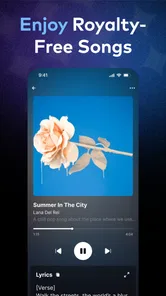
I tried Zurna: AI Song & Music Maker as a creative music app rather than treating it like a full recording studio, and that distinction matters. Its appeal is immediate: you can start with an idea, experiment with a generated song, and explore voice-cloning tools without needing formal music training. I found the experience most interesting when I treated it as a sketchbook for musical concepts, not as a replacement for a professional digital audio workstation.
This is a free Music & Audio app from Pixery Bilgi Teknolojileri, intended for everyone and available on Android devices running version 7.0 or later. It has reached over one hundred thousand installs and holds a 4.4 average from roughly three thousand ratings, which suggests that the basic concept is connecting with a meaningful group of users. The current version is 1.8.6, and the app was released on May 30, 2025.
My main question while using it was not simply whether it could make a song. Many creative apps can produce something quickly. The more useful question is whether I remained in control of the creative process, understood what I was doing at each step, and felt comfortable when working with voice-related material. On those points, Zurna is promising, but it deserves a thoughtful approach rather than casual tapping through every option.
How Zurna fits into an everyday music workflow
I use this section to place Zurna alongside the rest of a creative routine: where a quick musical sketch can help, and where I would hand the work over to a more hands-on tool. That distinction makes it easier to decide when opening the app is worthwhile. From there, I turn to the settings and choices I would check before starting a session.
A quick way to turn an idea into a musical draft
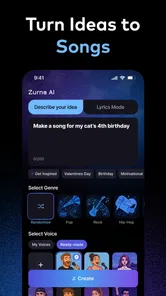
The strongest use case is the moment when an idea is clear in your head but you do not have the skills, equipment, or time to build it manually. I can imagine opening the app after thinking of a chorus during a commute, testing a mood for a short video, or creating a playful birthday song for a friend. Instead of starting with a blank timeline full of technical controls, the app encourages imagination first.
That makes it different from a traditional mobile audio editor. A conventional editor is better when I already have recordings, instruments, or a precise arrangement to assemble. Zurna is more suitable when I want to explore possibilities before committing to a detailed production. The trade-off is control: the faster path to a result can also mean fewer opportunities to shape every musical decision in the way a specialist tool would allow.
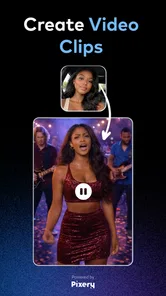
I would use it in the early stage of a project. For example, if I were planning a small social video, I could create several musical directions, compare the general feeling, and then decide whether one is worth developing further elsewhere. That workflow is more practical than expecting one generated result to be perfect on the first attempt.
More From Our News Desk

 Gmail
GmailGmail in a Busy Inbox: Who Benefits Most?
From first account to crowded workday, Gmail earns its place through dependable search and flexible sorting—but its best fit depends on how much inbox maintenance you can tolerate.

 Prime Video
Switching to Prime Video: What Changes in Your Viewing Routine
Prime Video can make a compelling second home for streaming, but switching means learning a different catalog, rental layer, and route from browsing to playback.

 Universal TV Remote Control
Universal TV Remote Control Works Best as a Reliable Backup
A phone remote earns its place through quick setup and reliable habits. Here is how to get more from Universal TV Remote Control—and where its limits show.

 Weather - By Xiaomi
Weather by Xiaomi Review: Clear at a Glance, Less Clear Up Close
Xiaomi’s weather app makes everyday forecasts quick to scan, but its calm surface can leave useful details and recovery paths harder to find than they should be.

 X
XX Under Pressure: Can It Recover When Posting Goes Wrong?
A resilience-focused review of X, examining setup, mistaken posts, interruptions, weak connections, and the gaps that matter when recovery needs to be dependable.

 Clash of Clans
Clash of Clans Is Won Between the Battles
Its raids are quick; its community is a long-term project of coordination, teaching, rivalry, and shared responsibility—with all the friction that entails.
Latest News



Voice cloning changes the responsibility of the experience
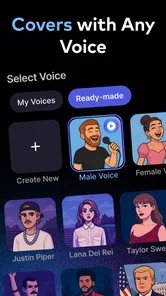
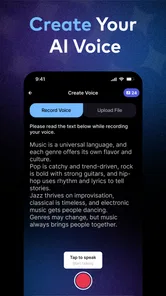
The voice feature is the part that requires the most care. A music generator can be treated as a playful composition tool, but voice cloning involves identity, permission, and expectations. I would only use my own voice or a voice from someone who has clearly agreed to the process. That is not just a legal-minded precaution; it also keeps the creative experiment honest and avoids turning another person’s identity into an unapproved sound effect.
Before creating anything voice-based, I would read every visible instruction and confirmation screen carefully. The important questions are practical: what am I being asked to provide, what result am I generating, and what choices does the app show before I continue? If a friend wanted a personalized song, I would ask them to participate directly rather than uploading their voice myself. That gives them a chance to understand the process and decide whether they want the result.
I also recommend keeping voice experiments separate from sensitive recordings. A casual singing sample is one thing; private conversations, family recordings, work calls, or audio containing other people are entirely different. The safest workflow is to prepare a clean clip made specifically for the experiment, with no background discussion or identifying details.
What the free entry point really means
Zurna is free to download, which makes trying the basic concept easy. However, the app includes in-app purchases ranging from $6.99 to $44.99 per item. That range is important for anyone who plans to use it regularly. I would not begin by assuming that every creative option is included without charge. Instead, I would explore the free experience first, identify which tools I genuinely need, and only then consider spending money.
For occasional users, the free access may be enough to decide whether the style of music creation suits them. For someone planning repeated song generation or frequent voice experiments, the cost can become a meaningful part of the decision. I prefer treating purchases as a deliberate project expense rather than unlocking options impulsively after becoming invested in a particular result.
A useful habit is to decide the purpose before opening the purchase screen. If I only want a funny greeting for one evening, paying for a broad set of capabilities may not make sense. If I am testing ideas for a continuing creative project, the calculation is different, but I would still compare the expected benefit with a conventional music app or a human collaborator.
Trust begins with visible choices
Because this app handles creative inputs and may involve voices, trust depends heavily on the choices shown during use. I look for clear prompts, understandable confirmations, and settings that let me decide what to submit. I do not treat a polished interface as proof that every data practice is automatically suitable for me. Instead, I pay attention to each point where the app asks for access, a recording, or an action that could affect my content.
My advice is simple: grant only the access needed for the task in front of you, and review the operating system’s permission controls if your comfort level changes. Android’s settings can be useful for checking and adjusting access after installation. I would also revisit those controls after finishing a project, especially if I do not expect to use the voice tools again soon.
Account controls deserve the same attention. If the app presents an account, sign-in, profile, or content-management choice, I would use the most limited setup that still supports my goal. I would avoid adding personal information merely to make a creative experiment feel more complete. A nickname may be enough for a casual project, while a public-facing identity should be reserved for situations where I intentionally want attribution.
Where sensitive moments appear during normal use
The most data-sensitive moment is obvious: recording or selecting a voice. Less obvious moments can include choosing a file from the device, sharing a generated result, or entering text that contains someone’s name or private situation. I would pause at each of these steps rather than assuming that a song draft is harmless just because it sounds playful.
For a family project, I would remove unrelated voices from the recording and avoid including a child’s personal details in the lyrics. For a workplace joke, I would not use a colleague’s voice without explicit permission, even if the final song were intended to stay private. For a public upload, I would check the result for accidental references, recognizable speech, or material that another person might reasonably object to.
This approach does not make the app less creative. It actually improves the workflow because I know exactly which material I am choosing to use. The best results often come from focused inputs anyway: a clean voice sample, a clear concept, and lyrics that communicate the intended mood without unnecessary personal information.
Practical controls I would use before sharing
I would keep an original copy of any recording outside the app before experimenting, then create a separate version specifically for the project. That way, I am not treating the app as the only place where an important source file exists. I would also listen to the complete output before sharing it, rather than relying on a preview or a quick impression.
Generated content can produce surprises. A voice may sound unlike the intended speaker, wording may feel awkward, or the musical mood may clash with the purpose of the song. Listening from beginning to end helps me catch those issues. If the result is meant for someone else, I would show it to them privately first, especially when their voice or name is involved.
Sharing is another point where user agency matters. I would not publish a result simply because the app makes sharing convenient. I would decide who actually needs access, whether the file contains personal material, and whether the recipient understands that it was generated or transformed. A private message, local file, or limited audience can be more appropriate than a public post.
Who will enjoy it most
Zurna is a good fit for curious beginners, casual creators, and people who want to turn a rough idea into something audible without studying music production. It can also suit writers who want to test lyrics in a musical setting, content creators searching for an initial direction, and friends making personalized songs for private occasions.
I think it is especially useful for overcoming the blank-page problem. When I have no melody, arrangement, or vocal performance ready, a generated draft gives me something to react to. Even if I discard the result, it can reveal whether the idea feels cheerful, dramatic, relaxed, or unsuitable. That reaction is valuable because creative decisions are often easier when there is something concrete to evaluate.
The app is less suitable for someone who needs detailed mixing, exact instrumental control, multitrack editing, or a predictable professional output. A musician who already works comfortably in a full audio workstation may find the simplified approach restrictive. Likewise, anyone uncomfortable with voice-cloning technology should skip that part entirely; there is no reason to use every feature simply because it is available.
How it compares with familiar alternatives
Compared with a standard beat-making app, Zurna places more emphasis on fast song creation and voice experimentation than on manually programming every drum hit or melody. That makes it approachable, but it may not satisfy users who enjoy building a track piece by piece. A beat-focused tool is usually the better choice when rhythm design and hands-on arrangement are the main goals.
Compared with a conventional voice recorder, Zurna offers a much more imaginative destination for an audio idea, but a recorder remains better for preserving a natural performance exactly as it happened. If authenticity matters more than transformation, I would record normally and use the app only if I intentionally wanted a generated interpretation.
Compared with a full mobile digital audio workstation, Zurna is easier to approach and faster for experimentation, while the workstation wins for precision and repeatable production. I would use Zurna to discover a direction and a traditional editor to refine a serious release. That combination makes more sense to me than forcing one app to handle every stage.
Small habits that improve the results
My first tip is to begin with a narrow creative brief. Instead of trying to make a song that is simultaneously funny, emotional, cinematic, and energetic, I would choose one dominant feeling and one clear occasion. A focused idea gives me a better basis for judging whether the output works.
My second tip is to make several short experiments rather than spending a long session polishing the first result. This is a better match for an AI-assisted tool because comparison reveals which choices actually matter. I would keep notes about the prompt or concept behind each attempt, especially if I plan to return later.
My third tip is to separate creative testing from publishing. I would treat early outputs as drafts, listen critically, and only share the version that fits the audience. This is particularly important with cloned voices, where a result that seems amusing in private may feel uncomfortable or misleading when heard by someone else.
A fourth useful habit is to check the purchase screen with a cool head. The free starting point is convenient, but the available purchase range means I would decide in advance how much the project is worth. If the app becomes part of a regular workflow, I would compare that expense with the control offered by other music tools instead of assuming that more features automatically mean better value.
My final view after testing the concept
I came away seeing Zurna as an accessible idea generator with a more sensitive side than its playful presentation might suggest. Its strongest quality is the low barrier between imagination and a listenable musical draft. Its biggest limitation is that convenience does not equal complete control, and the voice-cloning capability asks for more responsibility than an ordinary music toy.
The app’s Everyone rating makes it approachable in terms of audience classification, but I would still guide younger users through voice-related choices and sharing decisions. The technology is easy to experiment with; understanding consent and privacy takes more attention. That is where adults, parents, and educators can add useful oversight without discouraging creativity.
For me, the right way to use it is intentionally: prepare a clean input, avoid private or third-party material, inspect the visible controls, review the result carefully, and share only when the people involved are comfortable. The best experience comes from treating creative freedom and personal control as equally important.
In the end, I would recommend Zurna to a friend who wants a quick, approachable way to explore custom songs and voice-based musical ideas. I would not recommend it as the only tool for detailed production, nor would I encourage anyone to use another person’s voice casually. If your goal is playful experimentation and fast drafts, it is worth trying for free. If your goal is exact studio control or a strictly natural vocal recording, a more traditional alternative will serve you better.
Pixery Bilgi Teknolojileri has built an app that can make music creation feel less intimidating, and the 4.4 average from thousands of ratings reflects its broad appeal. I would approach the paid options and voice features with patience, but the core idea is genuinely useful: start with imagination, keep your choices visible, and let the generated result become a starting point rather than the final word.
Zurna: AI Song & Music Maker Frequently Asked Questions
What devices and operating systems can run Zurna: AI Song & Music Maker?
Before downloading, check that your device meets the app’s minimum operating-system requirement. Zurna is available for Android, and its minimum supported Android version is 7.0. The app is listed in the Music & Audio category, so it may suit users looking for an AI-assisted way to explore song creation. Keeping your operating system updated can also help with compatibility and general app performance.
Who develops Zurna, and is it a widely used app?
Zurna: AI Song & Music Maker is developed by Pixery Bilgi Teknolojileri. It has passed 100,000 installs and has an average rating of 4.4 from around 3,200 ratings, alongside 215 written reviews. Those figures can offer a sense of its reach and user feedback, but individual experiences may differ. The app is rated Everyone, which indicates its store content rating is suitable for a general audience.
What is Zurna: AI Song & Music Maker, and what can I create with it?
Zurna: AI Song & Music Maker is designed for creating original music with the help of artificial intelligence. You can typically start with a text prompt, describe a mood or genre, and experiment with lyrics, melodies, arrangements, or complete song ideas. It is useful for beginners, content creators, and musicians who want to turn a concept into a quick musical draft without needing advanced production skills.
Do I need musical experience to use Zurna?
No advanced musical knowledge is generally required to get started with Zurna. The app is built around accessible controls and AI-assisted generation, so users can describe what they want in everyday language and refine the result through additional prompts or available options. However, producing a polished, professional track may still require patience, creative direction, and familiarity with basic concepts such as genre, tempo, vocals, and song structure.
Is Zurna: AI Song & Music Maker free to download and use?
The app is free to download, but it also offers in-app purchases ranging from $6.99 to $44.99 per item. Some features may therefore depend on payment or other limits within the app. Before creating many songs, review the purchase options and any terms shown during use. Check carefully whether premium tools or additional generations require a purchase, since available features and purchase details can change with updates.
Pros
- Creates song ideas quickly from simple text prompts.
- Supports creative experimentation across multiple music styles.
- Useful for drafting melodies
- lyrics
- and song concepts.
- Beginner-friendly approach requires no music production experience.
- Convenient for generating inspiration while traveling or away from a studio.
Cons
- AI results can sound generic or require several prompt attempts.
- Generated tracks may lack the nuance of professionally produced music.
- Advanced editing and detailed mixing controls may be limited.
- Some features or exports may require a subscription or in-app purchase.
- Output quality can vary depending on the chosen style and prompt clarity.













