

ClimateCruise
- 7.00
- 4.2
- Installs
- 10.00K
- Price
- Free

Screenshots
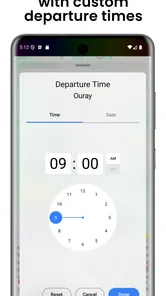
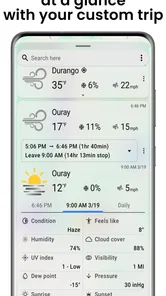
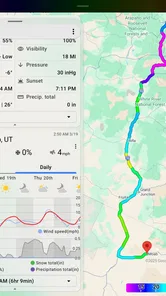
Analysis by Reviewed
Planning a trip often means checking several places before you even decide what to pack. ClimateCruise takes a simpler approach: it is a free weather app from DurkesLLC built around seeing conditions for more than one destination in one place. I found that idea more useful for travel planning than for replacing a full-featured daily forecast service. Its main appeal is reducing the back-and-forth between locations when a journey includes several stops.
The app has a straightforward identity as a travel weather planner, rather than a general-purpose weather dashboard packed with every possible measurement. That focus makes it approachable for someone installing it before a weekend away, a road trip, or a multi-stop itinerary. It is available for everyone, and the current release is version 4.5.8, so the first impression is that of a small, focused tool rather than a large platform trying to cover every weather-related task.
What to expect before you start
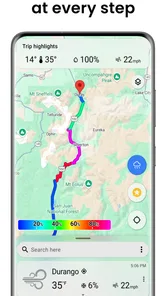
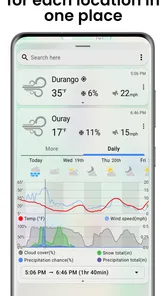
The most important thing to understand is the app’s purpose. ClimateCruise is designed to help you view weather across a trip, not merely to show the conditions where you are standing right now. That distinction affects whether it belongs on your phone. If you regularly compare several destinations, the concept is immediately practical. If you only want a quick glance at your local temperature, your phone’s built-in weather service may already be faster.
Its store rating sits at an average of 4.2 from around 33 ratings, and the app has passed the 10K-install mark. Those figures suggest a modest but real user base rather than a dominant weather service. I would interpret that as a reason to approach it as a specialized tool: useful when its travel-oriented workflow matches your needs, but not necessarily the only weather app you will want installed.
There is no charge to install it, which makes trying the central idea low-risk. The app also includes optional purchases priced at $1.00 per item. I would keep that in mind before treating it as a complete replacement for every weather resource you already use. The free starting point is enough to decide whether comparing trip locations in this format fits the way you plan.
ClimateCruise was released on Apr 1, 2022, and it requires iOS 12 or later. That requirement is useful for people using an older iPhone, because it gives a clear first compatibility check before spending time setting up a trip. On a supported device, I would begin with one simple journey rather than immediately entering a complicated itinerary. A short test makes it easier to understand how the app presents locations and whether its layout suits you.
Who will get the most from it
I see the strongest match in travelers who compare departure and arrival conditions, families coordinating clothing for different stops, and anyone planning an outdoor day that crosses more than one area. A person driving from a cool coastal town to a warmer inland destination can use the same overview to avoid packing based only on the weather at home. That is a small improvement, but it addresses a common planning mistake.
More From Our News Desk

 Gmail
GmailGmail in a Busy Inbox: Who Benefits Most?
From first account to crowded workday, Gmail earns its place through dependable search and flexible sorting—but its best fit depends on how much inbox maintenance you can tolerate.

 Prime Video
Switching to Prime Video: What Changes in Your Viewing Routine
Prime Video can make a compelling second home for streaming, but switching means learning a different catalog, rental layer, and route from browsing to playback.

 Universal TV Remote Control
Universal TV Remote Control Works Best as a Reliable Backup
A phone remote earns its place through quick setup and reliable habits. Here is how to get more from Universal TV Remote Control—and where its limits show.

 Weather - By Xiaomi
Weather by Xiaomi Review: Clear at a Glance, Less Clear Up Close
Xiaomi’s weather app makes everyday forecasts quick to scan, but its calm surface can leave useful details and recovery paths harder to find than they should be.

 X
XX Under Pressure: Can It Recover When Posting Goes Wrong?
A resilience-focused review of X, examining setup, mistaken posts, interruptions, weak connections, and the gaps that matter when recovery needs to be dependable.

 Clash of Clans
Clash of Clans Is Won Between the Battles
Its raids are quick; its community is a long-term project of coordination, teaching, rivalry, and shared responsibility—with all the friction that entails.
Latest News



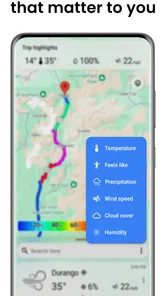
It may also help when the trip itself is the variable. A traveler deciding between two routes can compare the weather along each option instead of checking one destination at a time. The value is not necessarily a more sophisticated forecast; it is the ability to keep the relevant places together while making a decision.
I would skip it if your priority is advanced radar work, highly detailed meteorological analysis, or a single local forecast with extensive alerts and widgets. Those needs are usually better served by a mature weather platform designed around live conditions at one location. ClimateCruise makes more sense as a companion for comparing places than as a specialist instrument for severe-weather monitoring.
Getting from installation to a useful first result
I would treat the first setup as a quick test of whether the app’s travel-focused view fits the way you plan, rather than as a commitment to move your whole routine into it. Start with a journey whose locations you already know, then notice whether keeping them together helps you make a clearer weather-related choice. That gives you a practical baseline before deciding how to use the comparison on a more complicated trip.
Start with one uncomplicated trip
After installing the app, I recommend choosing a journey you already understand. Use a departure point and one destination rather than trying to model an entire holiday immediately. This gives you a clear test: can you see the weather for the places that matter without repeatedly leaving one screen and searching again?
Think of the first setup as organizing a question, not building a permanent database. The question might be, “What should I wear and carry for this trip?” Keeping that goal visible prevents the setup from becoming an exercise in entering every possible stop. Once the basic comparison makes sense, you can decide whether adding more locations improves the plan or simply makes the view harder to read.
A useful habit is to set up the app before packing, not while rushing out the door. Weather decisions are easier when you can compare the full route calmly. I would also revisit the trip close to departure, because an early planning glance and a final packing check serve different purposes. The first helps choose a route and activities; the second helps decide whether a light jacket, rain protection, or warmer layers belong in the bag.
Use the comparison as a packing checklist
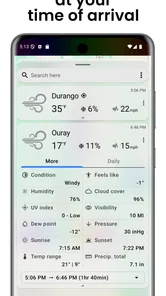
The first meaningful success is not merely opening a forecast. It is turning the comparison into one practical decision. For example, imagine leaving home in the morning, spending the afternoon in another city, and returning late. If the two locations differ noticeably, the app’s value is that it keeps both conditions in view while you decide what to wear. I would use that moment to create a small checklist: clothing layers, footwear, sun protection, and anything needed for an outdoor activity.
This workflow is more reliable than remembering one number from a quick glance. People often check the weather at departure, then discover that the destination feels completely different. A multi-location view encourages you to plan for the whole movement of the day. That is one of the app’s less obvious strengths: it changes the unit of planning from “my current location” to “the places connected by my trip.”
For a family, I would take the same approach but add a second pass for activities. Compare the locations first, then ask whether the planned activity is flexible. If the weather at one stop looks less suitable, you can adjust the timing or prepare an indoor alternative. The app does not make that decision for you; it gives you a more relevant set of conditions to consider.
Keep the view useful instead of crowded
One trade-off with any travel comparison tool is that more locations do not always mean more clarity. I would add only places that can change your decision: the starting point, meaningful stops, and the final destination. A long list of minor waypoints may make the overview less helpful because your attention gets divided between places that do not affect what you pack or when you travel.
This is especially important on a road trip. Instead of entering every town, select the locations where you expect to stop, sleep, or spend several hours outside. That produces a more actionable picture. It also makes later checks quicker, since you are reviewing the trip rather than searching through a catalog of places.
Where first-time users may hesitate
The phrase “see the weather all at once” sounds simple, but it can create an expectation of a complete itinerary manager. I would not assume that the app is intended to replace your map, booking service, or travel schedule. Its role is narrower and clearer: bring weather information for a journey into one planning context. Keep your route details elsewhere and use this app to inform the weather-related decisions.
Another possible point of friction is deciding how much confidence to place in a forecast. A combined view is convenient, but convenience does not remove normal weather uncertainty. Conditions can change between the moment you plan and the moment you leave. I would use the app to prepare sensibly, then check again near the trip rather than treating the first result as a guarantee.
It is also worth separating “weather comparison” from “weather safety.” If you are making a decision involving dangerous conditions, outdoor exposure, or a time-sensitive warning, I would consult a dedicated authoritative source as well. ClimateCruise is helpful for planning context, but a compact travel overview should not be your only basis for a serious safety decision.
How it compares with familiar alternatives
The usual alternative is the weather app already on your phone. That option often wins for speed when you need the current conditions at one place. It may also be preferable if your routine depends on local alerts, a home-screen glance, or a detailed view of one neighborhood. In those situations, opening another app adds a step without solving a real problem.
ClimateCruise becomes more interesting when the standard workflow starts to feel repetitive. With a typical local weather app, comparing several destinations may require repeated searches, separate screens, or mental notes. This app’s travel-centered arrangement is intended to reduce that fragmentation. The benefit is organizational rather than magical: it helps you compare the same trip’s locations in one planning session.
There is a trade-off in choosing a focused app. A broad weather service may offer more layers, historical context, notifications, or specialized visualizations. A travel comparison app can feel cleaner because it avoids overwhelming you, but that simplicity may leave advanced users wanting more. My recommendation is to keep your regular weather app if it handles local forecasting well, and add ClimateCruise only if multi-stop comparison is a recurring need.
Questions to answer before relying on it
If you are wondering whether it costs anything to try, the app is free to install. Optional purchases are available at $1.00 per item, so I would explore the basic experience first and only consider a purchase after understanding what part of your planning routine it improves. That approach keeps the decision tied to actual usefulness rather than assumptions based on the app’s travel theme.
If you are using an older iPhone, check that it runs iOS 12 or a newer version. That is the practical compatibility point to settle before installation. The age rating is Everyone, which makes the app suitable for general audiences, including a family member who wants a simple way to compare conditions before a shared trip.
If you are asking whether it can replace your usual weather service, my answer is usually no. I would treat it as a focused companion. It can be the better choice for organizing weather across a journey, while a conventional weather app may remain better for local routines, alerts, and detailed single-location checking.
If you are unsure how to begin, choose one real trip and add only the locations that affect your plans. Then use the result to make one decision, such as what layers to pack or whether an outdoor stop needs a backup plan. That gives you a meaningful test of the app without requiring a large setup.
My recommendation for the next step
After the first successful comparison, I would build a repeatable pre-trip routine. Check the departure location, the main destination, and any stop where you will spend meaningful time outside. Review them once while planning and again before leaving. The first check supports route and activity choices; the second keeps packing aligned with the latest outlook.
For a short city break, that routine may take only a moment and still prevent an uncomfortable mismatch between what you wear at home and what you need at the destination. For a longer journey, it can help you decide which items should remain accessible rather than buried in luggage. Those are practical gains that come from using the app as a planning aid, not from endlessly monitoring it.
I would also judge the app by whether it reduces mental effort. If you finish a comparison with a clearer packing list or a better activity plan, it has earned a place in your travel toolkit. If you still need to open several other services for the information you actually care about, keep it as an occasional helper rather than making it your primary weather source.
Overall, ClimateCruise is a focused weather app with a sensible travel use case. DurkesLLC has aimed it at the moment when one location is not enough, and that makes it more relevant for trips than for ordinary local forecasting. I like its potential to turn scattered weather checks into one practical decision, while recognizing that travelers wanting deep weather analysis will need another service alongside it.
My final advice is simple: install it for a real upcoming journey, start with two important locations, and see whether the combined view changes how you pack or schedule your day. Its strongest feature is the travel comparison habit it encourages. For people who regularly move between destinations, that can be enough to make a small free app genuinely useful.
ClimateCruise Frequently Asked Questions
Is ClimateCruise available for my device, and what should I check before installing it?
ClimateCruise is a weather app developed by DurkesLLC. It supports devices running iOS 12 or later, so check your device’s operating system before downloading. The app is rated for Everyone, and its current version is 4.5.8. Compatibility and available features can still vary by device and region, so review the app page on your platform before installing.
What is ClimateCruise, and what does the app do?
ClimateCruise is designed to help users understand how climate conditions may affect travel and daily journeys. Depending on the available features and region, it may provide climate-related information, route context, environmental data, or planning tools. Before downloading, check the current App Store or Google Play description because features, supported locations, and the type of information offered can change between versions.
Is ClimateCruise free to download and use?
ClimateCruise is free to download, with in-app purchases priced at $1.00 per item. Users should review the store listing carefully for the costs and terms of any purchases before buying. The free download lets you get started without an upfront purchase, while optional paid items may provide additional offerings. Check the purchase details on your platform before confirming a transaction.
Does ClimateCruise require location access or other permissions?
An app focused on climate or journey-related information may request access to your location so it can provide relevant local conditions, route details, or destination-based results. It could also request internet access and notification permissions. You can usually deny optional permissions, although doing so may limit certain functions. Review each request carefully and enable only the access you consider necessary.
Can ClimateCruise be used without an internet connection?
Offline availability depends on the specific version of ClimateCruise and the tools included in your region. Climate information, live updates, maps, and synchronized travel data commonly require an internet connection, while previously loaded content may remain accessible temporarily. If you expect to travel through areas with weak coverage, test the app beforehand and look for download, cache, or offline options.
Pros
- Clear climate data helps users plan routes more comfortably.
- Useful forecasts can make outdoor travel safer and more predictable.
- Simple trip-focused design keeps essential information easy to find.
- May help reduce weather-related surprises during cruises or journeys.
- Convenient mobile access is useful while traveling away from a computer.
Cons
- Forecast accuracy can vary by location and changing weather conditions.
- Some features may depend on an active internet connection.
- Coverage and data quality may differ between regions.
- Frequent updates could consume mobile data and battery power.
- The app may be less useful for users without climate-focused travel plans.











