

Cleveland19 FirstAlert Weather
- 809.00
- 4.8
- Installs
- 100.00K
- Price
- Free
Screenshots
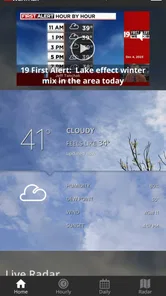
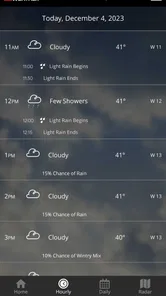
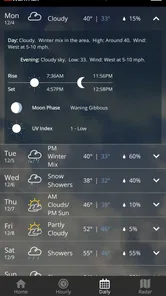
Analysis by Reviewed
On a morning when rain might change my commute, I want more than a temperature glance: I want to know whether to leave earlier, carry a layer, or rethink an outdoor plan. Cleveland19 FirstAlert Weather gives me a locally focused place to make that call, with a forecast, radar, saved locations, and weather alerts gathered into one routine. It is a free weather app from Gray Television, Inc., and it makes the most sense when the places I care about are in its Cleveland-area coverage. I would not use it as a universal guide for every destination, but it is a practical starting point for everyday decisions close to home.
From a quick check to a better plan
My useful routine is simple: look at the forecast before heading out, then return to the radar if the sky or the day’s plans start to change. That distinction matters. A forecast helps me make an initial plan; a radar view gives me another way to judge what may be approaching. I find the second check most valuable when rain could affect a walk, an outdoor errand, or the drive home. It’s a practical workflow, not a promise that any forecast can remove uncertainty.
Start with the decision, not the screen
The app works best for me when I open it with a specific question in mind. Do I need a jacket? Is it sensible to plan an outdoor errand for later? Should I allow extra time before leaving? A quick look at the outlook gives me a starting point, while radar is the follow-up when conditions look unsettled or my plans depend on timing. That order keeps a weather check useful rather than turning it into a habit of refreshing without learning anything new.
For someone deciding whether to install it, the key question is local relevance. Its Cleveland emphasis is a strength for people whose routines are centered on the area, but it is less compelling if most of the places they need are far beyond that focus. I would keep a broader weather service in reach for a trip through multiple regions, then use this app for the local view that shapes my day at home.
Checking conditions without overchecking
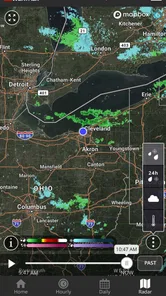
One of the things I love most about the Cleveland19 FirstAlert Weather app is its real-time weather updates. Whether it's a sunny day or a storm is brewing, the app keeps you informed with up-to-the-minute information. The radar feature is particularly impressive, offering detailed maps that are super easy to navigate. I often find myself checking it throughout the day, especially when the sky starts looking a bit ominous.
For a realistic example, I might check the outlook before leaving for work, then take a quick look at the radar before an evening walk if clouds have rolled in. That second glance can help me decide whether to go now, wait, or bring a rain layer. I still use what I can see outside as a reality check; a phone display is a planning aid, not a substitute for noticing conditions on the ground.
A useful habit is to connect each radar check to a decision: whether to start now, wait a little, or change the plan. If I am already indoors and nothing I do depends on the next few minutes, repeatedly studying the map adds little. This is a small but important trade-off: the radar helps me assess an uncertain situation, but it cannot make the weather predictable or tell me what I personally should do.
More From Our News Desk

 Gmail
GmailGmail in a Busy Inbox: Who Benefits Most?
From first account to crowded workday, Gmail earns its place through dependable search and flexible sorting—but its best fit depends on how much inbox maintenance you can tolerate.

 Prime Video
Switching to Prime Video: What Changes in Your Viewing Routine
Prime Video can make a compelling second home for streaming, but switching means learning a different catalog, rental layer, and route from browsing to playback.

 Universal TV Remote Control
Universal TV Remote Control Works Best as a Reliable Backup
A phone remote earns its place through quick setup and reliable habits. Here is how to get more from Universal TV Remote Control—and where its limits show.

 Weather - By Xiaomi
Weather by Xiaomi Review: Clear at a Glance, Less Clear Up Close
Xiaomi’s weather app makes everyday forecasts quick to scan, but its calm surface can leave useful details and recovery paths harder to find than they should be.

 X
XX Under Pressure: Can It Recover When Posting Goes Wrong?
A resilience-focused review of X, examining setup, mistaken posts, interruptions, weak connections, and the gaps that matter when recovery needs to be dependable.

 Clash of Clans
Clash of Clans Is Won Between the Battles
Its raids are quick; its community is a long-term project of coordination, teaching, rivalry, and shared responsibility—with all the friction that entails.
Latest News



Alerts as a handoff, not a full plan
Let’s be honest, no one wants to be caught off guard by a sudden downpour or a surprise snowstorm. Thankfully, this app has got us covered with its customizable alerts. You can set it to notify you about severe weather conditions, which is perfect for planning your day around potential disruptions. It's like having a personal weather assistant in your pocket!
I think of an alert as the point where checking the app hands off to taking action: pause a trip, check on someone, or look again at the forecast before heading out. Alerts are most useful when they prompt a sensible follow-up, not when I assume one notification answers every question. If you rely on them, take a moment to choose settings that fit your routine, so weather notices are helpful rather than easy to ignore.
That handoff matters most when I am away from my phone or focused on something else. An alert can bring a change in conditions to my attention, but I still need to open the app and decide what it means for the route, appointment, or person I am checking on. I would not treat a notification as a substitute for a dedicated emergency plan; it is a cue to pay attention and take the next sensible step.
Locations, forecasts, and the everyday trade-off
Navigating through the app is a breeze, even if you’re not tech-savvy. The interface is intuitive and straightforward, making it easy to find exactly what you’re looking for. From hourly forecasts to a 10-day outlook, everything is laid out in a way that’s both visually appealing and functional. It’s clear that the developers put a lot of thought into the user experience.
Another cool feature is the ability to save multiple locations. This is super handy if you travel frequently or just want to keep tabs on the weather in different areas. I’ve found this particularly useful when planning weekend getaways or checking in on family in other cities.
The saved places are also useful for coordinating with other people. I can check a family member’s area before calling about plans, or compare home with a destination before packing. My tip is to keep the list focused on places that influence real decisions; a short, familiar list is quicker to scan than a collection of locations I rarely revisit. For forecasts farther ahead, I use the longer outlook to spot possible conflicts, then check closer to the day before committing to a plan.
There is a practical limit to what that longer outlook can do. I use it to notice that a plan may need a backup, not to decide that conditions on a particular future hour are settled. For a weekend outing, I might keep an indoor alternative in mind and check again nearer the day. That makes the forecast useful for preparation without asking it to provide certainty it cannot offer.
Who it suits, and where another app may fit better
This is a good fit for someone who wants a clear local forecast, radar for a second look, and alerts that can help shape an ordinary day. It also makes sense for households juggling plans across a few saved locations. Cleveland-area users are the natural audience, while someone who regularly needs detailed forecasts for many regions may prefer a broader national or international weather service. I’d also choose another tool if my main need were specialized planning rather than a general daily forecast.
Compared with a phone’s built-in weather screen, Cleveland19 offers a more local, hands-on routine: check the outlook, inspect the radar, and use an alert as a cue to reassess. The built-in option may be faster for a quick temperature glance, so I wouldn’t replace it for every casual check. The value here is having several weather views together, especially when local conditions matter more than a single headline number.
It is also worth distinguishing this kind of app from tools made for a particular activity. If I were organizing a specialist outdoor plan, I would want information tailored to that activity rather than assuming a general local forecast covers every decision. For everyday errands, school or work travel, walks, and checking on family, the simpler mix of forecast, radar, locations, and alerts is more appropriate.
For a household, the best use is often coordination rather than constant monitoring. One person can check the local outlook before a shared outing, while another can compare the destination or a relative’s area using saved locations. That does not eliminate the need to agree on a backup plan, but it makes the weather part of the conversation easier to handle. If everyone needs forecasts for different parts of the country, a broader service may be a better shared choice.
What to expect over time
The app has an average rating of 4.8 from around 2.9 thousand ratings, with about 809 written reviews and over 100 thousand installs. It is rated for Everyone, was released on December 2, 2010, and its current version is 5.17.719, with Android 9 as the minimum operating system. Those details make it an established option rather than a brand-new experiment, though a long history alone doesn’t guarantee that every screen or forecast will suit every user.
One trade-off with any weather app is that more frequent checking can create noise instead of confidence. I try to check when a decision is coming up, rather than repeatedly refreshing without a plan. If alerts feel distracting, adjusting them to the kinds of severe weather that matter to me is more useful than turning every possible notice into an interruption. The app is free, which makes it easy to try, but the best test is whether its local information and alert workflow match the places I actually go.
If you are deciding whether it belongs on your phone, I would try it against a normal week rather than judge it on one dramatic weather day. Check the places you actually visit, see whether the forecast and radar help with a real choice, and notice whether the alerts feel useful or intrusive. That test answers the practical questions: whether its local focus suits you, whether saved locations fit your routine, and whether you prefer it to the faster but thinner glance offered by a basic weather screen.
Its age rating is Everyone, so it is presented as suitable for a broad audience. The more important personal question is how much weather detail you want to manage. Someone who prefers a single temperature and a simple daily outlook may find a built-in app more convenient; someone who wants a local radar check and alerts in the same place has a stronger reason to keep this one. I would make the choice based on that difference, not on the assumption that more features automatically make a better fit.
A grounded final take
In a world where weather can be as unpredictable as a toddler's mood, having a reliable app like Cleveland19 FirstAlert Weather is essential. It's packed with features that not only keep you informed but also help you plan your day with confidence. If you’re in the market for a weather app that’s both comprehensive and easy to use, give this one a try. You won’t be disappointed!
Overall, the Cleveland19 FirstAlert Weather app has become an indispensable tool in my daily routine. So, why not download it and see for yourself how it can help you stay ahead of the weather?
Cleveland19 FirstAlert Weather Frequently Asked Questions
Who develops Cleveland19 FirstAlert Weather, and who might find it useful?
Cleveland19 FirstAlert Weather is a weather app developed by Gray Television, Inc. It is designed for people who want weather information connected with Cleveland, whether they are checking conditions before heading out or keeping an eye on changing weather during the day. The app is free, and its content rating is Everyone, so it is suitable for a broad audience.
What does the app’s rating and user feedback suggest?
Cleveland19 FirstAlert Weather has an average rating of 4.8 from around 2.9 thousand ratings, with 809 written reviews. Those figures suggest that many users have shared their experience and that the app has received a strong overall response. As with any weather tool, your own experience may depend on which features you use and how well they fit your daily routine.
What features does the Cleveland19 FirstAlert Weather app offer?
The Cleveland19 FirstAlert Weather app provides users with comprehensive weather updates, including real-time radar maps, hourly and daily forecasts, and severe weather alerts. It also offers a customizable weather dashboard, video forecasts from meteorologists, and interactive maps to track storms, making it an essential tool for staying informed about weather conditions in the Cleveland area.
Is the Cleveland19 FirstAlert Weather app free to use?
Yes, the Cleveland19 FirstAlert Weather app is free to download and use. Users can access all the basic features without any charges, including weather forecasts, alerts, and radar maps. However, there might be premium features or ad-free versions available through in-app purchases, depending on the app’s development updates.
How accurate are the forecasts in the Cleveland19 FirstAlert Weather app?
The Cleveland19 FirstAlert Weather app is known for its accuracy, as it provides forecasts from experienced meteorologists and uses advanced radar technology. The app updates weather information regularly, ensuring users receive the most current data. Despite this, users should note that weather predictions can occasionally vary due to unforeseen meteorological changes.
Pros
- Accurate and reliable weather forecasts.
- User-friendly interface for easy navigation.
- Detailed radar and satellite imagery.
- Timely severe weather alerts.
- Customizable locations for personalized updates.
Cons
- Limited features in free version.
- Occasional ad interruptions.
- Requires internet for real-time updates.
- Somewhat large app size.
- Limited offline functionality.











