Circle K
- 7.51K
- 4.6
- Installs
- 1.00M
- Price
- Free

Screenshots
Analysis by Reviewed
I decide whether a convenience-store app is worth keeping by asking a practical question: will it help before, during, or after a stop I already plan to make? For Circle K, the answer depends on how often you visit its stores and whether its location, offer, and account tools fit your routine. If you mostly shop elsewhere, installing another retailer’s app may add more clutter than value.
Choose it for your kind of stop
Think about the task you want to make easier. A driver might care most about checking nearby locations and fuel prices; someone popping in for a drink or snack may get more from promotions and rewards. The useful habit is to check the app before setting off, rather than assuming a deal will still be available when you arrive. That small step can help you decide whether a particular stop makes sense.
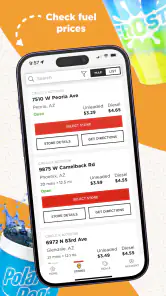
For example, if I’m already planning a fuel stop, I can look at the nearby Circle K options first and compare the displayed prices with the other places I would realistically pass. I wouldn’t make a long detour based on a tiny difference, but on a route with several convenient choices, the information can help me choose. If the app’s offer alerts are stale, I’d verify the promotion in the app or at the store before building a shopping plan around it.
Where its convenience has limits
The strongest case for this app is a routine centered on Circle K. Keeping rewards and promotions close to the store locator can make an ordinary stop easier to plan, and mobile payment may be useful if you prefer to handle a purchase through your phone. Those benefits are less compelling if your visits are occasional, you prefer paying another way, or the locations near you are not Circle K stores.
Compared with a general maps app, Circle K is aimed at its own locations and store-related information rather than serving as an all-purpose trip planner. A fuel-comparison service may suit someone who wants a broader view across different brands, while a competing retailer’s app makes more sense if that retailer is where you usually shop. I’d treat Circle K as a useful companion to those tools, not automatically a replacement for them.
Make the switch worthwhile
Before relying on the app, I’d check that the location I’m visiting is the one shown, then look over the offer details before checkout. This is especially sensible when a notification prompted the visit, since alerts can occasionally refer to promotions that have ended. It also helps to learn where the store finder, offers, and rewards sit in the menu while you have a moment, rather than trying to work it out in a queue or at the pump.
The app is free, from Circle K North America, and is rated for Everyone. Its current version is 3.51.2, and it requires Android 8.0 or later. It has a 4.6 average from around 29,000 ratings, with over a million installs. Those figures suggest a well-used app, but they don’t guarantee that every feature or promotion will be equally useful at every location. I’d judge it by whether it saves me effort on the trips I actually make.
More From Our News Desk

Clash of Clans Is Won Between the Battles

Android Auto Makes the Case for Quieter Car Software

MobiOffice: Transforming Mobile Productivity with Seamless Integration

EA SPORTS FC™ Mobile Soccer: Redefining Mobile Sports Gaming

How Microsoft OneDrive Became a Mobile Productivity Giant

How Google Translate Breaks Language Barriers Effortlessly
Switching from a familiar routine takes a little attention: you’ll need to set up or access an account, and you may need to check the app when you want to use its rewards or offers. If you already rely on another store’s loyalty program, compare which one you visit more often before adding another routine. For a frequent Circle K customer, keeping the app available is a low-cost way to check relevant tools; for a rare visitor, using it only when planning a specific stop may be the better approach.
How I’d use it on an ordinary day
Imagine I’m leaving work and need fuel, with a drink or snack as a possible extra rather than the main reason for stopping. I’d check the store options along the route before setting off, then decide whether the location and displayed fuel price justify stopping there. Once I arrive, I’d check the offer details before assuming a notification applies to the purchase I’m about to make. That order matters: it keeps a small saving from turning into a detour or an awkward checkout conversation.
For a quick convenience-store visit, the most useful approach is to open the app with a purpose. If I’m only passing through, I’d look for a relevant offer or location detail and leave the rest alone. Exploring every menu while waiting in line adds friction, especially when I’m carrying items or trying to get back on the road. Learning the basic path to the store finder and offers at home makes the app easier to use when time is short.
Who gets the most from it
I’d recommend trying it if Circle K is already part of your weekly routine, particularly if you make both fuel and in-store stops. In that case, checking location information, offers, or rewards can become a small part of planning rather than another chore. It may also suit someone whose routes pass several Circle K locations and who likes comparing practical options before choosing where to stop.
It is less convincing for someone who visits only when no other shop is open or who rarely passes a Circle K. A rewards program has little practical pull if you seldom make eligible visits, and an extra account is not automatically worthwhile just because the app is free. If your main need is to compare fuel across many brands, a broader comparison tool is a better starting point; if you mainly want directions, a general maps app will remain more versatile.
Small checks that prevent frustration
One useful habit is to distinguish between an offer you have seen and an offer you have confirmed. Notifications are convenient prompts, not a reason to assume the terms still apply. I’d open the promotion itself before shopping, read the conditions, and check that it is relevant to the location and purchase. This is especially helpful if I’m making a special trip for a deal rather than adding an item to a stop I was already planning.
Another trade-off is how much of your routine you want tied to a retailer account. An account can make store-specific tools easier to reach, but it asks you to remember another login and to keep the app available when you want to check rewards or offers. If you prefer a very simple visit—choose a store, pay as usual, and leave—the app may not change enough to justify that extra step. I’d try it during an ordinary visit before relying on it for a time-sensitive plan.
It’s also worth separating the app’s usefulness from the value of any single displayed price or promotion. A nearby option may be convenient even if it is not the cheapest, while the lowest price may not be worth a special drive. I’d compare only places already on my route and consider the whole stop, not chase a figure in isolation. That keeps the app in the role it handles best: helping me make a more informed Circle K decision, not planning every part of a journey.
When I stumbled upon the Circle K app, I was curious to see if it could really make my convenience store pit stops, well, more convenient! If you're like me, always on the lookout for ways to simplify your day-to-day errands, this app might just pique your interest.
Getting Started with Circle K
Downloading the Circle K app was a breeze. It’s available on both Android and iOS, so no matter your device allegiance, you’re covered. Once installed, the setup process was pretty straightforward. You just need to create an account or log in if you’re already a member. I appreciated that it didn’t require a ton of personal information right off the bat—just the basics to get you started.
Features You'll Love
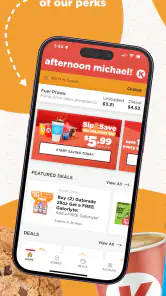
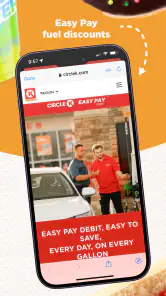
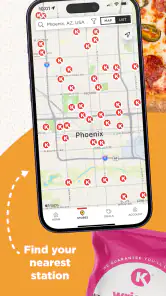
The app is a one-stop-shop for all things convenience store. You can find the nearest Circle K locations, check out the latest promotions, and even use the app to pay for your purchases. It’s like having a mini Circle K in your pocket! One feature that stood out to me was the rewards program. Every purchase racks up points that you can redeem for discounts—who doesn’t love saving a little cash?
The app also includes a fuel price checker, which is super handy if you’re looking to save a few pennies on gas. Just pop open the app, and you can see the current prices at your local stations. It’s a quick and easy way to make sure you’re getting the best deal.
User Experience
In terms of usability, the Circle K app is pretty intuitive. The layout is clean, with everything accessible from the main menu. Even if you’re not particularly tech-savvy, navigating through the app should be a breeze. I didn’t encounter any lag or crashes, which is always a plus in my book. It’s designed with the user in mind, making it a seamless addition to your daily routine.
One minor hiccup I encountered was with the app’s notification system. Occasionally, I received alerts about promotions that were no longer valid. It’s a small issue, but something to be aware of. Hopefully, future updates will address this little glitch.
My recommendation
Overall, the Circle K app is a solid companion for anyone who frequents their stores. Whether you’re grabbing a quick snack, fueling up, or just in the mood for some retail therapy, this app has got you covered. Its combination of convenience, rewards, and user-friendly design makes it worth a download. So, if you’re a Circle K regular or just curious to see what it offers, give it a shot—you might find it as handy as I did!
Circle K Frequently Asked Questions
Can I use Circle K to find a nearby store or fuel station?
The app is intended to make Circle K shopping and journeys easier, and its features include finding nearby stores and fuel stations. This can be useful when you want to locate a Circle K while out and about. The experience is most relevant to people who already shop at Circle K or expect to visit one of its locations.
What kind of app is Circle K, and who is it for?
Circle K is a shopping app from Circle K North America for people who want Circle K-related tools and offers in one place. Its store summary describes it as “One app for easy journeys.” It may be useful to regular customers as well as people who want to explore Circle K promotions, rewards, or nearby locations before deciding whether to install it.
What is Circle K and what services does it offer?
Circle K is a globally recognized convenience store chain that provides a wide range of products and services. In addition to offering everyday essentials like snacks, beverages, and household items, Circle K locations often feature fuel stations and car washes. The Circle K app enhances the shopping experience by offering exclusive promotions, rewards, and the ability to find nearby stores and gas stations.
What should I check before downloading the Circle K app?
Circle K is a shopping app from Circle K North America, intended to bring store-related tools and offers together in one place. It is free to download, and its content rating is Everyone. Before installing, check that your device runs a compatible operating system and that you are downloading the app for the Circle K service you plan to use. The app is presented as one app for easy journeys.
How can I benefit from using the Circle K app?
The Circle K app is designed to enhance your shopping experience by providing users with access to exclusive deals and rewards. By signing up, you can earn points on every purchase which can be redeemed for discounts. The app also allows you to locate the nearest Circle K store or fuel station, making it a convenient tool for regular customers.
Pros
- User-friendly interface with easy navigation.
- Wide range of products available for purchase.
- Convenient store locator feature included.
- Offers exclusive discounts and promotions.
- Secure payment options for peace of mind.
Cons
- Limited availability in certain regions.
- App occasionally experiences slow loading.
- Customer support response can be delayed.
- Requires frequent updates to function smoothly.
- Some features might be difficult to find.

- Category
- Shopping
- Version
- 3.51.2











