Chores & Allowance Bot
- 708.00
- 4.5
- Installs
- 100.00K
- Price
- Free

Screenshots



Analysis by Reviewed
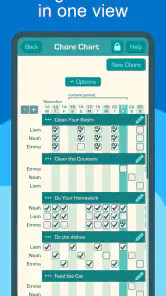
I found Chores & Allowance Bot most useful when a family wants to turn vague reminders into a shared routine. Instead of asking a child repeatedly whether a task is finished, I could use the app as a visible place for chores, allowance decisions, and savings goals. That sounds simple, but the difference matters: the conversation moves from “You never help” to “Let’s look at what is on the list and what still needs doing.”
This is a free parenting app from Wingboat.com LLC, with optional in-app purchases priced at $39.99 per item. It is aimed at Everyone, runs on operating systems from version 9 onward, and has reached over 100 thousand installs. Its average rating is 4.5 from around 2.8 thousand ratings, which suggests that the basic idea works well for many households, although a rating alone cannot tell you whether its approach matches your family.
How to decide whether Chores & Allowance Bot fits your family
The first question is not whether you need another family app. It is whether your current system is failing for a specific reason. If chores live on scraps of paper, in a parent’s memory, or in a long message thread, a dedicated tracker can remove a lot of friction. If everyone already follows a reliable whiteboard routine, adding an app may create more administration than it removes.
I would judge this app on four practical points: can the whole household understand the routine, can children see what is expected without waiting for a reminder, can parents connect work with allowance or savings in a way that feels fair, and can the system remain useful after the novelty wears off? The app’s store summary describes it as a shared chore, allowance, and savings tracker, so its appeal comes from combining those jobs rather than treating chores as an isolated checklist.
That combination is important for families that want allowance to teach responsibility. A plain task app can show that a bedroom needs cleaning, but it does not naturally support the follow-through conversation about earning, saving, and spending. A paper chart can do the same if a parent updates it consistently, yet paper is easy to lose and difficult to adjust when schedules change. Chores & Allowance Bot sits between those two approaches: more structured than paper, but more focused than a broad family organizer.
I would also decide how much control children should have. Younger children may need an adult to explain each task and check the result. Older children may benefit from seeing their responsibilities and progress themselves. The app is not a replacement for that conversation. It works best when the family agrees in advance what “done” means, when tasks are checked, and whether allowance depends on every chore or only selected ones.
A realistic week with the app
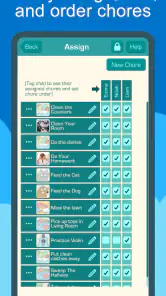
Imagine a household with two children, school mornings, and a parent who is tired of repeating the same requests. On Sunday evening, the parent sets up the week’s expectations: one child handles feeding a pet and putting away laundry, while the other clears the table and takes care of recycling. The children can refer to the shared routine instead of asking what they should do next.
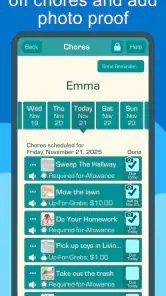
On a busy Tuesday, one child marks a task complete before leaving for an activity. The parent can review the routine later rather than interrupting dinner to investigate every small job. At the end of the week, the family discusses what was completed and how that connects with the agreed allowance or savings target. The valuable part is not the tap used to mark a chore; it is the shift toward a repeatable family process.
There is a useful parenting lesson here: do not load the app with every possible household job on the first day. Start with a small group of recurring responsibilities that children can realistically own. If the list becomes a complete inventory of domestic work, children may see it as an endless punishment rather than a manageable agreement. I would add tasks gradually, especially after the family has learned which chores are clear enough to complete without repeated instructions.
Where the shared routine feels strongest
The app’s strongest idea is shared visibility. A parent does not have to keep the entire arrangement in their head, and a child does not have to rely on catching an adult at the right moment. That is particularly helpful in households where responsibilities differ between children or change during school terms, holidays, and activities.
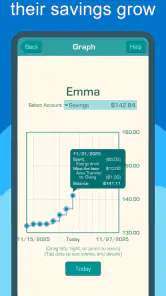
I also like the connection between chores and savings. Many allowance systems fail because money is handed over without a clear link to behavior, or because children have no way to think beyond the next payment. A savings tracker can make a goal more concrete. For a child saving toward something meaningful, seeing progress may be more motivating than hearing another lecture about delayed gratification.
One non-obvious advantage is that the app can help parents separate completion from quality. The family can agree that “put away laundry” means clothes are folded or stored properly, not merely moved from one chair to another. That rule still has to come from the parent, but recording the responsibility in one place makes the standard easier to repeat. Without that agreement, any chore tracker can become a button-pressing exercise.
Another useful workflow is to treat allowance as a weekly review rather than an automatic reward for touching every task. A child may accidentally mark something complete, or a parent may need to adjust a responsibility because of illness or a changed schedule. Reviewing the overall week gives the system room for judgment. It also prevents the app from turning family life into a rigid scorecard.
What the app cannot solve by itself
Chores & Allowance Bot can organize an agreement, but it cannot make an unfair agreement feel fair. If one child has a much heavier workload, or if a task takes five minutes for one child and twenty minutes for another, the parent still needs to notice. I would compare responsibilities by effort, not simply by the number of items shown on screen.
There is also a risk of over-monitoring. Children may accept a tracker as helpful when it gives them independence, but resist it when every action becomes a test. I would avoid checking constantly or using the app to reopen every small mistake. The better approach is to define expectations clearly, allow reasonable reminders, and use the record for a calm review rather than surveillance.
Families should also think about device access. A shared digital system is only genuinely shared if the people who need it can see and use it at suitable times. If a child rarely has access to the relevant device, the app may remain a parent-controlled ledger instead of becoming a child-friendly routine. In that situation, a visible paper chart alongside the app may be more practical, even if the app remains useful for allowance and savings discussions.
Where alternatives may fit better
A simple paper chart may be the better choice for very young children, families trying to reduce screen time, or households where the main problem is visibility rather than record keeping. A chart on the refrigerator is immediate and easy to personalize. It also avoids the temptation to turn every family interaction into an app session. Its weakness is that totals, changes, and savings goals become harder to maintain consistently.
A general calendar or task manager may suit families whose chores are only one part of a much larger scheduling problem. If you need appointments, school events, shopping, and household reminders in the same place, a broader tool can reduce the number of apps involved. The trade-off is that general tools often lack the parenting-focused connection between responsibilities, allowance, and savings that makes this app distinctive.
A dedicated allowance or budgeting tool may be preferable for older children who already manage chores independently and mainly need help with money. In that case, the chore side of this app could feel unnecessary. Conversely, a family that wants to teach the relationship between effort and saving may find a money-only tool too narrow.
Some families may prefer a shared notes document or a spreadsheet because it can be customized without adopting a particular reward philosophy. That flexibility is attractive when parents want detailed categories, unusual payment rules, or a custom division of work. The cost is setup and maintenance. A spreadsheet can become powerful, but it can also become another household project that only one adult understands.
My decision rule is straightforward: choose this app when the family needs a dedicated, shared bridge between chores and allowance; choose a general organizer when coordination across the whole household matters more; choose paper when simplicity and visibility matter most; and choose a money-focused option when chores are already working and savings is the only unresolved issue.
The practical cost of switching
Because the app is free to start, the financial barrier is low, but switching still has a time cost. Someone has to decide which chores belong in the system, explain the rules, and make sure the first week does not collapse under too many exceptions. I would schedule a short family setup conversation rather than quietly creating a detailed system and presenting it as a finished policy.
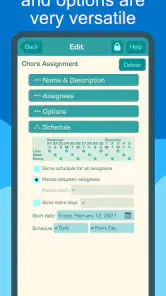
Start by writing each chore in language a child can understand. “Clean room” is often too broad, while “put clothes in the hamper and clear the floor” gives a clearer finish line. Then decide which items affect allowance and which are ordinary contributions to family life. If every helpful action has a price, children may learn to negotiate every responsibility. If nothing is connected to the allowance plan, the financial lesson may disappear. The balance depends on your family’s values.
A second switching cost is consistency. The app cannot help if parents forget to review completed work or change the rules without explaining why. I would choose one regular review time and keep it brief. A weekly check is usually more sustainable than daily accounting, especially when the purpose is to build independence rather than create another parental chore.
The optional purchase price also deserves a deliberate decision. Since individual in-app purchases are $39.99, I would not pay for anything until the free experience has demonstrated that the family will actually use the routine. The right question is not whether an extra purchase sounds useful, but whether it removes a real obstacle that the free setup cannot handle. If the household has not maintained the basic process, paying more is unlikely to fix the underlying problem.
Version 4.9.91 shows that the app is still presented as a maintained product rather than an abandoned experiment, and it has been available since September 5, 2016. That history may reassure families who prefer an established app, but longevity should not replace a practical trial. The important test is whether your children understand the routine and whether you can maintain it without constant correction.
Small habits that make the system work
One effective habit is to create a distinction between recurring chores and occasional jobs. Recurring tasks form the dependable baseline; occasional jobs can be discussed separately so that a child is not confused about what is expected every week. Mixing both into one long list makes it harder to tell whether the routine is stable.
Another is to use savings goals as conversation starters, not just targets. Ask what the child is saving for, how long it might take, and whether the goal is still important. This keeps the savings feature connected to learning. Otherwise, the number can become a passive display that children stop noticing.
I would also avoid using allowance as the only feedback. A child who completes a task should know that the work helped the household, even when the task is part of a normal family expectation. The app can support the financial side, but appreciation and teaching still need to happen face to face.
Finally, review the list when circumstances change. A chore that worked during a quiet school week may be unreasonable during exams, travel, or illness. Updating the routine is not lowering standards; it is showing children that responsibilities can be renegotiated responsibly rather than ignored silently.
Who should use it, and who should skip it?
I would recommend Chores & Allowance Bot to parents who want one focused place for shared chores, allowance planning, and savings progress. It is especially suitable when repeated reminders are causing tension, when children are old enough to understand a recurring agreement, and when the family wants money lessons to sit beside household responsibility.
I would be more cautious for families with toddlers, highly complex custody schedules, or children who do not have practical access to the shared device. It may also be the wrong choice if you dislike tying money to chores or if your household already has a reliable chart that everyone follows. In those cases, a broader family planner, a paper system, or a simple savings method could be clearer.
The app is not a magic behavior system. Its value depends on the quality of the family agreement around it. Parents still need to define tasks, inspect work appropriately, handle exceptions, and decide what allowance means. Children still need encouragement and increasing independence. The app simply gives those decisions a consistent home.
After trying it as a decision rather than an automatic recommendation, I see Chores & Allowance Bot as a focused parenting tool with a sensible purpose. It is less flexible than building your own spreadsheet, less immediate than a refrigerator chart, and less broad than a full family organizer. In return, it keeps the chore-to-allowance-to-savings relationship in view, which is exactly what many families are missing.
My recommendation is to begin with a small routine, use the free version long enough to test real family behavior, and agree on standards before entering tasks. If the shared view reduces reminders and makes weekly allowance conversations calmer, it is doing its job. If the app becomes another source of checking, arguing, or administrative work, switch to something simpler. The best reason to choose it is not that it tracks more; it is that it can make responsibility easier to discuss.
Pros
- Clear task tracking helps children understand daily responsibilities.
- Customizable chores can fit different family routines and ages.
- Allowance rewards make completing tasks more motivating.
- Simple design is easy for younger users to navigate.
- Useful for teaching consistency and basic money management.
Cons
- Some features may require in-app purchases or a subscription.
- Children may need parental help when setting up rewards.
- Limited appeal if your family does not use allowance incentives.
- Notifications can become repetitive for frequently assigned chores.
- Requires regular updates from parents to keep tasks relevant.

- Category
- Parenting
- Version
- 4.9.91











